Original price was: $78.60.Current price is: $0.00. (100% off)
Sale has ended!
Get More Giveaways And Discounts Discuss This Offer >> Submit A Review >>

Overview

Top 5 Reasons To Download AnyMP4 Video Editor

Alright, tech enthusiasts and aspiring content creators, gather 'round! Today, we're diving deep into a software giveaway that promises to elevate your digital storytelling game without costing you a dime. In a world saturated with fleeting moments captured on our phones, turning those raw clips and candid photos into something truly memorable often feels like a daunting task, requiring expensive software and a steep learning curve. But what if I told you there's a solution that not only simplifies the process but also packs a powerful punch, making professional-grade video editing and breathtaking slideshow creation accessible to everyone?

That's where AnyMP4 Video Editor steps into the spotlight. This isn't just another run-of-the-mill utility; it's a versatile creative suite that combines robust video editing capabilities with an intuitive slideshow maker, all designed to transform your ordinary footage into extraordinary visual narratives. Whether you're a seasoned vlogger, a budding filmmaker, a parent wanting to immortalize family memories, or just someone looking to spice up their social media presence, this software has something truly special to offer. And the best part? It's currently available as a giveaway, meaning you have absolutely nothing to lose and a whole world of creative potential to gain. Forget those clunky interfaces and limited feature sets; AnyMP4 Video Editor is engineered for both efficiency and artistry. So, let's cut to the chase and explore the top five compelling reasons why you absolutely need to hit that download button and claim this fantastic giveaway before it's gone!

  1. The Ultimate Two-in-One Creative Hub: Video Editing & Slideshow Mastery in One Package
  2. Unlock Professional-Grade Video Enhancement, Effortlessly
  3. Transform Mundane Footage into Cinematic Masterpieces with Stunning Effects and Flair
  4. Preserve and Celebrate Memories with Personalized Photo & Video Slideshows
  5. Seamless Compatibility & User-Friendly Design for Every Creator

1. The Ultimate Two-in-One Creative Hub: Video Editing & Slideshow Mastery in One Package

Let's kick things off with arguably the biggest selling point of AnyMP4 Video Editor: its remarkable ability to serve as a comprehensive two-in-one solution for both video editing and slideshow creation. In today's digital landscape, we're constantly bombarded with the need to produce engaging visual content. From short social media clips to more elaborate family montages, the demands on our creative tools are endless. Traditionally, this would mean juggling between multiple applications – one for trimming and enhancing videos, and another for weaving together photos with music. Not only is this workflow inefficient, but it often leads to compatibility issues, inconsistent user interfaces, and a general sense of frustration. AnyMP4 Video Editor sweeps these headaches aside by seamlessly integrating both functionalities into a single, cohesive platform.

Imagine this scenario: you've just returned from a fantastic vacation, armed with a treasure trove of breathtaking 4K video clips from your drone and hundreds of stunning photos from your smartphone. Your goal is to create a dynamic travelogue that showcases the best of both worlds. With most software, you'd export your edited video segments, then import them into a separate slideshow maker along with your photos, hoping everything syncs up perfectly. With AnyMP4 Video Editor, this entire process is streamlined. You can import all your media – pictures, photos, videos, and music – directly into the timeline. You can then fluidly transition between editing a dramatic video sequence, adding powerful enhancements and effects, and then effortlessly weaving in a beautiful photo slideshow segment set to a melancholic soundtrack, all within the same workspace. This integrated approach not only saves you an immense amount of time but also fosters a more coherent and consistent creative flow. You're not thinking about switching tools; you're just thinking about telling your story.

This dual functionality isn't just about convenience; it's about expanding your creative horizons. For instance, you could begin a project by creating a stunning photo slideshow celebrating a birthday, complete with custom themes and background music. Then, halfway through, decide to intersperse short, vibrant video clips from the party itself, using the editor's robust tools to quickly trim, enhance, and add exciting transitions to those clips. The ability to pivot between these two essential forms of visual storytelling without ever leaving the application is a game-changer for anyone who values efficiency and creative freedom. It means less time fumbling with software and more time focusing on crafting truly captivating content. This integrated design makes AnyMP4 Video Editor an exceptionally valuable asset, particularly given its status as a giveaway. It's like getting two premium tools for the price of none, making it an undeniable must-download for anyone looking to simplify and empower their digital media projects.

2. Unlock Professional-Grade Video Enhancement, Effortlessly

Let's be honest, not every shot we take is perfect. Lighting can be tricky, colors can appear washed out, and sometimes a shaky hand can ruin an otherwise fantastic moment. This is where AnyMP4 Video Editor truly shines, offering an impressive suite of professional-grade video enhancement tools that are surprisingly easy to use. Forget about complex color grading wheels and obscure sliders that require a degree in cinematography to understand. This software puts the power of visual correction and improvement directly at your fingertips, enabling you to transform dull, lifeless footage into vibrant, eye-catching masterpieces with just a few clicks.

The core of this capability lies in its granular control over key visual parameters. Have a video that looks a bit dim or underexposed? You can effortlessly adjust the brightness to bring out hidden details and illuminate your subjects. Is the footage looking a bit flat or lacking visual punch? Tweak the contrast to add depth and definition, making your blacks deeper and your whites crisper. Perhaps the colors in your outdoor shot don't quite reflect the glorious sunset you witnessed. AnyMP4 Video Editor allows you to fine-tune the saturation to make those reds pop and those blues sing, or adjust the hue to subtly shift the overall color palette, correcting any unwanted color casts and achieving a more natural or artistic look. These aren't just superficial filters; these are fundamental controls that empower you to correct imperfections and inject artistic intent into your videos.

But the enhancements don't stop at color and light. The software also provides crucial tools for temporal and auditory adjustments. Ever wanted to create a dramatic slow-motion sequence or speed up a time-lapse? With the ability to precisely set the video speed, you can achieve these effects with ease, adding a dynamic layer to your storytelling. Furthermore, audio is half the experience, and AnyMP4 Video Editor understands this. You can easily adjust the volume of your video clips, ensuring that dialogue is clear, background music is balanced, and no sudden loud noises disrupt your viewer's experience. This level of control, typically found in much more expensive and complex editing suites, is presented here in an accessible format, democratizing the art of video enhancement for everyone.

Beyond these foundational adjustments, the software also adeptly handles modern high-resolution footage. Whether you're working with crisp 1080p or stunning 4K Ultra HD video, AnyMP4 Video Editor is fully compatible, allowing you to edit and enhance without compromise. This means your high-quality drone footage or meticulously shot phone videos can be polished to perfection, maintaining their original fidelity. This comprehensive approach to enhancement means you're not just editing; you're refining, correcting, and perfecting every frame, ensuring your final output looks as professional and polished as possible. For a giveaway, the inclusion of such powerful and intuitive enhancement tools is nothing short of incredible, making it an indispensable asset for anyone serious about elevating the visual quality of their video content.

3. Transform Mundane Footage into Cinematic Masterpieces with Stunning Effects and Flair

Raw footage, no matter how well-shot, can often lack that certain spark, that professional polish that truly makes a video stand out from the crowd. This is where AnyMP4 Video Editor truly shines, offering an expansive toolkit of creative elements designed to inject personality, drama, and pure visual flair into your projects. It’s not enough to just cut clips together; you need to tell a story that captivates, and this software provides the artistic ammunition to do just that. Gone are the days of sterile, uninspired videos; prepare to transform your mundane footage into cinematic masterpieces with stunning filters, dynamic transitions, engaging themes, and playful elements.

Let's talk about filters. Think of them as instant mood-setters. With a single click, you can transport your video from a vibrant summer day to a vintage sepia-toned memory, or imbue it with the dramatic coolness of a film noir. AnyMP4 Video Editor boasts a rich library of filters, each designed to evoke a specific aesthetic or emotion. This allows you to unify the look of disparate clips, correct inconsistent lighting, or simply give your entire project a distinctive visual signature. Whether you're aiming for a retro vibe, a minimalist black-and-white documentary feel, or a bright and airy look for a travel vlog, the right filter can instantly elevate the perceived quality and artistic intent of your video, making it more engaging and visually cohesive.

Next up are transitions – the glue that holds your story together. A jerky cut between scenes can be jarring, pulling the viewer out of the narrative. AnyMP4 Video Editor provides a wide array of smooth, creative transitions that allow you to seamlessly move from one clip or photo to the next. From classic fades and wipes to more dynamic pushes, dissolves, and geometric patterns, these transitions aren't just functional; they're narrative tools. A quick, energetic transition can accelerate the pace of your story, while a slow, flowing dissolve can create a sense of calm or introspection. Experimenting with different transitions allows you to control the rhythm and flow of your video, guiding your audience through your story with grace and impact, ensuring a professional and polished viewing experience.

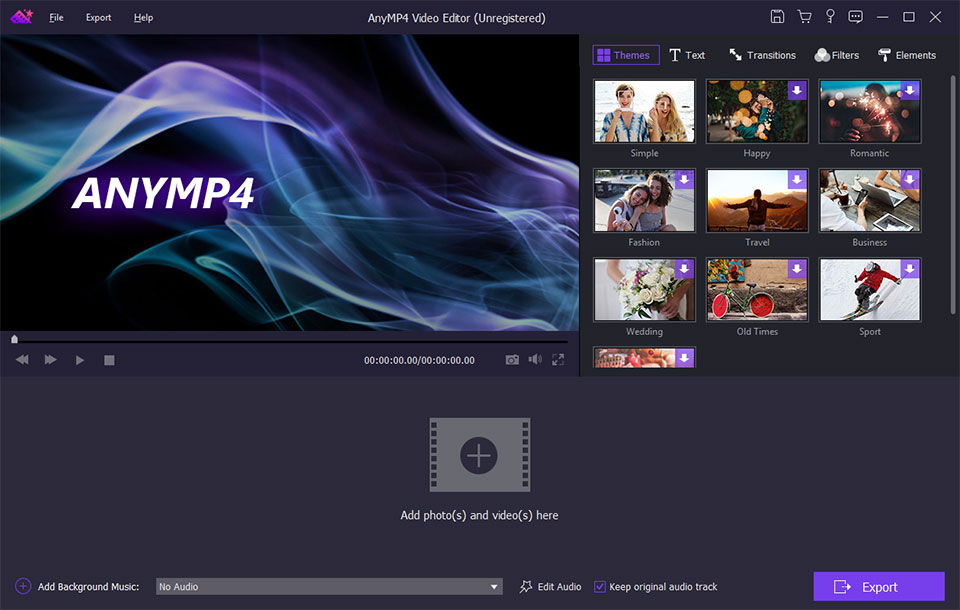
But the creative arsenal doesn't stop there. The software also offers a selection of pre-designed themes. For those times when you need a quick, stylish solution for a specific occasion – be it a wedding, a birthday, a holiday, or a family gathering – these themes provide a fantastic starting point. They often come with pre-selected music, transitions, and text styles, allowing you to instantly apply a professional and cohesive look to your project without having to manually select every element. This feature is particularly invaluable for users who want beautiful results quickly, or for those who are just starting out and want to understand how different creative elements work together harmoniously.

Finally, to truly make your videos stand out, AnyMP4 Video Editor includes a variety of interactive elements. These can range from animated emojis and stickers to decorative overlays and frames. These playful additions can add a layer of personality, humor, or emphasis to your footage. Want to highlight a funny moment with a burst of animated confetti? Or point out a key detail with an on-screen arrow? These elements provide that extra touch of flair that can transform a good video into a great one, making it more engaging, memorable, and shareable. The combination of powerful filters, smooth transitions, ready-to-use themes, and engaging elements means you have all the tools necessary to infuse your videos with a unique character and professional polish, turning raw footage into compelling cinematic narratives that truly resonate with your audience. This robust creative toolkit, available in a giveaway package, is an unparalleled opportunity to unleash your inner artist.

4. Preserve and Celebrate Memories with Personalized Photo & Video Slideshows

In an age where our lives are digitally documented more than ever before, our phones and cameras are overflowing with precious memories – countless photos and videos capturing everything from mundane daily moments to once-in-a-lifetime events. Yet, these invaluable snippets often remain trapped in our device galleries, rarely revisited or truly appreciated. This is where AnyMP4 Video Editor’s dedicated slideshow creation feature emerges as an absolute godsend. It's not just about stitching photos together; it's about crafting a heartfelt, personalized narrative that brings your cherished memories to life, allowing you to relive and share your stories in a way that static images simply cannot.

The beauty of this feature lies in its simplicity and profound impact. Imagine transforming a year's worth of family photos, short video clips from birthdays and holidays, and even scanned childhood pictures into a dynamic, emotional journey. With AnyMP4 Video Editor, this process is incredibly intuitive. You can effortlessly import all your pictures and videos, arrange them in chronological or thematic order, and then begin the magical process of personalization. The software acts as your digital storyteller, allowing you to dictate the pace, mood, and overall feel of your memory reel. This personalized touch is what elevates a simple collection of images into a moving piece of art, a tangible representation of your life's most precious moments.

A crucial element in any compelling slideshow is the soundtrack, and AnyMP4 Video Editor provides full control over this vital aspect. You can seamlessly integrate your favorite music, setting the perfect emotional backdrop for your visual story. Whether it's a nostalgic ballad for a retrospective on past years, an upbeat track for a vacation montage, or a sentimental melody for a tribute, the right music can amplify the impact of your images tenfold. The software allows for easy audio synchronization, ensuring that your music complements the visual flow without any awkward cuts or silences. You can even layer multiple audio tracks – perhaps a gentle background score combined with a voiceover – to add further depth and nuance to your creation, truly making it your own.

Beyond just pictures and music, the ability to intersperse video clips within your slideshow adds another layer of richness and dynamic energy. A short, joyful video of laughter from a family gathering, seamlessly transitioning into a still photo of the same event, can evoke a far more powerful response than either medium alone. This fusion of static and moving images creates a comprehensive and immersive experience for the viewer, ensuring that every nuance of your memory is captured and conveyed. Think of it as crafting a mini-documentary of your life, meticulously curated and thoughtfully presented.

The joy of creating these personalized slideshows extends far beyond the act of creation itself. It’s about sharing. Imagine presenting a beautifully crafted slideshow at a family reunion, a birthday celebration, or even as a unique gift. The ability to easily export and share these personalized narratives with friends and family members means these precious moments are not just preserved; they are actively celebrated. In a world where digital content often feels ephemeral, AnyMP4 Video Editor empowers you to forge enduring keepsakes, digital heirlooms that can be cherished for years to come. For anyone who values their memories and wants an elegant, easy way to transform them into shareable stories, this feature alone makes the giveaway an absolute must-have.

5. Seamless Compatibility & User-Friendly Design for Every Creator

In the bustling world of digital media, where new devices and formats emerge at a dizzying pace, compatibility and ease of use are not just desirable features – they are absolute necessities. What good is a powerful video editor if it can't handle your files or if its interface is so convoluted that you spend more time Googling tutorials than actually creating? This is where AnyMP4 Video Editor truly sets itself apart, offering a harmonious blend of broad device compatibility and an incredibly intuitive, user-friendly design that caters to creators of all skill levels, from absolute beginners to seasoned enthusiasts.

Let's address compatibility first. We live in a multi-device ecosystem, and our content originates from a diverse range of sources. Whether you're shooting stunning cinematic footage on the latest iPhone 11 Pro Max, capturing everyday moments on your Samsung Galaxy S9, or editing clips from an older iPad or Android device, AnyMP4 Video Editor has you covered. The software is designed to be compatible with a vast array of popular iOS devices, including the latest iPhone 11 series, X, 8, 7, 6s, and SE, as well as various iPad Pro and mini models. On the Android front, it supports leading devices like the Samsung Galaxy S9, S8, S7, and S6, HTC U12+/U11, LG G5 SE, and Huawei Mate RS/10, among many others. This extensive compatibility ensures that no matter where your raw footage comes from, you can import it, edit it, and export it without encountering frustrating format limitations or conversion headaches. This breadth of support means your creative workflow remains uninterrupted, allowing you to focus on your vision rather than technical constraints.

Beyond input compatibility, the output flexibility is equally impressive. Once your masterpiece is complete, you'll want to share it, and AnyMP4 Video Editor ensures your creations are ready for consumption on virtually any device or platform. Whether you're rendering for playback on your latest iPhone, an Android tablet, or a smart TV, the software provides optimized export presets that ensure your video looks fantastic wherever it's viewed. This means less tinkering with obscure settings and more confidence that your audience will experience your content exactly as you intended.

Crucially, all of this power is wrapped in an interface that is refreshingly simple and straightforward. Many video editors, especially those offering advanced features, can be intimidating, presenting a daunting array of buttons, menus, and timelines. AnyMP4 Video Editor, however, adopts a clean, uncluttered layout that is easy to navigate even for first-time users. The timeline is intuitive, the toolbars are logically organized, and the drag-and-drop functionality makes importing media and applying effects a breeze. You won't need to spend hours poring over user manuals or watching endless tutorial videos just to get started. The design philosophy clearly prioritizes accessibility, allowing you to jump straight into editing and creating without a steep learning curve. This user-friendly approach is particularly beneficial for those who might have been deterred from video editing in the past due to perceived complexity.

The combination of seamless device compatibility and a thoughtfully designed, user-friendly interface makes AnyMP4 Video Editor an incredibly valuable asset. It removes the technical barriers to entry that often plague creative software, empowering anyone to pick it up and start producing high-quality videos and slideshows immediately. For a giveaway, this level of accessibility and broad support is truly exceptional, making it a powerful tool that truly lives up to its promise of making video editing and slideshow creation easy for everyone. Downloading this giveaway isn't just about getting free software; it's about gaining an accessible gateway to a world of creative possibilities, without the usual headaches of technical specifications or convoluted user experiences.

So, there you have it, folks! Five undeniable reasons why AnyMP4 Video Editor isn't just another piece of software; it's a gateway to unleashing your creative potential and transforming your digital memories into captivating stories. From its ingenious two-in-one design that seamlessly blends robust video editing with intuitive slideshow creation, to its powerful yet easy-to-use enhancement tools that elevate your footage to professional standards, this software is truly a cut above. Add to that its impressive suite of filters, transitions, and elements that inject personality and flair into every project, and its dedicated features for preserving and celebrating memories through personalized slideshows, and you've got a formidable creative partner.

And let's not forget the crucial aspect of user experience: AnyMP4 Video Editor marries extensive device compatibility with an incredibly user-friendly design, ensuring that creators of all skill levels can dive in and start crafting masterpieces without frustration. This isn't just about getting a freebie; it's about acquiring a versatile, powerful, and accessible tool that could easily command a premium price tag. Don't let this incredible opportunity slip through your fingers. Whether you're a budding filmmaker, a dedicated family archivist, or simply someone who wants to make their social media content pop, AnyMP4 Video Editor provides all the tools you need in one elegant package. Hit that download button, claim your copy of this fantastic giveaway, and start turning your creative visions into stunning realities today!

Official Description

AnyMP4 Video Editor is two-in-one software for you to edit videos and make slideshow with pictures, photos, videos and music. You can easily edit video effects and enhance video quality with multiple editing features.

AnyMP4 Video Editor can help you edit video effects, enhance video quality and make video slideshows with pictures, photos, videos and music.

  • Edit 1080p/4K Ultra HD video to crop video frame, clip video to several video segments, rotate video in 90 clockwise or counterclockwise to play the video in the most comfortable way.
  • Enhance video quality by adjusting video brightness and contrast, changing video saturation and hue, setting video speed and volume, etc.
  • Make your videos standout with filters, transitions, themes and elements.
  • Create a personalized slideshow with your precious pictures, videos and favorite music and share with your friends or family members.
  • Compatible with popular iOS devices like iPhone 11/11 Pro/11 Pro Max/XS/XS Max/XR/X/8/8 plus/7/7 plus/6s/6/SE/5, iPad Pro/mini 4, and Android device like Samsung Galaxy S9/S8/S7/S6, HTC U12+/U11/One, LG G5 SE/G4/G3, Huawei Mate RS/10, etc.