What Does Ashampoo Background Remover 2 [with AI] Do?
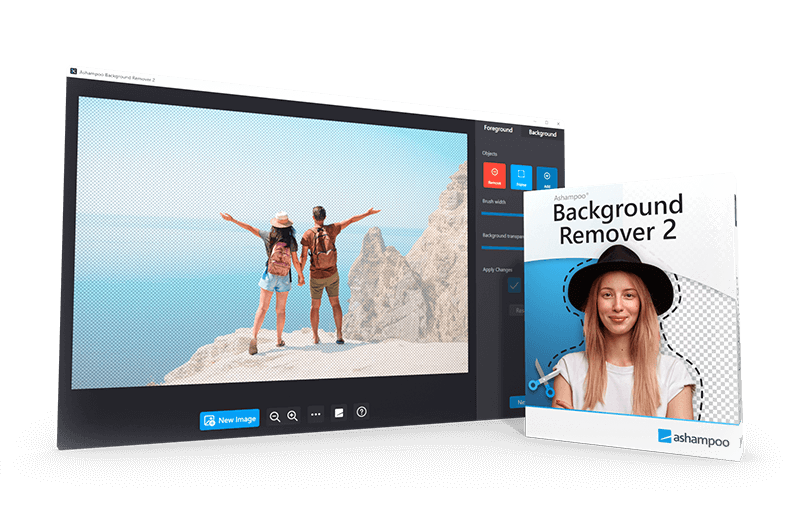
Ashampoo Background Remover 2 is a specialized utility designed to isolate subjects from digital images using AI-driven detection. The software identifies people and objects, managing intricate details such as hair, while providing manual post-processing tools for fine-tuning specific areas. Users can utilize a selection frame tool to isolate specific subjects within complex scenes containing multiple elements, effectively reducing manual masking time.
Once isolated, subjects can be exported as standalone assets or integrated into new backgrounds. A significant addition to this version is the AI upscaling engine, which allows users to enlarge extracted elements by up to four times their original dimensions without sacrificing visual clarity. This makes the tool suitable for high-resolution design projects even when the source material is small.
Creative control is provided through built-in visual filters—including sepia, noir, and black and white—along with precision transparency sliders to blend foregrounds into new environments. Notably, all AI operations, including subject detection and upscaling, occur entirely offline on local hardware. This ensures that no image data is transmitted to external servers, maintaining user privacy throughout the editing process. The software supports saving extracted objects for use in external applications or combining them with the included background effects for immediate results.
Top 5 Reasons To Download Ashampoo Background Remover 2 [with AI]
1. Unrivaled AI Precision with Manual Fine-Tuning: The software uses advanced neural networks to detect subjects with surgical accuracy, even handling complex details like hair, while providing manual tools for those who want total control.
2. High-Resolution AI Upscaling: Version 2 introduces a massive leap in quality, allowing users to enlarge extracted objects up to four times their original size without any visible loss in sharpness or detail.
3. Total Privacy through Local Processing: Unlike cloud-based competitors, all AI calculations happen directly on your machine, ensuring your personal photos never leave your hard drive or reach external servers.
4. Professional Creative Suite & Filters: Beyond simple removal, the app offers a full suite of transparency controls, color filters like noir and sepia, and background blending tools to create a finished masterpiece.
5. Workflow Efficiency with the Selection Frame: In busy photos with multiple subjects, the selection frame tool allows you to instantly pinpoint exactly what you want to extract, slashing the time spent on manual masking.
1. Unrivaled AI Precision with Manual Fine-Tuning
When you are looking for a tool to help you clean up your photography or prepare assets for a digital design project, the number one hurdle is always the quality of the mask. We have all been there: you try to use a "magic wand" tool or a basic lasso, and you end up with jagged edges, missing chunks of clothing, or—worst of all—that dreaded "halo" effect around a person's hair. Ashampoo Background Remover 2 solves this by utilizing a sophisticated AI engine that has been trained on millions of images to understand exactly where a subject ends and the background begins.
What makes this specific software stand out to me as a reviewer is how it handles the "impossible" areas. Most automated tools struggle with fine strands of hair, translucent fabrics, or fuzzy edges on pets. This AI reliably detects these subtle nuances, ensuring that the transition from the subject to the background is smooth and natural. It doesn’t just cut a hard line; it understands depth and transparency.
However, no AI is perfect 100% of the time, and that is where the manual post-processing tools come into play. Many apps give you an "all or nothing" result—if the AI misses a spot, you are stuck with it. This software provides a dedicated set of manual editing tools that allow you to add or remove specific areas with a brush. If the AI missed a small part of a shoelace or included a bit of the background by mistake, you can fix it in seconds. This combination of "AI-first, human-refined" workflow is exactly what professionals look for because it guarantees a perfect result every single time.
Furthermore, the extraction process isn't just about deleting the background. Once an object is cut out, it exists as a high-quality asset that can be exported directly to other applications. Whether you are building a website, creating a YouTube thumbnail, or designing a flyer for a local event, having a perfectly masked subject is the foundation of a professional-looking graphic. The ease with which you can toggle between the automatic detection and the manual brush makes the entire experience feel fluid rather than frustrating.
2. High-Resolution AI Upscaling
One of the most common problems in photo editing is finding the perfect subject in a photo, only to realize that once you cut it out, the object is too small for your intended project. Perhaps you took a wide shot of a landscape and realized the person in the distance would make a great profile picture, but when you crop in, the pixels start to fall apart. Ashampoo Background Remover 2 addresses this head-on with its new AI upscaling feature.
This isn't your standard "stretch and blur" scaling. Traditional image resizing simply makes the existing pixels larger, which results in a blocky, low-quality look. The AI upscaling in Version 2 actually reconstructs the missing information. It can enlarge your extracted elements up to four times their original size. If you start with a small 500-pixel cutout, the software can turn it into a 2,000-pixel asset that looks like it was captured at that resolution originally. This is a game-changer for anyone working on high-resolution projects or print media.
Imagine you are creating a poster. You have a photo from a few years ago that isn't quite up to modern 4K standards. With this giveaway, you can extract the subject and upscale it so that it remains crisp and clear even on a large canvas. This feature alone makes the software worth the download, as dedicated AI upscaling tools often cost a significant amount of money as standalone products. Having it integrated directly into your background removal workflow saves you both time and money.
The upscaling works in tandem with the object detection. Because the AI already knows the boundaries of your subject, it can apply the upscaling specifically to the extracted object, ensuring that the edges remain sharp and the textures—like skin or fabric—don't lose their realism. For those of us who frequently deal with "less than perfect" source images, this feature is nothing short of a lifesaver. It turns old or low-res photos into versatile assets for any modern digital workspace.
3. Total Privacy through Local Processing
In an era where almost every AI tool requires you to upload your files to a mysterious "cloud" server, Ashampoo Background Remover 2 takes a stand for user privacy. This is a point I cannot stress enough. When you upload a photo to an online background remover, you are often handing over your data to a third party. You don't know where those photos are stored, who can see them, or if they are being used to "train" other models without your explicit consent. This is a major concern for both private individuals with family photos and professionals handling sensitive client work.
All AI-powered features in this software—both the object removal and the upscaling—run entirely offline on your local hardware. No data is sent to external servers. This means your privacy is fully protected. You can work on photos of your children, your private documents, or sensitive corporate assets with the absolute peace of mind that nothing is leaving your computer. This "local-first" approach is becoming increasingly rare in the tech world, and it is something I highly value.
Beyond the privacy benefits, local processing also means you aren't at the mercy of your internet connection. If you are traveling, working in a cafe with spotty Wi-Fi, or simply living in an area with slow upload speeds, you can still process dozens of images without waiting for files to upload and download. The software uses your computer's own processing power to get the job done instantly. It is faster, safer, and more reliable than any web-based alternative. For the security-conscious user, this should be the primary reason to jump on this giveaway.
Furthermore, because there are no server costs associated with your usage, you don't have to worry about "credits" or monthly subscriptions that many online services use to gatekeep their tools. You own the software, you run the software, and your data stays with you. It is a refreshing return to the way software should be: a tool that serves the user without harvesting their information.
4. Professional Creative Suite & Filters
Most background removers are "one-trick ponies." They remove the background, and then they leave you to figure out the rest. Ashampoo Background Remover 2, however, is a complete creative suite for subject-based editing. Once you have isolated your subject, the software provides a variety of background filters and adjustment tools to help you create a finished, polished image within a single interface.
The software includes a range of visual filters such as black & white, sepia, and noir. These aren't just simple overlays; they can be applied to either the subject or the new background to create a specific mood. For example, you could keep your subject in full color while turning the background to a moody "noir" black and white. This creates a striking "color splash" effect that immediately draws the viewer's eye to the most important part of the photo. It’s a classic technique used in advertising and artistic photography, now achievable with just a few clicks.
Another standout feature is the precision transparency control. When you place a cut-out subject onto a new background, it can sometimes look "pasted on" because the lighting or the edges don't match. This software gives you a transparency slider that allows you to subtly blend the subject into its new environment. You can adjust the opacity to make the edges softer or to allow a bit of the background light to "bleed" through, which is essential for making the composite look realistic. It bridges the gap between a "cutout" and a "composition."
The new background filters also offer creative ways to separate the subject. You can blur the background to simulate a professional "bokeh" effect usually only found on expensive DSLR lenses, or you can replace the background entirely with a solid color for product photography. Whether you are aiming for an artistic portrait or a clean e-commerce listing, the creative tools included here ensure that you don't need to open a separate, more complex photo editor to finish the job. It is an all-in-one solution for creating striking visuals.
5. Workflow Efficiency with the Selection Frame
Time is the most valuable resource for any creator. If you have a photo of a crowded street and you only want to extract one specific person, most AI tools will get confused and try to cut out everyone in the frame. This leads to a messy result that requires minutes, if not hours, of manual cleanup. Ashampoo Background Remover 2 solves this with the selection frame tool, a feature designed specifically to minimize editing time in complex scenes.
With the selection frame, you can simply draw a rough box around the subject you are interested in. This tells the AI: "Ignore everything else and focus only on what is inside this box." This simple step dramatically increases the accuracy of the initial detection. It prevents the software from trying to process unnecessary background elements and allows it to dedicate its computational power to the specific edges of your chosen subject. It’s a "smart" way to guide the AI, giving you the best of both worlds: automated speed and human direction.
This tool is particularly useful for those who deal with bulk photography. If you are a social media manager or a small business owner who needs to process fifty product photos in an afternoon, every second saved per image adds up. The streamlined interface of Version 2 is built for this kind of efficiency. There are no cluttered menus or hidden settings; the tools you need are right where you expect them to be. The selection frame, combined with the fast local processing, allows you to move through your photo library at a lightning pace.
In conclusion, Ashampoo Background Remover 2 isn't just another utility; it is a sophisticated, privacy-respecting, and highly efficient creative partner. Whether you are looking to create professional-grade marketing materials, preserve family memories with a creative twist, or simply want a tool that respects your privacy while delivering top-tier AI results, this giveaway is an absolute must-have. The inclusion of AI upscaling and the selection frame tool sets it apart from the sea of mediocre alternatives. Don't miss the chance to add this powerhouse to your digital toolkit.

Reviews for Ashampoo Background Remover 2 [with AI]
Click Here to Read Reviews for Ashampoo Background Remover 2 [with AI] >> Click Here to Submit Reviews for Ashampoo Background Remover 2 [with AI] >>