What Does Ashampoo Photo Optimizer 2026 Do?
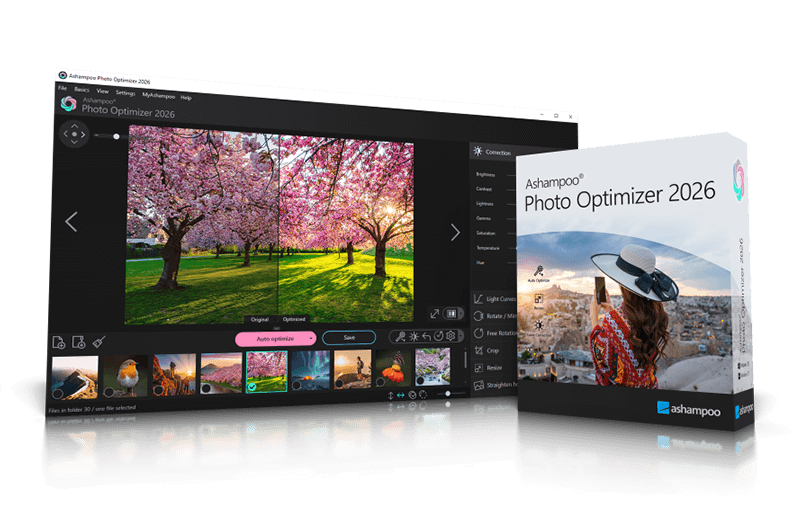
Photo Optimizer 2026 is a streamlined image editing application designed for rapid photo enhancement. The software's primary function is its 1-click optimization engine, which automatically analyzes imported images for weaknesses in lighting, color temperature, and contrast. A dedicated algorithm then adjusts these parameters to mitigate issues such as noise or poor exposure, resulting in more balanced and vibrant visuals.
Beyond automation, the utility provides a suite of manual controls for users who require precise adjustments. Key features include:
- Standard Editing Tools: Users can crop, rotate, mirror, and resize images to fit specific requirements.
- Color and Light Manipulation: The software supports the adjustment of brightness, contrast, gamma settings, and light curves.
- Perspective Correction: A specialized tool allows for the straightening of image horizons to fix alignment errors.
- Text Annotations: Users can add customizable text overlays to their photographs for personalization or labeling.
- Printing: Integrated support for direct photo printing.
This version focuses on speed and accessibility, consolidating complex post-processing tasks into a simplified interface. By combining automated correction with traditional editing tools, the software manages both quick fixes and detailed image refinement.
Top 5 Reasons To Download Ashampoo Photo Optimizer 2026
Every digital photographer, casual smartphone shooter, and content creator knows the feeling: you capture what seems like a breathtaking moment, only to open it on a larger display and realize it looks washed out, underexposed, or noticeably crooked. In an ideal world, we would all have hours to sit down with complex, expensive graphic design suites, painstakingly adjusting thousands of intricate sliders just to make a single image look respectable. But in reality, who has the time or the money for subscription-based software with a steep learning curve?
That is precisely why the giveaway for Ashampoo Photo Optimizer 2026 is such a massive deal. As a tech reviewer who evaluates dozens of creative software packages every year, I can confidently say that this software strikes the absolute sweet spot between automatic magic and professional precision. It removes all the headaches associated with post-processing while delivering jaw-dropping, vibrant results in seconds. Whether you want to quickly fix a batch of vacation photos, prep images for social media, or fine-tune fine art prints, this tool delivers the goods without asking you to spend a dime during this limited-time promotional offer.
Before we dive into the deep-dive technical breakdown of what makes this software so impressive, here are the top five reasons you need to download this giveaway immediately:
- Revolutionary 1-Click Auto-Optimization: An intelligent auto-analysis algorithm that instantly fixes contrast, lighting, noise, and color temperature weaknesses across any photo in a single click.
- Granular, Pro-Level Light and Color Controls: Complete manual control over light curves, gamma values, brightness, saturation, and contrast for when you want custom creative direction.
- Effortless Horizon and Perspective Straightening: Instant automated and manual tools to correct crooked landscapes and distorted architecture that usually ruin otherwise perfect shots.
- Essential Productivity Tools in One Seamless Suite: Lightning-fast cropping, resizing, rotating, and mirroring capabilities paired with a built-in, optimized printing module.
- Customizable Text Annotations and Personalization: Powerful, easy-to-use text overlays for adding personal messages, captions, or custom watermarks to protect and brand your work.
Now that you have seen the high-level breakdown, let us take a close, detailed look at why each of these features makes Ashampoo Photo Optimizer 2026 an essential addition to your digital toolkit.
1. Revolutionary 1-Click Auto-Optimization
The headline feature of Ashampoo Photo Optimizer 2026 is, without a doubt, its legendary auto-optimization engine. Plenty of photo editing applications claim to offer single-click enhancements, but most of them simply apply a generic, heavy-handed filter that over-saturates colors and blows out highlights. Ashampoo takes an entirely different, technological approach that sets it apart from the competition.
When you load an image into the program and click the optimization button, the software performs a real-time, comprehensive analysis of your photograph. It scans the pixel structure to evaluate shadow depth, highlight preservation, dynamic range, color temperature inconsistencies, and digital noise levels. Once the weaknesses are pinpointed, a specialized, highly refined algorithm goes to work, adjusting lighting curves and color balances tailored uniquely to that specific image.
The result is nothing short of incredible. Dull, hazy landscapes suddenly pop with natural depth and vivid greens; dark, underexposed family portraits regain warm skin tones and hidden shadow details; and noisy night shots become surprisingly crisp and clear. It transforms mediocre snapshots into eye-catching visual pieces without requiring you to understand technical histogram curves or exposure mathematics. For users with hundreds of unedited photos sitting on their hard drives, this single feature will save countless hours of tedious manual labor.
2. Granular, Pro-Level Light and Color Controls
While automated corrections are fantastic for speedy workflow management, seasoned photographers and detail-oriented editors often demand full manual control. A major flaw of many lightweight image editors is that they limit you purely to automatic presets. Ashampoo Photo Optimizer 2026 avoids this trap by offering an extensive suite of classic, pro-grade adjustment controls right at your fingertips.
If you want to push an image beyond standard realism into something more dramatic, you can freely dive into manual parameters. The program offers fine-grained sliders for brightness, contrast, color temperature, and saturation. More impressively, it includes advanced manipulation tools like gamma correction and light curve adjustments. Light curves allow you to precisely dictate how dark your shadows are and how vibrant your midtones and highlights appear, giving you total artistic freedom over the mood and tone of your image.
What I personally love about this software in my testing is how intuitive these advanced controls feel. You do not need a degree in graphic design to understand how tweaking the gamma slider impacts your shot's global illumination. The visual feedback is instant, responsive, and smooth, meaning you can experiment with dramatic atmospheric changes, cool cinematic tones, or punchy retro aesthetics without wrestling with a convoluted, cluttered user interface.
3. Effortless Horizon and Perspective Straightening
There is nothing more frustrating than taking a magnificent photo of a beach sunset or a towering skyscraper, only to review it later and discover that the horizon line is visibly tilted or the building appears to be leaning backward due to lens distortion. Correcting these perspective errors in high-end photo editing suites often requires complex grid overlays, manual vanishing point calculations, and tedious canvas re-sampling.
Ashampoo Photo Optimizer 2026 addresses this common annoyance head-on with its dedicated horizon and perspective correction features. The software allows you to straighten image horizons effortlessly, bringing balance and symmetry back to your landscape and marine photography. Whether your hands were slightly uneven when holding the camera or you were shooting from an awkward angle on a moving boat, a quick fix aligns the scene perfectly.
Additionally, perspective straightening fixes the dreaded optical convergence effect, where tall structures seem to warp inward at the top. By realigning the lines of sight, your architectural photos look crisp, professional, and structurally sound. It is a feature that turns ruined, throwaway captures into magazine-ready shots with zero technical stress.
4. Essential Productivity Tools in One Seamless Suite
Beyond its eye-popping correction algorithms and visual enhancement tools, a truly great photo editor must serve as an efficient utility knife for day-to-day image management. Ashampoo Photo Optimizer 2026 excels in this department, incorporating all the essential, high-frequency utility features you need without forcing you to switch between multiple applications.
Cropping, resizing, rotating, and mirroring are executed with absolute precision and blazing speed. Need to crop an image to a specific aspect ratio for an Instagram post, a widescreen desktop background, or a physical picture frame? The cropping tool provides intuitive presets and freeform adjustments to compose your shot masterfully. Need to downscale a massive 48-megapixel RAW conversion so you can quickly email it to a client or relative? The resizing engine uses advanced re-sampling methods to shrink image dimensions while preserving maximum sharpness and eliminating ugly pixel aliasing.
Furthermore, when you are ready to bring your digital creations into the physical world, the program features a powerful, integrated printing engine. Instead of relying on Windows' bare-bones default print dialog, Ashampoo gives you complete control over print layouts, paper margins, target DPI settings, and color reproduction parameters. This guarantees that what you see on your calibrated screen is exactly what comes out of your photo printer, saving you expensive ink and photo paper in the process.
5. Customizable Text Annotations and Personalization
In today's fast-paced digital ecosystem, sharing images online comes with two distinct challenges: communicating context and protecting your intellectual property. Whether you are creating promotional banners for a small business, designing customized digital greeting cards, or adding protective watermarks to your photography portfolio, having built-in annotation tools is vital.
The 2026 edition of Photo Optimizer includes a robust, extremely versatile text annotation tool that allows you to give your photos a unique, personal touch. You can effortlessly overlay elegant captions, date stamps, poetic quotes, or stylized signatures anywhere on your image canvas. The software offers comprehensive control over font selections, text sizes, color swatches, opacity, alignment, and positioning.
For content creators and independent photographers, this feature doubles as a rapid watermarking pipeline. You can quickly drop your logo or copyright text onto a batch of images before uploading them to social media platforms, ensuring your work remains protected against unauthorized usage. The interface makes text placement smooth and flexible, allowing you to seamlessly integrate typography with your imagery without obscuring the core visual subjects of your photos.
The Verdict: Why You Should Click Download Right Now
Software giveaways of this caliber do not come around often. Far too frequently, "free" image editing software is either loaded with intrusive ad modules, restricted behind crippling feature paywalls, or so woefully outdated that it feels like a artifact from two decades ago. Ashampoo Photo Optimizer 2026 is the complete opposite: a modern, polished, feature-rich powerhouse designed to meet the demands of modern digital photography.
By blending high-end, intelligent auto-optimization algorithms with a clean user interface, granular color correction controls, perspective fixes, versatile scaling tools, and text annotation features, this program solves nearly every single challenge common to digital photo editing. It caters brilliantly to absolute beginners who just want their memories to look bright and colorful, while providing enough manual control and precision to satisfy seasoned hobbyists looking for a quick, efficient editing workflow.
Whether you want to revive old scanned family photos, polish up your latest vacation captures, or streamline your online content creation process, this software provides immediate value from the moment you install it. Opportunities to grab full-featured, high-performance software applications completely free of charge are rare. Do not let this promotion pass you by. Take advantage of this giveaway today, download Ashampoo Photo Optimizer 2026, and transform your personal image collection into a stunning, vibrant visual portfolio in just a few clicks!

Reviews for Ashampoo Photo Optimizer 2026
Click Here to Read Reviews for Ashampoo Photo Optimizer 2026 >> Click Here to Submit Reviews for Ashampoo Photo Optimizer 2026 >>