What Does ASTER Do?
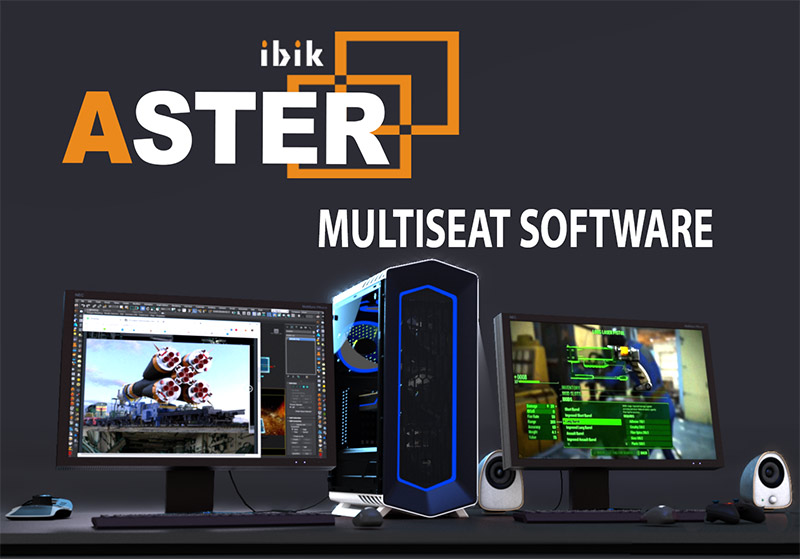
ASTER is a multiseat software solution designed to expand a single Windows-based PC into multiple independent workstations. Compatible with Windows 7, 8, and 10, the application eliminates the need for thin clients or terminal stations, relying instead on the existing hardware capabilities of the host system to distribute resources.
To establish an additional workplace, users simply connect a secondary monitor, keyboard, and mouse to the central system unit. The software supports a wide array of connection interfaces, including VGA, DVI, HDMI, and DisplayPort. Furthermore, ASTER accommodates external displays through USB, Wi-Fi, or LAN connections. Peripheral support extends beyond standard input devices to include microphones, speakers, and game controllers, ensuring each station is fully functional for diverse tasks.
Once launched, ASTER provides each user with a dedicated, independent desktop environment. This allows multiple individuals to operate the same computer simultaneously for office work, academic research, or high-demand activities like gaming and video editing. By leveraging a single CPU to power several stations, the software reduces the physical footprint and hardware expenditure typically associated with deploying multiple standalone PCs.
Top 5 Reasons To Download ASTER
- Massive Budget Optimization: Eliminate the need to purchase multiple expensive PC towers, motherboards, and processors by turning one computer into two or more independent workstations.
- Full System Performance for Every User: Unlike traditional thin clients or terminal stations, ASTER allows every user to tap into the high-speed processing power and GPU capabilities of the main system for gaming, video, and intensive tasks.
- Unmatched Space Efficiency: Save physical room in small offices, dorms, or home setups by removing the clutter of multiple bulky system units, leaving only the monitors and peripherals.
- Drastic Reduction in Energy Consumption: Operating one PC for multiple users significantly lowers electricity bills and reduces the thermal output (heat) of your workspace compared to running several individual machines.
- Incredible Versatility and Hardware Support: Support for Windows 7, 8, and 10, combined with the ability to use various connection types like HDMI, VGA, USB, and even WiFi displays, makes it compatible with almost any existing hardware.
If you have ever found yourself in a situation where you needed another computer but didn't have the budget to drop several hundred—or even thousand—dollars on a new rig, then you are exactly who ASTER was built for. We live in an era where computer hardware is becoming increasingly powerful, often sitting with 80% of its resources idle while we browse the web or write documents. ASTER is the revolutionary tool that unlocks that wasted potential. In this review, I’m going to break down exactly why this software-only multiseat solution is a complete game-changer and why you should jump on this giveaway immediately.
1. Massive Budget Optimization
The first and most obvious reason to download ASTER is the sheer amount of money it is going to save you. Think about the components required for a modern PC: you need a case, a power supply, a motherboard, a CPU, RAM, and storage. When you multiply those costs for two, three, or even six users, the price tag becomes astronomical. For a small business owner trying to kit out an office or a parent with two kids who both need to do homework at the same time, the financial barrier is often too high.
ASTER flips the script on traditional hardware purchasing. Instead of buying a "second" computer, you are essentially buying a "second" user license for the hardware you already own. By utilizing the spare ports on your current graphics card and the extra USB slots on your motherboard, ASTER creates a virtual partition that allows another person to work simultaneously. You are effectively cutting your hardware costs by 50% or more. You only need to provide the "interface" hardware—a monitor, a keyboard, and a mouse—which are the cheapest parts of any computer setup. This giveaway offers a rare opportunity to double or triple your productivity without touching your bank account for new internal components.
Furthermore, the savings extend beyond the initial purchase. Maintenance costs are slashed because you only have one "brain" to manage. You only have one set of internal fans to clean, one OS to update, and one set of drivers to maintain. In a professional environment like a computer class or an internet cafe, this reduction in Total Cost of Ownership (TCO) is the difference between profit and loss. It is a smarter way to manage technology.
2. Full System Performance for Every User
A common concern when people hear about "sharing" a computer is the fear of lag. We have all used sluggish remote desktops or underpowered thin clients that stutter when you try to open a high-definition video. ASTER is fundamentally different. It is not a terminal server; it is a multiseat extension. This means that each user is working directly on the local hardware.
Because ASTER operates at a low level within the Windows environment, it allows each user to access the GPU (Graphics Processing Unit) acceleration. This is a massive deal. It means that while one person is working on an Excel spreadsheet on Monitor A, another person can be playing a high-intensity 3D game or editing video on Monitor B. The resources are shared dynamically. If User 1 isn't using the CPU, User 2 gets the full power of the processor. This "on-demand" resource allocation ensures that no power is wasted and that every user feels like they have their own dedicated, high-speed machine.
Imagine the possibilities for a home gaming setup. Instead of building two mediocre gaming PCs, you can build one "monster" rig with a high-end graphics card and use ASTER to let two people play together in the same room on separate monitors. This software makes high-end computing accessible to everyone at the desk, without the performance compromises usually associated with multi-user environments.
3. Unmatched Space Efficiency
Physical space is a luxury that many of us don’t have. If you are working out of a small apartment, a cramped office, or a shared dorm room, finding a place to put a second or third PC tower is a logistical nightmare. Cables get tangled, the floor space disappears, and the room becomes a maze of black plastic boxes and humming fans. This is where the "software-only" nature of ASTER becomes its most beautiful feature.
By using ASTER, your "system unit" remains a single entity. You don't need a second desk for a second tower; you just need enough room for a monitor and a keyboard. You can mount the second monitor on a wall or a desk arm, plug the peripherals into the existing PC, and you’re done. You have effectively created a second workplace out of thin air. This is particularly transformative for libraries and internet cafes where every square foot of floor space translates to potential revenue or utility.
The aesthetic benefit shouldn't be overlooked either. A cleaner workspace leads to a cleaner mind and better productivity. By eliminating the extra "bulk" of multiple PCs, you create a sleek, modern environment. All the heavy lifting is done by the one PC tucked away under the desk, while the users enjoy a minimalist, focused workspace. If you want to expand your digital footprint without expanding your physical one, this software is the only logical choice.
4. Drastic Reduction in Energy Consumption
In today's world, we have to be conscious of our energy footprint, both for the environment and for our monthly utility bills. Running a modern PC, especially one capable of high performance, draws a significant amount of power. If you run two separate PCs, you are powering two power supplies, two sets of cooling fans, and two sets of internal components. This doubles your electricity consumption and generates twice the amount of heat.
With ASTER, you are optimizing the efficiency of a single power supply. A single PC running two users will consume significantly less power than two separate PCs running the same tasks. This is because the core components (the motherboard, the idle CPU cycles, and the system fans) are already running. Adding a second user only marginally increases the power draw rather than doubling it. Over a year of use, especially in an office or a school with dozens of users, the energy savings can be massive, totaling hundreds or even thousands of dollars.
Additionally, there is the factor of "thermal comfort." Multiple PCs in a small room can quickly turn that space into a sauna. By using a single system unit, you keep the room cooler and quieter. There is less fan noise and less ambient heat. It’s a "green" solution that benefits both the planet and your personal comfort. Download this giveaway, and you aren't just getting free software; you are signing up for long-term savings on your electric bill.
5. Incredible Versatility and Hardware Support
One of the most impressive things about ASTER is that it doesn't demand that you go out and buy specific, proprietary hardware. It is designed to work with what you already have. Whether you are running an older machine with Windows 7 or a modern rig with Windows 10, ASTER is ready to go. It supports a vast array of connection methods, which is a testament to its robust engineering.
Do you have a spare monitor with an old VGA connection? It works. Do you have a modern 4K screen with DisplayPort or HDMI? It works. But ASTER goes even further by supporting external monitors via USB (using DisplayLink technology) or even over WiFi and LAN connections. This level of flexibility is unheard of in most multiseat software. You can even assign specific sound cards, microphones, speakers, and joysticks to each user. If User 1 wants to listen to music on their headphones while User 2 watches a movie with the speakers, ASTER handles the routing effortlessly.
The setup process is surprisingly intuitive for such a powerful tool. Once you connect your additional monitor and peripherals, ASTER provides a visual interface where you can simply drag and drop the hardware icons to the respective "workplace." It removes the technical headache of trying to configure complex server settings or terminal services. It is "plug-and-play" in the truest sense of the word. Whether you are a hardcore tech enthusiast or a casual user just trying to get an extra station for a friend, the accessibility of ASTER is a major selling point.
Final Thoughts from the Reviewer:
I have seen a lot of "productivity" tools in my time, but few offer the immediate, tangible value that ASTER provides. We are so used to the idea that "one computer equals one user" that we forget how much power we have at our fingertips. This software breaks that old-fashioned paradigm. It’s efficient, it’s powerful, and it’s incredibly cost-effective. Whether you’re looking to build a multi-user home office, a school computer lab, or a "pro" gaming station for you and a buddy, ASTER is the bridge that gets you there without the heavy hardware investment.
Don’t let this giveaway pass you by. We are talking about a professional-grade tool that is being used globally in offices, libraries, and homes. It’s a program that pays for itself within the first hour of use just by the hardware costs it saves you. If you have an extra monitor and a spare keyboard lying around, you are already halfway to having a brand-new computer. Download ASTER, plug in your peripherals, and unlock the true potential of your PC today. You won't believe you ever lived without it.
In conclusion, ASTER is not just a utility; it is a liberation from the "one box per person" rule. It’s an essential download for anyone looking to maximize their resources, save space, and work smarter. It is the closest thing to "downloading more RAM" or "downloading a new PC" that actually works. Get it now, set it up in minutes, and join the multiseat revolution.


Reviews for ASTER
Click Here to Read Reviews for ASTER >> Click Here to Submit Reviews for ASTER >>