What Does AudFree Audio Capture Do?
AudFree Audio Capture is a dedicated utility designed to record and manage internal system audio. The software functions by intercepting audio streams from various digital sources, including web browsers, streaming platforms such as Spotify and YouTube, and local media players. Unlike traditional downloaders, this tool captures the raw output, allowing users to save music streams, online radio, or in-game sound effects directly to local storage.
The software supports a range of high-quality output formats, including MP3, FLAC, WAV, AAC, M4A, and M4B. During the capture process, the application automatically preserves original ID3 tags, ensuring metadata such as artist names, album titles, and release years remain intact for library organization.
In addition to its recording capabilities, AudFree Audio Capture includes integrated post-processing tools. Users can split long recordings into smaller segments or merge multiple captured tracks into a single audio file. This functionality is designed for extracting specific segments from live broadcasts or creating custom audio mixes. By converting streaming content into standalone local files, the software enables offline playback across any compatible hardware or media player without the need for an active internet connection.
Top 5 Reasons To Download AudFree Audio Capture
- Universal Audio Capture from Any Source: Whether it is a streaming service, a video platform, or a local application, this tool captures it all.
- Lossless Quality and Multi-Format Support: Save your audio in high-fidelity formats like FLAC or WAV, or versatile formats like MP3 and AAC.
- Automatic ID3 Tag Preservation: Keep your library organized without lifting a finger, as the software automatically detects and saves metadata.
- Simultaneous Multi-Track Recording: Boost your efficiency by recording multiple audio streams from different sources at the exact same time.
- Built-in Precision Editing Tools: Trim, split, and merge your recordings directly within the app to create the perfect custom track.
If you have ever found yourself listening to a rare live performance on a video sharing site or a lo-fi beat on an obscure radio station and wished you could just hit a "save" button, then you know the struggle of the modern digital audiophile. We live in an era where content is everywhere, but ownership is increasingly rare. Subscription services keep our favorite tunes behind paywalls, and the moment your internet drops or your subscription expires, your music library vanishes. This is exactly where AudFree Audio Capture steps in to change the game. As a tech reviewer who has seen dozens of recording tools come and go, I can confidently say that this specific software is a powerhouse that every digital collector needs in their arsenal. It is not just another recorder; it is a comprehensive solution for capturing the soundtrack of your digital life.
What sets this tool apart from the crowd is its sheer versatility and the "it just works" factor. Often, recording software is either too simplistic, resulting in poor quality, or too complex, requiring a degree in sound engineering just to save a song. AudFree strikes that perfect balance. It acts as a bridge between the transient world of streaming and the permanent world of local storage. This giveaway is an incredible opportunity to snag a professional-grade tool that solves the problem of digital fragmentation. Let’s dive deep into the top five reasons why you need to stop what you are doing and download this software right now.
1. Universal Audio Capture from Any Source
The primary reason you want to download AudFree Audio Capture is its absolute refusal to be limited by source material. Most recording tools are specialized; some only work with browsers, others only with specific apps. This software, however, is a "one-stop" solution. Think about the variety of audio you encounter in a single day. You might start with a morning playlist on Spotify, move to a news broadcast on an online radio station, watch a few trailers on YouTube, and then end the night with some intensive gaming. This tool can capture the audio from every single one of those activities.
It doesn't matter if the sound is coming from a web browser like Chrome, Firefox, or Safari, or if it's coming from a standalone application like iTunes, Pandora, or even your local VLC media player. It can even grab in-game sounds or audio from video calls. The flexibility here is unmatched. For the tech-savvy user, this means no more juggling multiple extensions or programs. You have one central hub that listens to your system’s sound card and pulls out the audio you want with surgical precision. It effectively turns your computer into a high-end recording studio that can tap into any digital stream available on the internet.
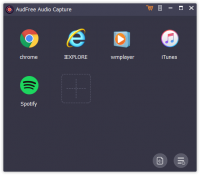
Furthermore, the software is designed to be incredibly intuitive. You simply add the applications you want to record from into the AudFree interface, and it monitors those specific channels. This level of control ensures that you aren't accidentally recording your system notification sounds or the click-clack of your typing while you are trying to capture a pristine music track. It is a clean, isolated recording experience that respects the user's need for high-quality, focused output.
2. Lossless Quality and Multi-Format Support
In the world of audio, quality is king. There is nothing worse than recording a beautiful orchestral piece or a high-energy dance track only to realize the final file sounds thin, muffled, or distorted. AudFree Audio Capture addresses this by supporting high-fidelity, lossless audio recording. When you use this tool, you aren't just getting a "good enough" copy; you are getting a bit-for-bit capture of the stream as it is intended to be heard. This is vital for anyone who values their listening experience and wants to maintain the integrity of the original sound.
The software offers a robust selection of output formats to suit any need. If you are looking for maximum compatibility across all devices, you can opt for the industry-standard MP3 or AAC. These are perfect for smartphones, car stereos, and portable players. However, if you are an audiophile who demands the best, you can choose FLAC or WAV. These lossless formats ensure that no data is discarded during the conversion process, giving you a master-quality file that sounds identical to the source. It also supports M4A, M4B, and other specialized formats, making it a Swiss Army knife for audio conversion.
Beyond just selecting the format, the software allows you to tweak the technical parameters. You can adjust the bit rate, sample rate, and channel settings to find the sweet spot between file size and sound quality. This level of customization is usually reserved for expensive professional software, but here it is presented in a user-friendly way that anyone can master. Whether you are building a high-res library for your home theater or just want some tunes for your morning jog, this software provides the technical foundation to make it happen.
3. Automatic ID3 Tag Preservation
If you have a large music collection, you know that organization is the difference between a functional library and a chaotic mess of "Track 01" and "Unknown Artist." Manually entering metadata for hundreds of songs is a soul-crushing task that most of us would rather avoid. One of the most impressive "under the hood" features of this giveaway is its ability to automatically identify and preserve ID3 tags. This means that while the software is recording, it is also scanning for information like the song title, artist name, album, genre, and even the album art.
This intelligent tagging system works seamlessly with most major streaming platforms. When the recording is finished, you don't just have a raw audio file; you have a fully labeled asset that is ready to be dropped into your music player of choice. It will look professional, be easily searchable, and fit perfectly into your existing collection. For those who are particularly meticulous, the software also includes a built-in tag editor, allowing you to manually adjust or add information if the automatic scanner misses a detail or if you want to add custom comments to your tracks.
This feature alone saves hours of manual labor. Imagine recording a full concert or a long radio broadcast. Instead of having one giant file with no information, the software can help you identify segments and label them accordingly. It turns a "recording" into a "release." In the style of a true tech reviewer, I have to emphasize how much this improves the user experience. It takes the "work" out of "workflow," letting you focus on enjoying your music rather than managing it.
4. Simultaneous Multi-Track Recording
Efficiency is the hallmark of great software, and AudFree Audio Capture takes this to the next level with its multi-track recording capability. Most audio recorders are "serial," meaning you can only record one thing at a time. If you want to record three different songs from three different tabs, you have to wait for each one to finish. That is a massive waste of time in our fast-paced digital world. AudFree breaks this limitation by allowing you to record multiple tracks from different sources simultaneously.
You can have a playlist running in Spotify, a YouTube video playing in Chrome, and a podcast streaming in another app, and AudFree will capture them all into separate files at the same time. The software is smart enough to detect the start and end of each track, even if they are playing at once. It uses an innovative technology that isolates the audio streams so they don't bleed into each other. This is a game-changer for anyone who wants to build a library quickly.
Think of the possibilities: you could set up several different streams to record while you go to lunch or run errands, and when you come back, you’ll have a dozen perfectly trimmed and tagged songs waiting for you. It’s like having a team of recording assistants working for you. This feature highlights the "smart" nature of the program. It isn't just listening to your speakers; it is interacting with your system's individual audio processes to provide a highly efficient, professional output that respects your time.
5. Built-in Precision Editing Tools
While the recording and tagging features are the stars of the show, the built-in editing suite is the secret weapon that makes AudFree Audio Capture a truly "all-round" tool. Often, when we record streaming audio, we end up with unwanted bits: the intro talk from a radio DJ, a few seconds of silence at the end of a track, or an annoying ad that snuck in. Normally, you would have to export the file and open it in a separate editor like Audacity to fix these issues. With this software, you can do it all in one place.
The editing interface is clean and straightforward. You can use the "split" tool to cut a long recording into smaller clips, which is perfect for segmenting a recorded podcast or a radio show into individual segments. Conversely, you can use the "merge" tool to combine several different recordings into one seamless file. This is ideal if you want to create a custom mixtape or a continuous "best of" track for a party. The precision here is key; you can zoom in on the waveform to ensure your cuts are frame-perfect, avoiding any awkward jumps or pops in the audio.
This integrated approach means you never have to leave the application to get your files into their final, polished state. For someone who values a streamlined desktop, this is a huge win. You go from "capturing" to "editing" to "finished product" in a single, fluid motion. It empowers the user to be a creator, not just a consumer. You can customize your audio files exactly how you want them, ensuring that your offline library is even better than the online streams they came from.
Conclusion: Why You Shouldn't Miss This
In conclusion, AudFree Audio Capture is more than just a simple utility; it is a gateway to true digital freedom. In a world where we are often told what we can and cannot do with the media we pay for, this software puts the power back into the hands of the user. It removes the barriers of connectivity, the frustrations of proprietary formats, and the clutter of unorganized files. It is a sophisticated, high-performance tool wrapped in an interface that is accessible to everyone, from the casual listener to the dedicated tech enthusiast.
By downloading this giveaway, you are securing a tool that offers:
- Unrestricted access to any sound played on your computer.
- High-fidelity audio that satisfies even the most discerning ears.
- Automated organization that keeps your music library pristine.
- Unmatched efficiency with multi-track recording capabilities.
- Creative control with built-in editing and merging features.
We often take for granted how much audio we consume every day. From the background music in our favorite games to the insightful interviews in our podcasts, audio is the heartbeat of our digital experience. Having the ability to capture those moments and keep them forever—offline, on any device, and in the highest possible quality—is something you shouldn't pass up. This giveaway is your chance to own a premium solution that usually comes with a price tag. It is an investment in your digital lifestyle that will pay dividends every time you put on your headphones and hear your favorite track, perfectly recorded and ready to play, no matter where you are or what your internet status is. Don't let this opportunity slip by; download AudFree Audio Capture today and start building the music library you’ve always wanted.


Reviews for AudFree Audio Capture
Click Here to Read Reviews for AudFree Audio Capture >> Click Here to Submit Reviews for AudFree Audio Capture >>