What Does Audio to Text Converter Do?
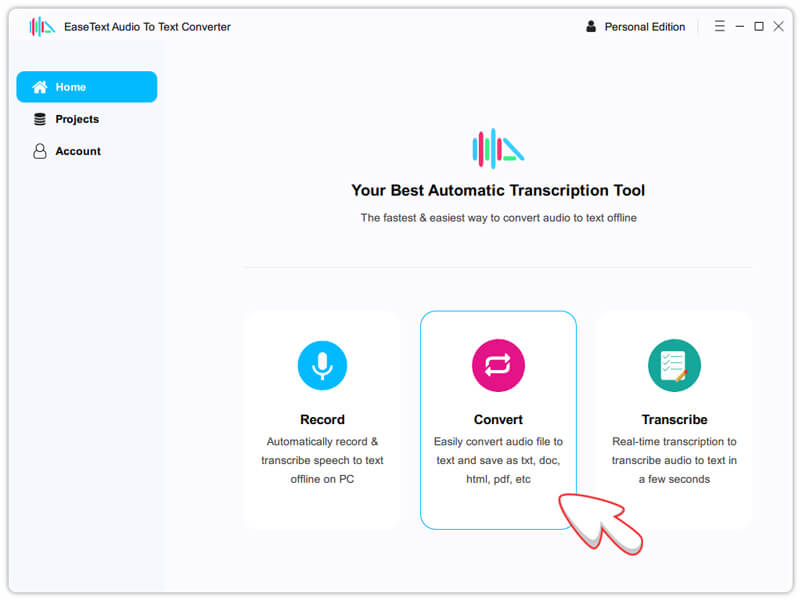
EaseText Audio to Text Converter is an AI-driven desktop application designed to transcribe and convert audio into text locally. Unlike many cloud-dependent services, this software functions entirely offline, ensuring that sensitive data remains on the user's hardware. The tool leverages artificial intelligence to provide high-accuracy transcriptions for both pre-recorded files and live speech.
The software is equipped to handle diverse scenarios, from individual recordings to multi-speaker environments. It includes dedicated features for capturing notes and generating summaries from virtual meeting platforms such as Zoom, Microsoft Teams, and Google Meet. Users can also process multiple audio files simultaneously through its high-speed batch conversion engine.
Key capabilities include:
- Offline Processing: Ensures data privacy by transcribing without an internet connection.
- Real-Time Transcription: Converts live speech to text as it happens for immediate note-taking.
- Multi-Language Support: Recognizes and processes various languages including English, Spanish, Dutch, Italian, and Chinese.
- Speaker Identification: Distinguishes between different participants in a conversation for clearer transcripts.
- Versatile Export Options: Saves completed transcripts in formats such as TXT, Word, HTML, and PDF.
By supporting various input formats and providing automated summarization features, EaseText Audio to Text Converter serves as a professional-grade tool for streamlining digital documentation and meeting management.
Top 5 Reasons To Download Audio to Text Converter
In the fast-paced world of digital productivity, finding a tool that actually saves you hours of manual labor is like finding gold. We have all been there—sitting through a two-hour Zoom meeting, a long lecture, or a series of interviews, knowing that later we will have to spend double that time transcribing every word. It is tedious, it is prone to human error, and frankly, it is a drain on your creative energy. That is why the tech community is buzzing about the EaseText Audio to Text Converter. This is not just another transcription app; it is a heavy-duty, AI-powered solution designed for people who value their time and their data privacy. If you have been looking for a way to streamline your workflow, this is the giveaway you cannot afford to miss.
Before we dive into the deep technical analysis of why this software stands out in a crowded market, let’s look at the core benefits. Here are the top five reasons why you should download the EaseText Audio to Text Converter today:
- Total Data Privacy via Offline AI Processing: Unlike most competitors that upload your sensitive audio to the cloud, this tool works entirely offline on your local machine.
- High-Accuracy, Real-Time Transcription: It uses advanced artificial intelligence to convert speech to text as it happens, ensuring you never miss a beat during live meetings or lectures.
- Massive Time Savings with Batch Conversion: You can process dozens of audio files simultaneously at high speeds, making it perfect for large-scale projects and archives.
- Intelligent Meeting Management and Summarization: The software identifies different speakers and can generate concise summaries, turning hours of talk into actionable notes.
- Unrivaled Format Support and Multi-Language Versatility: Whether you need a PDF, Word doc, or HTML file, and whether the audio is in English, Spanish, or Chinese, this tool handles it with ease.
Now, let’s break these down and look at why these features make the EaseText Audio to Text Converter a must-have tool for students, journalists, legal professionals, and corporate power users alike.
1. Total Data Privacy via Offline AI Processing
In an era where data breaches are a daily occurrence, the biggest concern with AI tools is usually where your data goes. Most transcription services require you to upload your MP3 or WAV files to their servers. This means your private conversations, proprietary business ideas, or sensitive legal interviews are sitting on someone else’s computer. For many professionals, this is a dealbreaker. EaseText Audio to Text Converter changes the game by keeping everything local.
When you use this software, the AI models reside on your own hardware. This means the conversion process happens within the "four walls" of your computer. There is no data transmission to a third-party server, which means there is no risk of your audio being intercepted or stored in a cloud database. For journalists protecting a source or a lawyer transcribing a confidential deposition, this "Offline First" approach is the ultimate security feature. You get the power of modern artificial intelligence without the privacy trade-offs usually associated with it.
Furthermore, because it runs offline, you are not dependent on an internet connection. If you are traveling, working in a remote area, or stuck on a plane, you can still get your work done. You don't have to worry about slow upload speeds or losing your progress because the Wi-Fi dropped. It is reliable, secure, and gives you total sovereignty over your digital assets.
2. High-Accuracy, Real-Time Transcription
We have all tried those free transcription tools that produce "word salad"—a jumble of text that barely resembles what was actually said. EaseText is built on a sophisticated AI engine specifically trained to handle various accents, background noises, and technical jargon. The accuracy is high enough that your editing time is slashed to a fraction of what it used to be. But the real "wow" factor is the real-time transcription capability.
Imagine sitting in a Microsoft Teams meeting or a Google Meet session. Instead of frantically typing notes while trying to stay engaged in the conversation, you simply let EaseText run in the background. It captures the audio and turns it into text instantly. You can watch the transcript grow as the meeting progresses. This allows you to stay present and participate in the discussion, knowing that every detail is being captured with precision. This is a game-changer for students in lectures as well; you can focus on the concepts being taught rather than the mechanics of writing them down.
The AI is also smart enough to understand context. It doesn't just recognize sounds; it understands the structure of language, which helps it choose the right homophones (like "their" versus "there") based on the surrounding words. This level of intelligence is what separates a professional tool from a basic utility.
3. Massive Time Savings with Batch Conversion
If you are a content creator, a researcher, or a legal clerk, you don't just have one file to transcribe; you likely have a folder full of them. The traditional way to handle this is to upload files one by one, wait for them to finish, and then download the results. It is a tedious process that wastes hours. EaseText solves this through its high-speed batch file conversion feature.
With batch processing, you can simply drag and drop an entire library of audio files into the interface. The software then leverages your computer’s processing power to churn through them at high speed. While the software works through your backlog, you can focus on other tasks. Because it is optimized for performance, it doesn't just do one file at a time; it manages resources to ensure the fastest possible turnaround. This makes it an essential tool for "clearing the deck" on large projects.
Think about the implications for a podcaster who wants to create a searchable archive of five years of episodes. Or a researcher who has conducted fifty individual interviews for a study. What used to be a week-long project can now be completed in an afternoon. This efficiency boost is exactly why tech reviewers look for "pro-sumer" tools that can handle heavy workloads without breaking a sweat.
4. Intelligent Meeting Management and Summarization
Raw text is great, but organized information is better. One of the most frustrating things about basic transcription is getting a giant "wall of text" where you can't tell where one person stopped talking and another began. EaseText addresses this by offering multi-speaker identification. The AI can distinguish between different voices, labeling the transcript so you can clearly see the flow of the conversation. This is vital for meeting minutes, where knowing who said what is often more important than the actual words themselves.
Beyond just identifying speakers, the software helps you manage the output of those meetings. It can generate summaries of your conversations. In a corporate environment, this is pure gold. Instead of reading through a 40-minute transcript to find the action items, you can look at the summary to get the gist of the discussion. This turns EaseText from a simple converter into a productivity hub.
The software is designed to integrate seamlessly with the tools you already use. Whether you are using Zoom for a client call or Google Meet for a team sync, EaseText acts as your digital secretary. It takes the notes, identifies the speakers, and summarizes the points, leaving you free to lead the meeting and make decisions.
5. Unrivaled Format Support and Multi-Language Versatility
A tool is only as good as its flexibility. EaseText understands that different professionals have different needs when it comes to document types. Some people need a simple TXT file for a blog post, while others need a formal PDF for a legal record, or a Word document for a report. This software supports saving your transcripts in a wide variety of formats, including TXT, WORD, HTML, and PDF. This means you don't have to waste time copying and pasting text into other applications and fixing the formatting. The export is clean, professional, and ready for use.
Furthermore, we live in a globalized world. If your business or research takes you across borders, you need a tool that speaks more than just English. EaseText supports a massive range of languages, including Spanish, Dutch, Italian, Chinese, and many more. The AI is trained on diverse linguistic datasets, ensuring that the accuracy remains high regardless of the language being spoken.
This multi-language support is especially beneficial for translation workflows. You can transcribe a Dutch interview into text, and then use your preferred translation tool to bring it into English, or vice versa. For international companies, this tool becomes a bridge that helps teams communicate and document their processes across different regions without language becoming a barrier.
Conclusion: Why You Should Download It Now
If you have ever felt overwhelmed by the sheer volume of audio you need to process, or if you have ever hesitated to use AI tools because of privacy concerns, the EaseText Audio to Text Converter is the answer you have been waiting for. It is a rare piece of software that balances cutting-edge technology with user-centric privacy.
We have covered the major highlights: the security of offline processing, the sheer speed of batch conversion, the intelligence of speaker identification and summarization, and the massive flexibility of its language and format support. In the style of a true tech reviewer, I can tell you that this isn't just "another app" to clutter your hard drive. It is a professional-grade utility that pays for itself in saved time within the first week of use.
Think about your current workflow. How much time do you spend listening back to recordings? How much do you pay for subscription-based transcription services that charge you by the minute? By downloading this tool, you are taking control of your productivity. You are getting a tool that works as hard as you do, without the recurring costs or the privacy risks of cloud-based alternatives.
The EaseText Audio to Text Converter is a robust, reliable, and incredibly smart piece of software. It bridges the gap between the spoken word and the written record with an elegance that few other tools can match. Whether you're a student trying to ace your exams, a professional aiming to optimize your meetings, or a creator looking to repurpose your audio content, this is the definitive tool for the job. Do yourself a favor and get this giveaway downloaded—your future, more productive self will thank you for it. Don't wait until you're staring at a five-hour backlog of audio; be prepared and start converting like a pro today.
With its ability to handle everything from real-time Microsoft Teams notes to massive batches of historical audio files, EaseText proves that you don't need to sacrifice your privacy for the sake of artificial intelligence. It brings the power of the AI revolution directly to your desktop, keeping your data safe and your workflow fast. This is the pinnacle of modern transcription technology, and it's ready for you to put it to the test.

Reviews for Audio to Text Converter
Click Here to Read Reviews for Audio to Text Converter >> Click Here to Submit Reviews for Audio to Text Converter >>