What Does AweClone Do?
Magoshare AweClone is a specialized utility designed to facilitate disk cloning and system migration for both Windows and macOS users. Utilizing sector-by-sector cloning technology, the software creates an exact replica of a hard drive or partition, ensuring that files, installed applications, and system settings remain intact during the transfer process.
The application is primarily used for upgrading hardware or creating comprehensive data backups. By selecting a source drive and a target destination, users can move their entire operating environment without the need for manual reinstallation. This functionality extends to several specific use cases:
- System Migration: Clone an existing operating system to a new internal or external drive for bootable access.
- Hardware Upgrades: Seamlessly transfer data from an aging HDD to a high-performance SSD or move from an old drive to a new one.
- Disk Duplication: Create a 1:1 copy of an entire hard drive or a specific partition to an external storage device.
- Data Protection: Generate a secure backup of all disk contents to facilitate easy restoration in the event of hardware failure.
- Partition Management: Clone specific partitions without data loss to reallocate storage space or organize files.
AweClone focuses on a streamlined user experience, requiring minimal technical configuration to initiate the cloning process. The software ensures data integrity across different storage media, providing a factual and secure method for managing storage transitions and system recovery.
Top 5 Reasons To Download AweClone
- Absolute Bit-for-Bit Precision with Sector-by-Sector Technology
- Effortless "Two-Step" User Experience
- The Ultimate Shortcut for SSD Upgrades and Hardware Migrations
- Complete Cross-Platform and Multi-Device Versatility
- Rock-Solid Disaster Recovery and Data Redundancy
If you have ever spent an entire weekend reinstalling your operating system, hunting down obscure hardware drivers, and reconfiguring your software settings from scratch, you know that digital migration is usually a nightmare. We live in an era where our entire lives—professional and personal—are stored on magnetic platters and flash memory chips. Yet, most users treat their hard drive health like a game of Russian Roulette. When the time comes to upgrade to a faster SSD or move to a larger disk, the anxiety of losing a single precious file or a critical system configuration can be paralyzing. This is exactly where Magoshare AweClone steps in, and if you are looking for a reason to jump on this giveaway, you have come to the right place. As a tech reviewer who has seen dozens of utilities claim to "simplify" disk management, I can tell you that AweClone stands out by actually delivering on that promise without the usual bloatware or complex jargon.
In the following sections, I am going to break down exactly why this software is a mandatory addition to your digital toolkit. We are going to look at how it handles the "heavy lifting" of data movement, why the interface is a breath of fresh air for non-technical users, and why the sector-by-sector technology is the "secret sauce" that makes this giveaway a must-download for anyone who values their time and data integrity.
1. Absolute Bit-for-Bit Precision with Sector-by-Sector Technology
The most significant reason to download AweClone during this giveaway is its underlying engine. Many "backup" tools simply perform a glorified copy-paste operation. They look at the files you have, copy them to a new location, and call it a day. The problem? Your operating system is more than just a collection of files. It is a complex ecosystem of registry entries, boot sectors, hidden partitions, and metadata that standard file copying simply cannot capture. If you try to move Windows or macOS using standard methods, your computer likely won't even boot when you plug in the new drive.
Magoshare AweClone utilizes advanced sector-by-sector cloning technology. This means the software doesn't just look at the files; it looks at the physical "sectors" on the disk. It replicates every single bit of data, including the Master Boot Record (MBR) or GUID Partition Table (GPT), the hidden recovery partitions, and the system settings that make your computer unique. When you use AweClone to clone your system, the resulting drive is an exact, functional twin of the original. This level of precision is what separates professional-grade tools from amateur utilities. By downloading this giveaway, you are essentially getting a professional imaging suite that ensures your system remains 100% bootable and identical to the original source, right down to the desktop wallpaper and the browser cookies.
This technology is also incredibly beneficial for data recovery scenarios. If you have an old hard drive that is starting to show signs of mechanical failure—perhaps it's making clicking noises or showing "bad sector" errors—AweClone can attempt to clone the readable sectors onto a healthy drive. Because it operates at such a low level, it can often bypass the errors that would cause Windows Explorer to freeze or crash during a normal file transfer. This is the kind of peace of mind that you usually have to pay a premium for, but it is available to you right now as part of this exclusive offer.
2. Effortless "Two-Step" User Experience
Let’s be honest: most disk utility software looks like it was designed in 1995 for someone with a PhD in Computer Science. They are filled with confusing dropdown menus, frightening warnings about "cylinders" and "clusters," and interfaces that make you feel like one wrong click will erase your entire life. AweClone completely disrupts this trend with an interface that is as clean as it is intuitive. The developers at Magoshare clearly understood that when someone is cloning a hard drive, they are already feeling a bit stressed. The software's job is to reduce that stress, not add to it.
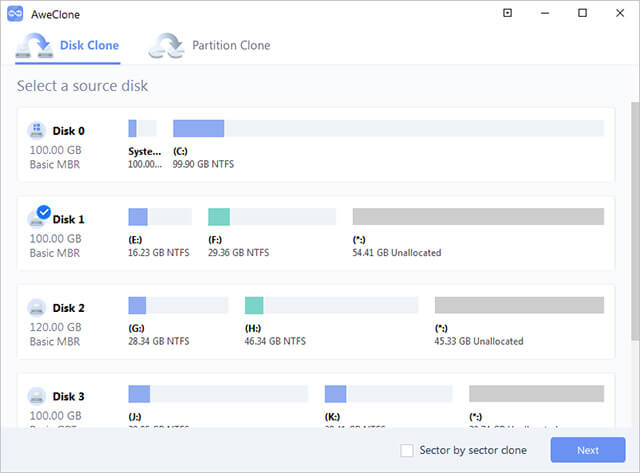
The process in AweClone is boiled down to a simple, wizard-driven flow. You select your source drive (the drive you are currently using) and your target drive (the new drive where the data is going). Once you've made those two selections, the software takes care of everything else. It calculates the necessary space, aligns the partitions, and begins the cloning process with a single click. There are no complicated configuration screens to navigate and no need to manually resize partitions unless you want to. This "set it and forget it" approach is perfect for the home user who just wants to get the job done, but it is powerful enough for the tech-savvy user who appreciates efficiency.
Furthermore, the visual feedback provided by the software is excellent. You get a clear progress bar and real-time status updates so you aren't left wondering if the software has frozen or if it’s actually working. In a world where tech products are becoming increasingly over-engineered, the elegant simplicity of AweClone is its greatest asset. It removes the "fear factor" from disk cloning, making it an accessible task for anyone, regardless of their technical background. If you can move a mouse and click a button, you can successfully clone your hard drive with this tool.
3. The Ultimate Shortcut for SSD Upgrades and Hardware Migrations
If you are still running your computer on a traditional mechanical Hard Disk Drive (HDD), you are missing out on the single greatest performance boost available in the modern era: the Solid State Drive (SSD). However, the biggest hurdle for most people when upgrading to an SSD is the thought of having to reinstall their operating system and all their programs. It is a time-consuming process that can take hours, if not days, to get everything back to exactly how you like it. This is why AweClone is a game-changer for hardware enthusiasts and casual users alike.
One of the standout features of this software is its ability to seamlessly clone HDD to SSD or vice versa. SSDs work differently than HDDs, and AweClone is optimized to handle these differences, ensuring that partitions are correctly aligned for optimal SSD performance and longevity. When you use this giveaway to migrate your data, you can go from a sluggish, 5-year-old mechanical drive to a lightning-fast NVMe SSD in the time it takes to have a cup of coffee. Once the clone is complete, you simply swap the drives, and your computer boots up instantly, with all your programs, files, and settings exactly where you left them.
This isn't just about speed, though; it’s about the value of your time. Think about the hundreds of software licenses, browser passwords, custom toolbars, and system tweaks you have accumulated over the years. Recreating that environment on a new drive is a Herculean task. AweClone acts as a "teleporter" for your digital life, moving your entire environment from old hardware to new hardware without dropping a single packet of data. Whether you are moving to a larger drive because you’re out of space or moving to a faster drive for better performance, this software is the most efficient bridge between your old hardware and your new investment.
4. Complete Cross-Platform and Multi-Device Versatility
Many cloning tools are limited by the types of devices or file systems they support. Some only work with Windows; others struggle with external USB drives or SD cards. AweClone breaks down these barriers by offering support for a massive range of hardware and software environments. Whether you are a Windows power user or a dedicated Mac enthusiast, AweClone has a version tailored for your ecosystem. It supports all major file systems, including NTFS, FAT32, exFAT, and APFS, making it one of the most versatile tools on the market.
But the versatility doesn't stop at operating systems. AweClone is designed to interface with virtually any storage device you can plug into your machine. This includes:
- Internal HDDs and SSDs (SATA, NVMe, M.2).
- External portable hard drives and desktop expansion drives.
- USB flash drives and thumb drives.
- Memory cards (SD, microSD, CF).
- Hardware RAID arrays.
This makes the software useful for much more than just system migrations. Have you ever wanted to create a perfect copy of a bootable USB installer? AweClone can do it. Do you need to backup a critical SD card from your camera before a big edit? AweClone has you covered. Do you have a secondary partition where you store all your games or photos? You can clone individual partitions rather than the entire disk if you want to save time and space.
By downloading this giveaway, you aren't just getting a one-trick pony. You are getting a Swiss Army knife for data management. The ability to move data between different types of storage media with the same reliability as a system clone is a massive advantage. It ensures that no matter what hardware you buy in the future, you will have a tool that can communicate with it and protect your data across the board.
5. Rock-Solid Disaster Recovery and Data Redundancy
We often talk about "backups" in the tech world, but a backup is only as good as its recovery time. If your hard drive fails and your backup is just a pile of files in the cloud, you still have to spend hours reinstalling Windows and your apps before you can even start downloading those files. This is the "hidden cost" of traditional backups: downtime. AweClone offers a superior solution through the concept of disk imaging and cloning for disaster recovery.
When you use AweClone to create a clone of your system drive onto an external hard drive, you aren't just creating a backup; you are creating a "Cold Standby." If your main drive dies on a Tuesday morning when you have a deadline at noon, you don't have to panic. You can simply boot from your cloned drive or swap it into your machine, and you are back to work in minutes. This level of redundancy is critical for freelancers, students, and professionals who cannot afford a single day of technical downtime. AweClone makes it so easy to create these "system snapshots" that there is no excuse not to have one.
Furthermore, the software allows for safe data restoration. Because the clone is a perfect copy, you can easily pull individual files off the cloned drive if you accidentally delete them from your main drive. It acts as a massive, physical "Undo" button for your entire computer. In an era where ransomware and system-breaking software updates are a constant threat, having a physical, cloned copy of your drive stored safely in a drawer is the ultimate insurance policy. This giveaway gives you the keys to that insurance office for free. It is a proactive step toward digital security that pays for itself the very first time your hardware fails or a software update goes south.
In conclusion, Magoshare AweClone is more than just a utility; it is a vital safeguard for your digital life. It combines the technical sophistication of sector-by-sector cloning with a user interface that anyone can master. Whether you are looking to upgrade to a blazing-fast SSD, migrate to a new computer, or simply create a foolproof backup of your most important files, this software provides a secure, efficient, and incredibly simple solution. Don't wait for a hard drive failure to realize you needed this tool. Download the giveaway today, clone your drive, and enjoy the peace of mind that comes with knowing your data is exactly where it should be—safe, secure, and ready for anything.

Reviews for AweClone
Click Here to Read Reviews for AweClone >> Click Here to Submit Reviews for AweClone >>