What Does BitLocker Anywhere Do?
Hasleo BitLocker Anywhere is a utility designed to provide full BitLocker Drive Encryption features to Windows editions where the tool is natively restricted, specifically Windows 11/10/8.1/8/7 Home and Windows 7 Professional. The software allows users to perform core encryption tasks normally reserved for Pro and Enterprise versions of Microsoft’s operating systems.
The application facilitates the encryption of both the operating system partition (C: drive) and secondary data volumes. It provides a suite of administrative controls for managing BitLocker-protected drives, including the ability to lock and unlock volumes, decrypt previously encrypted partitions, and modify access passwords. For data recovery and security maintenance, users can export BitLocker recovery keys and startup keys directly through the interface.
Key technical capabilities include:
- Full Volume Encryption: Secure the Windows boot drive or individual data partitions using BitLocker Drive Encryption.
- Drive Management: Decrypt drives, change existing passwords, and toggle lock statuses.
- Key Recovery: Export BitLocker recovery keys and startup keys for emergency access.
- Legacy Support: Encrypt and start Windows 7 systems using password protection.
- Broad Compatibility: Support for Windows 11 through Windows 7, as well as Windows Server 2008, 2012, 2016, and 2019.
By bypassing the edition-based limitations of standard Windows installations, this software ensures that users on Home editions can implement volume-level security standards typically found in professional environments.
Top 5 Reasons To Download BitLocker Anywhere
- Bridges the Gap Between Windows Home and Pro Editions: It provides full BitLocker functionality to users on Windows 11/10 Home and Windows 7 Professional, versions that are normally locked out of this essential security feature.
- Complete Boot Drive Protection: Unlike many third-party encryption tools, it allows you to encrypt your C: drive and data volumes, ensuring your operating system and personal files are safe from unauthorized access.
- Advanced Recovery Key Management: It offers the ability to export BitLocker recovery keys and startup keys, providing a critical safety net so you never lose access to your encrypted data.
- Enhanced Startup Security for Legacy Systems: It introduces a unique feature to encrypt and start Windows 7 with a password, adding a modern layer of pre-boot security to older hardware.
- Unrivaled Universal Compatibility: The software works seamlessly across almost every version of Windows from Windows 7 through Windows 11, including Server editions, making it a versatile tool for any environment.
In the modern digital landscape, data security is no longer a luxury; it is a fundamental necessity. Whether you are a student carrying a laptop between classes, a remote worker handling sensitive company information, or a home user who simply values their privacy, the threat of data theft or unauthorized access is a constant reality. For years, Microsoft has offered a robust solution in the form of BitLocker Drive Encryption. However, there has always been a frustrating catch: BitLocker is officially reserved for the expensive Pro and Enterprise editions of Windows. If you are running a Home edition—which the vast majority of consumer laptops do—you are effectively left out in the cold. That is exactly why Hasleo BitLocker Anywhere is such a monumental game-changer, and why you should jump at the chance to download this giveaway immediately.
As a tech reviewer, I have seen countless encryption tools come and go. Some are too complex for the average user, while others are too lightweight to offer real protection. Hasleo BitLocker Anywhere strikes the perfect balance by bringing the gold standard of Windows encryption to the masses. It doesn’t just mimic BitLocker; it functions as a bridge that unlocks the native capabilities of the Windows operating system that Microsoft chose to hide behind a paywall. Here is a deep dive into why this software is a must-have for your digital toolkit.
1. Bridges the Gap Between Windows Home and Pro Editions
The primary reason you need to download Hasleo BitLocker Anywhere is that it corrects a major oversight in the Windows ecosystem. For years, users who purchased the Home editions of Windows 10 or Windows 11 discovered that they lacked the most powerful security tool built into the OS. If your laptop is stolen or you lose a USB drive, a simple password on your Windows account won't stop a savvy thief. They can simply pull the hard drive, plug it into another machine, and read every single one of your files. BitLocker prevents this by scrambling your data with 128-bit or 256-bit AES encryption.
Hasleo BitLocker Anywhere is the world's first software to provide a full BitLocker solution for Windows 11/10/8.1/8/7 Home and Windows 7 Professional. It effectively upgrades your security posture to an enterprise level without requiring you to pay for a costly Windows Pro license upgrade. By using this tool, you are essentially "unlocking" the ability to interact with BitLocker-protected drives and create new ones. This means that if you have a workplace drive that is encrypted with BitLocker, you can finally open it on your home computer without any compatibility issues. It democratizes high-end security, making it accessible to everyone regardless of which version of Windows came pre-installed on their machine.
2. Complete Boot Drive Protection
Many third-party encryption programs are great for protecting an external thumb drive or a secondary "D:" drive, but they often stumble when it comes to the "C:" drive—the heart of your computer where the operating system lives. Encrypting the boot drive is inherently risky because if the encryption process isn't handled perfectly, your computer won't be able to start up. Hasleo BitLocker Anywhere excels here by allowing you to encrypt the Windows C: drive with the same reliability as the native Pro feature.
When you encrypt your boot drive, you are protecting more than just your documents. You are protecting your browser cookies (which hold your logged-in sessions), your saved passwords, your system configuration, and your personal metadata. Hasleo BitLocker Anywhere ensures that the entire volume is wrapped in a layer of protection that requires authentication before the operating system even begins to load. This "at-rest" encryption is the best defense against physical hardware theft. In my experience, the peace of mind that comes from knowing your entire system is a black box to anyone without your password is worth the download alone. The fact that it manages this on Home editions—where this was previously impossible—is nothing short of a technical feat.
3. Advanced Recovery Key Management
One of the biggest fears people have regarding encryption is the "lockout" scenario. What happens if you forget your password? With native BitLocker, managing recovery keys can sometimes be a headache, especially if you aren't using a Microsoft Account to sync them. Hasleo BitLocker Anywhere simplifies this process significantly by providing dedicated tools to export your BitLocker Recovery Key and Startup Key.
During the encryption process, or even after the drive is already encrypted, you can use the software to generate a recovery key file or a printable document. This is your "get out of jail free" card. If your computer's hardware changes or you experience a technical glitch that prevents the normal password prompt from working, these exported keys are the only way to save your data. Furthermore, the app allows you to change the password for BitLocker-encrypted volumes easily. In a standard Windows environment, changing an encryption password can sometimes be a convoluted process involving command-line prompts. Hasleo makes it a simple, user-friendly experience. Having these management tools at your fingertips reduces the risk associated with encryption, making it a viable and safe option for non-technical users who want to stay secure.
4. Enhanced Startup Security for Legacy Systems
While the tech world is buzzing about Windows 11, a significant number of users and businesses are still utilizing Windows 7 for specific software compatibility or personal preference. However, Windows 7 is increasingly vulnerable to modern security threats. One of the standout features of Hasleo BitLocker Anywhere is its ability to encrypt and start Windows 7 with a password. This is a specialized feature that adds a pre-boot authentication layer that wasn't originally available in the same way for Home or Professional users of that era.
By implementing a startup password, you are adding a significant barrier to entry. Even if a bad actor has physical access to your Windows 7 machine, they cannot even begin the boot process without the correct credentials. This is particularly useful for those who use legacy machines to run sensitive offline tasks or store historical data. It breathes new life into older hardware by giving it a modern security makeover. For anyone still holding onto a Windows 7 machine, this feature alone makes the software an essential download. It’s about more than just encryption; it’s about total control over the boot sequence and the integrity of the machine from the moment you hit the power button.
5. Unrivaled Universal Compatibility
In the world of utility software, compatibility is king. There is nothing more frustrating than downloading a tool only to find it doesn't support your specific OS version or file system. Hasleo BitLocker Anywhere is impressively robust in this department. It is compatible with Windows 11, 10, 8.1, 8, 7, and even Windows Server 2019, 2016, 2012, and 2008. This wide range of support means that this single tool can be the security solution for every computer in your house or small business.
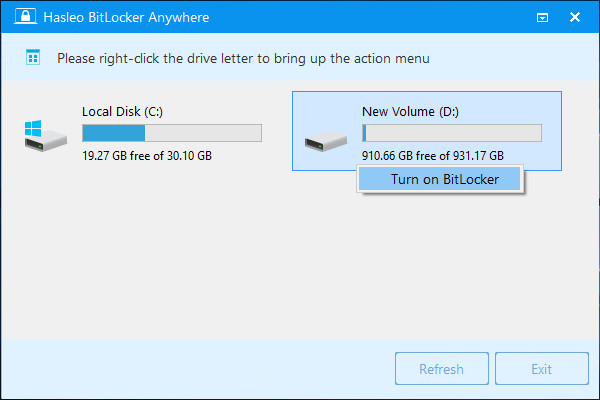
Think about the versatility this offers. You can encrypt a drive on an old Windows 7 desktop, move it to a modern Windows 11 Home laptop, and manage it seamlessly using the same software. It handles both FAT32 and NTFS file systems, ensuring that your USB flash drives and external hard drives are covered regardless of how they were formatted. It also allows you to easily lock and unlock drives with a right-click-like simplicity. This level of cross-version compatibility ensures that your encrypted data remains portable and accessible to you, and only you, across your entire ecosystem of devices. Whether you are a tech enthusiast with a multi-OS setup or a casual user with one laptop, the universal nature of this tool makes it a permanent fixture on your "must-install" list.
Why You Should Download It Now
If you have been following the tech news lately, you know that data breaches and identity theft are at an all-time high. We often think of "security" as having a good antivirus or a strong password for our email, but we frequently forget about the physical security of our hardware. If your laptop is in your backpack and you leave it in a coffee shop or a car, all those digital protections mean nothing if the drive itself isn't encrypted. Hasleo BitLocker Anywhere provides that final, most important layer of defense.
The beauty of this giveaway is that it gives you a professional-grade tool for a fraction of the effort and cost of upgrading your entire operating system. It is designed with a clean, straightforward interface that doesn't require a degree in computer science to navigate. You are guided through the encryption process, warned about the importance of recovery keys, and given the tools to manage your drives with confidence. It is the definition of "set it and forget it" security. Once your drives are encrypted, you can go about your day knowing that even if the worst happens and your hardware is lost, your personal photos, financial documents, and private data remain invisible to the world.
In conclusion, Hasleo BitLocker Anywhere isn't just another utility app; it's a vital security upgrade that Microsoft should have provided in the first place. By downloading this software, you are taking proactive control of your digital life. You are bridging the gap between Home and Pro versions, securing your boot drive, managing your recovery keys, protecting legacy systems, and ensuring compatibility across all your devices. Don't wait until after a security incident to wish you had encrypted your data. Download this tool, secure your drives, and enjoy the peace of mind that comes with knowing your information is safe under the protection of BitLocker, no matter which version of Windows you choose to run.
Final Thoughts from the Reviewer: In my years of testing software, I rarely come across a tool that solves such a specific and widespread problem so elegantly. Hasleo BitLocker Anywhere is a rare gem that provides real, tangible value to the average Windows user. It’s fast, it’s reliable, and most importantly, it works where the native OS fails. If you value your privacy, this download is a no-brainer. Get it, install it, and lock down your data today.

Reviews for BitLocker Anywhere
Click Here to Read Reviews for BitLocker Anywhere >> Click Here to Submit Reviews for BitLocker Anywhere >>