What Does BMS eBook Factory Do?
eBook Factory is a utility designed to convert HTML files and their linked content into standalone Windows executable (.EXE) files. This allows users to transform existing web pages into portable digital assets such as ebooks, product manuals, catalogs, and price lists. The application streamlines the process of merging multiple source files into a single, navigable container without requiring advanced programming knowledge.
The software provides several customization options for the final output. Users can define a table of contents, implement splash screens, and configure custom "About" dialogs. The interface of the resulting ebook can be tailored with specific toolbar buttons—including navigation, search, and fullscreen toggles—alongside custom logos and background branding. Users can also adjust window borders, cursors, and initial window sizes.
For enhanced functionality, eBook Factory includes an autopilot mode for automated slideshow presentations. Security features allow for password protection to restrict access to the compiled content. Before finishing the build, users can select from six different compression modes to optimize file size for distribution. The final self-running EXE file is compatible with Windows 7 and higher, ensuring the content can be viewed on most modern Windows desktops without the need for an external web browser.
Top 5 Reasons To Download BMS eBook Factory
- Seamless HTML to EXE Conversion: Effortlessly transform complex web folders into a single, professional, self-contained executable file.
- Professional Branding and Customization: Fully customize splash screens, "About" dialogs, logos, and toolbars to reflect your personal or corporate identity.
- Advanced Security and Protection: Secure your intellectual property with robust password protection and choose from six different compression levels.
- Versatile Presentation Modes: Utilize the unique "Autopilot" mode for automated slideshows, making it perfect for digital signage and marketing kiosks.
- User-Centric Design and Accessibility: Enjoy a streamlined workflow that requires zero coding knowledge, compatible with all modern Windows environments.
In the fast-paced world of digital content creation, the way we package and distribute information can be just as important as the information itself. As a tech reviewer, I’ve seen countless tools that claim to simplify the publishing process, but few manage to strike the perfect balance between power and accessibility. If you have ever felt overwhelmed by the technical hurdles of creating a professional ebook or a digital product catalog, you are looking at a potential game-changer. eBook Factory is more than just a utility; it is a comprehensive solution for anyone who wants to take their HTML content and turn it into a high-quality, standalone Windows application. Here is why this giveaway is an absolute must-download for creators, marketers, and business owners alike.
1. Seamless HTML to EXE Conversion
The core strength of this application lies in its ability to take a disparate collection of HTML files, images, scripts, and stylesheets and compile them into one single EXE file. Why does this matter? In the modern era, we are used to sharing links or sending bulky PDF files, but these have limitations. HTML files sent as a folder are messy, prone to broken links, and require the recipient to navigate a file structure. By converting your content into an EXE, you are providing your audience with a self-contained environment that doesn’t require an external browser or a specific reader app to function.
This software allows you to indicate a source folder and immediately begins the process of merging these assets. It preserves the integrity of your links and layout, ensuring that the experience you designed in your favorite web editor is exactly what the end user sees. Whether you are building a complex technical manual with hundreds of cross-references or a simple price list, the conversion process is incredibly stable. The portability of an EXE file means you can distribute your work via USB drives, cloud storage, or direct downloads without ever worrying about a "missing image" icon or a CSS file that failed to load on the user’s machine. It is the ultimate way to ensure your vision remains intact from creator to consumer.
Furthermore, because the resulting file is a Windows executable, it feels like a real piece of software rather than just another document. This adds a layer of professionalism to your work that can set you apart from competitors who are still relying on basic document formats. For indie authors, this means your book feels like an interactive experience; for businesses, your catalog feels like a dedicated tool.
2. Professional Branding and Customization
One of the biggest complaints I have with entry-level ebook creators is the lack of "white-label" options. Usually, you are stuck with the software’s branding or a generic UI. This application flips the script by giving you granular control over the aesthetic and functional elements of your EXE. When you download this giveaway, you are getting a toolkit that allows you to brand your ebook as your own.
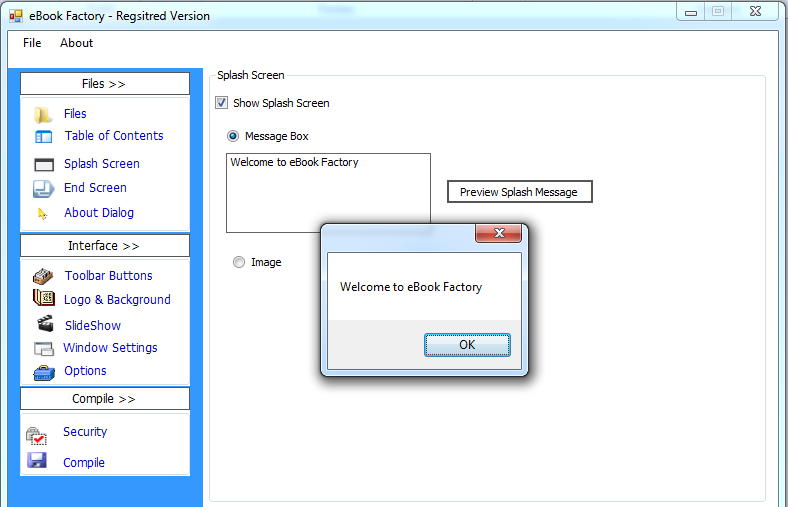
You can start the user’s journey with a custom splash screen. This could be a high-resolution image of your book cover, a corporate logo, or a welcoming message box. This immediate visual cue tells the reader that they are engaging with a premium product. But the customization doesn't stop at the entrance. You can also tailor the "About" dialog box, adjusting its dimensions and content to include your bio, copyright information, or contact details. These small touches are what build trust with an audience.
The software also provides a suite of toolbar options. You can decide exactly which buttons the user sees—whether they need a "Search" function, "Fullscreen" mode, "Refresh" options, or standard navigation like "Back" and "Forward." You can even upload a custom logo for the toolbar and select a background color or image that matches your brand’s color palette. Even the window borders, cursors, and initial window size are within your control. This level of customization ensures that the final product doesn't just function well; it looks like a bespoke application designed specifically for your content.
3. Advanced Security and Protection
In the digital age, protecting your work is paramount. If you are selling an ebook, a proprietary manual, or a confidential price list, you cannot afford to have your content easily scraped or distributed without permission. One of the most compelling reasons to use this tool is its built-in security features. Unlike a standard HTML site or a PDF, which can be easily edited or copied, a compiled EXE offers a significantly higher level of protection.
The application allows you to implement password protection on your compiled files. This is a vital feature for anyone looking to monetize their content or restrict access to a specific group of users. By setting a password, you ensure that only those with the proper credentials can view your work. This turns your ebook into a secure digital asset.
Beyond security, the software addresses the issue of file size through its robust compression engine. It offers six different compression modes, allowing you to find the "sweet spot" between file size and performance. If you have a content-heavy catalog with thousands of images, you can opt for high compression to make the file easier to email or download. If speed is your priority, you can choose a lighter compression level. This flexibility is a godsend for creators who need to distribute their work across various platforms with different bandwidth constraints. You get the peace of mind knowing your work is secure and the technical efficiency to ensure it is accessible.
4. Versatile Presentation Modes
While many people think of ebooks as static text on a screen, this software understands that modern content is often dynamic. This leads us to one of its coolest features: the Autopilot mode. This feature allows your compiled EXE to function as a slideshow, automatically transitioning through your pages. This opens up a world of possibilities that go far beyond traditional reading.
Imagine you are a business owner at a trade show. You can compile your product catalog into an EXE, set it to Autopilot, and run it on a large screen at your booth. It becomes a hands-free marketing kiosk that cycles through your best offers and images. Similarly, for digital magazines or portfolios, this mode allows for a cinematic viewing experience where the user can sit back and watch the content unfold.
Even if you aren't using the slideshow feature, the inclusion of a Table of Contents editor ensures that navigation is fluid. You can move items up and down, add new entries, and structure your "book" exactly how you want it. The ability to include a search function within the EXE also makes it an incredible tool for creating reference manuals or technical documentation. A user can find exactly what they need in seconds, rather than scrolling through endless pages. This versatility makes the software an essential tool not just for writers, but for marketers, educators, and technicians who need to present information in a structured, engaging way.
5. User-Centric Design and Accessibility
As a reviewer, I often encounter software that has a great list of features but is so difficult to use that most people give up before they see results. This application is the complete opposite. It was built with simplicity at its core. You don’t need to be a programmer, you don’t need to know how to write code, and you don’t need a degree in software engineering to produce a professional-grade executable.
The interface is intuitive and guides you through the process step-by-step. From indicating the source folder to customizing the toolbar and finally hitting the "compile" button, the workflow is logical and fast. This is particularly important for small business owners or independent creators who are wearing many hats and don't have hours to spend learning a new, complex system. The fact that it supports Windows 7 and higher ensures that it remains a viable tool for a massive user base, regardless of how modern their hardware might be.
In conclusion, if you have ever wanted to create a standalone digital product but didn't know where to start, this is your sign. eBook Factory takes the universal language of the web—HTML—and gives it the structure and professional polish of a desktop application. It bridges the gap between simple web pages and dedicated software. By downloading this giveaway, you are gaining the ability to consolidate your work, brand it professionally, secure it from unauthorized access, and present it in creative new ways. It is a well-balanced, feature-rich application that turns the daunting task of "app development" into a simple, enjoyable process of "compiling." Don't let your content stay hidden in a mess of folders; give it the home it deserves in a sleek, custom-made EXE.
Whether you are an aspiring author looking to publish your first novel, a marketing professional needing to distribute an interactive catalog, or a teacher wanting to package a semester's worth of materials, this tool provides the utility and the professional edge you need. It is rare to find a tool that is this functional yet this easy to navigate. Make sure to take advantage of this giveaway and start turning your HTML files into powerful, self-running desktop applications today!

Reviews for BMS eBook Factory
Click Here to Read Reviews for BMS eBook Factory >> Click Here to Submit Reviews for BMS eBook Factory >>