What Does Browser Password Recovery Tool Do?
The Browser Password Recovery Tool is a specialized utility designed to retrieve login credentials stored across multiple web browsers. As digital footprints expand, users frequently accumulate hundreds of unique accounts, leading to the recurring issue of forgotten passwords. While manual reset procedures are available on most websites, they become increasingly inefficient when managing a high volume of lost credentials.
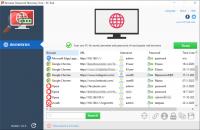
This software automates the extraction process, identifying and displaying saved usernames and passwords in seconds. The application provides a centralized interface where users can view, sort, and search through their recovered data points based on specific criteria. To facilitate better organization and long-term accessibility, the tool includes functionality to export all recovered information into a portable text file format.
The current iteration of the software offers comprehensive support for a wide range of browser architectures, including:
- Google Chrome
- Microsoft Edge (both Legacy and Chromium versions)
- Mozilla Firefox
- Opera
- Brave
- Vivaldi
By consolidating fragmented login information, the tool serves as a recovery solution for users who need to audit their stored security data or regain access to accounts across various platforms. The streamlined workflow eliminates the need for repetitive manual resets, providing a direct method for local credential retrieval.
Top 5 Reasons To Download Browser Password Recovery Tool
Before we dive into the nitty-gritty of why this utility is a must-have for your digital toolkit, let's look at the highlights. If you are someone who lives your life online, these are the primary reasons you need to grab the Browser Password Recovery Tool during this giveaway period:
- Lightning-Fast Extraction: Recover every single saved credential across multiple browsers in a matter of seconds.
- Universal Browser Compatibility: Full support for the world’s most popular engines, including Chrome, Firefox, and the entire Chromium family like Edge, Brave, and Vivaldi.
- Seamless Data Portability: The ability to export your entire digital keychain into a clean, readable text file for offline backup.
- Advanced Search and Organization: Powerful filtering tools that allow you to navigate through hundreds, or even thousands, of accounts without breaking a sweat.
- The End of the "Reset Loop": Stop wasting hours on "Forgot Password" emails and security questions by having your original data at your fingertips.
Now, let’s get into the details. As a tech reviewer, I see hundreds of utilities every year, but few address a problem as universal and as frustrating as the "forgotten password" syndrome. We are living in an era of account bloat. Every shop, every news site, and every niche forum wants you to create a profile. It’s a digital nightmare, and here is why this specific tool is the solution you’ve been looking for.
1. Lightning-Fast Extraction: Speed Meets Efficiency
We have all been there. You are trying to log into an old tax portal, a forgotten gaming account, or perhaps an old cloud storage drive. You know the password is saved somewhere on your computer because you remember clicking "Save" three years ago. However, digging through the nested menus of a modern browser's settings to find the "Password Manager" section is a chore. Even once you get there, many browsers require you to manually click an "eye" icon and enter your Windows PIN for every single entry you want to view.
The Browser Password Recovery Tool changes the game by offering what I call "instant transparency." Instead of the tedious one-by-one manual look-up, this software scans the local database of your browsers and pulls everything into a unified interface in about a second. It is incredibly satisfying to see a massive list of your digital history populate the screen instantly. For a power user, time is the most valuable commodity. This tool respects your time by removing the friction between you and your own data. It’s not just about recovery; it’s about the speed of access. Whether you have ten accounts or two thousand, the performance remains snappy and reliable.
From a technical standpoint, the way the software interacts with the encrypted local storage of the browser is impressive. It bypasses the clunky UI of the browser itself to talk directly to the data. This means no more waiting for "Settings" pages to load or dealing with browser lag. It is a streamlined, purpose-built engine designed for one thing: getting your information back to you as quickly as humanly possible.
2. Universal Browser Compatibility: One Tool to Rule Them All
In the modern tech landscape, very few people stay loyal to just one browser. You might use Google Chrome for your work tasks because of its integration with G-Suite, but perhaps you prefer Mozilla Firefox for personal browsing because of its privacy features. Maybe you’ve recently switched to Microsoft Edge because of its new AI features, or you’re a power user who enjoys the resource management of Opera or the ad-blocking capabilities of Brave and Vivaldi.
The problem with this multi-browser lifestyle is that your passwords become fragmented. You have a "work identity" in one browser and a "personal identity" in another, and eventually, you forget which browser holds the key to which vault. The Browser Password Recovery Tool is a master key. It doesn't care if your data is tucked away in the Chromium engine or the Gecko engine used by Firefox. It supports Chrome, Microsoft Edge (both Legacy and the newer Chromium version), Opera, Brave, Vivaldi, and Mozilla Firefox.
As a reviewer, I find this "browser-agnostic" approach to be the software’s greatest strength. You don’t have to download six different utilities for six different browsers. You open one app, and it aggregates the data from across your entire system. This is especially useful if you are planning to migrate to a new computer or if you are trying to consolidate your digital life. It bridges the gap between competing software ecosystems, putting the user—not the browser developer—back in control of the information.
3. Seamless Data Portability: Your Data, Your Way
There is a significant risk in keeping all your passwords locked inside a browser’s internal manager. If your browser profile becomes corrupted, or if a software update goes south, you could potentially lose access to your saved credentials. While cloud syncing exists, it isn't always reliable, and many users (rightfully) have privacy concerns about storing their most sensitive keys on a third-party server.
This is where the Browser Password Recovery Tool becomes an essential backup utility. It allows you to save your recovered passwords into a standard text file. This might sound simple, but the implications for your digital security and organization are huge. By exporting to a text file, you are creating a physical, offline backup of your accounts. You can print this list and put it in a fireproof safe, or you can keep it on an encrypted USB drive. It removes the "black box" element of browser storage.
Emphasizing data ownership is a common theme in my reviews, and this tool nails it. When you save your passwords to a text file, they are no longer dependent on a specific piece of software to be read. You don’t need to be logged into a Google account or a Firefox Sync account to see your credentials. You just need a basic text editor. This portability is the ultimate safety net. It ensures that no matter what happens to your software or your internet connection, you have a hard copy of the keys to your digital kingdom.
4. Advanced Search and Organization: Taming the Digital Jungle
Let’s be honest: most of us are digital hoarders. We create accounts for one-time purchases, temporary projects, or newsletters we stop reading after a week. Over five or ten years, a single user can easily accumulate hundreds of sets of login credentials. If you were to look at a raw list of all these accounts, it would be overwhelming. You would be scrolling for minutes just to find the login for a specific utility company or an old school email.
The developers of the Browser Password Recovery Tool clearly understood this "information overload" problem. They didn't just stop at recovery; they included robust sorting and searching features. If you are looking for a specific site, you don’t have to hunt through the alphabet. You can simply type the name into the search bar, and the software filters the results in real-time. This level of organization is what separates a professional utility from a basic script.
Furthermore, the ability to sort your passwords is a hidden gem for security auditing. By sorting your list, you can quickly see if you have been reusing the same password across multiple different sites. We all know we shouldn't do it, but seeing it laid out in a clear, sortable list makes the patterns obvious. This tool actually helps you become more secure by giving you a bird’s-eye view of your account habits. You can identify which accounts use old, weak passwords and prioritize which ones need an update. It’s an organizational powerhouse that brings order to the chaos of your digital history.
5. The End of the "Reset Loop": Reclaiming Your Time
Perhaps the most compelling reason to download this giveaway is the sheer amount of frustration it will save you. We have all experienced the "Reset Loop." It starts when you try to log into a site and fail. You click "Forgot Password." Then you have to log into your email (hope you remember that password!), find the reset link, click it, answer three security questions about your first pet or your third-grade teacher, and then create a new password that meets a list of complex criteria. Then, three months later, you forget that new password and start the whole process over again.
This cycle is a massive drain on productivity and mental energy. The Browser Password Recovery Tool effectively deletes this problem from your life. Instead of resetting, you are recovering. Instead of spending fifteen minutes jumping through security hoops, you spend five seconds opening this tool and finding the original password. It is the ultimate "quality of life" upgrade for any computer user.
In a world where we are constantly bombarded with notifications, two-factor authentication prompts, and security alerts, having a tool that simplifies your life is worth its weight in gold. This giveaway isn't just offering you a piece of software; it’s offering you a way to reclaim your time and reduce your daily stress. It turns a potential "tech emergency" into a non-issue. As a reviewer, I always look for tools that solve a "pain point," and there is no pain point more universal than the forgotten password. This utility solves it elegantly and efficiently.
Final Verdict: Why You Should Grab This Now
If you have ever felt the sinking feeling of being locked out of an important account, you know that the value of a recovery tool is immeasurable in that moment of crisis. The Browser Password Recovery Tool is a small, lightweight, and incredibly powerful utility that does exactly what it promises without any unnecessary fluff or complicated setup.
Most people don't think they need a password recovery tool until it is too late. They wait until their browser crashes or they lose their sync settings before they realize how much data was stored there. By downloading this giveaway today, you are being proactive. You are taking a snapshot of your digital life and ensuring that you are never at the mercy of a forgotten string of characters again.
The combination of multi-browser support, ease of use, and the ability to export your data into a portable format makes this one of the most practical giveaways I’ve seen in a long time. It’s the kind of tool that you might not use every day, but when you do need it, you will be incredibly glad it’s sitting in your "Utilities" folder. It is simple enough for a novice to use but powerful enough for a tech professional to rely on. Don't wait until you're staring at a "Login Failed" screen—download this tool, run a scan, and secure your digital keys today. You’ll thank yourself the next time you encounter an old login screen and realize the answer is only a click away.
In summary: We create accounts faster than we can remember them. The Browser Password Recovery Tool is the bridge between your memory and your digital requirements. It is fast, it is compatible with everything you use, it allows for physical backups, it organizes your digital mess, and it saves you from the headache of password resets. This is a five-star addition to any PC, and considering it's a giveaway, there is absolutely no reason to pass it up. Grab your copy, run the extraction, and take a deep breath of relief knowing your accounts are finally back in your control.


Reviews for Browser Password Recovery Tool
Click Here to Read Reviews for Browser Password Recovery Tool >> Click Here to Submit Reviews for Browser Password Recovery Tool >>