What Does Digital Notes Do?
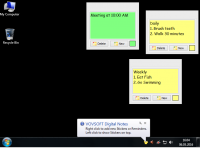
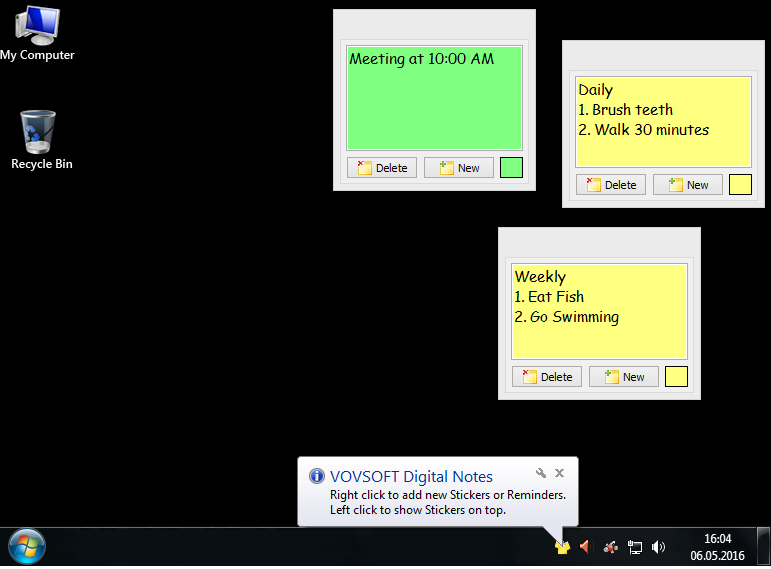
Digital Notes is a lightweight productivity utility designed to transform the Windows desktop from a static icon repository into a functional workspace. The application allows users to utilize empty screen real estate by placing resizable virtual sticky notes directly onto the interface. These digital stickers serve as a centralized location for tracking tasks, storing snippets of text, or organizing thoughts without the need to launch a full-scale word processor.
The software operates primarily from the system tray to minimize workflow disruption. By right-clicking the tray icon, users can instantly generate a new note. Each window is adjustable in size, supporting both direct typing and the pasting of external content. This makes it an efficient tool for managing transient data that requires immediate visibility during daily operations.
In addition to static note-taking, the application features a built-in scheduling tool for digital reminders. Key functionalities include:
- Custom Frequency Intervals: Users can determine exactly how often a specific alert should trigger.
- Personalized Notifications: Each reminder supports unique text messages tailored to specific deadlines or recurring activities.
- Resizable Windows: Note dimensions can be modified to accommodate varying lengths of text or specific desktop layouts.
- Persistent Accessibility: Because the tool resides in the system tray, new notes can be generated without navigating through the Start menu.
By integrating these features, the software provides a streamlined method for managing short-term data and time-sensitive alerts directly on the user's primary display.
Top 5 Reasons To Download Digital Notes
- Instant Productivity Boost through Seamless Task Management
- Optimizing Underutilized Desktop Real Estate
- Customizable Reminders that Guard Your Schedule
- Ultra-Lightweight Performance with Minimal System Impact
- Zero-Learning-Curve Accessibility for All Users
How many times have you stared at your computer desktop and realized it is essentially a digital graveyard? For the vast majority of PC users, the desktop is a static background—a place where shortcut icons go to be forgotten and where high-resolution wallpapers are obscured by a random assortment of files. We have all been there. You have a brilliant idea, a quick phone number to jot down, or a deadline that is looming, and yet you find yourself scrambling for a physical notepad or opening a heavy word processor just to save a single line of text. This is where Digital Notes enters the fray, and quite frankly, it is the utility you didn't know you were missing until you actually see it in action. In this review, I am going to break down why this specific giveaway is a mandatory addition to your digital toolkit.
1. Instant Productivity Boost through Seamless Task Management
In the modern fast-paced work environment, productivity is not just about doing more; it is about reducing the friction between having a thought and recording it. Digital Notes excels at removing this friction. When you download this software, you are not just getting a "notepad"; you are getting a dedicated workflow enhancer. Because the application lives in your system tray, it is always a single click away. This eliminates the "context switching" that kills productivity. Usually, when you need to take a note, you have to minimize your current window, find an app, wait for it to load, and then type. With this tool, the process is instantaneous.
The ability to create digital stickers means you can categorize your day visually. You can have one note for "Immediate Fires" that need to be put out, another for "Long-term Projects," and a third for "Personal Reminders." By having these notes persistent on your screen, you are utilizing a psychological technique called visual cues. Unlike a browser tab that gets lost among twenty others, a digital sticker on your desktop stays in your peripheral vision, gently nudging your brain to stay on track. For anyone who struggles with ADHD or general forgetfulness, this kind of constant, non-intrusive visual reminder is a game-changer. It transforms your desktop from a static image into a dynamic dashboard of your daily goals.
Furthermore, the "copy and paste" functionality within these notes is incredibly robust. You can grab a snippet of code, a URL, or a quote from an email and dump it into a resizable window in less than a second. This makes it an essential tool for researchers, students, and office professionals who deal with high volumes of fragmented information throughout the day. You are essentially building a second brain that sits right on your monitor.
2. Optimizing Underutilized Desktop Real Estate
Most of us have large, high-definition monitors, yet we only use the center 60% of the screen for our active windows. The edges of the desktop are often "dead zones." One of the most compelling reasons to download Digital Notes is its ability to reclaim this lost territory. The software allows you to create resizable windows for your notes, meaning you can tuck a thin, vertical note on the far right of your screen or a small square in the bottom corner. It turns your wallpaper into a functional workspace.
Think about the physical post-it notes that currently clutter the bezel of your monitor or the surface of your desk. They are messy, they lose their stickiness, and they are impossible to search or edit cleanly. By moving these notes into the digital realm, you are decluttering your physical environment, which has been proven to reduce stress and improve focus. Digital Notes provides a clean, sleek alternative to the chaotic "paper-covered" desk. You can customize the size of each note to fit the specific importance of the task. A major project might deserve a large, prominent note, while a grocery list can be shrunk down to a tiny corner.
The beauty of this desktop optimization is that it feels native. It doesn't feel like you are running a heavy "app" that takes over your screen. Instead, it feels like an extension of the operating system itself. It bridges the gap between the file system and your active memory. By utilizing the empty space on your desktop, you are making your hardware work harder for you, ensuring that no pixel is wasted.
3. Customizable Reminders that Guard Your Schedule
While the "sticker" aspect of the app is fantastic for organization, the Reminder functionality is what elevates this software to a "must-have" status. We live in an age of notification fatigue. Our phones buzz constantly, and our email clients chime every few minutes. Most of these notifications are easily ignored or swiped away. However, the reminders in Digital Notes are different because they are tied directly to your primary workstation.
The software allows you to set specific frequency intervals for your messages. This is incredibly powerful for habit stacking and deep work. Do you need to remember to take a break every 60 minutes to stretch? Set a reminder. Do you have a recurring meeting every afternoon that you constantly forget until the last minute? The interval system has you covered. You simply enter your message, choose how often you want to see it, and let the software handle the rest. It is a "set it and forget it" system that ensures you actually don't forget it.
What makes these reminders particularly effective is their simplicity. They aren't buried in a complex calendar app that requires five clicks to configure. The interface is streamlined so that you can create a reminder in seconds. In a tech world that is increasingly obsessed with "feature bloat," there is something incredibly refreshing about a tool that does one thing—reminding you of important tasks—and does it perfectly. It acts as a digital nudge, keeping you accountable to your own schedule without the complexity of a full-blown project management suite.
4. Ultra-Lightweight Performance with Minimal System Impact
As a tech reviewer, I see far too many applications that claim to be "productivity tools" but actually end up slowing down the user's computer. They hog RAM, drain battery life on laptops, and take forever to boot up. Digital Notes is the complete opposite. This is a lean, mean, productivity machine. Once installed, it sits quietly in your system tray, consuming almost zero resources. You won't see your CPU usage spike, and you won't hear your laptop fans kick in just because you have a few notes on your screen.
This lightweight nature is a significant advantage for users who are running older hardware or for power users who already have resource-heavy applications like video editors or CAD software running in the background. You don't want your "helper" apps to compete for resources with your "work" apps. Because Digital Notes is so well-optimized, it stays out of the way until you need it. It is designed to be a permanent resident of your system tray, starting up with your PC and remaining ready at a moment's notice.
Furthermore, the installation process is quick and clean. There are no unnecessary background services or invasive telemetry features that some modern software packages insist on including. It is a straightforward utility designed for a specific purpose. For those of us who value a fast, responsive PC, downloading a tool that offers so much utility with such a small footprint is an absolute no-brainer.
5. Zero-Learning-Curve Accessibility for All Users
The final, and perhaps most important, reason to grab this giveaway is its sheer ease of use. We have all downloaded software that requires a 50-page manual or a series of YouTube tutorials just to understand the basic functions. Digital Notes rejects that philosophy entirely. The user interface is intuitive and honest. If you know how to right-click a mouse and how to type, you are already an expert at using this app.
To create a new note, you right-click the icon in the system tray. To type, you click inside the box. To resize, you grab the corner. It follows the standard logic of Windows interactions, making it accessible to everyone from tech-savvy developers to casual home users who just want a better way to keep track of their "to-do" lists. This accessibility is a breath of fresh air. It means you can download the app right now and be more organized five minutes from now.
There is no "onboarding" process, no account to create, and no "cloud syncing" hurdles to jump through. It is local, private, and immediate. In an era where software is becoming increasingly "as a service" and overly complicated, Digital Notes provides a return to the classic utility era—where a tool was built to solve a problem, and it did so without getting in the user's way. Simplicity is the ultimate sophistication, and this software embodies that principle perfectly.
Final Thoughts: Why You Should Act Now
Software giveaways are a dime a dozen, but it is rare to find a tool that is this practical and universally useful. Whether you are a student trying to keep track of assignment due dates, a professional managing multiple client projects, or a home user who just wants to remember to water the plants, Digital Notes fits into your life seamlessly. It takes the "empty space" of your digital life and gives it purpose.
By downloading this tool, you are choosing to work smarter. You are choosing to clear the physical clutter from your desk and the mental clutter from your mind. The combination of resizable digital stickers and a robust, interval-based reminder system creates a productivity powerhouse that sits quietly in your system tray, ready to assist whenever inspiration or obligation strikes. Don't let your desktop stay empty and non-functional. Turn it into the command center you deserve. This is one download that you will find yourself using every single day, and in the world of software, there is no higher praise than that. Grab it while the giveaway lasts and start transforming your workflow today.

Reviews for Digital Notes
Click Here to Read Reviews for Digital Notes >> Click Here to Submit Reviews for Digital Notes >>