What Does Document Manager Do?
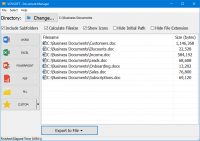
Vovsoft Document Manager is a productivity utility designed to centralize and streamline the management of local office files. By pointing the software to a specific directory, users can automate the organization of Word, Excel, PowerPoint, and PDF documents into a single, unified interface. The application is built for ease of use, requiring minimal technical configuration as it automatically groups files based on their extensions upon folder selection.
Beyond standard office formats, the software allows for the creation of custom categories, enabling users to define specific file extensions for monitoring. The interface provides a comprehensive list of documents matching selected sorting criteria, which can be further managed through a built-in context menu. Users can open files in their default associated programs, remove entries from the management list, or permanently delete files from the disk without navigating through Windows File Explorer.
Key features include:
- Automated Sorting: Groups files by type instantly upon directory selection.
- Clipboard Integration: Ability to copy files or specific filenames for use in other applications.
- Export Functionality: Users can save the current document list to TXT or CSV formats for external analysis.
- Custom Filtering: Support for user-defined file formats beyond standard office suites.
This tool serves as a lightweight dashboard for document-heavy workflows, consolidating file access and basic file operations into a consolidated workspace.
Top 5 Reasons To Download Document Manager
- Unrivaled Centralization of Your Workspace
- Zero-Learning Curve for Maximum Accessibility
- Customizable File Architecture for Any Workflow
- Advanced Right-Click Command Functionality
- Simplified Data Export and Reporting Capabilities
We have all been there. You are in the middle of a high-pressure project, your boss is waiting for a report, and you know exactly what you named the file, but for the life of you, you cannot remember which nested folder it is buried in. Your desktop is a cluttered mess of icons, and Windows Explorer feels like a labyrinth designed to keep you from being productive. In the modern era of digital work, the sheer volume of documents we handle daily is staggering. Between PDFs, Word documents, Excel spreadsheets, and PowerPoint presentations, the average user is drowning in data. This is exactly where Vovsoft Document Manager steps in, and if you have the chance to grab this as a giveaway, you should not hesitate for a single second. As someone who tests hundreds of productivity tools every year, I can tell you that the most effective software isn't always the most complex; it is the one that removes the friction from your daily tasks. Here is an in-depth look at why this specific tool needs to be in your digital utility belt.
1. Unrivaled Centralization of Your Workspace
The primary reason you need to download this software today is the sheer power of centralization. Most of us work across multiple formats. You might be crunching numbers in Excel while simultaneously referencing a PDF guide and drafting a summary in Word. Traditionally, this requires you to have three or four different windows open, or worse, navigating back and forth between different folder directories to find the relevant files. Vovsoft Document Manager solves this by providing a "single pane of glass" view.
When you use this tool, you are essentially creating a mission control center for your most important files. Instead of hunting through the C-drive or your User folders, you point the software to your primary directory, and it instantly aggregates everything into one screen. This is a game-changer for anyone who values their time. By having your Word, Excel, PowerPoint, and PDF files all visible in one unified interface, you eliminate the mental "context switching" that kills productivity. You no longer have to remember if a specific project plan was saved as a PDF or a Word document; you just look at the list and there it is. For a tech reviewer, this kind of streamlined efficiency is the holy grail. It transforms a chaotic file system into an organized library with almost zero effort on the part of the user.
Furthermore, the visual clarity of having these files grouped by type on a single screen cannot be overstated. It reduces the visual noise that often comes with standard file explorers. You aren't seeing system files, temp files, or random image folders; you are seeing your work. This focus allows you to stay in "the zone" longer, which is the ultimate goal of any good piece of software.
2. Zero-Learning Curve for Maximum Accessibility
One of the biggest complaints I hear from users about new software is that it is too complicated to set up. People are busy; they don't want to spend three hours reading a manual just to figure out how to organize their files. This is where Vovsoft Document Manager truly shines as a standout download. It is built with the philosophy that software should work for the user, not the other way around.
Whether you consider yourself a "power user" or someone who barely knows how to restart their computer, you can master this application in under sixty seconds. There are no complex configurations, no registry tweaks, and no confusing permission settings. You simply select the directory where you store your documents, and the software takes over. It automatically scans, identifies, and groups your files. This "set it and forget it" approach is incredibly refreshing in an age where every app seems to require an account, a subscription, and a lengthy tutorial.
For the beginner, this means no more fear of "losing" a file. For the expert, it means a lightweight tool that does exactly what it promises without bloating the system. In my reviews, I always prioritize accessibility because the best tool in the world is useless if people are too intimidated to use it. Vovsoft has stripped away the fluff and left behind a lean, mean, document-managing machine that anyone can use to regain control over their digital life.
3. Customizable File Architecture for Any Workflow
While the software comes pre-configured to handle the "Big Four" (Word, Excel, PPT, and PDF), one of the most compelling reasons to download this tool is its customizability. Every professional has a unique "file fingerprint." If you are a graphic designer, you might care more about PSD or AI files. If you are a web developer, you might want quick access to your HTML or CSS files. Vovsoft Document Manager allows you to define custom categories and specify exactly which file types you want to track.
This level of flexibility is what elevates the app from a simple utility to a professional-grade workflow optimizer. You can create a specific category for a project that uses obscure file formats, and the software will treat them with the same priority as a standard Word doc. This means the tool evolves with you. As your career changes or your hobbies shift, you can reconfigure the Document Manager to reflect your current needs.
I find this particularly useful for "cleaning" specific directories. For example, if you have a "Downloads" folder that is a graveyard of various file types, you can set up a custom filter to only show you the ZIP files or the executables. This ability to define your own sorting criteria is a power-user feature hidden inside a beginner-friendly interface. It gives you the "surgeon's scalpel" precision needed to manage thousands of files across different formats without feeling overwhelmed.
4. Advanced Right-Click Command Functionality
Efficiency isn't just about finding files; it is about what you can do with them once you have found them. This is where Vovsoft Document Manager really starts to outshine the standard Windows interface. The software includes a robust set of "extra actions" accessible via a simple right-click. This might sound minor, but in practice, it is a massive time-saver.
From within the interface, you can right-click any file to open it in its default software, but that is just the beginning. You can also remove a file from the list if it is no longer relevant, or—more importantly—you can erase it from your PC entirely without ever having to open the source folder. This "direct action" capability is fantastic for spring cleaning your projects. If you see an old draft that you know is no longer needed, you can kill it right there on the spot.
Additionally, the ability to copy either the file itself or just the filename to the clipboard is an underrated gem of a feature. How many times have you needed to paste a long, complex filename into an email or a report? Usually, that involves clicking the file, hitting F2, highlighting the text, copying it, and then clicking away. Here, it is a streamlined action. These small "micro-efficiencies" add up over the course of a workday. By the end of the week, you've saved yourself hours of clicking and dragging. As a reviewer, I look for these "quality of life" features because they prove the developer actually uses their own software and understands the daily annoyances of the average user.
5. Simplified Data Export and Reporting Capabilities
The fifth reason this is a must-download is the export functionality. In many professional environments, managing documents isn't just about opening them; it’s about auditing and reporting. Perhaps you need to provide a list of all current project files to a colleague, or you want to keep a text-based log of your archived documents for future reference. Vovsoft Document Manager allows you to export your current file list to either TXT or CSV formats with just a few clicks.
For those who use Excel for project management, the CSV export is a dream. You can dump your document list into a spreadsheet and then add columns for "Status," "Assigned To," or "Due Date." This essentially allows you to use the Document Manager as a data-entry tool for your broader organizational systems. It bridges the gap between your raw file system and your high-level project tracking.
Even for home users, the export feature is incredibly handy. If you are backing up files to an external drive, you can export a list of everything that should be there, providing you with a manifest that you can check against later. It provides a level of accountability for your data that most people simply don't have. Instead of wondering "did I save that file?", you have a hard copy—a digital paper trail—that confirms exactly what is on your machine and where it is located. This feature alone makes it a professional-grade tool that usually carries a premium price tag, but getting it as part of this giveaway is an absolute steal.
Conclusion: Why You Need To Act Now
In the world of tech, we often get distracted by "flashy" apps that have beautiful animations but offer very little substance. Vovsoft Document Manager is the opposite. It is a tool designed for utility, speed, and reliability. It addresses the fundamental problem of the digital age: information overload. By centralizing your files, removing the technical barriers to entry, allowing for deep customization, providing quick-action commands, and offering robust export options, it solves the "messy folder" problem once and for all.
Imagine starting your workday with a clean, organized view of every spreadsheet and report you need. Imagine the lack of stress when you can find a document in two seconds rather than two minutes. That is what this software offers. It isn't just about "managing documents"; it is about reclaiming your time and reducing your digital fatigue.
As a reviewer, I see a lot of software come and go, but the ones that stay on my hard drive are the ones that make my life easier without asking for anything in return. Vovsoft Document Manager fits that description perfectly. It is lightweight, it doesn't hog system resources, and it solves a universal problem. If you are looking for a way to boost your productivity and finally get organized, this is the giveaway you have been waiting for. Do not let your files manage you—take control with this software today. Download it, set up your directories, and experience the relief of a truly organized digital workspace. You will wonder how you ever managed without it.
In summary, the value proposition here is simple: less searching, more doing. Whether you are a student managing essays, a freelancer juggling multiple clients, or a corporate employee handling a mountain of paperwork, this tool is designed for you. It turns the chore of file management into a seamless, almost invisible part of your workflow. Grab it while you can and start your journey toward a more organized, more efficient, and less stressful digital life. You deserve a cleaner desktop, and this is the tool that will give it to you.


Reviews for Document Manager
Click Here to Read Reviews for Document Manager >> Click Here to Submit Reviews for Document Manager >>