What Does File Hider Pro Do?
File Hider Pro is a utility designed for users looking to secure local files and folders from unauthorized access on shared or public desktops. The software functions as a lightweight, portable application, meaning it requires no formal installation process. Users can run the executable directly after unzipping the package, which minimizes the system footprint and avoids permanent changes to system registries.
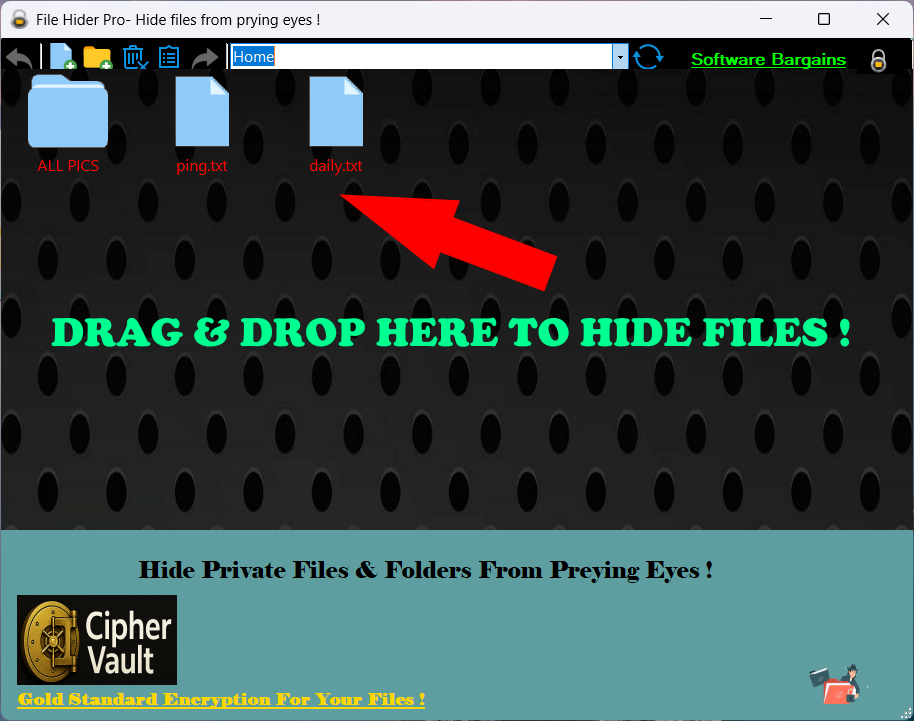
The core functionality revolves around a drag-and-drop interface. To secure data, users move their sensitive documents, images, or directories into the application window. Once processed, these items are hidden from standard directory views and search results. The software provides a centralized management dashboard where all hidden assets are indexed, allowing users to toggle visibility or restore items to their original state with a single click.
Key features of this tool include:
- Portability: The application can be stored and operated from a USB flash drive.
- Instant Hiding: Immediate removal of files from the file explorer view.
- Lightweight Design: Minimal resource consumption during operation.
- Folder Support: The ability to hide entire directories rather than just individual files.
This software is specifically built for efficiency, bypassing complex encryption workflows in favor of a visibility-based security layer. It serves as a practical solution for preventing casual prying eyes from discovering private content on a local machine.
Top 5 Reasons To Download File Hider Pro
1. Unmatched Simplicity via Drag-and-Drop Functionality
2. True Portability with No Installation Required
3. Ultra-Lightweight System Footprint
4. Comprehensive Protection for Files and Folders Alike
5. Instant Privacy Against Physical Intrusions
The Privacy Crisis on Your Desktop
In an era where we are constantly told that our data is being tracked by giant corporations and shadowy hackers across the globe, we often forget the most immediate threat to our privacy: the person sitting right next to us. Whether it is a nosy roommate, a curious colleague at the office, or a family member sharing the home computer, our digital lives are often more exposed than we care to admit. We keep our tax returns, private creative projects, sensitive medical documents, and personal photos on our hard drives, assuming they are safe just because they are "ours." But the reality is that anyone with access to your desktop can, with just a few clicks, stumble upon things that were never meant for their eyes.
This is where File Hider Pro enters the scene. As a tech reviewer, I see hundreds of security applications every year. Most of them are over-engineered, bloated, and require a degree in computer science just to set up a basic encrypted vault. Users don't want a manual; they want a solution. They want something that works as fast as they do. This software giveaway represents one of the most streamlined approaches to local data privacy I have encountered. It doesn’t try to be an enterprise-grade firewall; it tries to be a digital curtain that you can draw over your most sensitive files in a heartbeat. Let’s dive deep into the five reasons why this specific tool needs to be in your digital utility belt.
1. Unmatched Simplicity via Drag-and-Drop Functionality
The biggest barrier to digital security is friction. If a security tool is difficult to use, people simply won't use it. We have all been there: you download a piece of "protection" software, and it asks you to create a virtual drive, format a partition, and select an encryption algorithm. By the time you are halfway through the setup, you’ve decided that your files aren’t that important, and you close the program. File Hider Pro eliminates this friction entirely through its core mechanic: the drag-and-drop interface.
When we talk about "drag-and-drop," we are talking about the most intuitive gesture in modern computing. It is the way we move files, the way we organize our desktops, and the way we interact with our digital environment. By leveraging this familiar action, the software makes hiding a file as easy as moving a piece of paper into a drawer. You don't have to navigate through complex file trees or right-click through endless context menus. You simply grab the file that needs to disappear and drop it into the application interface. It is instantaneous. This level of simplicity means that you are more likely to actually protect your files because the "cost" in terms of your time and effort is essentially zero. It transforms privacy from a chore into a seamless part of your workflow.
2. True Portability with No Installation Required
In the world of professional software, "portability" is a buzzword that is often misused. Many programs claim to be portable but still leave "digital breadcrumbs" all over your Windows Registry or create hidden folders in your AppData directory. File Hider Pro is a "portable" application in the truest sense of the word. This is a massive advantage for several reasons. First, it means you don't need administrative privileges to "install" the software. If you are using a work computer or a library machine where software installation is restricted, you can still run this app directly from a folder or a USB stick.
Secondly, the lack of an installation process means there is no "trace" of the program being on the system in the traditional sense. There is no entry in the "Add or Remove Programs" list, and there are no shortcuts automatically added to your Start menu for everyone to see. You can keep the application tucked away in a sub-folder or on an external drive, and when you are done hiding your files, you can simply close it. This adds an extra layer of "stealth" to your security. After all, the best way to keep a secret is to make sure no one even knows you have a secret-keeping tool. You simply unzip the folder and you are ready to go. It is clean, efficient, and respects the integrity of your operating system.
3. Ultra-Lightweight System Footprint
We are currently living in the age of "software bloat." Even the simplest applications now seem to require hundreds of megabytes of RAM and constant CPU cycles just to sit idle in the background. For those of us who value system performance—whether you are a gamer who needs every frame per second or a creative professional who needs every gigabyte of RAM for rendering—adding another heavy background process is out of the question. File Hider Pro is the antithesis of bloatware.
Because it is designed with a singular, focused purpose, it doesn't need to hog your system resources. It is lightweight and lightning-fast. It doesn't run a dozen background services that phone home to a server, and it doesn't slow down your boot time. It exists only when you need it to. This is a crucial point for users who are running older hardware or laptops with limited resources. You shouldn't have to sacrifice your computer’s speed to ensure your privacy. By using a tool that is as lean as this one, you get the protection you need without the "performance tax" that usually comes with security suites. It proves that powerful tools don't have to be massive in size.
4. Comprehensive Protection for Files and Folders Alike
One common flaw in many basic file-hiding utilities is that they only work on individual files, or they struggle with specific file types. Some might handle a text document just fine but choke when you try to hide a 4GB video file or a complex folder structure containing hundreds of sub-files. File Hider Pro offers a universal solution. It doesn't matter if you are trying to hide a single sensitive image, a spreadsheet full of passwords, or an entire directory containing years of private projects; the software handles it all with the same level of ease.
The ability to hide entire folders is particularly important for organization. Most users don't have just one "secret" file; they have categories of information. Being able to drag an entire folder into the software means you can maintain your organizational structure while keeping everything out of sight. You don't have to hunt through a list of individual files to find what you need; you simply unhide the parent folder and everything is exactly where you left it. This versatility makes it an all-in-one privacy hub for your desktop. Whether it's a .pdf, .jpg, .mp4, or a proprietary project file from a professional suite, this software treats them all with the same level of priority and protection.
5. Instant Privacy Against Physical Intrusions
While we often focus on the technical side of privacy, the psychological side is just as important. There is a specific kind of anxiety that comes when someone asks, "Hey, can I borrow your laptop for a second to check my email?" In that moment, your mind races. Did you leave that sensitive document on the desktop? Is there a folder visible that might invite questions? Windows has a built-in "Hide" feature, but let's be honest: anyone who knows how to click "View" and check "Hidden Items" can bypass that in three seconds. It is a "privacy" feature that offers no real privacy.
File Hider Pro provides a much more robust solution for these real-world "social" situations. It allows you to effectively "vacuum" your desktop of anything sensitive before handing your device over to someone else. It provides a level of peace of mind that standard OS features simply cannot match. You aren't just clicking a checkbox; you are using a dedicated tool designed to keep preying eyes away. This makes it the perfect companion for students in dorms, professionals in open-plan offices, or anyone who lives in a shared household. It turns your computer into a truly personal space, even if you aren't the only one who uses the hardware. The "pro" in the name isn't just about the features; it's about the professional-grade confidence it gives you in your own digital boundaries.
The Reviewer's Verdict: Why This Giveaway is a Must-Have
In the world of tech, we often get caught up in the "more is better" trap. We want more features, more settings, more buttons, and more complexity. But in the realm of day-to-day privacy, less is often more. The more complex a system is, the more likely it is to fail or be used incorrectly. File Hider Pro succeeds because it understands exactly what the user wants: they want a file to go away, and they want to be the only ones who can bring it back.
By offering this as a giveaway, the developers are giving you a chance to upgrade your digital hygiene without any financial risk. In my experience, once you start using a dedicated file hider, you realize how much you actually needed it. You start to notice how many things you were leaving exposed—not because you wanted to, but because there wasn't a convenient way to hide them. This software provides that convenience. It is the digital equivalent of a high-quality desk drawer with a secret compartment. You might not use it every single minute of the day, but when you need to put something away, you will be incredibly glad you have it.
The portable nature of this tool also means it is a "lifetime utility." You can put the executable on a cloud drive or a thumb drive and take it with you from computer to computer as you upgrade your hardware over the years. It is a "zero-maintenance" tool. You don't have to worry about subscription fees, constant updates that change the interface, or complex account logins. It is a utility in the purest sense—a tool designed to perform a specific task perfectly every time you call upon it.
Who Should Download This?
I would recommend this software to several specific types of users:
- The Student: If you live in a dorm or study in libraries, your laptop is constantly at risk of being peeked at. Hide your personal journals, photos, or sensitive financial aid documents instantly.
- The Remote Worker: If you use your personal computer for work, or vice-versa, you likely have files that shouldn't mix. Use this to keep your professional and personal lives digitally separated.
- The Creative Freelancer: If you are working on a project for a client that is under a non-disclosure agreement (NDA), you cannot afford for that project to be seen by anyone else. This tool adds an extra layer of "physical" security to your files.
- The Family Member: If you share a PC with children or a spouse, you might want to hide gift ideas, surprise party plans, or just your own private documents that don't need to be part of the "communal" file system.
In conclusion, File Hider Pro is a masterclass in focused utility. It solves a real-world problem with an elegant, simple, and lightweight solution. In a digital landscape that feels increasingly public, having a small, private corner of your desktop that is truly your own is more than just a convenience—it’s a necessity. Don't wait until someone sees something they shouldn't. Take advantage of this giveaway, simplify your privacy workflow, and gain the peace of mind that comes with knowing your private files are exactly that: private. This is one download you won't regret having in your arsenal when the need for secrecy arises. Protect yourself, protect your data, and do it with the simple click of a mouse.

Reviews for File Hider Pro
Click Here to Read Reviews for File Hider Pro >> Click Here to Submit Reviews for File Hider Pro >>