What Does Filename Lister Do?
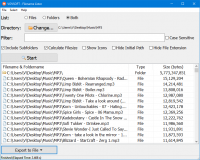
Filename Lister is a Windows-based utility designed to generate comprehensive indexes of files and directories. The application allows users to select specific drives or directories to scan, producing a structured list of all contained elements. It offers granular control over the scanning process, enabling the isolation of files, folders, or a combination of both. Beyond internal viewing, the software includes export functionality for saving directory metadata into external files for documentation or systematic analysis.
The application includes several key technical features designed for thorough data management:
- Long Path Support: The software natively handles file names and paths exceeding the standard 260-character Windows limit.
- Metadata Extraction: It captures and displays filename length, file and folder size, and the last modified date.
- Export Options: Users can save captured information to a file for use in other applications or for archival purposes.
The installation process is streamlined to allow for immediate deployment. The interface provides a minimalist environment, focusing on speed and ease of use. Once a drive or directory is selected, the scan begins immediately, providing a rapid overview of the file system. This utility is particularly useful for professionals requiring detailed audits of complex storage structures or simple directory exports without the need for manual data entry. By providing a clear snapshot of storage contents, Filename Lister serves as a practical solution for various organizational tasks.
Top 5 Reasons To Download Filename Lister
1. Seamless Folder Hierarchy Exporting: Convert complex directory structures into organized, readable lists instantly.
2. Support for Extremely Long File Paths: Bypass the notorious Windows 260-character limit that breaks other tools.
3. Comprehensive Metadata Visibility: View and export file sizes, modification dates, and filename lengths at a glance.
4. Ultra-Lightweight and High-Speed Performance: Experience a rapid setup and lightning-fast scanning even on massive drives.
5. Intuitive, No-Nonsense User Interface: A clean design that allows you to get the job done without a steep learning curve.
If you have ever spent hours trying to manually document the contents of a hard drive or struggled to get a clear picture of a bloated server directory, you know exactly how frustrating Windows File Explorer can be. While it is great for basic browsing, it is notoriously terrible at giving users a high-level overview or an exportable manifest of their data. Enter Filename Lister. This utility is a specialized powerhouse designed to do one thing exceptionally well: catalog your digital world. As a tech reviewer who has tested hundreds of "productivity" apps, I can tell you that the most valuable tools are often the ones that solve a specific, nagging problem with surgical precision. Filename Lister is exactly that kind of tool. Below, I am going to dive deep into the top five reasons why this software belongs in your utility folder today.
1. Seamless Folder Hierarchy Exporting
We live in an era of data hoarding. Between high-resolution photos, massive video libraries, and endless work documents, our digital storage has grown exponentially. The problem arises when you need to share a list of those files or archive a directory map for future reference. Windows does not provide a native "Export to Text" button for your folders. You are often left with the archaic method of using the Command Prompt or taking dozens of screenshots that you can't even search through. Filename Lister changes that dynamic entirely.
This software allows you to select any drive or directory and instantly generate a comprehensive list of every file and folder within it. But it does not stop at just showing you the names; it allows you to export this data. Imagine you are a creative professional who needs to send a client a manifest of all the raw assets in a project folder. Instead of typing them out or sending a messy folder view, you can generate a clean, professional list. This feature is a lifesaver for IT professionals performing audits, researchers organizing massive datasets, or even casual users who want to keep a printed log of their physical media backups. By providing a bridge between your raw data and a readable document format, this tool saves you hours of manual labor.
2. Support for Extremely Long File Paths
Any power user who has dealt with deep directory structures—especially those involving synced cloud storage or complex software development projects—has encountered the dreaded "Path Too Long" error. Historically, Windows has a limit known as MAX_PATH, which restricts file paths to 260 characters. When you exceed this, Windows File Explorer often chokes, refusing to copy, move, or even properly display those files. It is an aging limitation that continues to haunt modern workflows.
One of the most compelling reasons to download Filename Lister is its robust support for paths longer than 260 characters. This software is built to handle the complexities of modern file systems. It doesn't matter if your file is buried thirty folders deep in a nested architecture; this utility will find it, list it, and report on it without crashing or throwing an error message. For anyone involved in data migration or server management, this is not just a "nice-to-have" feature—it is an essential requirement. By using this tool, you gain visibility into parts of your drive that other software simply cannot reach, ensuring that no file is left behind or forgotten simply because its name was too long.
3. Comprehensive Metadata Visibility
A list of filenames is useful, but a list of filenames accompanied by their vital statistics is powerful. Filename Lister goes beyond the basics by allowing you to display and export critical metadata alongside the file names. This includes the filename length, the file or folder size, and the last modified date. Why is this important? Let's look at a few real-world scenarios.
First, consider the filename length. If you are preparing to move data to a cloud service like SharePoint or an older server environment, knowing which filenames are nearing character limits is crucial for a smooth transition. Second, the file and folder size data allows you to quickly identify "data hogs." While there are other disk analyzers out there, having the size integrated directly into your directory list makes it much easier to document where your storage is going. Finally, the last modified date is indispensable for version control and archival purposes. When you export this information, you aren't just getting a list of names; you are getting a snapshot in time of your data's state. This level of granular detail allows for better decision-making, whether you are cleaning up your drive or preparing a legal discovery document.
4. Ultra-Lightweight and High-Speed Performance
In the modern software landscape, "feature creep" is a common disease. Many applications that should be simple end up being bloated with unnecessary animations, background processes, and telemetric tracking that slows down your entire system. One of the things I appreciate most about Filename Lister is its commitment to speed and efficiency. The setup operation is remarkably fast, and the software itself has a tiny footprint on your system resources.
When you trigger a scan on a drive containing hundreds of thousands of files, you don't want to wait for minutes while the UI freezes. This tool is optimized for performance. It moves through your directory tree with impressive velocity, fetching data and populating the list in real-time. Because it doesn't try to be an "all-in-one" media player or a cloud-synced file manager, it can dedicate all of its processing power to the task at hand: listing your files. This makes it the perfect "portable" style utility to keep on a thumb drive or in a dedicated "Tools" folder on your desktop. It is ready when you need it, does its job instantly, and then gets out of the way.
5. Intuitive, No-Nonsense User Interface
There is a specific beauty in software that doesn't require a manual to understand. Filename Lister features a plain, simple, and highly functional interface. Upon opening the application, you are greeted with a clear window that tells you exactly what to do next. You choose your drive or directory, set your filters (files, folders, or both), and hit the scan button. There are no hidden menus, no confusing jargon, and no distracting advertisements.
For the average user, this means you can go from "I need a list of these files" to "I have an exported CSV" in less than sixty seconds. For the professional, it means a reliable workflow that can be repeated without friction. The interface emphasizes usability above all else. In an age where apps are increasingly cluttered with "AI assistants" and social media integrations, a tool that focuses on utility and clarity is a breath of fresh air. You don't have to be a "techie" to master this software, but you will certainly feel like one once you see how much more organized your data becomes.
The Verdict:
We often overlook the simple utilities that make our digital lives easier, but Filename Lister is one of those rare gems that solves a universal problem. Whether you are an IT professional needing to audit a server, a photographer organizing a decade’s worth of shoots, or someone who just wants to keep their computer tidy, this software provides the transparency and control that Windows lacks by default.
By downloading this giveaway, you are adding a professional-grade tool to your arsenal that handles long file paths with ease, exports detailed metadata, and operates with lightning speed. It is a no-brainer for anyone who values their time and wants to maintain a pristine digital environment. Don't wait until you are struggling with a "Path Too Long" error or manually typing out file names—get Filename Lister now and take control of your file system once and for all.
In conclusion, the combination of its lightweight nature and its powerful exporting capabilities makes it a standout choice in the world of file management utilities. It represents the best kind of software design: focused, efficient, and incredibly effective. If you have been looking for a way to "see" your data more clearly, this is the solution you have been waiting for. Grab the download, run your first scan, and you will immediately see why this is a must-have for every Windows user.
The ability to list and export folder structures is more than just a convenience; it is a necessity for data integrity and organization. With Filename Lister, you get the peace of mind knowing that you can always generate a manifest of your assets, no matter how deep or complex your folder structure may be. Its support for long paths ensures you never lose sight of deep-nested files, and its metadata reporting gives you the context you need to manage your storage effectively. It is fast, it is simple, and it works exactly as advertised. This is a five-star addition to any software collection.


Reviews for Filename Lister
Click Here to Read Reviews for Filename Lister >> Click Here to Submit Reviews for Filename Lister >>