What Does HT System Administrator 25 Do?
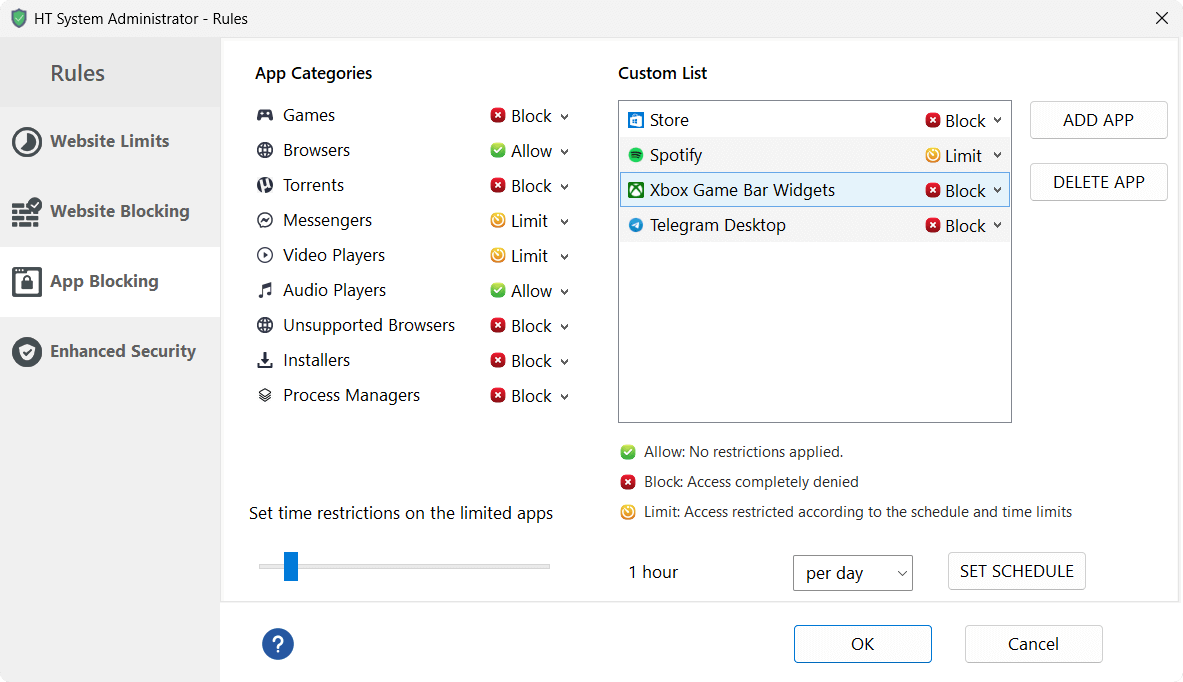
HT System Administrator is a management utility designed to restrict computer activities and monitor usage with minimal configuration. The software provides a centralized interface to block specific websites, entire categories of web content, and encrypted HTTPS sites. Users can also disable or set time limits on local applications, including games, messaging platforms, and system tools.
The core features of the software include:
- Website Filtering: Block specific URLs, keywords, or website categories across all major browsers.
- Application Control: Restrict access to specific software or categories of programs to prevent distractions.
- Detailed Reporting: View comprehensive logs and statistics of all websites visited and applications launched.
- Remote Management: Configure rules and view activity reports from another computer on the same network.
The application includes an integrated internet filter to automatically block inappropriate content. To maintain system integrity, HT System Administrator features built-in protections against unauthorized removal or bypassing. These security measures are designed to prevent advanced users from circumventing the established restrictions or disabling the background processes. The tool is intended for users who require sysadmin-level control over productivity and content filtering without the need for complex network configurations or specialized technical knowledge.
Top 5 Reasons To Download HT System Administrator 25
- Pro-Level Control Without the Learning Curve: You can manage your computer like a professional system administrator without needing a degree in computer science.
- Granular Website and Application Filtering: Total authority over what content enters your workspace, including the ability to block entire categories or specific HTTPS sites.
- Built-In Productivity Optimization: Use time limits and scheduling to ensure that work hours remain dedicated to work and downtime is actually restorative.
- Unrivaled Security and Stealth: The software is designed to be tamper-proof, meaning even the most tech-savvy users cannot bypass your established rules.
- Comprehensive Activity Reporting and Remote Management: Detailed logs show you exactly how the computer is being used, with the added benefit of managing everything from a remote location.
In the modern digital landscape, our biggest enemy isn't a lack of information or slow hardware; it is the constant, unrelenting barrage of distractions. Whether you are a parent trying to keep your children safe online, a business owner looking to maximize employee output, or an individual trying to reclaim your own focus, the challenge remains the same: how do you keep the "noise" out? This is where HT System Administrator steps in, and let me tell you, as someone who has reviewed hundreds of utility tools, this one is a game-changer. It takes the complex, often intimidating world of network management and boils it down into a package that anyone can use. Here are the top five reasons why you need to download this giveaway today.
1. Pro-Level Control Without the Learning Curve
The name "System Administrator" usually evokes images of a dark room filled with servers and a technician typing cryptic commands into a green-text terminal. For most of us, that is a nightmare scenario. We want the power to control our computers, but we don't want to spend weeks reading manuals. The first and most compelling reason to download HT System Administrator is its sheer simplicity. The developers have managed to create a user interface that is so intuitive that "simple" feels like an understatement.
Most enterprise-level blocking software requires a deep understanding of IP addresses, ports, and protocols. With this tool, you are operating with a few clicks. If you want to block a website, you type the name and hit a button. If you want to stop a specific program from launching, you select it from a list. It bridges the gap between high-level utility and consumer-level accessibility. For the average user, this means you can finally stop "hoping" that your computer is being used correctly and start "ensuring" it. You become the master of your digital domain without ever having to touch a line of code or look at a registry editor.
This accessibility is what makes this giveaway so valuable. It democratizes system management. Whether you are 25 or 75, if you can navigate a basic Windows menu, you can successfully deploy HT System Administrator. It is rare to find a tool that offers this much "under-the-hood" power without requiring the user to be a mechanic.
2. Granular Website and Application Filtering
We have all tried the basic "parental controls" built into Windows or various web browsers, and we all know the truth: they are often clunky and easy to circumvent. HT System Administrator provides a level of granularity that puts those built-in tools to shame. This isn't just a blunt instrument that turns the internet off or on; it is a scalpel that allows you to perform precision surgery on your web and app environment.
One of the standout features is the Powerful Internet Filter. You aren't just limited to blocking specific URLs. You can block entire categories of content. If you want to ban all social media, gambling, or adult content with one click, you can. But it goes deeper. We live in an encrypted world where most sites use HTTPS. Many basic filters fail to block these encrypted connections, leaving a massive loophole. This software handles HTTPS filtering with ease, ensuring that your blocks are actually effective across the modern web.
Beyond the web, the application filtering is equally impressive. Think about the distractions that plague a typical workday: games, instant messengers, or even specific system tools that users shouldn't be messing with. You can blacklist any executable file. This means if you don't want Fortnite or Discord running during school or work hours, they simply won't open. The level of control here is absolute, giving you the ability to curate a "whitelist" environment where only the tools necessary for the task at hand are permitted to function.
3. Built-In Productivity Optimization
Blocking is great, but management is better. As a reviewer, I often find that the "all-or-nothing" approach to computer use leads to burnout or frustration. HT System Administrator understands this nuance and offers sophisticated time-limiting and scheduling features. This is the third reason why this is a must-download: it doesn't just stop "bad" behavior; it encourages "good" habits.
Imagine setting a schedule where certain websites (like YouTube or news sites) are available only during lunch hours or after 5:00 PM. Or perhaps you want to allow only two hours of gaming per day. This software allows you to set time quotas. Once the time is up, the application or website shuts down automatically. This is an incredible tool for self-discipline or for teaching children how to manage their digital time responsibly.
In a professional setting, this translates directly to increased productivity. By removing the temptation of "just checking one thing" on a distracting site, you help users stay in a flow state. The software acts as a silent coach, keeping everyone on track without the need for constant verbal reminders or micromanagement. It creates a structured environment where work is done during work hours, and leisure is reserved for the appropriate times.
4. Unrivaled Security and Stealth
What good is a lock if the intruder can just pick it? Most "blocking" apps are easily bypassed by anyone who knows how to open a Task Manager or boot into Safe Mode. This is where HT System Administrator truly earns its title. It is built to be highly protected. The developers knew that tech-savvy teenagers and employees would try to find ways around the rules, so they built the software to be essentially "un-bypassable."
The program is protected by a password, but it goes further. It hides its own processes and protects its files from being deleted or modified by unauthorized users. Even if a user tries to kill the process in the background, the software is designed to persist. It is robust and resilient. For a parent or an employer, this provides a level of peace of mind that is hard to put a price on. You don't have to worry about your "rules" being laughed at by a kid who knows how to use a VPN or a proxy—this software is designed to anticipate and shut down those common workarounds.
Furthermore, the software operates with a low system footprint. It doesn't bog down your computer or interrupt your workflow with constant pop-ups. It sits quietly in the background, doing its job with ironclad reliability. It is the "silent guardian" of your computer's integrity, ensuring that the boundaries you set remain firmly in place regardless of who is sitting at the keyboard.
5. Comprehensive Activity Reporting and Remote Management
The final reason you need to jump on this giveaway is the "Admin" part of HT System Administrator. A good manager doesn't just set rules; they look at the results. This software provides detailed reports of computer use, giving you a transparent view of where time is actually going. You can see which websites were visited, how long each application was used, and even see if there were attempts to access blocked content.
This data is invaluable. If you're an individual, seeing that you spent four hours on a "five-minute" social media break can be the wake-up call you need to change your habits. For a business, these reports can identify bottlenecks or highlight where training might be needed. The logs are easy to read and provide a chronological breakdown of activity, turning vague suspicions into hard data.
But the real "pro" feature here is the Remote Control capability. In today’s world, we aren't always sitting at the same desk as the computer we need to manage. This software allows you to view reports and change rules remotely. Whether you're in the next room or in a different city, you can maintain control over your systems. This level of flexibility is usually reserved for expensive corporate suites, but here it is, included in a package that is incredibly easy to set up. You can check in on your home computer while at the office, or manage your office computers from home, all through a secure and straightforward interface.
In conclusion, HT System Administrator is not just another "blocker" app. It is a comprehensive suite for digital management that balances power with simplicity. It addresses the core issues of the digital age—distraction, lack of oversight, and security—in a way that is accessible to everyone. Whether you are looking to boost your own productivity, protect your family, or manage a small business, this software provides the tools you need to succeed. Don't miss out on this giveaway; it is the simplest way to take back control of your computer and your time. Download it, set your rules, and experience the peace of mind that comes with knowing your technology is finally working for you, not against you.

Reviews for HT System Administrator 25
Click Here to Read Reviews for HT System Administrator 25 >> Click Here to Submit Reviews for HT System Administrator 25 >>