What Does iBeesoft Data Recovery Do?
iBeesoft Data Recovery is a utility designed to retrieve deleted, formatted, or lost data across multiple hardware environments. The software supports recovery from internal hard drives, SSDs, external drives, USB flash storage, and SD cards. It addresses a wide range of data loss scenarios, including accidental deletion, partition loss, and drive corruption.
The tool is engineered to handle data restoration following system crashes or malware infections, specifically targeting impacts from ransomware strains like Petya and WannaCry. Users can recover a broad spectrum of file formats, including common office documents, multimedia files such as photos and videos, and archived emails. It is compatible with Windows-based systems and storage devices ranging from digital cameras to mobile memory cards.
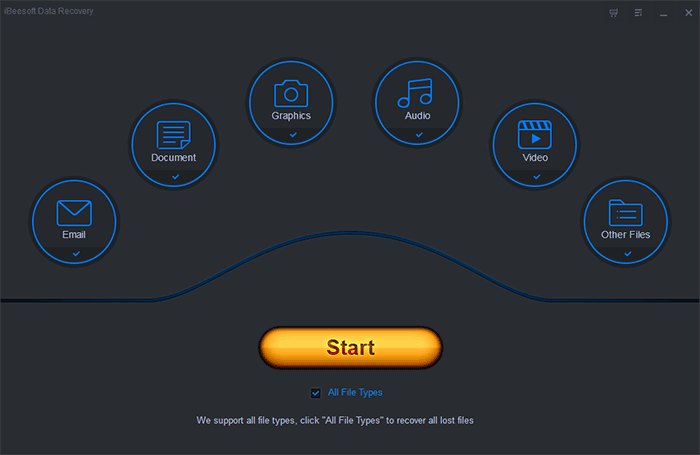
The recovery process is facilitated through a wizard-driven interface intended to streamline the user experience. This guided approach allows users to initiate scans and manage the recovery workflow with minimal manual configuration. Key features include the ability to pause and resume the scanning process based on user requirements. The software operates as a secure solution to ensure the integrity of the original data during the retrieval phase, completing the restoration process in just a few clicks.
Top 5 Reasons To Download iBeesoft Data Recovery
Before we dive into the deep technical specifications and the incredible utility of this software, let us look at the core benefits. If you have ever felt that sinking feeling in your stomach after accidentally hitting "Delete" on a folder full of precious memories or critical work documents, this is the solution you have been waiting for. Here are the top five reasons why you should download iBeesoft Data Recovery today:
- Universal File and Device Compatibility: It recovers everything from documents and photos to videos and emails across almost any storage medium, including SSDs, SD cards, and external drives.
- Comprehensive Disaster Recovery: Whether it is a simple accidental deletion, a formatted partition, or a corrupted hard drive, this software handles the most complex data loss scenarios.
- Advanced Protection Against Modern Malware: It features specialized recovery capabilities to retrieve data lost during virus attacks, specifically targeting files impacted by ransomware like Petya and WannaCry.
- Streamlined Wizard-Driven Interface: You do not need to be an IT professional to use it; the user-friendly interface and step-by-step wizard make professional-grade recovery accessible to everyone.
- Efficient Scan Management: With the ability to pause and restart scans, users have total control over the recovery process without being tethered to their computer for hours on end.
In the digital age, our lives are stored in bits and bytes. From the photographs of our children’s first steps to the complicated spreadsheets that keep our businesses running, our data is our legacy. However, data is inherently fragile. A single hardware failure, a rogue virus, or a momentary lapse in judgment can lead to the permanent loss of years of hard work and irreplaceable memories. This is why having a robust, reliable, and effective data recovery tool is not just a luxury—it is an absolute necessity. iBeesoft Data Recovery has emerged as a leader in this space, and today we are looking at why this specific giveaway is a "must-download" for every PC user.
1. Universal File and Device Compatibility
The first and most compelling reason to download iBeesoft Data Recovery is its sheer versatility. We live in an ecosystem of varied devices. You might have a laptop with an internal SSD, a desktop with a traditional HDD, a digital camera using a high-speed SD card, and a handful of USB thumb drives for transferring files. Most recovery tools excel in one area but fail in others. iBeesoft, however, is designed to be a "Swiss Army Knife" for your data.
This software supports an exhaustive list of file types. For the office professional, it effortlessly retrieves lost Word documents, Excel spreadsheets, PowerPoint presentations, and PDFs. For the creative professional or hobbyist, its ability to recover high-resolution images (JPG, PNG, RAW), videos (MP4, AVI, MOV), and audio files is unparalleled. It even handles database files and archived folders like ZIP or RAR files, ensuring that no matter what you lost, you have a fighting chance of getting it back.
Furthermore, the compatibility extends to the hardware itself. Whether you are dealing with a modern NVMe SSD or an old-school mechanical hard drive, the scanning algorithms adapt to the specific architecture of the storage medium. It even works with specialized devices like digital cameras and MP3 players. This means you only need one piece of software to protect your entire digital hardware portfolio.
2. Comprehensive Disaster Recovery
Data loss is rarely a simple "oops" moment. Sometimes, it is a catastrophic event. We have all seen the terrifying message: "The disk in drive X is not formatted. Do you want to format it now?" Usually, this indicates a corrupted file system or a raw partition. Many basic recovery tools give up at this point, but iBeesoft Data Recovery thrives in these high-stakes environments.
The software is engineered to handle formatted drive recovery. Even if you have already performed a quick format on a partition, the data is often still there, hidden beneath the surface. iBeesoft digs deep into the sectors of the drive to reconstruct the directory tree and bring those files back to life. It also handles partition loss, which can happen during a botched Windows update or a failed attempt at repartitioning your drive. If a volume disappears from your File Explorer, iBeesoft can often locate the "lost" space and extract the data within.
System crashes are another common culprit for data loss. When the "Blue Screen of Death" strikes and your OS refuses to boot, the anxiety level hits the roof. By using this recovery tool, you can target specific areas of a crashed system to salvage files before you resort to a clean OS installation. This level of comprehensive coverage ensures that regardless of how the data was lost—be it deletion, corruption, or system failure—you have a professional-grade tool at your disposal.
3. Advanced Protection Against Modern Malware
In recent years, the threat landscape has changed. We are no longer just dealing with viruses that slow down our computers; we are dealing with ransomware. Attacks like WannaCry and Petya have devastated individuals and corporations alike by encrypting files and demanding payment for their release. While no software can promise a 100% recovery rate against every single encryption algorithm, iBeesoft Data Recovery provides a critical line of defense.
When a virus or malware attacks your system, it often deletes the original files after creating encrypted copies, or it hides files in hidden sectors to make them invisible to the user. iBeesoft’s deep scanning technology is specifically tuned to look for these anomalies. It can often find the "shadow" copies or the original unencrypted versions of files that the malware attempted to wipe. This makes it an essential tool for anyone concerned about cybersecurity.
Moreover, the software itself is 100% secure. In an era where "free" software often comes bundled with bloatware or even its own set of tracking cookies, iBeesoft maintains a clean, safe environment. It operates in a read-only mode during the scanning process, which is vital. This ensures that the software does not overwrite the very data you are trying to save, maintaining the integrity of your drive while it searches for lost information.
4. Streamlined Wizard-Driven Interface
One of the biggest barriers to entry for data recovery is the perceived technical difficulty. Many people assume they need to open a command prompt or understand hex code to get their files back. iBeesoft completely shatters this myth with its user-friendly interface and wizard-based approach. From the moment you launch the application, you are guided through a logical, simple process.
The workflow is designed around the philosophy of "Select, Scan, and Recover." First, you choose the location where the data was lost—this could be a specific folder, a whole drive, or an external device. Second, the software performs its scan. Finally, you are presented with a preview of the recoverable files. This preview feature is a game-changer. It allows you to see the image or read the document before you commit to the recovery process, ensuring that you are not wasting time on corrupted fragments or the wrong files.
The "Wizard" style means that the software makes the hard decisions for you. It automatically chooses the best scanning parameters based on the drive type and the loss scenario. This democratizes data recovery, putting the power of a high-end forensic lab into the hands of the average home user. If you can navigate a basic website, you can use iBeesoft Data Recovery to save your files.
5. Efficient Scan Management
Time is a valuable commodity, and scanning a massive 10TB external hard drive for lost data can be a time-consuming process. Many recovery programs force you to finish a scan once it has started, or you lose all progress. iBeesoft understands the needs of the modern user and provides unprecedented flexibility with its scan management.
According to your needs, you can pause and restart the scan process at any time. If you need to take your laptop to a meeting or if you need to shut down your computer for the night, you don't have to start from scratch the next day. This level of control is particularly helpful when performing "Deep Scans," which examine every sector of a disk. You can scan for a few hours, pause, and then resume whenever it is convenient for you.
Furthermore, the software is optimized for performance. It utilizes your system resources efficiently to ensure that the scanning process is as fast as possible without causing your computer to lag. The interface provides real-time updates on what has been found, allowing you to often recover files even while the scan is still running. This efficiency, combined with the "Easy-to-Use" interface, makes the entire experience stress-free and productive.
The Importance of Acting Quickly
While having iBeesoft Data Recovery is a massive advantage, it is important to understand why you should download this giveaway right now rather than waiting for an emergency. In the world of data recovery, time is of the essence. When a file is deleted, the computer doesn't actually erase the data; it simply marks the space as "available." As you continue to use your computer, new data is written to the drive, which can eventually overwrite the lost files.
By downloading and installing this software now, you are prepared. You won't have to spend precious minutes searching for a solution while your system potentially overwrites your wedding photos or your tax returns. Having the software pre-installed—or having it ready on a USB drive—means you can initiate the recovery process the second you realize something is wrong. This significantly increases your chances of a successful 100% recovery.
Why This Giveaway Is a Game-Changer
Premium data recovery software often comes with a hefty price tag. Professional services can cost hundreds, if not thousands, of dollars. This giveaway provides you with a professional-grade solution at no cost. It is an opportunity to add a high-tier utility tool to your digital arsenal that would normally be out of reach for casual users.
Think of this software as an insurance policy. You hope you never have to use it, but the peace of mind that comes from knowing it is there is invaluable. Whether you are a student with a semester's worth of notes on a flash drive, a photographer with a card full of client shots, or a parent with a lifetime of family videos, iBeesoft Data Recovery is the safety net you need.
Final Thoughts from the Reviewer
I have tested dozens of data recovery tools over the years. Some are too complex, some are too slow, and some simply don't work as advertised. iBeesoft Data Recovery stands out because it strikes the perfect balance between powerful technical capabilities and extreme ease of use. It doesn't matter if your data was lost to a "Delete" key, a "Format" command, or a sophisticated "Ransomware" attack; this software has the tools to bring it back.
The inclusion of specific features to combat modern threats like Petya and WannaCry shows that the developers are active and responsive to the current tech climate. The ability to pause scans shows they respect the user's time. And the broad compatibility ensures that no device is left behind. This is not just another utility; it is a comprehensive data protection suite.
Do not wait until the screen goes black or the folder turns up empty. Download this giveaway, familiarize yourself with the interface, and rest easy knowing that your digital life is protected by one of the most effective and secure recovery tools on the market today. This is a rare chance to get a premium piece of software that truly delivers on its promises. Grab it now and save yourself from the heartbreak of data loss.
In conclusion, the combination of security, versatility, and simplicity makes iBeesoft Data Recovery an essential download. Its robust scanning engine and intuitive design ensure that anyone can recover their lost files with just a few clicks. It is effective, it is safe, and most importantly, it gives you back control over your digital world.


Reviews for iBeesoft Data Recovery
Click Here to Read Reviews for iBeesoft Data Recovery >> Click Here to Submit Reviews for iBeesoft Data Recovery >>