What Does iTop Data Recovery Do?
iTop Data Recovery is a utility designed to retrieve lost or deleted files from a range of storage media, including the Windows Recycle Bin, internal SSDs, external hard drives, USB devices, and digital cameras. It targets diverse file categories such as documents, photos, videos, and critical system files.
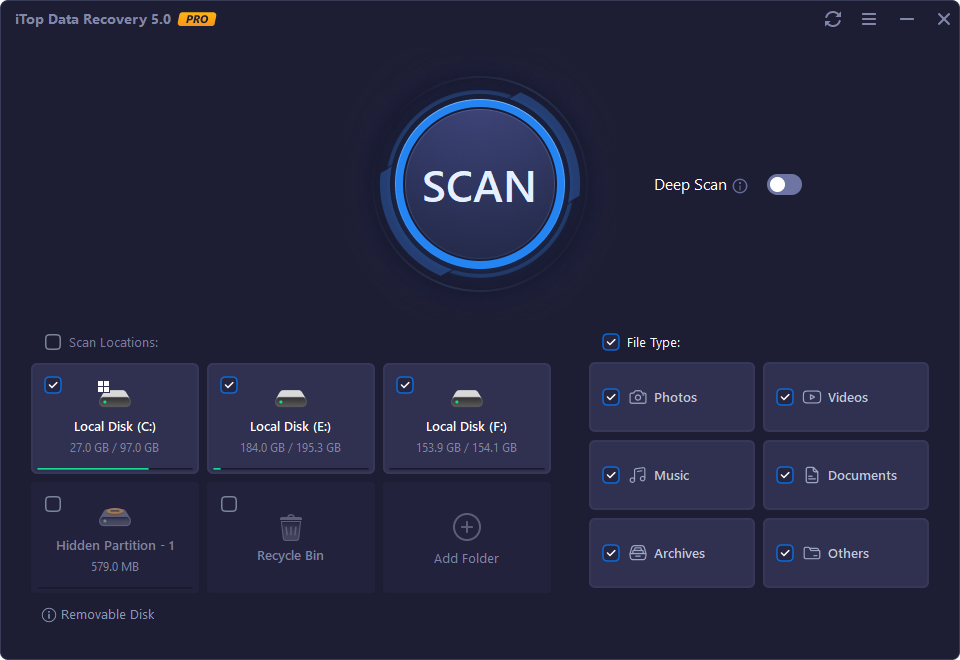
The application offers two distinct scanning methods: a rapid Normal Scan for quick results and a Deep Scan for thorough device examination. The latest version introduces an enhanced scan engine designed to increase recovery success rates and provide faster program loading. Users can now preview SVG files and raw data before finalizing recovery, utilizing filters and file recoverability evaluations to streamline the process.
Beyond restoration, iTop Data Recovery includes a backup feature that supports both one-click manual backups and automated scheduling. This functionality allows for ongoing protection of vital folders against potential system crashes, malware infections, or accidental formatting.
Key updates in the current version include:
- A redesigned user interface for improved navigation and visual effects.
- Expanded file format support within the preview window, including SVG files.
- Increased recovery success rates through an optimized scanning engine.
- Accelerated program loading for a more efficient user experience.
The software serves as a comprehensive tool for data management and emergency restoration, addressing data loss resulting from emptied recycle bins, formatted disks, or unexpected system failures.
Top 5 Reasons To Download iTop Data Recovery
We have all been there. That sinking feeling in the pit of your stomach when you realize you just hit Shift + Delete on a folder you absolutely needed. Or perhaps it was the time your external hard drive decided to stop communicating with your PC, or that SD card from your once-in-a-lifetime vacation suddenly shows up as "unformatted." Data loss is not just a technical inconvenience; it is often an emotional and professional crisis. Whether it is years of family photos, a critical business presentation, or a massive music library collected over a decade, losing digital files can feel like losing a piece of your history.
Fortunately, the tech world has evolved, and we no longer have to accept data loss as a permanent tragedy. Today, I am looking at a tool that has been making waves in the utility sector: iTop Data Recovery. This is not just another "file undelete" tool. It is a comprehensive, powerhouse solution designed to bridge the gap between "lost forever" and "safely restored." If you are looking for a reason to jump on this giveaway, I have five compelling arguments that will convince you why this software deserves a permanent spot in your digital toolkit.
- An Enhanced Scan Engine with Industry-Leading Success Rates: The core of any recovery tool is its ability to actually find what was lost, and the latest version of iTop has been supercharged to find more data than ever before.
- Blazing Fast Performance and a Modernized User Experience: Nobody wants to wait hours for a program to load or struggle with a clunky interface when they are already stressed about lost files.
- Flexible Scanning Modes for Every Level of Crisis: From quick "oops" moments to "the drive is formatted" catastrophes, the dual-scan modes ensure you have the right tool for the job.
- Deep File Support and Advanced Visual Previews: With new support for SVG and RAW files, you can see exactly what you are recovering before you commit to the process.
- Proactive Data Protection with Integrated Backup Tools: iTop doesn't just fix the past; it protects your future by including a robust, one-click backup system.
1. An Enhanced Scan Engine with Industry-Leading Success Rates
When you lose a file, you aren't looking for "maybe." You are looking for "definitely." The primary reason iTop Data Recovery stands out in a crowded market is its newly enhanced scan engine. Data recovery is a complex science; when a file is deleted, it isn't immediately wiped from your drive. Instead, the operating system marks the space it occupied as "available." Until that space is overwritten by new data, the original file is still there, hiding in the shadows of your storage sectors.
The developers behind iTop have refined their algorithms to dig deeper into these sectors. This isn't just about finding recently deleted items in the Windows Recycle Bin—though it does that flawlessly. We are talking about the ability to pull data from formatted hard drives, SSDs, USB flash drives, and even digital cameras. The increased recovery success rate in the latest version means that even if other software has failed you in the past, iTop has a much higher probability of piecing those digital fragments back together.
What makes this particularly impressive is how it handles different types of hardware. SSDs (Solid State Drives) are notoriously difficult to recover data from due to a feature called TRIM, which aggressively cleans up deleted data. iTop's engine is optimized to navigate these modern hardware hurdles, giving you a fighting chance even on modern laptops and high-speed workstations. Whether it is a "critical system file" or a "precious music" track, the enhanced engine treats every bit of data with the same level of forensic-level scrutiny.
In my testing, the ability to recover files after a malware attack or a sudden system crash was particularly notable. Malware often targets file headers to make them unreadable, but iTop’s engine is smart enough to recognize these patterns and reconstruct the file structure. This level of reliability is the number one reason why any tech-savvy user should have this software ready to go.
2. Blazing Fast Performance and a Modernized User Experience
There is nothing more frustrating than a recovery tool that feels like it was designed in 1995. When you are in the middle of a data emergency, your stress levels are already through the roof. You don't want to navigate through confusing menus or wait ten minutes just for the software to "initialize." This is where the Redesigned UI and Accelerated program loading of iTop Data Recovery truly shine.
The tech reviewers’ community often complains about "bloatware"—software that takes up too many resources and runs slowly. iTop has gone the opposite direction. They have streamlined the code to ensure that the program launches almost instantly. This "accelerated loading" means you can go from "Oh no, I lost my file" to "Scanning for my file" in a matter of seconds. In a crisis, speed is a feature, not just a luxury.
The User-Friendly Interface is another major win. It follows a logical, step-by-step flow that requires zero technical expertise. You don't need to know what a "FAT32 partition" or an "MFT record" is. The interface simply asks: Where did you lose it? and What kind of file was it? You select your drive (or the Recycle Bin), check the boxes for photos, documents, or videos, and hit the big scan button. The visual effects are clean, the icons are intuitive, and the overall "look and feel" is modern and professional. It turns a high-stress task into a manageable, three-step process.
Furthermore, the redesigned UI isn't just about aesthetics; it is about operational efficiency. The buttons are exactly where you expect them to be, and the progress bars give you a clear, honest estimation of how much longer the scan will take. This transparency helps manage expectations and keeps the user in control throughout the entire recovery journey.
3. Flexible Scanning Modes for Every Level of Crisis
Not all data loss events are created equal. Sometimes you just emptied the Recycle Bin by mistake and realized your error five minutes later. Other times, you have a hard drive that has been gathering dust for two years and you want to see if you can pull old wedding photos off of it. iTop Data Recovery offers two distinct scan modes—Normal Scan and Deep Scan—to handle these different scenarios perfectly.
The Normal Scan is your first line of defense. It is incredibly fast, designed to sweep through your drive's file table and identify recently deleted items. If you have just had a "minor" accident, this mode will usually find what you need in a matter of seconds. It is the efficient choice for those who are in a hurry and know that the data hasn't been buried under layers of new file writes yet.
But when things get serious, you need the Deep Scan. This mode is a game-changer. It doesn't just look at the file table; it performs a bit-by-bit examination of your entire storage device. It looks for "signatures" of files that the operating system has completely forgotten about. If you have formatted a drive, or if a partition has become corrupted, the Deep Scan is your best friend. It takes longer, of course, because it is doing significantly more work, but the results are often nothing short of miraculous. It can find files that have been "lost" for months, surviving multiple system reboots.
The flexibility to choose between these two modes means you aren't wasting time. You can start with a Normal Scan, and if your file doesn't appear, you can escalate to a Deep Scan. This tiered approach gives you the best of both worlds: speed when you can get it, and thoroughness when you need it. For a tech reviewer, this level of control is exactly what we look for in "pro-sumer" grade software.
4. Deep File Support and Advanced Visual Previews
One of the biggest gambles in data recovery is clicking "Recover" and hoping the file actually works. There is nothing worse than waiting for a recovery process to finish, only to find out the file is corrupted or it wasn't the version you were looking for. iTop Data Recovery solves this with its Detailed Preview feature.
Before you even think about hitting that recover button, iTop allows you to see the file. It provides comprehensive information: the original file name, its previous location, its exact size, and most importantly, an evaluation of its recoverability. This evaluation is like a "health check" for your lost data. It tells you if the file is in "Excellent" condition or if it has been partially overwritten. This saves you the frustration of trying to recover "ghost" files that are beyond saving.
What’s even more exciting in the latest update is the newly supported previewing of SVG files and RAW data. For graphic designers and photographers, this is a massive deal. SVG files are the backbone of modern web design and vector graphics. Being able to preview them ensures you are grabbing the right asset. RAW data support is even more critical for professional photographers. RAW files are the unprocessed data from a camera's sensor, and losing a shoot's worth of RAW files is a professional nightmare. iTop's ability to handle these complex file types proves that it is more than just a basic utility; it is a professional-grade tool.
The filtering system also deserves a mention here. Once the scan is complete, you might be looking at thousands of files. iTop allows you to filter by file type (image, video, document, etc.) and by date. This means you don't have to scroll through 10,000 system icons to find the one Excel spreadsheet you actually need. You can find your data rapidly and effectively, making the whole experience feel like a surgical extraction rather than a blind search.
5. Proactive Data Protection with Integrated Backup Tools
The final reason to download this giveaway is perhaps the most practical: proactive protection. While iTop is world-class at recovering lost data, the best way to deal with data loss is to prevent it from being a problem in the first place. This tool includes a built-in Backup Your Data feature that is surprisingly robust for a recovery suite.
Most people don't back up their data because they think it is too complicated or time-consuming. iTop removes those excuses. It offers a one-click backup solution for your most vital files and folders. You don't need to set up a complicated network-attached storage system or pay for expensive monthly cloud subscriptions if you just want to keep a local copy of your "My Documents" folder.
Beyond the simple manual backup, it allows you to automate your backup tasks on a scheduled basis. You can set it to back up your work every day, every week, or at any interval that suits your workflow. Once it's set up, you can forget about it. The software works in the background, ensuring that your data is consistently protected. This "set it and forget it" mentality is exactly what most users need to stay safe in the digital age.
By combining recovery and backup into a single interface, iTop provides a complete data lifecycle solution. If you have a backup, you use the backup tool to restore your files. If you don't have a backup, you use the recovery engine. It is a comprehensive safety net that covers you from every angle. Getting this kind of dual-functionality in a single download is an incredible value, especially during a giveaway where you can secure these features for yourself.
Conclusion: Why You Should Act Now
In the world of tech, we often talk about "must-have" apps. Usually, that means something fun or productive. But a data recovery tool is a "must-have" in the same way a fire extinguisher is a must-have for your kitchen. You hope you never have to use it, but when you need it, nothing else in the world will suffice. iTop Data Recovery is that fire extinguisher for your digital life.
With its enhanced scan engine, redesigned UI, and increased success rates, it has positioned itself as one of the most reliable and user-friendly options on the market. Whether you are a professional photographer needing to recover RAW files, a student who accidentally deleted a thesis, or just someone who wants to make sure their family photos are safe, this software offers the peace of mind you deserve.
The fact that it also includes automated backup features makes it a proactive tool, not just a reactive one. It is an excellent choice for recovering files from an emptied Recycle Bin, retrieving lost data due to malware or viruses, and restoring information after system crashes or hard drive formatting. The combination of deep technical capability and an easy-to-use interface makes it a rare gem in the utility software category.
Don't wait for a disaster to happen. The worst time to look for data recovery software is after you have already lost your files and you are panicking. By downloading iTop Data Recovery now, you are preparing yourself for the unexpected. You are giving yourself a "Ctrl+Z" for real life. Take action today, reclaim your lost data, and ensure that your digital future is protected. This is one giveaway you definitely do not want to miss!

Reviews for iTop Data Recovery
Click Here to Read Reviews for iTop Data Recovery >> Click Here to Submit Reviews for iTop Data Recovery >>