What Does Kingshiper Audio Editor Do?
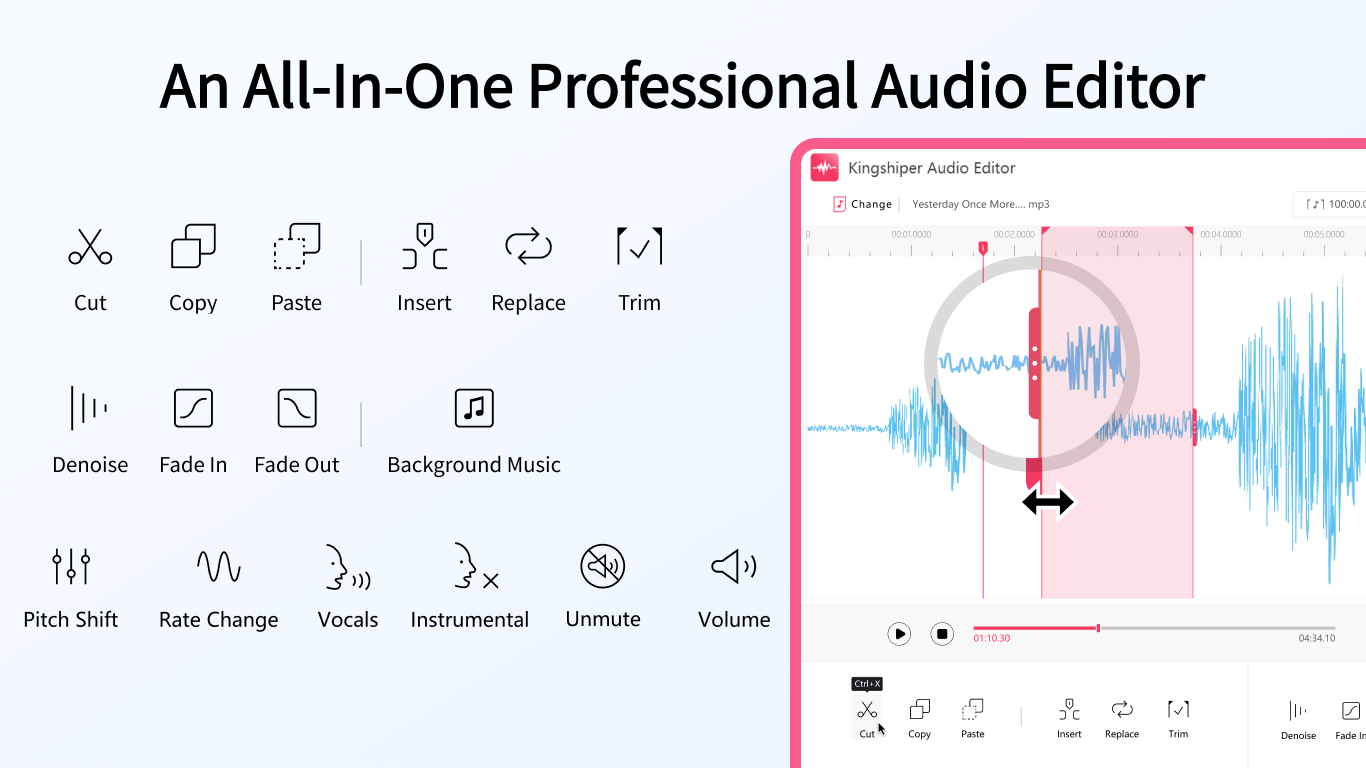
Kingshiper Audio Editor is a comprehensive software suite designed for the creation, modification, and conversion of audio files. The application serves both professional sound engineers and enthusiasts by providing a streamlined interface that simplifies complex editing tasks. Users can perform essential functions such as cutting, trimming, inserting, and replacing audio segments within a centralized workspace.
The software includes a specialized toolkit for enhancing recording quality. Key features include noise reduction capabilities to eliminate background hums and unwanted interference, alongside specialized tools for extracting vocals or instrumentals from tracks. A real-time preview feature allows for the immediate monitoring of adjustments, ensuring accuracy before the user saves any changes.
Technical specifications and capabilities of Kingshiper Audio Editor include:
- Extensive Format Support: Compatibility with over 30 audio formats, including MP3, OGG, FLAC, M4A, WAV, AMR, and AC3.
- Audio Manipulation: Tools for adjusting volume levels and executing one-click manipulations to achieve professional-grade results.
- High-Fidelity Output: Engineering focused on maintaining the original clarity and quality of the source material during the export process.
- Batch Processing: Efficiency-focused workflows for handling multiple files without requiring manual conversion.
This giveaway provides access to a versatile utility for managing diverse audio projects, ranging from basic file trimming to advanced recording cleanup and format standardization.
Top 5 Reasons To Download Kingshiper Audio Editor
1. Intuitive and User-Friendly Interface: Kingshiper Audio Editor eliminates the steep learning curve usually associated with professional audio software, making high-end editing accessible to everyone.
2. Comprehensive Professional Toolkit: From basic trimming to advanced vocal extraction and noise reduction, the software provides every tool necessary for a polished final product.
3. Massive Format Compatibility: With support for over 30 different audio formats, you never have to worry about compatibility issues or tedious file conversions again.
4. Efficient Real-Time Previewing: The ability to hear changes exactly as you make them saves hours of rendering time and ensures your creative vision is met instantly.
5. Lossless High-Quality Output: This software prioritizes the integrity of your sound, ensuring that the exported files maintain professional-grade clarity and fidelity.
If you have ever dipped your toes into the world of digital audio, you know exactly how intimidating the landscape can be. For years, the industry has been dominated by massive, expensive Digital Audio Workstations (DAWs) that look more like the control panel of a nuclear reactor than a creative tool. If you just wanted to trim a podcast, clean up some background hiss on a voice memo, or extract a vocal track from a song, you were often forced to spend weeks watching tutorials or hundreds of dollars on subscriptions. But every once in a while, a piece of software comes along that disrupts that status quo. Today, that software is Kingshiper Audio Editor.
As a tech reviewer who has seen hundreds of apps claim to "simplify" the creative process, I am usually skeptical. However, this giveaway is something you genuinely do not want to pass up. Whether you are a budding podcaster, a YouTuber looking to improve your production value, or just someone who wants to clean up their personal music library, Kingshiper Audio Editor is the Swiss Army knife you’ve been waiting for. Let’s dive deep into why this specific giveaway deserves a permanent spot on your hard drive.
1. An Interface Designed for Humans, Not Just Engineers
The biggest barrier to entry for audio editing has always been the interface. Most professional tools hide their best features behind layers of complex menus and cryptic icons. Kingshiper Audio Editor takes a refreshingly different approach. When you first launch the application, you aren't greeted by an overwhelming wall of buttons. Instead, you get a clean, streamlined environment where the most important tools are exactly where you expect them to be.
For the beginner, this means you can start being productive within minutes of downloading the app. You don’t need a degree in sound engineering to understand how to cut a clip or adjust the volume. The "one-click" philosophy is baked into the DNA of this software. For the professional, this user-friendly design translates to speed. When you aren't fighting the interface, you can focus on the creative side of your work. The layout is logical, the response time is snappy, and the visual feedback is clear. It’s rare to find a tool that manages to be this powerful without feeling cluttered, but Kingshiper has hit the sweet spot.
2. A Toolkit That Handles Everything from Basics to Brilliance
What really sets Kingshiper Audio Editor apart from the standard free tools you might find online is the sheer depth of its feature set. This isn’t just a "trim and save" utility; it is a full-fledged editing suite. Let’s talk about some of the heavy hitters in its arsenal. First, there is the noise reduction. We’ve all been there—you record a great take, only to realize later that there’s a persistent hum from your air conditioner or a hiss from your microphone. Kingshiper allows you to surgically remove these unwanted sounds, leaving you with a clean, professional-sounding recording that sounds like it was done in a multi-million dollar studio.
Beyond noise removal, the software excels at vocal and instrumental extraction. This is a feature that used to require incredibly expensive specialized software. With Kingshiper, you can isolate the vocals from a track to create an acapella or remove them to create a high-quality instrumental backing track. Add to this the ability to insert audio, replace sections, adjust volume levels on the fly, and mix multiple tracks, and you have a powerhouse of a program. It handles the "boring" tasks like trimming and merging with ease, but it also gives you the advanced tools to truly transform your audio into something special.
3. The End of Format Frustration
If there is one thing that drives content creators crazy, it is the "unsupported file format" error message. The world of digital audio is a fragmented mess of extensions. You might have a recording in WAV, a background track in MP3, and a sound effect in OGG. Usually, this would mean opening a separate converter, changing everything to a uniform format, and then finally starting your edit. Kingshiper Audio Editor puts an end to that nonsense.
Supporting over 30 different audio formats—including favorites like FLAC, M4A, AMR, AC3, and MP2—this software acts as its own universal translator. You can drag and drop almost any audio file into the timeline, and it just works. This level of compatibility is a massive time-saver. It ensures that no matter where your audio comes from—a high-end field recorder, a smartphone, or an old CD rip—you can edit it immediately without any technical hiccups. In the fast-paced world of content creation, being able to skip the conversion step is a massive competitive advantage.
4. The Power of Real-Time Previewing
In the world of audio editing, "guesswork" is the enemy of quality. Many lower-end editors require you to apply an effect, wait for it to process, and then play it back to see if you liked the result. If you didn't, you had to undo and try again. This "trial and error" workflow is incredibly frustrating and slows down your creative momentum. Kingshiper Audio Editor solves this with its Real-Time Preview feature.
Imagine you are trying to find the perfect volume balance or trying to trim a clip down to the exact millisecond to match a beat. With real-time preview, you can hear the changes as you make them. If you move a slider, you hear the audio change instantly. This immediate feedback loop allows for much greater precision. It allows you to experiment freely, trying out different edits and effects without the fear of "breaking" your file. You get to hear the final result before you ever hit the "save" button, ensuring that every export is perfect on the first try. It’s one of those features that you don’t realize you need until you have it—and once you have it, you can never go back.
5. Professional-Grade Quality You Can Hear
At the end of the day, an audio editor is only as good as the sound it produces. Some software, especially the free ones, uses aggressive compression algorithms that can "crunch" your audio, stripping away the high-end frequencies and making everything sound muddy. Kingshiper Audio Editor is built on a foundation of high-fidelity processing. It is designed to respect the original source material.
When you export your project from Kingshiper, the software ensures that the output is as clear and original as possible. If you started with high-quality 24-bit audio, the editor works to maintain that depth throughout the editing process. This is crucial for professionals who are producing content for broadcast, music streaming services, or high-end podcasts. Your audience might not always be able to describe why one recording sounds better than another, but they can certainly feel it. By using a tool that prioritizes high-quality output, you are giving your work the professional "sheen" that separates the amateurs from the pros.
Why You Should Act Now
The tech world moves fast, and opportunities to grab a "world-leading" piece of software for free don't come around every day. We often tell ourselves that we’ll look for an audio editor "when we have a project," but by then, the pressure is on, and you’ll likely end up settling for a subpar tool or paying a premium for a monthly subscription. By downloading this giveaway now, you are future-proofing your creative setup.
Think about the projects you have on the horizon. Maybe you’ve been thinking about starting a podcast to share your expertise. Maybe you want to start a YouTube channel and you know that bad audio is the number one reason people stop watching videos. Or maybe you just have a collection of old family recordings that are buried in static and noise. Kingshiper Audio Editor is the solution to all of these problems. It is a professional toolkit disguised as a simple app, providing the perfect balance of power and ease of use.
In summary, Kingshiper Audio Editor isn't just another utility; it’s a gateway to better content. It respects your time with its intuitive interface, it respects your creativity with its massive toolkit, and it respects your ears with its high-quality output. Don’t wait until you’re frustrated with a complicated DAW or limited by a basic browser-based editor. Take advantage of this giveaway and see for yourself why this software is leading the charge in the audio editing space. Your ears—and your audience—will thank you.
Final Verdict: If you want a reliable, powerful, and incredibly easy-to-use audio editor that can handle any format you throw at it while maintaining professional sound quality, Kingshiper Audio Editor is a "must-download." This is a rare chance to add a premium tool to your digital belt at no cost. Grab it while you can!

Reviews for Kingshiper Audio Editor
Click Here to Read Reviews for Kingshiper Audio Editor >> Click Here to Submit Reviews for Kingshiper Audio Editor >>