What Does MiniTool Data Recovery Do?
MiniTool Data Recovery is a technical utility designed to retrieve lost or deleted information across multiple storage platforms. The software is compatible with Windows PC, Windows Server, and Mac environments, allowing users to restore data from HDDs, SSDs, USB flash drives, and memory cards. It employs deep scanning technology to identify and reconstruct more than 100 file types, including standard documents, high-resolution photos, videos, and audio files.
The application is built to handle diverse data loss scenarios, such as:
- Accidental file deletion and emptied Recycle Bins.
- Drive formatting errors and partition loss.
- System crashes and OS boot failures.
- Data corruption resulting from virus or malware attacks.
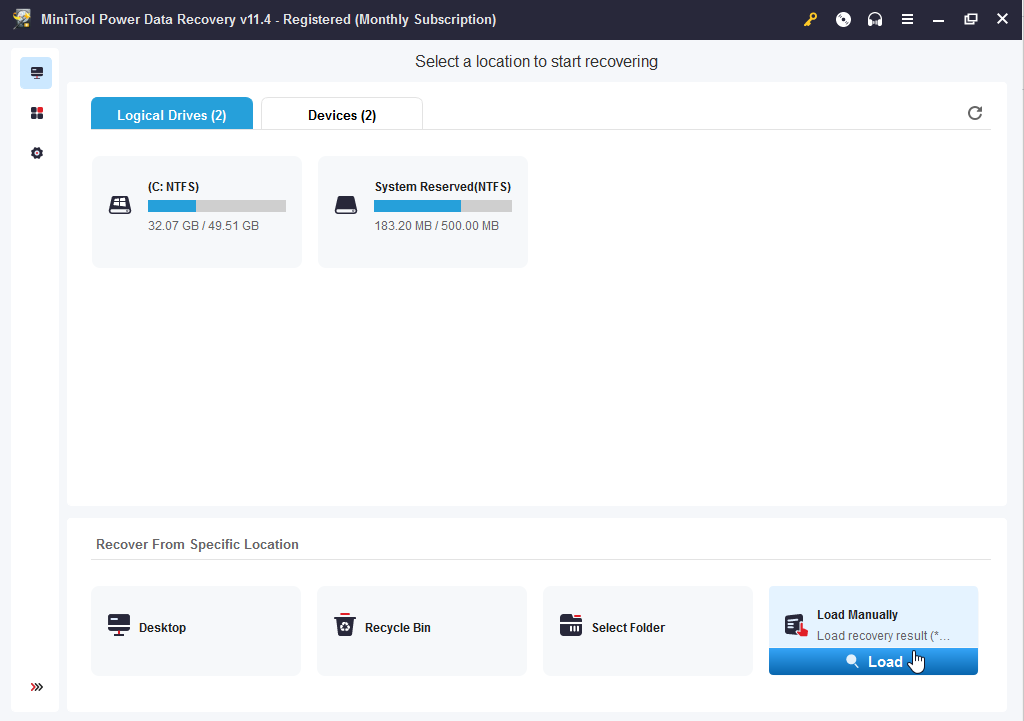
To streamline the recovery process, the software offers targeted scanning for specific locations, including the Desktop and individual folders. This functionality reduces wait times by focusing the scan on the most likely areas of data loss. Additionally, users can preview files before the final recovery to ensure data integrity. By providing a structured approach to data retrieval, this tool serves as a recovery solution for both common human errors and critical system failures.
Top 5 Reasons To Download MiniTool Data Recovery
- Universal File Type Support: Recover over 100 different types of files, including photos, videos, audio, and complex documents.
- Hardware Versatility: Compatible with a massive range of storage devices, from modern SSDs and traditional HDDs to SD cards and USB drives.
- Targeted Scanning Locations: Save time by focusing recovery efforts on specific areas like the Recycle Bin, Desktop, or individual folders.
- Comprehensive Disaster Recovery: Effectively restores data lost through human error, formatting mistakes, system crashes, and virus attacks.
- Multi-Platform and Deep Scan Technology: Advanced bit-by-bit scanning capabilities that work across Windows, Windows Server, and Mac environments.
Introduction: Why This Is the Tool You Cannot Afford to Miss
We have all been there. It is that cold, sinking feeling in the pit of your stomach when you realize that the "Delete" key you just pressed was a catastrophic mistake. Maybe it was a folder of irreplaceable family photos from a decade ago. Maybe it was the final draft of a project you have been working on for months. Or perhaps, it was a system-wide crash that wiped out your entire partition structure. In the world of modern computing, data is our most valuable currency, and losing it feels like losing a piece of ourselves. This is exactly why a professional-grade data recovery tool isn't just a luxury; it is a fundamental necessity for any serious tech user.
Today, I am looking at a piece of software that has consistently sat at the top of the industry recommendations: the MiniTool data recovery software. Whether you are a creative professional, a student, or someone who just wants to make sure their digital memories are safe, this giveaway represents a massive opportunity to secure your digital life. This software is designed to bridge the gap between complex data forensics and the average user's need for a simple, "one-click" solution. In this review, I am going to break down the top five reasons why you need to download this giveaway immediately and how it can save you from the brink of digital disaster.
1. Universal File Type Support: Everything from RAW to RTF
One of the biggest frustrations with entry-level recovery tools is their limited scope. There is nothing worse than running a two-hour scan only to find that the software found your file but cannot actually "read" or "reconstruct" it because the format is too obscure. This MiniTool recovery software eliminates that hurdle entirely by supporting over 100 different file types. This isn't just about common JPEGs and Word documents; we are talking about a deep, comprehensive library of file signatures that the software can recognize.
For the photographers out there, this means support for various RAW formats, ensuring that your high-resolution shots are recovered with their metadata intact. For videographers, it handles MP4, MOV, AVI, and more, reconstructing the complex headers that often get corrupted during a crash. For the office power user, it covers everything from Excel spreadsheets and PDFs to specialized database files. The beauty of this software lies in its ability to look at the raw data on a drive and identify what that data *used* to be, even if the file system itself has forgotten. When you download this giveaway, you are essentially getting a master key that can unlock almost any type of data container, giving you the best possible chance of a 100% successful recovery.
Furthermore, the software doesn't just find the files; it categorizes them. This makes the recovery process significantly less overwhelming. Instead of looking through a list of ten thousand "Recovered_File_001" names, the software helps you filter by file type, allowing you to jump straight to the videos or the documents you actually need. This level of granularity is what separates professional software from the "freeware" junk that often does more harm than good.
2. Hardware Versatility: From Spinning Platters to Solid State
The landscape of storage technology has changed drastically over the last few years. We have moved from the slow, mechanical spinning of Hard Disk Drives (HDDs) to the lightning-fast, flash-based world of Solid State Drives (SSDs). We also rely heavily on peripheral storage like USB thumb drives, microSD cards in our cameras and phones, and even external RAID arrays for backups. A data recovery tool is only as good as the hardware it can communicate with, and this software is a powerhouse in this department.
One of the most impressive features is its ability to handle "Deep Scans" on SSDs. Recovering data from an SSD is notoriously more difficult than from an HDD because of the way "TRIM" commands work, which effectively wipe data blocks to keep the drive fast. This software uses advanced algorithms to navigate these complexities, often finding data that other tools might miss. But it doesn't stop at internal drives. Have you ever unplugged a USB drive without "Ejecting" it, only for the computer to tell you the drive is now "unreadable" or "must be formatted"? This software thrives in those situations. It can bypass the logical errors presented by the operating system to talk directly to the storage controller, pulling your files off the brink of oblivion.
Whether you are trying to recover a lost partition on a massive 12TB server drive or trying to save a few precious photos from a corrupted microSD card used in a drone, this software provides a unified interface to handle it all. It is truly a "one-stop-shop" for hardware recovery, ensuring that no matter where your data was stored, you have a fighting chance of getting it back.
3. Targeted Scanning Locations: Efficiency When Every Minute Counts
If you have a 2TB hard drive, a full sector-by-sector scan can take hours, if not an entire day. When you are in a panic because you accidentally emptied the Recycle Bin, you don't always have time to wait for the software to check every single nook and cranny of your entire drive. This is where the MiniTool software's "Targeted Scanning" feature becomes an absolute game-changer. It allows you to point the software specifically at the Desktop, the Recycle Bin, or a specific folder of your choosing.
This "quick-strike" capability is perfect for the most common data loss scenario: human error. We’ve all been in a situation where we were cleaning up our desktop, highlighted a group of files, and hit "Shift+Delete" instead of just "Delete." By targeting just the Desktop area, the software can find those specific file markers in a matter of seconds. It significantly reduces the "wear and tear" on your drive during the recovery process and, more importantly, it reduces the stress on you.
The software also features a robust "Find" and "Filter" system within the scan results. Even if you do have to run a larger scan, you can search for a file by name or extension while the scan is still in progress. This level of user-centric design shows that the developers understand the psychology of data loss. They know that the user is likely stressed and in a hurry, and they have built the interface to be as streamlined and efficient as possible. This efficiency is a core reason why I recommend this specific tool over many of the more cluttered alternatives on the market.
4. Comprehensive Disaster Recovery: Handling the Worst-Case Scenarios
Data loss isn't always as simple as an accidental deletion. Sometimes, it is much more sinister. Maybe a malware attack encrypted your files and then corrupted the file table. Maybe your OS crashed during a critical update, leaving you with a "Blue Screen of Death" and an unbootable partition. Or perhaps, in a moment of confusion, you formatted the wrong drive entirely. These are the "disaster" scenarios that keep IT professionals up at night.
This MiniTool software is built to handle these high-stakes situations. It specializes in recovering data from formatted partitions, which is a process that requires the software to ignore the current "empty" file structure and look for the "ghosts" of the previous data. It can also recover data from "RAW" drives—drives where the file system has become so corrupted that Windows no longer recognizes if it is NTFS, FAT32, or exFAT. In these cases, the software performs a deep dive into the raw binary code of the drive to reconstruct the directory tree.
Moreover, the software's ability to handle OS crash recovery is vital. When a system fails to boot, your data isn't necessarily gone; it’s just trapped behind a broken door. This software provides the tools necessary to reach in and grab that data before you perform a clean install of your operating system. By downloading this giveaway, you are essentially getting an "emergency kit" for your PC. You might not need it today, and you might not need it tomorrow, but when the day comes that your system refuses to wake up, you will be incredibly glad you have this professional-grade tool ready to go.
5. Multi-Platform and Deep Scan Technology: Pro-Level Power for Everyone
The final reason this giveaway is a must-download is the sheer technical power hidden behind its simple interface. While many tools offer a "quick scan," the "Deep Scan" technology in this software is what sets it apart. Deep scanning involves a bit-by-bit analysis of the storage medium. It looks past the file system entirely and searches for the unique signatures of file headers. This is a time-consuming process, but it is the "gold standard" of data recovery, often finding files that were deleted months or even years ago, provided they haven't been overwritten by new data.
Furthermore, the cross-platform nature of the MiniTool ecosystem is a huge plus. Whether you are running a standard Windows 10 or 11 home PC, a high-end Windows Server in a business environment, or even a Mac, there is a version of this technology designed to work for you. In a multi-device household, having a recovery tool that understands the nuances of different file systems (like NTFS for Windows and HFS+/APFS for Mac) is invaluable. It ensures that no matter what device in your home or office fails, you have a consistent, reliable method for data retrieval.
The software is also designed to be "read-only" during the scanning process. This is a critical technical detail that many people overlook. Some inferior recovery tools actually write data to the drive they are trying to save, which can overwrite the very files you are trying to recover. This software is built with data integrity as a priority; it never writes to the source drive, ensuring that your data remains as safe as possible throughout the entire recovery attempt. This "safety-first" approach, combined with its deep-scanning muscle, makes it one of the most reliable tools available today.
Conclusion: Don't Wait Until Disaster Strikes
In the world of technology, there are two types of people: those who have lost data, and those who are about to lose data. It is an inevitable part of the digital age. Hardware fails, software bugs out, and humans make mistakes. The difference between a minor inconvenience and a life-altering disaster is the tools you have at your disposal when things go wrong.
The MiniTool data recovery software is more than just an application; it is peace of mind. With its support for over 100 file types, its ability to talk to almost any piece of hardware, and its specialized features for handling everything from a simple accidental deletion to a full-scale system crash, it stands as a titan in the data recovery space. The interface is clean enough for a novice to navigate, yet the engine under the hood is powerful enough for a tech expert to trust.
By taking advantage of this giveaway, you are preparing yourself for the unexpected. You are ensuring that your photos, your work, and your digital life are protected by some of the best recovery algorithms in the business. Don't wait until you are staring at an empty folder or a "Drive Not Found" error message. Download this tool now, get it set up, and rest easy knowing that you have the ultimate safety net ready to catch your data if it ever falls. This is a rare opportunity to get a premium solution for one of the most common and stressful problems in computing. Do not let it pass you by.
In summary: If you value your data—and in 2024, who doesn't?—this software is a mandatory addition to your digital toolkit. It is fast, it is powerful, and it is proven. Whether it is a single document or a whole drive's worth of memories, MiniTool gives you the best chance of bringing them back from the dead. Download it, keep it handy, and hope you never have to use it—but if you do, you'll be glad it's there.

Reviews for MiniTool Data Recovery
Click Here to Read Reviews for MiniTool Data Recovery >> Click Here to Submit Reviews for MiniTool Data Recovery >>