What Does O&K Printer Viewer Do?
O&K Printer Viewer functions as a management and auditing tool for monitoring print activity. The software allows users to intercept and visualize documents sent to a local or network printer, providing a comprehensive history of spool files. By capturing these files, users can review the exact content of printed materials, reprint documents directly from the interface, or export them into digital formats. Conversion options include PDF and standard graphic formats such as BMP, GIF, JPEG, and TIFF.
The software’s primary utility is its wide-ranging compatibility with various printer control languages. It supports industry-standard formats including PCL5, HP-GL/2, PCL6 (PCL XL), and PostScript, as well as Windows-native EMF spooled files. Additionally, the tool provides support for several manufacturer-specific languages:
- GDI printing (ZjStream) and Xerox GDI.
- Samsung Printer Language Color.
- XQX, utilized by HP LaserJet models such as the M1005 and P1505.
- CPCA (Canon Common Peripheral Controlling Architecture) with PCL XL.
- HBPL, used by Dell, Epson, and Fuji-Xerox hardware.
This broad support ensures that print jobs from diverse hardware environments remain accessible for review and archival purposes. By providing a way to digitize spool data, the utility allows for the storage of printed records without requiring the original source application or physical paper copies.
Top 5 Reasons To Download O&K Printer Viewer
- Complete Document Recovery and Reprinting Capabilities
- Extensive Support for Universal Printer Languages and Spool Formats
- High-Fidelity Conversion to PDF and Graphic Formats
- Comprehensive Print Auditing and Security Monitoring
- A Lightweight, Streamlined Interface for Maximum Productivity
How many times have you clicked print on a vital document, only for the printer to jam, run out of ink, or simply vanish the job into the digital ether? We have all been there. You close the application, thinking your work is safely on its way to the paper tray, only to realize the document is gone, and you no longer have the source file open. Or perhaps you are managing an office and need to know exactly what is being sent to those expensive laser printers. In the world of tech, the "spooler" has always been a bit of a black box—a mysterious middleman between your computer and the physical page. But today, that changes. Enter the O&K Printer Viewer, a powerhouse utility designed to give you total control over your printing pipeline.
In this article, I am going to break down why this specific piece of software is a must-download. As someone who has tested countless system utilities, I can tell you that a reliable printer viewer is one of those tools you do not realize you need until it saves your skin. Whether you are a professional handling complex CAD drawings, a home user trying to archive digital receipts, or a system administrator keeping tabs on resource usage, the O&K Printer Viewer is an essential addition to your digital toolkit. Let’s dive into the detailed reasons why you should grab this giveaway right now.
1. Complete Document Recovery and Reprinting Capabilities
The primary reason to download the O&K Printer Viewer is the sheer peace of mind it offers through its recovery features. In a standard Windows environment, once a print job is sent, the spooler handles the data and usually deletes it the moment the printer signals completion. If the printer fails mid-job, or if you realize you need a second copy after you have already closed your word processor or browser, you are usually out of luck. You have to reopen the software, find the file, and re-send the job.
With O&K Printer Viewer, those days are over. This software acts as a sophisticated window into your print history. It allows you to view exactly what was printed, even after the physical printer has finished its task. Because it captures the spool data, you can look back through your history and see every page of every document. If a page came out blurry or the stapler caught a corner, you don't need to go back to the original source. You simply open the viewer, select the job, and print it again directly from the interface.
This is a lifesaver for people who work with dynamic content, such as web pages that might change or expire, or temporary digital forms. By keeping a visual record of the spool file, O&K Printer Viewer ensures that your "hard copy" is never truly lost until you decide to delete the digital trail. It turns your printer's memory from a fleeting moment into a permanent, searchable database of your output.
2. Extensive Support for Universal Printer Languages and Spool Formats
One of the most impressive technical feats of O&K Printer Viewer is its wide-ranging compatibility. Most people do not realize that printers speak many different languages. Depending on your hardware—be it an HP, Canon, Samsung, or Xerox—the data sent from your PC looks very different under the hood. Most basic viewers might handle a simple PDF, but they choke when faced with raw spool data. O&K Printer Viewer is a versatile powerhouse that understands almost every major printer language on the market.
The software supports PCL5, PCL6 (PCL XL), and Postscript, which are the industry standards for professional office printing. If you are an architect or an engineer working with HP-GL/2, this viewer can handle those complex vector instructions with ease. It even supports EMF Spooled Files, which is the native language of the Windows print subsystem. But it doesn't stop at the big names. It includes support for specialized languages like Samsung Printer Language Color, XQX (used by many popular HP LaserJet models like the M1005), and CPCA for Canon devices. It even covers HBPL, used by Dell, Epson, and Fuji-Xerox.
Why does this matter to you? It means that no matter what printer you currently own, or what printer you might upgrade to in the future, this software will work. You won't find yourself in a situation where you change your hardware and lose the ability to view your old print logs. This is professional-grade compatibility packed into a user-friendly package, ensuring that the software remains useful across diverse hardware environments.
3. High-Fidelity Conversion to PDF and Graphic Formats
We are all trying to move toward a paperless office, but sometimes the "Print to PDF" function in Windows can be clunky or change the formatting of a document. O&K Printer Viewer offers a superior alternative by allowing you to save any captured print job as a high-quality PDF document or a variety of graphic files, including BMP, GIF, JPEG, and TIFF.
Imagine you are printing a complex document with specific margins, embedded fonts, and intricate graphics. Instead of relying on a virtual printer driver that might alter the layout, you can send the job to your actual printer queue, view it in O&K Printer Viewer to ensure it looks exactly right, and then save that exact "printed" version as a PDF. This ensures 100% visual fidelity between what would have appeared on paper and what you are saving digitally.
The ability to export to image formats like TIFF or JPEG is equally valuable. This is perfect for archival purposes where you want an unalterable snapshot of a document. If you are a graphic designer or a lawyer who needs to prove exactly how a document looked when it was sent to the press or the printer, having the ability to export the spool file as a high-resolution image is an indispensable feature. It bridges the gap between the physical and digital worlds with incredible precision.
4. Comprehensive Print Auditing and Security Monitoring
For those who share a computer or manage a small network, security and monitoring are paramount. Who is printing what? Are people wasting expensive color toner on personal photos? Are sensitive documents being printed without authorization? O&K Printer Viewer serves as a silent auditor for your printing activities.
By allowing you to view each document printed on your printer, the software provides a level of transparency that is usually reserved for expensive enterprise-level print servers. You can see the content of every page, the timestamp of the job, and the specific formatting used. It’s an excellent way to keep track of your own usage for billing purposes if you are a freelancer, or to ensure that children or employees are using the printer responsibly.
Security is also a major factor here. If you suspect that sensitive information is being leaked through physical copies, having a viewer that captures the spool files allows you to conduct a forensic review of exactly what has left your system. It adds a layer of accountability to your workflow that simply does not exist in standard operating system configurations. In a world where data breaches are common, monitoring your "physical" data output is just as important as monitoring your digital traffic.
5. A Lightweight, Streamlined Interface for Maximum Productivity
I have used a lot of system utilities that feel bloated, slow down the boot process, or clutter the screen with unnecessary animations. O&K Printer Viewer is the exact opposite. It is a highly optimized, lightweight application that focuses on doing one thing exceptionally well: showing you your prints. The interface is intuitive, allowing you to quickly browse through history, zoom in on specific pages to check for detail, and execute reprints or exports with just a few clicks.
Because it is designed to handle spool files—which can sometimes be quite large and complex—the engine behind the software is built for speed. It renders PCL and Postscript files rapidly, allowing you to flip through a hundred-page document with the same ease you would a standard PDF. It doesn't bog down your system resources, making it the perfect tool to keep running in the background.
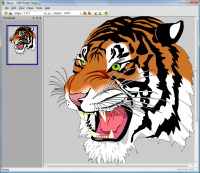
The user experience is clearly designed by people who understand the frustrations of printing. There are no convoluted menus or hidden settings. You get a clear list of jobs, a large preview pane, and easy-to-find buttons for saving and printing. This simplicity is its greatest strength. It removes the technical barriers between you and your print data, making document management feel like a breeze rather than a chore. If you value your time and want a tool that just works without a steep learning curve, this is the giveaway for you.
In conclusion, the O&K Printer Viewer is not just another utility; it is a specialized tool that solves a very specific, very common set of problems. It provides recovery for lost documents, universal support for various hardware languages, conversion tools for a paperless workflow, auditing for security and cost control, and a fast, easy-to-use interface. Whether you are a tech enthusiast who loves having control over every aspect of your PC or someone who just wants to make sure their documents are safe, this software is a fantastic addition to your library. Don't let your print jobs remain a mystery—download this giveaway and take command of your printer today!


Reviews for O&K Printer Viewer
Click Here to Read Reviews for O&K Printer Viewer >> Click Here to Submit Reviews for O&K Printer Viewer >>