
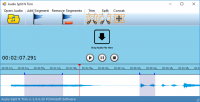
Audio Split & Trim is perfect for trimming audio, splitting audio into 2 or more segments, and concatenate 2 or more audios into 1. Easy to use with no learning curve.
Official Product Description
Overview
What Does PCWinSoft Audio Split & Trim Do?
PCWinSoft’s Audio Split & Trim is a focused utility designed for three primary audio manipulation tasks: trimming, splitting, and concatenating audio files. The software targets users who require quick edits without the complexity often found in full-scale digital audio workstations. It functions as a straightforward tool for managing audio content across various common formats.
The core feature set includes:
- Trimming: Users can select specific portions of an audio file to retain, effectively removing unwanted introductory or concluding segments from a recording.
- Splitting: This function allows for the division of a single audio file into two or more separate segments, which is useful for organizing long recordings or extracting specific clips for individual use.
- Concatenation: The tool can merge two or more audio tracks into a single, continuous file, facilitating the creation of seamless sequences or combined voice recordings.
The interface is built for immediate accessibility, prioritizing a workflow that requires no specialized training or technical background. By streamlining these specific functions, the software eliminates the need for navigating multi-track timelines or complex effect menus. Audio Split & Trim provides a practical solution for those needing to perform basic cuts and joins efficiently while maintaining a low learning curve.
Top 5 Reasons To Download PCWinSoft Audio Split & Trim
- Zero Learning Curve for Instant Productivity
- Surgical Precision in Trimming and Splitting
- Seamless Audio Concatenation for Flawless Merging
- High-Fidelity Output with Wide Format Support
- Lightweight System Footprint and Lightning-Fast Processing
In the modern digital landscape, we are constantly bombarded with audio content. Whether it is a three-hour-long podcast that you only need a specific ten-minute segment from, a collection of voice memos that need to be stitched together for a presentation, or a favorite song that needs to be shortened for a custom ringtone, the need for a reliable audio editor is more prevalent than ever. However, most users find themselves caught between two extremes: overly simplistic online tools that compromise privacy and quality, or professional-grade Digital Audio Workstations (DAWs) that require a degree in sound engineering just to navigate the interface. This is exactly where Audio Split & Trim steps in, offering a masterclass in functional simplicity. If you have been looking for a tool that respects your time and your system resources, this giveaway is something you cannot afford to miss. As a tech reviewer who has seen hundreds of "utility" apps come and go, I can confidently say that this software identifies a specific set of problems and solves them with clinical efficiency.
1. Zero Learning Curve for Instant Productivity
The biggest hurdle to adopting new software is the "activation energy" required to learn how it works. We have all downloaded apps that promised the world, only to open them and find a cluttered dashboard filled with obscure icons and hidden menus. Audio Split & Trim completely bypasses this frustration. From the moment you launch the application, the workflow is self-explanatory. The developers have leaned heavily into an intuitive design philosophy that prioritizes the user’s immediate goals. You don’t need to spend forty minutes watching YouTube tutorials or reading through a PDF manual to understand how to cut a clip. This is the definition of "pick up and play" software.
For the average user, time is the most valuable commodity. When you have a deadline or a creative spark, the last thing you want is for your software to get in the way. The interface of Audio Split & Trim is clean, focused, and purposeful. It avoids the "feature creep" that plagues so many modern applications, sticking instead to a refined toolkit that does exactly what it says on the tin. This lack of complexity is actually a sophisticated feature in itself. It allows you to move from an unedited raw file to a finished product in seconds. Whether you are a student, a busy professional, or a casual hobbyist, the ease of use offered here ensures that your technical skills—or lack thereof—will never be a bottleneck to your creativity.
Furthermore, this simplicity extends to the installation and setup process. Unlike bloated suites that require gigabytes of space and background services that slow down your boot time, this software is streamlined. It is designed for the user who wants to get the job done and then get back to their life. In a world of "subscription-model" software that constantly demands your attention and your credit card, having a dedicated, easy-to-use tool like this in your local arsenal is incredibly refreshing. It’s about empowerment through simplicity.
2. Surgical Precision in Trimming and Splitting
While the software is easy to use, don’t let that fool you into thinking it lacks power. The core functionality of Audio Split & Trim revolves around its ability to manipulate audio files with incredible precision. Trimming audio is more than just "cutting the ends off." It is about finding the exact millisecond where a breath ends and a word begins. This software provides the visual feedback and fine-tuned controls necessary to perform these edits with surgical accuracy. You can isolate specific sections of an audio track and remove unwanted noise, silences, or segments with ease.
The splitting feature is equally impressive. Imagine you have a long recording of a lecture or a business meeting. Navigating a single two-hour file is a nightmare. With Audio Split & Trim, you can effortlessly segment that large file into smaller, manageable chapters. You can split a file into two, three, or even dozens of individual segments. This is a game-changer for content creators who need to break down long-form interviews for social media "snackable" content or for music lovers who want to separate a single-track live album into individual songs. The software handles these transitions smoothly, ensuring that the start and end points of your new files are clean and free of digital pops or clicks.
The value of this precision cannot be overstated for anyone working with voice-over work or podcasting. Being able to quickly "trim the fat" from a recording allows for a much more professional end product. You aren't just deleting data; you are sculpting your audio. The tool provides a level of control that feels tactile and responsive, making the editing process feel less like a chore and more like a craft. If you’ve ever struggled with clunky sliders in other apps that jump ten seconds when you only wanted to move one, you will appreciate the granularity offered here.
3. Seamless Audio Concatenation for Flawless Merging
On the flip side of splitting is the art of concatenation—joining two or more audio files into one cohesive unit. Many tools that offer "merging" features often struggle with different bitrates or sample rates, resulting in a final file that sounds disjointed or has audible gaps at the junction points. Audio Split & Trim handles this process with remarkable grace. Whether you are combining several short voice memos into a single narrative or stitching together different movements of a musical piece, the concatenation engine ensures a seamless flow.
Think about the practical applications of this. For educators, you can merge various clips of instructions into a single cohesive guide for students. For creators, you can join an intro, a main segment, and an outro into a finished podcast episode without having to deal with the overhead of a multi-track editor. The software manages the heavy lifting of aligning the files and ensuring the transition is as smooth as possible. It’s a "set it and forget it" process: you select your files, arrange their order, and let the software work its magic.
What makes this feature particularly impressive in Audio Split & Trim is the speed at which it operates. Merging large audio files can be a CPU-intensive task, but this application is optimized for performance. It processes the concatenation efficiently, saving you from staring at a progress bar for half an hour. This efficiency makes it an ideal tool for "bulk" tasks where you might have dozens of clips that need to be unified. It brings a level of workflow organization that is hard to find in other lightweight utilities.
4. High-Fidelity Output with Wide Format Support
One of the biggest risks when using cheap or free audio tools is the "re-encoding" trap. Many low-quality editors will compress your audio every time you save a change, leading to a noticeable degradation in sound quality—a phenomenon known as digital generation loss. Audio Split & Trim is built with quality in mind. It respects the source material, ensuring that when you trim, split, or merge, the resulting output maintains the fidelity of the original file. This is crucial for anyone who values high-quality audio, from audiophiles to professional presenters.
Furthermore, the software boasts extensive support for various audio formats. We live in a world of fragmented file types—MP3, WAV, AAC, and many others. A tool that only supports one or two of these is essentially useless in a modern workflow. This software allows you to work with the most popular formats, giving you the flexibility to handle whatever files come your way. Whether you are pulling audio from a mobile device, a professional recorder, or a web download, Audio Split & Trim serves as a universal translator and editor.
The importance of "High-Fidelity Output" cannot be ignored when your work is meant to be shared. If you are creating a podcast that will be heard on headphones, every bit of clarity matters. If you are merging audio for a video project, you need that audio to be crisp and clear to match the visuals. By using a tool that prioritizes the integrity of the waveform, you are ensuring that your final product sounds professional and polished. This software doesn't just cut and paste; it preserves the soul of your sound.
5. Lightweight System Footprint and Lightning-Fast Processing
In an era of "bloatware," where even simple calculators seem to require hundreds of megabytes of RAM, Audio Split & Trim is a breath of fresh air. It is a lightweight application that packs a heavy punch. This means you can run it on almost any machine, from a high-end workstation to an older laptop you use for travel. It doesn't hog your system resources, which is a massive advantage if you are someone who likes to multi-task. You can have your browser open with twenty tabs, your word processor running, and still perform complex audio edits without your computer breaking a sweat.
This efficiency also translates to speed. Audio Split & Trim is optimized for modern processors, meaning that the actual "rendering" or "exporting" of your edited files happens in a flash. There is nothing more frustrating than finishing an edit and then having to wait for the software to "finalize" the file for ten minutes. This app minimizes that downtime, allowing for a rapid-fire editing workflow. It’s perfect for those "I need this done five minutes ago" moments that happen so often in professional environments.
Finally, the lightweight nature of the software makes it incredibly stable. Large, complex programs are prone to crashing, especially when handling large media files. Because Audio Split & Trim focuses on doing a few things perfectly rather than a hundred things poorly, it is remarkably robust. You won't find yourself losing work due to unexpected errors or system freezes. It is a reliable, "workhorse" utility that stays out of your way and does its job. For anyone who has ever lost an hour of work to a software crash, the stability of this app alone makes it worth the download.
Conclusion: In conclusion, Audio Split & Trim is a rare find in the software world. it is a tool that understands its purpose and executes it with precision, speed, and an unwavering commitment to user-friendliness. By stripping away the unnecessary complexities of professional audio suites, it provides a streamlined experience that empowers users to take control of their audio files without the stress of a steep learning curve. Whether you are looking to trim, split, or concatenate, this software offers the perfect balance of simplicity and power. Do not let this giveaway pass you by—every digital toolbox needs a reliable audio utility, and this is quite simply one of the best "no-nonsense" options available today. Download it, try it out, and you’ll quickly realize how often you’ll find yourself reaching for it in your daily digital life.

Reviews for PCWinSoft Audio Split & Trim
Click Here to Read Reviews for PCWinSoft Audio Split & Trim >> Click Here to Submit Reviews for PCWinSoft Audio Split & Trim >>