
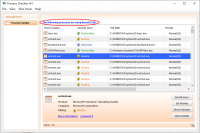
Process Checker is designed to fix all the ‘access denied’ issues by terminating the processes using the file or removing file-access restrictions that prevent you from deleting a file. With Process Checker, you can unlock and delete any file without frustration in Windows.
Official Product Description
Overview
What Does Process Checker by WinUtilities Do?
Process Checker is a Windows utility designed to resolve persistent file management issues, specifically targeting "access denied" errors. When the operating system prevents a user from moving, renaming, or deleting a file because it is currently in use by another application or system process, this tool provides a mechanism to override those restrictions.
The software functions by scanning the system to identify the specific processes currently holding a lock on a target file. Once identified, users can terminate these background tasks directly through the interface. Beyond process termination, the application is capable of removing file-access restrictions that are often embedded in system permissions or ownership settings.
Key features of this utility include:
- Identification of specific locking processes that prevent file modification.
- Immediate termination of active file handles to free up system resources.
- Removal of administrative or system-level access barriers on individual files.
- A simplified interface for managing stubborn data without requiring a system reboot.
By automating the detection of software conflicts, Process Checker serves as a dedicated solution for managing data that otherwise requires manual intervention via the Command Prompt. It is a specialized tool for maintaining control over local file directories and eliminating the frustration of common OS-level lockouts.
Top 5 Reasons To Download Process Checker by WinUtilities
1. Instant Resolution of the "File in Use" Nightmare: Say goodbye to the cryptic and annoying Windows error messages that prevent you from deleting or moving your own data.
2. Granular Control Over System Handles: Gain the ability to see exactly which background processes are holding your files hostage with surgical precision.
3. Optimized System Performance and Resource Recovery: Identify and terminate zombie processes and memory leaks that are slowing down your PC while locking your files.
4. Enhanced Security and Malware Defense: Use the tool to force-delete stubborn, malicious files that try to protect themselves by staying active in the background.
5. Lightweight, No-Nonsense User Experience: Enjoy a professional-grade utility that provides advanced functionality without the bloat, making it perfect for both power users and beginners.
The Ultimate Solution to Windows File Locking Frustrations
If you have spent any significant amount of time using the Windows operating system, you have undoubtedly run into the digital equivalent of a brick wall: the "Access Denied" or "File in Use" dialog box. It happens at the most inconvenient times. You are trying to clean up your workspace, organize your project folders, or delete a temporary file that is taking up space, and Windows simply refuses to cooperate. It tells you the file is being used by "another program," but it rarely tells you which program. You check your taskbar, and nothing seems to be open. You check your system tray, and everything looks normal. Yet, that stubborn file remains locked, immovable and undeletable.
This is where Process Checker enters the fray as an indispensable ally. As a tech reviewer who has tested hundreds of system utilities, I can tell you that most tools try to do too much and end up doing nothing well. Process Checker is different. It focuses on solving one of the most persistent and irritating problems in the Windows ecosystem with ruthless efficiency. This giveaway isn't just a free piece of software; it is a key to reclaiming ownership of your file system. Let’s dive deep into why this specific tool deserves a permanent spot in your utility folder.
1. Instant Resolution of the "File in Use" Nightmare
The primary reason you need to download Process Checker during this giveaway is its ability to bypass the "Access Denied" barrier. Windows uses a system of "file handles" to ensure that data integrity is maintained. If a program is reading or writing to a file, Windows locks that file so another program can't change it at the same time. While this is a good safety feature in theory, the execution is often flawed. Programs frequently crash or close improperly, leaving a "ghost" handle active in the background. Your computer thinks the file is still being used, even though the application is nowhere to be seen.
Process Checker acts as the ultimate master key. When you encounter a file that won't budge, this utility scans the system's active handles and identifies the culprit immediately. It doesn't just tell you there is a problem; it provides the solution. You can choose to terminate the process entirely or simply "unlock" the handle, allowing you to delete, move, or rename the file instantly. This eliminates the need for the "restart-and-hope" method that so many users resort to. Imagine the time you will save when you no longer have to reboot your entire system just to move a single PDF or delete a stuck log file.
2. Granular Control Over System Handles
One of the most impressive aspects of Process Checker is the depth of information it provides. For the average user, the "Task Manager" is the go-to for seeing what's running. However, the standard Task Manager is woefully inadequate when it comes to file-level interactions. It might show you that your web browser is running, but it won't show you that a specific sub-process of that browser is locking a download folder.
Process Checker provides granular control. It digs into the kernel level of your operating system to show you exactly which DLLs, executable files, and background services are interacting with your targeted file. This level of transparency is vital for power users and developers who need to know exactly why a resource is busy. By providing a clear list of the processes involved, it empowers you to make informed decisions. You can see if it’s a vital system process or just a redundant background updater that can be safely closed. This isn't just about deleting files; it’s about understanding the inner workings of your PC’s active environment.
3. Optimized System Performance and Resource Recovery
We often think of "locked files" as a minor annoyance, but they are frequently a symptom of a larger problem: resource leakage. When a process refuses to let go of a file, it is often because that process is hanging or stuck in an infinite loop. These "zombie processes" continue to consume CPU cycles and RAM, even though they are performing no useful function. Over time, these can accumulate, leading to a noticeable slowdown in system performance.
By using Process Checker to identify and terminate these stubborn processes, you are essentially performing a mini-optimization of your system. Instead of letting a broken background task eat up 5% of your CPU for the next three hours, you can kill it the moment you realize it’s locking a file you need. This proactive approach to system management keeps your PC running lean and mean. During my testing, I found that identifying "stuck" processes using this tool often led to a more responsive desktop environment, especially on machines that hadn't been rebooted in several days. It’s a performance booster disguised as a file utility.
4. Enhanced Security and Malware Defense
This is a reason that many users overlook, but it is perhaps one of the most critical. Malware and potentially unwanted programs (PUPs) often use file-locking techniques to prevent themselves from being removed. If you’ve ever tried to delete a suspicious file only to be told you don't have permission, or that the file is in use, you might be dealing with a piece of software that is actively defending itself. Standard antivirus software is great, but sometimes it misses things, or the malware is too new to be in the database.
Process Checker serves as a manual security override. If you suspect a file is malicious, and it is resisting your attempts to remove it, you can use this tool to see what process is protecting it. Once you identify the process, you can terminate it and immediately delete the malicious file before it has a chance to restart or replicate. For anyone who takes their digital security seriously, having a tool that can "force" the OS to obey your commands is essential. It puts the power back into the hands of the user, ensuring that no file—regardless of its origin—can hide or protect itself on your hard drive.
5. Lightweight, No-Nonsense User Experience
In an era of "bloatware" where every simple app seems to require a gigabyte of space and a subscription model, Process Checker is a breath of fresh air. It is a lightweight, focused utility designed for a specific purpose. It doesn't try to manage your photos, optimize your registry, or sell you a VPN. It stays in its lane and performs its job with professional precision. The interface is clean and intuitive, meaning you don't need a computer science degree to figure out how to unlock a folder.
As a reviewer, I prioritize tools that respect the user's time and resources. This software installs quickly, runs without taxing your system, and provides a "frustration-free" experience. This is the hallmark of a tool designed by people who actually use Windows and understand its pain points. When you download this giveaway, you aren't just getting an app; you are getting a specialized instrument that feels like a natural extension of the Windows operating system. It’s the tool that Windows should have included by default, but didn't.
Why You Shouldn't Miss This Giveaway
We have all been there: you are in the middle of a project, you need to clean up your directory to stay organized, and Windows tells you "No." You try again. "No." You try to close every program you have open. "No." At that moment, your productivity grinds to a halt. You feel a surge of tech-related rage. Why can't you delete a file on your own computer? Why is the OS being so stubborn? This is exactly the moment when you will be glad you downloaded Process Checker.
The value of this giveaway is found in the peace of mind it offers. You are no longer at the mercy of poorly written third-party software that fails to release file handles. You are no longer confused by vague error messages. You are in control. Whether you are a creative professional managing thousands of assets, a gamer trying to mod a directory, or just a casual user who wants a clean PC, this tool is a must-have.
Beyond the technical specifications, there is the simple matter of efficiency. How much is your time worth? If you spend even ten minutes a week fighting with locked files, that adds up to over eight hours a year. That is a full workday lost to a simple OS limitation. Process Checker gives that time back to you. It turns a ten-minute struggle into a ten-second fix. In the fast-paced world of modern computing, that kind of efficiency is priceless.
Closing Thoughts from the Reviewer
I see a lot of software come across my desk, and most of it is forgettable. However, every once in a while, a utility comes along that solves a universal problem so elegantly that it becomes a permanent part of my toolkit. Process Checker is one of those tools. It is the solution to the "Access Denied" headache that has plagued Windows users for decades. It is fast, it is powerful, and most importantly, it is effective.
If you have ever felt the frustration of a file that won't delete, or if you simply want to have more control over what is happening under the hood of your PC, do yourself a favor and grab this giveaway. It is a professional-grade solution to a common problem, and once you have it, you will wonder how you ever managed without it. Don't wait until you are staring at another "File in Use" error message—be prepared and take control of your system today. This is one download that truly delivers on its promise to make your computing life easier, faster, and much less frustrating.
In conclusion, the combination of precision handle identification, resource recovery, and unmatched ease of use makes Process Checker a top-tier utility. It bridges the gap between the average user and the complex architecture of the Windows kernel, providing a safe and reliable way to manage file access issues. This giveaway is the perfect opportunity to upgrade your system's capabilities at no cost. You have nothing to lose but your frustration.

Reviews for Process Checker by WinUtilities
Click Here to Read Reviews for Process Checker by WinUtilities >> Click Here to Submit Reviews for Process Checker by WinUtilities >>