What Does Slidewise PowerPoint Add-in Do?
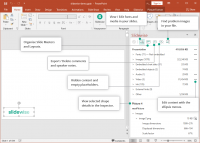
Slidewise is a specialized PowerPoint add-in designed to streamline the auditing and optimization of presentation files. The tool functions as an advanced file inspector, scanning .pptx documents for technical inconsistencies and bloat that often remain hidden during standard editing. It provides a granular view of a presentation’s internal structure, categorizing elements like images, fonts, and embedded objects for quick review.
With this software, users can execute several critical maintenance tasks efficiently:
- Optimize Resources: Identify and replace oversized images or media files that cause sluggish performance or large file sizes.
- Standardize Typography: Locate every instance of a specific font and replace it globally to ensure brand consistency across the entire deck.
- Clean Layouts: Detect and remove unused slide masters, hidden shapes, and empty placeholders that clutter the file.
- Merge Decks: Simplify the process of combining multiple presentations by highlighting conflicting styles and redundant data.
By integrating directly into the Microsoft PowerPoint interface, Slidewise allows for immediate remediation of issues. It replaces manual searching with a central dashboard, making it easier to prepare professional decks for distribution. The software essentially acts as a quality assurance layer, ensuring that the final file is technically sound, lightweight, and visually uniform across all slides.
Top 5 Reasons To Download Slidewise PowerPoint Add-in
- Unprecedented Transparency into File Composition
- Instant and Global Font Management
- Precision Media and Image Optimization
- Seamless Cleanup of "Frankenstein" Presentations
- Automated Detection of Hidden Bloat and Errors
If you have ever spent a long night wrestling with a PowerPoint presentation that refused to behave, you know the specific kind of frustration I am talking about. We have all been there: the file size is inexplicably massive, the fonts are inconsistently jumping between Calibri and some obscure corporate typeface you do not even have installed, and you have no idea why your computer is lagging every time you switch slides. For years, the solution has been a tedious manual search-and-destroy mission through every single slide, every master layout, and every hidden corner of the file structure. But what if you had a tool that acted like an X-ray machine for your decks? That is exactly what Slidewise offers, and why this giveaway is something every professional, student, and designer needs to jump on immediately.
As a tech reviewer who has seen countless add-ins and productivity tools come and go, I am rarely genuinely surprised by software. Most "optimization" tools are just fancy interfaces for features that already exist within the native app. Slidewise is different. It provides a level of forensic detail that PowerPoint itself simply does not offer. It is a powerful, lightweight, and incredibly intuitive companion that sits right inside your workflow, turning a chaotic mess of slides into a streamlined, professional asset. Let us dive into the five core reasons why Slidewise is the ultimate "must-download" for anyone who uses PowerPoint regularly.
1. Unprecedented Transparency into File Composition
The biggest problem with modern presentations is that they are essentially "black boxes." When you save a 50MB PowerPoint file, you are often left guessing why it is so large. Is it that high-resolution hero image on slide five? Is it an embedded video that you thought you deleted? Or is it a series of complex vector graphics that are bogging down the rendering engine? Without a tool like Slidewise, you are essentially flying blind. You might try to compress all pictures, but that often destroys the quality of images you actually need to keep sharp. It is a blunt instrument approach to a problem that requires a scalpel.
Slidewise gives you that scalpel. The moment you open the add-in, it provides an organized, hierarchical view of every single element inside your presentation. It breaks down the file size by category: images, fonts, embedded objects, and media. You can see exactly how many kilobytes or megabytes each specific item is contributing to the total file size. This level of transparency is a game-changer. It allows you to pinpoint the "bad actors" in your deck instantly. Instead of guessing, you can look at a list and say, "Oh, that one logo on the master slide is actually a 10MB TIFF file." With one click, you can navigate directly to that object and fix it. This is not just about saving space; it is about understanding your work on a structural level, ensuring that your presentation is lean, mean, and ready for distribution.
For power users who manage hundreds of slides across multiple projects, this transparency is the difference between a productive afternoon and a night of troubleshooting. By providing a clear, sortable index of content, Slidewise transforms the way you interact with your files. You stop treating your deck as a series of visual snapshots and start treating it as a managed data structure, which is exactly what a professional-grade presentation should be.
2. Instant and Global Font Management
Fonts are the silent killers of great presentations. We have all experienced the "missing font" nightmare: you design a beautiful deck using a specific typeface, you send it to a client or colleague, and they open it to find a jumbled mess of substituted fonts that ruin the alignment and aesthetic. Or perhaps you are working on a deck that has been passed through ten different people, and now it contains a chaotic mixture of Arial, Helvetica, and three different versions of Open Sans. Manually hunting down every text box to unify fonts is a soul-crushing task that is prone to human error.
Slidewise solves this by offering a centralized font management hub. It lists every single font used in your presentation—even those hidden deep within grouped objects or master slides that are notoriously difficult to reach. If you see a font that should not be there, Slidewise allows you to replace it globally with a single click. Think about the time savings here. Instead of clicking through 100 slides to change a rogue font, you simply select the replacement, and Slidewise handles the heavy lifting across the entire file. It ensures brand consistency and professional polish in seconds.
Furthermore, it identifies "problem fonts" that might not be installed on your system or fonts that cannot be embedded due to licensing restrictions. This proactive approach prevents the embarrassment of presenting a broken deck in front of an audience. By giving you total control over typography, Slidewise ensures that your message is delivered exactly as you intended it to look, regardless of whose computer is running the show. It is the kind of peace of mind that you cannot put a price on, but getting it as part of this giveaway makes it an absolute steal.
3. Precision Media and Image Optimization
We live in an age of high-resolution imagery, and while that is great for visual impact, it is the primary cause of bloated PowerPoint files. Most users simply drag and drop images into their slides, unaware that a 20MB JPEG is being stored in the file's background, even if they have resized it to fit in the corner of a slide. PowerPoint's internal "Compress Pictures" tool is often too aggressive or not aggressive enough, and it lacks the granularity needed for professional work. It often applies settings to the whole document, which can be disastrous if you need some images to remain high-res for printing while others can be compressed for email.
Slidewise approaches media optimization with surgical precision. It shows you the original size of every image versus its "on-slide" size. If you have an image that is vastly larger than it needs to be, Slidewise alerts you. This allows you to make informed decisions about which assets to compress and which to keep in high fidelity. It also helps you find and remove cropped-out data. When you crop an image in PowerPoint, the "hidden" parts of the image are often still stored in the file. Slidewise identifies these inefficiencies, allowing you to purge unnecessary data without losing the visual quality you need.
But it is not just about images. Slidewise also tracks down embedded videos and audio files, which are often the biggest contributors to file bloat. By seeing exactly where these files are and how much space they occupy, you can decide to link to external files or use more efficient formats. For anyone who has ever tried to email a presentation only to have it bounce back because it exceeded the 25MB limit, Slidewise is the ultimate solution. It empowers you to create visually stunning decks that remain small enough to share effortlessly.
4. Seamless Cleanup of "Frankenstein" Presentations
In the corporate world, very few presentations are built from scratch. Most are "Frankenstein" creations—stitched together from various other decks, older templates, and slides borrowed from different departments. This leads to a massive accumulation of "junk" in the background. You end up with multiple master slides, dozens of unused layout variations, and a disorganized mess of styles that make the file sluggish and difficult to edit. Cleaning this up manually is a nightmare because you never know if deleting a master slide will break something three slides down the line.
Slidewise is the perfect tool for checking, combining, and cleaning presentations. It provides a clear overview of the "structure" of your deck, including all master slides and layouts. It allows you to see which layouts are actually being used and which are just taking up space. This makes the process of merging decks infinitely smoother. You can bring in slides from another presentation and then use Slidewise to quickly unify the styles and delete the redundant master slides that usually come along for the ride. It turns a messy, multi-source document into a cohesive, single-source presentation.
This "cleaning" aspect of the software is where it truly shines as a productivity tool. It saves hours of busywork. Instead of fighting with PowerPoint's interface to find where a specific layout is being applied, Slidewise shows you exactly which slides are using which master. You can then reassign slides to the correct layouts and purge the leftovers. The result is a clean, professional file that is easy for anyone else to edit and maintain. If you frequently collaborate on decks, this feature alone makes Slidewise an essential part of your toolkit.
5. Automated Detection of Hidden Bloat and Errors
There are many things that can go wrong with a PowerPoint file that are not immediately visible to the naked eye. From broken links to embedded OLE objects that no longer work, to hidden metadata that could be a security risk, presentations are often full of "hidden" issues. These problems might not show up while you are editing, but they can cause the application to crash during a live presentation or make the file impossible to open on another machine. Slidewise acts as an automated health check for your slides, pinpointing these difficult-to-spot issues before they become disasters.
The add-in scans for things like "Ghost Text Boxes"—those tiny, empty boxes that accidentally get created and make selecting other objects difficult. It finds external links that might be broken or pointing to files on a local drive that won't be accessible to others. It even helps you identify if you have multiple versions of the same image stored in the file, which often happens when you copy and paste slides. By identifying these redundancies and errors, Slidewise helps you maintain a "healthy" file that is less likely to become corrupted or sluggish over time.
In the style of a tech reviewer, I cannot emphasize enough how much this changes your relationship with the software. We often treat PowerPoint as a temperamental beast that we just have to live with. Slidewise changes that dynamic. It gives you the control and the data you need to master the medium. You are no longer just a user; you are an optimizer. You are not just making slides; you are engineering a professional communication tool. This giveaway is your chance to upgrade your workflow from "struggling to get it done" to "effortless professional mastery."
Conclusion
Slidewise is more than just a simple add-in; it is a comprehensive management suite for anyone who takes their presentations seriously. By providing visibility, control, and automation, it removes the friction and frustration that have defined the PowerPoint experience for decades. Whether you are looking to shave 50% off your file size, ensure your fonts are perfect, or clean up a messy collaborative deck, Slidewise provides the tools to do it effortlessly. Don't miss out on this giveaway. Download it, install it, and watch as your presentation workflow transforms from a chore into a streamlined, high-efficiency process. Your decks will be smaller, faster, and more professional—and your stress levels will thank you for it.
The features described in this article represent a significant leap forward in presentation management. By focusing on the structural integrity of your files, Slidewise ensures that your hard work is never undermined by technical glitches or file bloat. It is a rare example of a tool that delivers exactly what it promises: a faster, cleaner, and more powerful way to work with PowerPoint.


Reviews for Slidewise PowerPoint Add-in
Click Here to Read Reviews for Slidewise PowerPoint Add-in >> Click Here to Submit Reviews for Slidewise PowerPoint Add-in >>