What Does Videomate Do?
Videomate is a versatile video processing utility designed for downloading, converting, and managing digital media. The software supports a wide range of resolutions, including 4K UHD, HD, and SD, allowing users to transcode files into various popular formats compatible with diverse hardware devices. Beyond standard conversion, the application includes a specialized feature for transforming 2D video content into 3D formats.
The toolset extends to video editing and customization. Users can retouch and enhance footage through built-in adjustment options, facilitating a more personalized viewing experience. For those needing to extract specific frames, the software includes a snapshot function to capture instant moments during playback. Technical features also include support for multi-track video output, ensuring that complex files with multiple audio or subtitle streams are preserved during the conversion process.
Connectivity features allow users to access video files stored on a local computer via a Wi-Fi connection, facilitating wireless media sharing across different devices within a network. Key features provided by the software include:
- Complete digital video management for handling various media formats and resolutions.
- Device compatibility to expand movie viewing across mobile and desktop platforms.
- Enhanced 4K support for high-resolution content playback and conversion.
- Video retouching tools to customize visual quality and add effects.
- Multi-track output for maintaining complex media streams and audio tracks.
Top 5 Reasons To Download Videomate
Before we dive into the deep end of what makes this software a must-have for your digital arsenal, let’s look at the core benefits. If you are looking for a reason to hit that download button, here are the top five reasons why Videomate stands out in a crowded market of media utilities:
- All-in-One Download and Conversion Power: A seamless bridge between online content and your local library, supporting everything from standard SD to 4K UHD.
- Seamless Multi-Device Compatibility: Optimized presets that ensure your movies work on every screen you own, from smartphones to game consoles.
- Professional-Grade Video Editing and 3D Conversion: The ability to retouch your footage and transform standard 2D videos into immersive 3D experiences.
- Wireless Local Sharing via WiFi: A revolutionary way to access and manage your video files across your local network without fumbling for USB cables.
- Advanced Multi-Track Preservation and 4K Enhancement: High-fidelity audio and video tools that maintain the integrity of multi-language tracks and boost 4K enjoyment.
Now, let’s get into the nitty-gritty. As someone who spends a significant amount of time testing software, I have seen dozens of video converters come and go. Most of them are clunky, slow, or filled with more bloatware than actual features. However, every once in a while, a tool comes along that feels like a Swiss Army knife for your digital life. Videomate is that tool. In the following sections, I am going to break down exactly why this software deserves a permanent spot on your hard drive.
1. All-in-One Download and Conversion Power
We live in an age of fragmented content. You might find a documentary you love on one site, a tutorial on another, and a high-definition movie file on your backup drive that your current media player simply refuses to open. The frustration of "File Format Not Supported" is a ghost that haunts many of us. This is where Videomate steps in as a heavy hitter. It doesn’t just convert files; it acts as a gateway to your entire media collection.
The software handles 4K UHD, HD, and SD videos with ease. In the world of tech, 4K is the gold standard, but it often comes with massive file sizes and complex codecs that can choke older systems or mobile devices. Videomate allows you to take those massive, high-bitrate files and downscale or transcode them into any popular format you need. Whether it is MP4, MKV, AVI, or MOV, the software handles the heavy lifting without sacrificing the visual fidelity that makes 4K so stunning in the first place.
But it isn’t just about conversion. The ability to download videos directly within the software changes the workflow entirely. Instead of using sketchy browser extensions or third-party websites that bombard you with pop-up ads, you have a clean, integrated solution. You can pull content from the web and immediately queue it for conversion into the format of your choice. It is a streamlined process that saves time and, more importantly, keeps your computer safe from the risks associated with less reputable downloading methods.
2. Seamless Multi-Device Compatibility
How many times have you tried to move a movie from your PC to your tablet, only to find that the audio is out of sync or the video won't play at all? It is a common headache for anyone who enjoys media on the go. One of the standout features of Videomate is its commitment to "expanding the movie experience to all devices at will." This isn't just marketing speak; it’s a core functionality that solves a real-world problem.
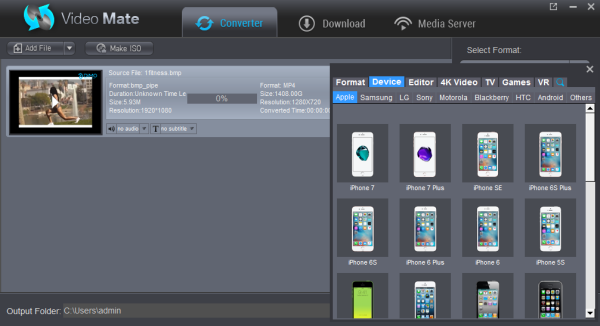
The software comes pre-loaded with an extensive library of device profiles. If you have an iPhone, an Android flagship, a PlayStation 5, or a smart TV, you don’t need to be an expert in bitrates, frame rates, or resolutions. You simply select your device from the list, and Videomate automatically adjusts the settings to ensure the video plays perfectly. This "set it and forget it" approach is a breath of fresh air for users who want high-quality results without having to earn a degree in video engineering.
Furthermore, this compatibility extends to the "Digital Video Entertainment" philosophy. By making your library portable, you are no longer tethered to your desk. You can take your favorite films on a plane, a train, or just to your couch, knowing that the file has been optimized for the specific screen size and processing power of your device. It maximizes the value of your existing hardware by ensuring your content is always accessible, regardless of the ecosystem.
3. Professional-Grade Video Editing and 3D Conversion
Sometimes, simply converting a video isn't enough. Maybe the footage you captured on your phone is a bit too dark, or perhaps there is a distracting element at the edge of the frame. Videomate includes a suite of retouching and enhancement tools that allow you to polish your videos before you finalize the conversion. You can trim clips, crop out unwanted areas, and add watermarks to protect your original content. It turns a basic utility into a creative workspace.
But the real "wow" factor here is the 2D to 3D conversion. While 3D TVs may have had their peak in the living room, the rise of VR headsets and personal cinema displays has revitalized the interest in 3D content. Videomate allows you to take any standard 2D video and transform it into a fantastic 3D movie. This isn't a gimmick; the software uses sophisticated algorithms to create depth maps that simulate a true cinematic 3D experience. It’s a fantastic way to breathe new life into your old movie collection or home videos.
Additionally, the Snapshot Instant Moment feature is incredibly handy. If you’re watching a high-quality 4K video and see a frame that would make a perfect wallpaper or a social media post, you can capture it with a single click. These high-resolution snapshots ensure you never miss a beat when it comes to preserving memories from your video files. It is these small, thoughtful additions that elevate the software from a "tool" to an "experience."
4. Wireless Local Sharing via WiFi
In my opinion, this is the hidden gem of Videomate. We have all been there: you have a video on your computer that you want to watch on your phone, but you can’t find a USB cable, or your cloud storage is full. Videomate solves this by allowing you to access video files on your local computer via a WiFi connection. This turns your PC into a localized media server, accessible by other devices on your network.
The beauty of this feature lies in its simplicity. By removing the physical barrier of cables, you make your media library fluid. You can be lying in bed and stream a movie directly from your desktop in the other room. This functionality effectively bridges the gap between your storage and your consumption. It’s about convenience and freedom. In a world where we are increasingly moving toward wireless everything, having a video converter that understands the importance of network accessibility is a game-changer.
This feature also plays into the "Complete Solution" aspect of the software. It isn't just about changing a file extension; it’s about managing how that file moves through your life. By leveraging your home’s WiFi, Videomate ensures that your high-quality conversions are actually used and enjoyed, rather than just sitting in a folder on a hard drive gathering digital dust. It makes your media library feel "alive" and integrated.
5. Advanced Multi-Track Preservation and 4K Enhancement
For the true cinephiles and tech enthusiasts, the details matter. Most basic converters will flatten a video, stripping away extra audio tracks or subtitles in the name of a smaller file size. Videomate, however, offers Multi-track Video Output. This means if you have a movie with multiple language tracks—say, English, French, and Japanese—you can choose to preserve those tracks in the output file. This is essential for anyone who values the original director’s cut or requires specific subtitle tracks for accessibility.
This attention to detail extends to the 4K movie enjoyment. Converting 4K isn't just about the resolution; it's about the color depth and the clarity. Videomate is designed to enhance that enjoyment by ensuring the conversion process doesn't introduce artifacts or "muddy" the image. When you are dealing with high-end displays, every pixel counts. This software treats your high-resolution footage with the respect it deserves, maintaining the sharpness and vibrancy that you expect from UHD content.
The multi-track feature is also a massive win for home theater setups. If you are running a complex audio system, you want to make sure your converted files still carry the high-quality audio data required for surround sound. Videomate’s ability to handle these complex data streams makes it a professional-level tool hidden inside a user-friendly interface. It caters to the casual user who just wants their video to "work," while providing the depth and control that the power user craves.
Conclusion: Why You Should Act Now
Software giveaways are a dime a dozen, but it is rare to find one that offers this much utility in a single package. Videomate is more than just a converter; it is a downloader, an editor, a 3D creator, and a wireless media hub. It addresses the most common pain points of digital media management—compatibility, accessibility, and quality—and wraps them in a package that is easy to navigate.
If you have a collection of videos that you can’t play on your new phone, or if you have ever wanted to try out 3D movies without buying an expensive new setup, this is your chance. The ability to enhance 4K movies and manage them over WiFi is worth the download alone. When you factor in the editing tools and the snapshot features, it becomes clear that this is a comprehensive suite for anyone who takes their digital entertainment seriously.
As a tech reviewer, I always look for the "killer app"—the one piece of software that replaces three or four others. Videomate is exactly that. It replaces your downloader, your basic editor, and your file transfer utility. It simplifies your workflow and maximizes your enjoyment of your media.
Don't let your videos stay trapped in formats you can't use or on devices you can't access. Take control of your digital library and experience your movies the way they were meant to be seen—in high definition, on any device, and with total creative control. This giveaway is a golden opportunity to upgrade your tech life without the usual hurdles. Download it, explore the features, and I guarantee you’ll wonder how you ever managed your video collection without it.
In summary, Videomate provides a Complete Solution for Your Digital Video Entertainment. Whether you are looking to Retouch and Enhance your favorite clips or simply want to Expand Movie Experience to All Devices, this software has the tools to make it happen. The inclusion of Multi-track Video Output and Local WiFi Access proves that the developers have thought about the actual needs of the modern user. This isn't just another app; it’s the upgrade your media library has been waiting for.


Reviews for Videomate
Click Here to Read Reviews for Videomate >> Click Here to Submit Reviews for Videomate >>