What Does Ashampoo WinOptimizer 27 Do?
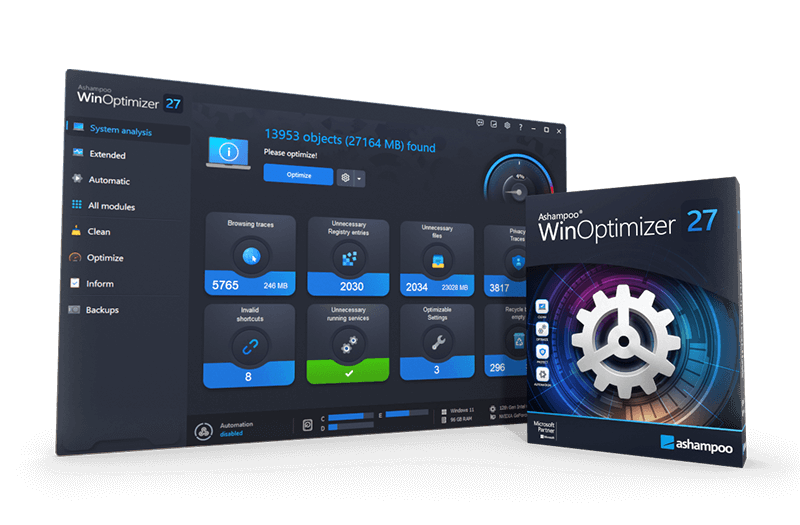
Ashampoo WinOptimizer 27 is a comprehensive system utility suite featuring over 30 modules designed to enhance Windows performance, privacy, and stability. The software focuses on automating maintenance tasks while providing deep diagnostic tools for advanced users. By analyzing the operating system during startup, the tool identifies unnecessary files and configuration issues that may hinder performance.
Key technical capabilities include:
- Performance Optimization: The Live Tuner and Profile Booster manage CPU and memory distribution to accelerate application launches and resource efficiency.
- System Cleaning: Modules like Auto-Clean and the empty folder finder remove digital clutter, including browsing traces, temporary files, and installation residues.
- Diagnostics: The Crash Analyzer examines hidden Windows error reports to provide insight into system failures and stability issues.
- Customization: Users can access Windows GodMode and a dedicated tweaking module to alter the operating system’s behavior and appearance.
The latest version introduces improved memory management for 64-bit systems and updated cleaning profiles for current web browsers and Windows builds. It also features a deletion history to track past cleaning activities and allows for custom file scheduling within the automation modules. Dashboards provide quick access to these tools, offering real-time data on system health and resource allocation.
Top 5 Reasons To Download Ashampoo WinOptimizer 27
- Next-Gen Automation and the Profile Booster: Experience intelligent resource management that prioritizes your active tasks for maximum speed.
- The Ultimate Digital Janitor: Comprehensive cleaning modules that find hidden junk, empty folders, and privacy-leaking traces that other tools miss.
- Unprecedented System Insight with Crash Analyzer: Finally understand why your PC crashes with deep-dive reports into hidden Windows error logs.
- GodMode and Total Customization: Take absolute control over Windows behavior and appearance with a single click.
- Modern 64-bit Architecture and Stability: A faster, more stable experience optimized specifically for modern hardware and the latest Windows versions.
Let’s be honest for a second: we have all been there. You unbox a brand-new PC, and for the first few weeks, it feels like a lightning-fast supercar. Programs snap open instantly, the boot time is mere seconds, and everything feels fluid. But give it six months, a year, or two, and that supercar starts feeling more like a rusty bicycle with a flat tire. Windows has a notorious habit of gathering "digital sludge"—temporary files, broken registry entries, unnecessary background processes, and a mountain of cache files that do nothing but slow you down. This is exactly where Ashampoo WinOptimizer 27 steps in, and if you have the chance to grab this as a giveaway, you shouldn't just walk to the download button—you should sprint.
As a tech reviewer, I see a lot of "optimizer" software. Quite frankly, a lot of it is "snake oil"—apps that do nothing but show you scary red icons to convince you to buy a subscription. Ashampoo WinOptimizer 27 is the complete opposite. It is a Swiss Army knife of system utility, packed with over 30 individual modules designed to actually do something. It isn't just about deleting files; it’s about fine-tuning the very engine of your operating system. Here is a deep dive into why this specific version is a mandatory addition to your digital toolkit.
1. Next-Gen Automation and the Profile Booster
The biggest problem with system maintenance is that most of us forget to do it. We wait until the computer is crawling before we think about "cleaning" it. Ashampoo WinOptimizer 27 solves this with its revamped automation modules. The Live Tuner has been significantly enhanced in this version. Think of the Live Tuner as a proactive traffic controller for your CPU. When you launch a demanding application—like a video editor or a high-end game—the Live Tuner detects the launch and shifts system priorities in real-time. It ensures that the app you are actually using gets the lion's share of your processor's attention, leading to noticeably faster application launches and smoother performance.
But the real star of the show in version 27 is the Profile Booster. Every user is different. A gamer needs different system resources than an office worker or a professional photographer. The Profile Booster allows for custom profiles that adjust your system's resource distribution based on what you are doing right then. It optimizes memory efficiency and processor cycles to match your specific use case. This isn't just a "one size fits all" boost; it is a surgical adjustment of your hardware's capabilities. When you combine this with the Auto-Clean feature—which now uses new technology to delete unnecessary files the very moment they are no longer needed—you get a PC that essentially maintains itself. You don't have to remember to run a scan every Sunday; the software is working silently in the background, keeping the "sludge" from ever building up in the first place.
2. The Ultimate Digital Janitor
If you were to look into the hidden corners of your hard drive right now, you would likely be shocked. Windows hides away gigabytes of "installation residues," temporary internet files, and telemetry data. Ashampoo WinOptimizer 27 features three core cleaning modules that have been the gold standard for years, but in this version, they have been completely overhauled with brand new cleaner profiles. These profiles are specifically designed to support the latest versions of Windows 11 and all major browsers.
What makes this cleaner different? It goes deeper. It doesn't just clear your cookies; it finds and safely deletes empty folders, which can clutter your file system and slow down search indexing. It hunts down those pesky "browsing traces" that browsers leave behind, which is a massive win for privacy. More importantly, it uses a sophisticated System Analysis tool at program start-up. This gives you a high-level overview of your system's health and identifies immediate areas for optimization. The cleaning process is safe, fast, and incredibly thorough. It’s the difference between sweeping the middle of the room and doing a full spring cleaning that involves moving the furniture and scrubbing the baseboards. With the new deletion history feature, you can even look back and see exactly what was removed, giving you total transparency and peace of mind.
3. Unprecedented System Insight with Crash Analyzer
There is nothing more frustrating than the "Blue Screen of Death" or an application that simply vanishes into thin air without an error message. Windows actually keeps logs of these events, but for the average user, those logs are buried in the "Event Viewer," a tool so cryptic it feels like it was written in an ancient, forgotten language. Ashampoo WinOptimizer 27 introduces the Crash Analyzer, and for me, this is a game-changer.
The Crash Analyzer acts as a digital detective. It examines those hidden Windows crash and error reports and presents them in a way that actually makes sense. Instead of an obscure hex code, you get insights into what might be causing the instability. Is it a faulty driver? A memory conflict? A specific Windows update? By giving you a glimpse into the "under the hood" failures of your OS, it empowers you to fix issues rather than just suffering through them. This kind of diagnostic power was previously reserved for IT professionals using expensive enterprise tools. Having it built directly into your optimizer is a massive value-add that can save you hours of troubleshooting and potentially expensive trips to the repair shop.
4. GodMode and Total Customization
Windows is a powerful operating system, but Microsoft likes to keep a lot of the best settings hidden behind layers of menus or obscure registry keys. Ashampoo WinOptimizer 27 includes a Tweaking module that lets you customize the behavior and appearance of Windows to your exact liking. Whether you want to disable annoying animations, change the way the taskbar behaves, or shut down telemetry services that "phone home" to Microsoft, the Tweaking module puts the power back in your hands.
The coolest feature for power users, however, is the Windows GodMode button. For those who aren't familiar, GodMode is a hidden Windows feature that consolidates hundreds of settings and control panel options into a single, searchable folder. Usually, you have to create a specifically named folder with a long string of code to unlock it. WinOptimizer 27 gives it to you at the click of a button. Between the Tweaking module and GodMode, you can finally make Windows look, feel, and act exactly the way you want it to. You can eliminate the "bloat" that comes pre-installed and streamline your workflow by surfacing the settings you actually use.
5. Modern 64-bit Architecture and Stability
A system optimizer is only useful if it doesn't slow down the system it's trying to help. Many older optimization tools were built on 32-bit architectures, which means they can't fully utilize the memory (RAM) available in modern computers. Ashampoo WinOptimizer 27 has been optimized with improved memory management on 64-bit systems. This means the program itself runs faster, uses resources more efficiently, and is incredibly stable.
This technical foundation is vital because it allows the software to handle the massive amounts of data found on modern multi-terabyte drives. Whether you are scanning a 4TB SSD or managing 32GB of high-speed RAM, WinOptimizer 27 scales to match your hardware. It feels snappy and responsive, which is exactly what you want from a tool designed to make your other apps feel snappy and responsive. Furthermore, the dashboards provide up-to-date information at a glance, allowing for quick access to the main modules without digging through menus. The software is built for the modern era of computing—supporting the latest Windows updates and hardware configurations—ensuring that it won't become obsolete the next time Microsoft pushes a major update.
Conclusion: Why You Need This Giveaway
In the world of PC maintenance, there are tools that pretend to help, and then there is Ashampoo WinOptimizer 27. This isn't just a utility; it's a comprehensive health suite for your computer. It addresses the three pillars of a great computing experience: speed, privacy, and stability. By combining high-level automation like the Profile Booster with deep-dive diagnostics like the Crash Analyzer, Ashampoo has created a tool that is as useful for my grandmother as it is for a seasoned sysadmin.
Think about the value here. You're getting a tool that can reclaim gigabytes of lost disk space, protect your privacy from prying eyes, and potentially fix the crashes that have been ruining your productivity. You're getting the "GodMode" control that lets you bend Windows to your will. And perhaps most importantly, you're getting a tool that manages your PC's resources in real-time, ensuring that you get every bit of performance out of the hardware you paid for.
When software this powerful is offered as a giveaway, it’s a rare opportunity to upgrade your digital life for free. Most people ignore their PC's health until it's too late and they're forced to perform a clean reinstallation of Windows, losing their files and settings in the process. Don't be that person. Download Ashampoo WinOptimizer 27, run that first System Analysis, and watch as your PC regains that "day one" speed. It is discreet, it is powerful, and it is exactly what your Windows installation has been begging for. Don't miss out—give your PC the optimization it deserves.

Reviews for Ashampoo WinOptimizer 27
Click Here to Read Reviews for Ashampoo WinOptimizer 27 >> Click Here to Submit Reviews for Ashampoo WinOptimizer 27 >>