What Does Watermark Plus for Mac Do?
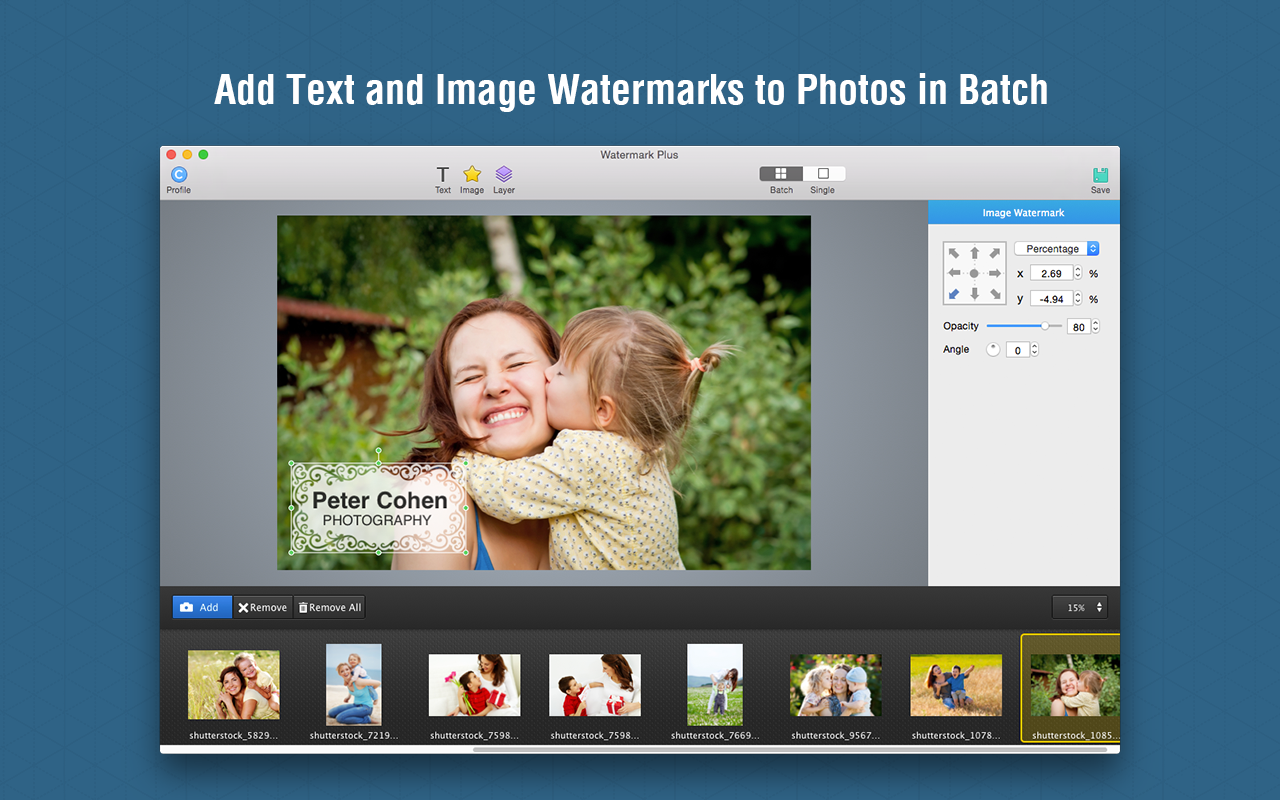
Watermark Plus is a specialized bulk photo converter designed to streamline the process of watermarking, resizing, and renaming large batches of images. The software supports common file formats, including JPEG, TIFF, BMP, and PNG, while maintaining a WYSIWYG (What You See Is What You Get) interface for real-time previews during the editing process.
The application allows users to apply multiple text, image, script, or symbol watermarks simultaneously. Key features include 17 built-in watermark profiles and the ability to save custom configurations for repeated use. For precise control, the Single Mode enables users to adjust the position of a watermark on individual photos within a batch, while an auto-fit function automatically scales stamps to suit different image dimensions. Users can also incorporate metadata, such as EXIF info or creation dates, directly into their stamps as info stamps.
Beyond security features, the tool provides robust bulk processing capabilities. Users can resize images by width, height, or percentage and rename files using wildcards such as sequential numbers and modified dates. The software also functions as a batch converter, exporting files to various formats while allowing for granular adjustments to stroke, glow, and shadow effects on text-based watermarks. The interface includes a relative controller and auto-snap features to ensure consistent placement across all processed files.
Top 5 Reasons To Download Watermark Plus for Mac
- Unrivaled Batch Processing Efficiency: Save hours of manual labor by resizing, renaming, and watermarking hundreds of photos simultaneously with a single click.
- Intelligent Auto-Scaling Technology: The software automatically adjusts watermark sizes to perfectly fit images of varying dimensions, ensuring a consistent look across your entire portfolio.
- Pro-Level Metadata and Scripting Tools: Protect your intellectual property by embedding EXIF data or using script watermarks that fill the entire frame with protective text tags.
- Complete Creative Freedom and Layering: Combine multiple text and image watermarks, adjust opacity, add shadows, and use "Single Mode" for fine-tuning individual photos within a batch.
- High-Speed WYSIWYG Real-Time Preview: Experience a seamless workflow with an instant preview engine that shows every adjustment as you make it, eliminating the guesswork from photo editing.
In the digital age, your photography is your currency. Whether you are a professional photographer, a social media influencer, or a small business owner, the images you produce represent your brand, your hard work, and your unique creative vision. However, the internet is a double-edged sword; while it allows you to share your work with the world, it also makes it incredibly easy for others to claim your work as their own. This is where a powerhouse tool like Watermark Plus becomes an essential part of your digital toolkit. If you have been looking for a way to streamline your workflow while securing your digital assets, this giveaway is something you simply cannot afford to miss. Let’s dive deep into why Watermark Plus is the definitive solution for photo protection and batch management.
1. Unrivaled Batch Processing Efficiency
Time is the most valuable resource for any creator. If you have ever spent an entire afternoon opening individual files in a heavy-duty photo editor just to resize them for a website or add a simple logo, you know how soul-crushing that repetitive manual labor can be. Watermark Plus is designed specifically to eliminate that bottleneck. The core philosophy of this software is built around batch processing, but it does so without the complexity often found in professional suites.
The batch conversion engine is a marvel of efficiency. It supports all the major image formats you likely use every day, including JPEG, TIFF, BMP, and PNG. You can drag an entire folder of high-resolution RAW exports into the interface and instantly apply a series of commands. Need to resize them all to 1200 pixels wide for a blog post? Done. Need to convert them all from TIFF to JPEG to save space? Easy. The software even allows for flexible renaming using wildcards. You can add sequence numbers, the date the photo was created, or the date it was modified. This turns a cluttered mess of "IMG_4829.jpg" files into an organized, professional gallery in seconds. For anyone managing an e-commerce store or a large social media presence, this feature alone justifies the download.
2. Intelligent Auto-Scaling Technology
One of the biggest headaches with traditional watermarking software is the "one size fits all" approach. If you apply a 200-pixel wide logo to a high-resolution landscape photo and then apply that same 200-pixel logo to a low-resolution portrait-oriented photo, the results will be inconsistent. On the large photo, the watermark will look like a tiny speck; on the small photo, it might cover the subject's face. Watermark Plus solves this with an incredibly smart auto-adjust feature.
The software intelligently analyzes the dimensions of every single photo in your batch. When you place a watermark, it calculates the relative size and position, ensuring that the watermark looks identical in proportion regardless of the image's original resolution or aspect ratio. You no longer have to worry about manually tweaking every photo to make sure your branding isn't intrusive or invisible. It "fits" the watermark to the photo automatically. This level of automation is rare in budget-friendly software and is usually reserved for high-end enterprise tools. Having this capability at your fingertips ensures that your brand looks professional and consistent across every platform, from high-def monitors to mobile screens.
3. Pro-Level Metadata and Scripting Tools
For the serious professional, a simple logo in the corner of a photo isn't always enough to deter unauthorized use. Watermark Plus goes several steps further by offering Script Watermarks and Info Stamps. The Script Watermark feature allows you to fill the entire photo with a pattern of text tags. This is the ultimate "nuclear option" for protecting photos that you are sending to clients for proofing before final payment. It ensures that the image cannot be used without your permission, yet the text adjustment options allow you to keep the tags subtle enough that the client can still evaluate the composition and color of the shot.
Furthermore, the ability to insert Info Stamps is a game-changer for organization and copyright. You can automatically pull EXIF data—such as the date the photo was taken, the camera model, or even the GPS location—and burn it directly onto the image as a watermark. This is perfect for forensic photography, real estate, or even hobbyists who want to keep track of their shooting settings for educational purposes. By embedding this data directly onto the visual layer of the image, you create a permanent record that is much harder for automated "scraper" bots to remove than simple file metadata.
4. Complete Creative Freedom and Layering
A watermark shouldn't just be a "stamp"; it should be an extension of your artistic style. Watermark Plus provides a level of customization that rivals dedicated graphic design software. You aren't limited to just one watermark; you can add several text and image watermarks at once. You can group these elements together to move them as a single unit, or ungroup them to fine-tune the placement of a specific text line relative to a logo.
The editing suite offers full control over opacity, rotation, and layers. You can make your watermark a subtle ghost-like impression that doesn't distract from the art, or a bold, vibrant badge. For text watermarks, you can go beyond basic fonts. The software allows you to customize the style, color, and alignment, and even add Stroke, Glow, and Shadow effects. These effects are crucial for making sure your watermark is legible regardless of the background colors of the photo. If your logo is dark and you place it over a dark area of a photo, a simple white "glow" or "shadow" can make it pop. Perhaps the most impressive feature in this category is Single Mode. Even while you are in the middle of a batch process, you can switch to Single Mode to manually adjust the watermark on one specific photo that might have a tricky composition, without affecting the settings for the rest of the batch.
5. High-Speed WYSIWYG Real-Time Preview
There is nothing more frustrating than waiting for a "render" or "export" just to see if your edits look right. Watermark Plus utilizes a What You See Is What You Get (WYSIWYG) interface that operates with incredible speed. As you drag your watermark across the screen, rotate it, or change its transparency, the preview window updates instantly. You are viewing the final result in real-time before you ever hit the "convert" button.
This workflow is bolstered by the 17 built-in profiles. These are pre-designed templates that allow you to get started immediately. If you find a specific combination of text, imagery, and effects that you love, you can save it as your own custom profile. This means that next time you have a batch of photos, you don't even have to think about the design; you simply load your profile and let the software do the work. The "Auto Snap" feature also helps by snapping your watermarks to the edges or center of the photo, ensuring mathematical precision in your placement. The combination of speed, precision, and ease of use makes this the most user-friendly watermarking tool on the market today.
Watermark Plus is not just another utility app; it is a comprehensive workflow solution for the modern digital creator. It addresses the three biggest pain points of image management: protection, organization, and time-management. By combining a powerful batch engine with an intuitive, visual interface, it removes the technical barriers that often prevent people from properly securing their work.
Imagine being able to finish a photo shoot, come home, and have your entire gallery resized, renamed, and watermarked with professional-grade effects in the time it takes to pour a cup of coffee. That is the reality that Watermark Plus offers. The inclusion of advanced features like EXIF stamping and script watermarking ensures that even the most demanding professionals will find the tools they need to succeed.
In a world where digital theft is rampant, leaving your photos unprotected is a risk you don't need to take. This giveaway provides a golden opportunity to take control of your digital portfolio with a tool that is as easy to use as it is powerful. Whether you are looking to add a simple signature to your family vacation photos or you need to process thousands of product shots for a catalog, Watermark Plus is the reliable, high-speed workhorse you have been looking for. Download it today and start protecting your creative legacy with the professionalism it deserves.
Final Reviewer Note: I have tested dozens of batch converters over the years, and many of them feel clunky or dated. Watermark Plus feels modern and responsive. The "Relative Controller" for positioning is a subtle but brilliant touch that shows the developers actually understand the frustrations of photographers. It is rare to find a tool that balances "bulk" power with "single-file" precision so elegantly. This is a must-have for your applications folder.

Reviews for Watermark Plus for Mac
Click Here to Read Reviews for Watermark Plus for Mac >> Click Here to Submit Reviews for Watermark Plus for Mac >>