What Does ZD Meeting Recorder Do?
ZD Meeting Recorder is a specialized screen recording utility designed for capturing online meetings, academic lectures, and corporate training sessions. Unlike general-purpose capture tools, it integrates local AI transcription to convert video content into searchable text assets.
The software functions by recording sessions and generating transcripts directly on the user's local hardware. This privacy-focused approach ensures that sensitive discussions and proprietary data are not uploaded to cloud servers for processing. Once transcribed, the software enables precise text-to-video navigation, allowing users to locate specific topics by searching the transcript rather than manually scrubbing through a video timeline.
Key features of the application include:
- Local AI Transcription: Automatic generation of text records without cloud dependency.
- Searchable Video: Instant jumps to specific moments in the recording via keyword search.
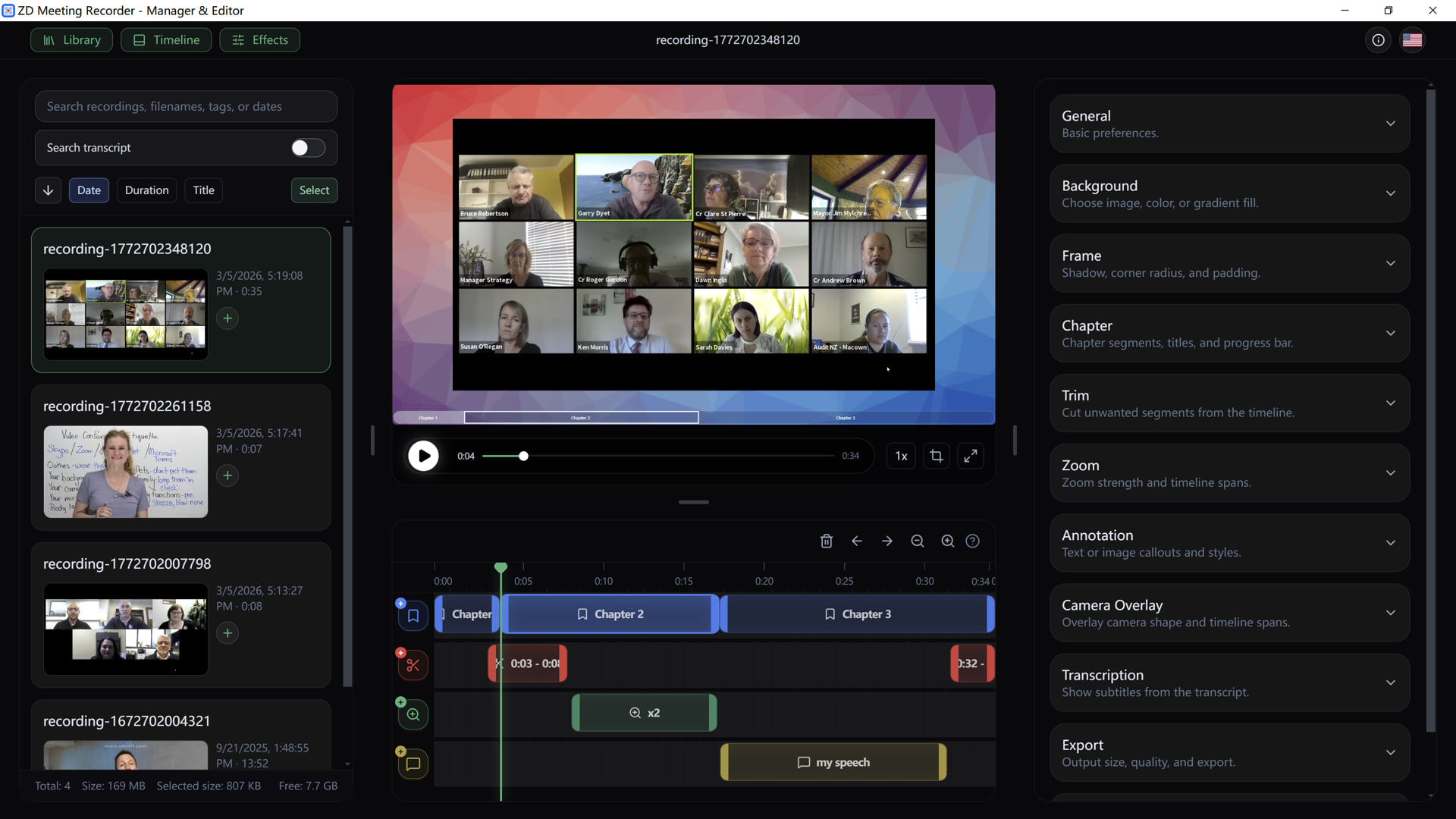
- Editing Suite: Tools to trim, merge, and zoom, alongside options for adding chapters and subtitles.
- Production Overlays: Support for camera overlays to enhance professional presentations.
By transforming long-form video into indexed archives, ZD Meeting Recorder serves as a productivity tool for professionals and students who need to review and reuse information from webinars, customer calls, and technical demonstrations. It effectively turns hours of raw footage into a library of reusable knowledge assets.
Top 5 Reasons To Download ZD Meeting Recorder
- Privacy-First Local AI Transcription: Unlike cloud-based competitors, ZD Meeting Recorder processes all your audio-to-text transcriptions locally on your own hardware, ensuring your sensitive corporate data and private conversations never leave your machine.
- Revolutionary Text-to-Video Navigation: Say goodbye to manual scrubbing; this software allows you to search for specific keywords within a transcript and instantly jump to the exact timestamp in the video where those words were spoken.
- Comprehensive Professional Editing Suite: Beyond simple recording, the tool features built-in capabilities to trim, merge, zoom, and add chapters or subtitles, turning raw footage into polished, professional-grade content.
- High-Fidelity Reliability for High-Stakes Sessions: Engineered for stability, the recorder captures online meetings, webinars, and lectures with perfect synchronization and zero frame drops, making it the most dependable tool for professionals and students alike.
- Transformation of Meetings into Actionable Knowledge Assets: It bridges the gap between passive listening and active resource management by converting ephemeral video calls into searchable, reusable digital libraries for your team or personal study.
The New Standard for Digital Productivity
In the modern workspace, we are drowning in video. Between the endless stream of Zoom calls, Microsoft Teams briefings, Google Meet brainstorming sessions, and academic webinars, the average professional or student spends hours every day staring at a screen. But the real problem isn't the meeting itself—it is what happens after the meeting. How many times have you found yourself desperately scrubbing through a two-hour recording, trying to find the thirty seconds where your boss mentioned the specific budget numbers? How many times have you missed a crucial detail in a lecture because you were too busy trying to type notes instead of listening? This is where ZD Meeting Recorder steps in to change the game entirely. This isn't just another screen recorder; it is a productivity powerhouse designed to turn your video sessions into searchable, intelligent data.
If you have been looking for a reason to upgrade your workflow, this giveaway is the perfect opportunity. As a tech reviewer, I see hundreds of utilities that claim to "optimize" your life, but few actually tackle the fundamental friction of the digital age: the difficulty of retrieving information from video. ZD Meeting Recorder is a dedicated solution that understands the nuance of professional communication. It doesn't just record pixels; it captures context. Let’s dive deep into the five primary reasons why you need to download this software today and how it will fundamentally shift the way you interact with digital media.
1. Privacy-First Local AI Transcription
We live in an era where data is the new gold, and unfortunately, most "convenient" AI tools want to mine your data to enrich themselves. Most transcription services require you to upload your audio or video files to a remote server. This means your private company strategy, your confidential medical consultations, or your proprietary research is sitting on someone else’s cloud. For many professionals—especially those in legal, healthcare, or high-level finance—this is an absolute dealbreaker. Privacy by design is not just a buzzword for ZD Meeting Recorder; it is the core architecture of the software.
By utilizing Local AI Transcription, the software uses your computer's own processing power to convert speech to text. This is a massive win for security. Because the AI model runs locally, your transcripts are generated in real-time or post-session without a single byte of data being sent to a third-party server. You maintain 100% ownership and control over your intellectual property. Furthermore, local processing means you aren't dependent on a high-speed internet connection to get your transcripts done. Whether you are on a plane or in a secure facility with restricted network access, the AI transcription engine remains fully functional. It is the ultimate peace of mind for the security-conscious user who refuses to compromise on privacy for the sake of utility.
2. Revolutionary Text-to-Video Navigation
If you have ever spent fifteen minutes fast-forwarding and rewinding through a video to find one specific quote, you know the "scrubbing fatigue." It is one of the biggest time-wasters in the professional world. ZD Meeting Recorder solves this with its Precise Text-to-Video Navigation system. This is the feature that will make you wonder how you ever lived without it. Once the local AI has generated your transcript, that text becomes a dynamic map of your video file.
Imagine typing the word "milestone" into a search bar and immediately seeing every instance where that word was mentioned. With a single click on the text, the video player jumps exactly to that frame. It turns a static video file into a searchable document. This functionality is a lifesaver for students reviewing complex lectures or project managers who need to verify client requirements from a kickoff call. Instead of "watching" a meeting, you "query" a meeting. This shift from linear consumption to non-linear data retrieval is the hallmark of a truly "smart" application. It empowers you to find exactly what you need in seconds, effectively giving you back hours of your week that would otherwise be spent on tedious manual searching.
3. High-Fidelity Reliability for High-Stakes Sessions
There is nothing worse than recording a one-time-only webinar or a critical client presentation only to find out later that the audio is out of sync or the video is a stuttering mess. Many generic screen recording tools struggle with the heavy resource demands of modern video conferencing software. They lag, they crash, or they produce massive, unoptimized files that are difficult to share. ZD Meeting Recorder is a dedicated tool built specifically for this purpose, and that focus shows in its performance.
The software is engineered to capture high-definition video with crystal-clear audio synchronization, regardless of the platform you are using. Whether it is a browser-based meeting or a standalone application, ZD Meeting Recorder hooks into the system to ensure that what you see and hear is exactly what gets saved. It handles dynamic window resizing and screen sharing transitions with ease. For those who conduct training sessions or high-stakes corporate presentations, this level of reliability is non-negotiable. You need to know that when you hit that record button, the software will perform flawlessly from the first minute to the last. This reliability makes it the "set it and forget it" solution that professionals can actually trust with their most important work.
4. Comprehensive Professional Editing Suite
Most people think the job is done once the recording ends, but raw footage is rarely ready for primetime. Usually, you need to cut out the "dead air" at the beginning while waiting for people to join, or you need to trim the casual chatter at the end. ZD Meeting Recorder includes a robust set of Comprehensive Review Tools that eliminate the need for expensive, third-party video editing software. You can trim and merge clips directly within the interface, allowing you to curate the most important parts of a session into a concise highlight reel.
But the editing features go much deeper than just cutting and pasting. You can add professional touches like chapters, which make long recordings even easier to navigate for your colleagues or students. You can add subtitles—generated automatically from your local AI transcript—ensuring that your content is accessible and easy to follow even in loud environments. The software even allows for camera overlays and zoom functions, which are essential for creating high-quality training materials or instructional videos. It turns a simple meeting capture into a polished educational asset. By providing these tools in one package, ZD Meeting Recorder streamlines the entire content creation pipeline, moving you from "recorded" to "ready to share" in record time.
5. Transformation of Meetings into Actionable Knowledge Assets
The final, and perhaps most compelling, reason to download this giveaway is the long-term impact on your Knowledge Management. In many organizations, the incredible insights shared during meetings are lost the moment the call ends. People forget, notes are incomplete, and context is stripped away. ZD Meeting Recorder changes the status of a meeting from a "temporary event" to a "permanent knowledge asset." By creating a library of searchable, transcribed, and edited recordings, you are essentially building a custom Wikipedia for your own life and work.
For a student, this means every lecture becomes part of a searchable database that can be used for exam prep years down the line. For a business, this means that when a new employee joins the team, they can catch up on months of project history by searching the meeting archives for relevant topics. This is the essence of smarter reviews. You aren't just hoarding video files; you are building a structured repository of information. The "Stop scrubbing, start searching" philosophy isn't just about saving time in the moment; it's about valuing the information you spend your time generating. When every meeting is searchable and every insight is retrievable, your collective intelligence as an individual or an organization skyrockets.
Conclusion: Why You Shouldn't Wait
It is rare to find a tool that balances high-end technical capability with a user-friendly interface so effectively. ZD Meeting Recorder isn't just for "techies"—it's for anyone who values their time and their privacy. From the Local AI Transcription that keeps your data safe to the Text-to-Video Navigation that makes manual scrubbing a thing of the past, every feature is designed to solve a real-world problem. You are getting a screen recorder, a professional editor, a transcriptionist, and a knowledge manager all in one package.
If you are ready to elevate your productivity and take control of your digital life, this is the tool you have been waiting for. Don't let your important discussions vanish into the digital ether. Capture them, transcribe them, and turn them into the valuable resources they were meant to be. This giveaway provides an incredible opportunity to get your hands on a premium solution that will pay for itself in saved time and increased efficiency within the first week of use. Download it, test the local AI for yourself, and experience the future of meeting management. Once you've experienced the power of searching through your videos as easily as you search a PDF, you'll never go back to "regular" screen recording again. It is time to work smarter, not harder. Start your journey toward ultimate productivity today with ZD Meeting Recorder.

Reviews for ZD Meeting Recorder
Click Here to Read Reviews for ZD Meeting Recorder >> Click Here to Submit Reviews for ZD Meeting Recorder >>