What Does Button Shop by Kristanix Software Do?
Button Shop is a specialized design utility engineered to streamline the creation of high-resolution buttons and navigation menus for web development. The software bypasses the limitations of pre-rendered images by using dynamic generation, ensuring that every asset maintains visual clarity regardless of scaling or modifications. Users can access a library of over 200 professionally designed templates and textures to serve as a baseline for their web projects.
The application facilitates the construction of diverse interface styles, ranging from Mac-style Aqua effects to Windows Vista and XP aesthetics. Beyond basic aesthetics, Button Shop automates the technical backend of web design. It generates the required HTML code for interactive states, such as mouse-over and mouse-pressed triggers, eliminating the need for manual JavaScript implementation. Additionally, the software can assemble individual buttons into fully functional web menus automatically.
Designers have granular control over visual elements, including mirror effects, lighting, and specific color adjustments for every part of the button component. The tool also supports the insertion of custom icons and images directly into the design. Final projects can be exported in various formats, including PNG, JPEG, GIF, BMP, and TIFF, making them compatible with standard web hosting environments and professional graphic design workflows.
Top 5 Reasons To Download Button Shop by Kristanix Software
- Instant Professionalism with Over 200 Designer Templates: Access a massive library of professionally crafted button styles, from Mac-style Aqua to Vista and XP aesthetics, ensuring your site looks premium in minutes.
- Dynamic High-Quality Rendering: Unlike competitors that use stretched, pre-made images, this software dynamically generates buttons for crisp, pixel-perfect results at any size.
- Zero-Coding Interactive Menus: Automatically generate the HTML and Javascript required for complex mouse-over and mouse-pressed states without writing a single line of code.
- Granular Design Customization: Take total control over every visual element, including mirror effects, light source positioning, custom icons, and individual color mapping for every part of the button.
- Direct Impact on Conversion and Sales: Elevate your user interface to build immediate trust with visitors, turning "lost sales" into successful conversions through clear, attractive calls to action.
The Power of a Great First Impression
In the fast-paced world of web design, you have less than a few seconds to capture a visitor's attention and convince them that your brand is trustworthy, professional, and worth their time. We often focus on high-resolution hero images or complex backend databases, but we frequently overlook the most critical element of the user interface: the button. The button is the bridge between a casual browser and a paying customer. It is the final "Click Here" that seals the deal. If your buttons look amateurish, outdated, or—even worse—broken, you are bleeding revenue. This is why Button Shop is not just a utility; it is a vital investment for anyone serious about their online presence. In this review, we are going to dive deep into why this specific giveaway is a must-download for web developers, entrepreneurs, and hobbyists alike.
1. Instant Professionalism with Over 200 Designer Templates
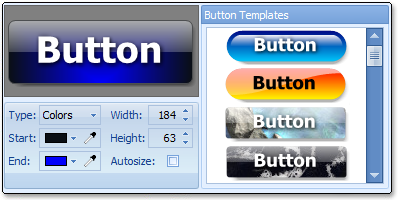
The biggest hurdle for most people when building a website is the design phase. Not everyone is a graphic designer, and even those who are often find themselves stuck in "creative blocks." Button Shop eliminates this friction immediately by providing over 200 professionally designed button templates and textures. These aren't just generic rectangles; we are talking about high-fidelity designs that mirror the most iconic operating system aesthetics in history. Whether you want the sleek, translucent look of Mac-style Aqua buttons, the glossy finish of Windows Vista, or the classic, functional feel of XP, this software has you covered.
The beauty of having these templates at your fingertips is the speed of execution. The developers claim you can have a stunning button ready in under five minutes, and in my testing, that is actually an overestimation. Once you find a template that matches your site’s theme, you simply tweak the text and you are ready to go. This massive library allows you to experiment with different "vibes" for your site without having to start from scratch every time you want to try a new look. You can play with textures, gradients, and shapes, modifying them to suit your specific brand identity. For a small business owner, this means saving hundreds, if not thousands, of dollars on freelance design fees.
2. Dynamic High-Quality Rendering
One of the most frustrating things about traditional button creators is their reliance on pre-made, static images. When you try to resize a static image, you end up with "pixelation"—those ugly, blurry edges that scream "amateur." Button Shop takes a completely different approach. Every button created within the application is dynamically created. This means the software calculates the geometry and rendering on the fly. When you change the size or shape of your button, the software regenerates the visual elements to ensure that the quality remains crisp and high-definition.
This dynamic generation is what separates the pros from the amateurs. High-quality visuals are essential for retina displays and modern high-resolution monitors. If a button looks "stretched," the user instinctively feels that the website is unsafe or poorly maintained. By using dynamic rendering, Button Shop ensures that your buttons have the smoothest gradients, the sharpest borders, and the most realistic shadows possible. It doesn't matter if you are exporting a tiny "Submit" button or a giant "Buy Now" call-to-action; the quality remains consistent and impressive across the board.
3. Zero-Coding Interactive Menus
Let’s talk about the technical side of web design. For a long time, if you wanted a button that changed color when a user hovered their mouse over it (a "mouse-over" state) or changed shape when clicked (a "mouse-pressed" state), you had to be proficient in Javascript or complex CSS. You had to manage multiple image files and write code to swap them out based on user interaction. For the average person, this is a nightmare. Button Shop changes the game by automating this entire process. It doesn't just make the button; it creates the web menus and the HTML code for you.
This is a massive time-saver. You can design your button states within the app, and the software will output the necessary code to make those interactions work seamlessly in a browser. No Javascript knowledge is required. This feature alone makes the software worth the download. Interactive menus provide essential feedback to the user; they make a website feel "alive" and responsive. When a button reacts to a user’s touch, it confirms that the site is functional and ready to process their request. Button Shop makes it so easy to implement these professional touches that there is no longer any excuse for having a "flat" or unresponsive website.
4. Ultimate Design Flexibility and Special Effects
While templates are a great starting point, the real magic of Button Shop lies in its customization suite. This isn't just a "pick and click" tool; it’s a full-featured design workshop. You have maximum control over every individual part of the button. Want to change the color of the shadow? Done. Want to adjust the transparency of the reflection? Easy. The software allows you to change the color of every part of the button, ensuring it fits perfectly within your existing color palette.
Beyond simple color changes, you have access to a suite of "cool features" that usually require advanced knowledge of Photoshop. You can add mirror effects to give your buttons a high-end, reflective glass look. You can manipulate light effects to change where the "sun" is hitting your button, creating realistic highlights and depths. You can even insert your own icons and images directly onto the buttons. If you have a specific logo or a shopping cart icon you want to include, the software handles the layering and blending for you. Furthermore, the export options are incredibly robust. You can save your creations in almost any format imaginable, including PNG, JPEG, BMP, GIF, TIFF, EXIF, WMF, EMF, and ICON. This versatility means you can use your buttons not just for web design, but for software interfaces, presentations, and digital documents as well.
5. Direct Impact on Conversion and Sales
We need to talk about the "Bottom Line." Why are you building a website? Most likely, you want people to do something—sign up for a newsletter, download a file, or buy a product. The button is where that action happens. Button Shop is advertised as a program that will "pay for itself within days," and from a marketing perspective, that’s not an exaggeration. Professional-looking buttons increase user trust. When a visitor sees a polished, well-designed "Check Out" button, they feel much more comfortable entering their credit card information than they would on a site with clunky, 1990s-style graphics.
Psychologically, colors and effects like the ones found in Button Shop guide the user's eye. A bright, glossy button with a subtle "light effect" naturally draws attention away from the background and toward the action you want the user to take. By using the professionally designed templates in this software, you are essentially leveraging years of UI/UX (User Interface/User Experience) research. These templates are designed to be "clickable." When you improve the "click-through rate" (CTR) of your buttons, you are directly increasing your sales and your site's popularity. This is the ultimate reason to download this giveaway: it is a tool that helps you make more money by making your site more usable and more attractive.
A Closer Look at the User Experience
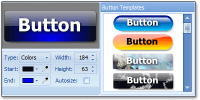
When you first open the software, you are greeted with an interface that is designed for efficiency. Unlike heavy graphic design suites that take minutes to load and hours to learn, this tool is lightweight and intuitive. The sidebar contains your primary categories of templates, while the central workspace shows you a real-time preview of your button. As you adjust sliders for things like mirroring or glow, the button updates instantly. This "What You See Is What You Get" (WYSIWYG) approach is perfect for rapid prototyping.
Imagine you are working on a project for a client and they suddenly decide they want the buttons to be blue instead of green, and they want them to have a "Vista-style" gloss. In a traditional workflow, this might take an hour of re-rendering and code tweaking. In Button Shop, it takes about 30 seconds. You pick the new template, use the color picker to match the client's branding, and export the new HTML. This efficiency is why tech reviewers and web pros love tools like this; it allows you to focus on the big picture while the software handles the tedious details of visual rendering and code generation.
The Versatility of Export Formats
I want to touch briefly on the importance of the file formats mentioned. Saving as a PNG is crucial for modern web design because it supports alpha transparency. This means your button can have rounded corners and drop shadows that blend perfectly into whatever background color your website uses, without any of those ugly white boxes around the edges. The inclusion of ICO format support is also a huge plus, as it allows you to create favicons for your website or icons for Windows applications using the same design language as your buttons. The fact that it supports legacy formats like WMF and EMF (Windows Metafiles) shows a level of depth that ensures compatibility with older office software and specialized printing applications.
Conclusion: Why You Need This Now
In conclusion, Button Shop is a rare find in the world of web utilities. It manages to be powerful enough for professional developers while remaining simple enough for someone who has never touched a line of code in their life. The combination of 200+ templates, dynamic rendering, and automatic HTML generation creates a "triple threat" that solves the three biggest problems in UI design: aesthetics, quality, and functionality.
By downloading this software, you are giving yourself the tools to compete with the "big players." You don't need a massive design budget to have a website that looks like it cost thousands of dollars. You just need the right tools. With its ability to create Mac-style, Vista, and XP buttons in a snap, its focus on high-quality dynamic images, and its intuitive menu-creation features, Button Shop is a must-have. Don't let your website suffer from low engagement or lost sales. Download this giveaway, spend five minutes playing with the textures and effects, and watch your website's popularity—and your conversion rates—soar. It is time to stop settling for "good enough" and start creating stunning, memorable buttons that truly represent the quality of your work.
Final Verdict: If you are looking for an easy-to-use, powerful, and versatile button creator that handles the design and the code, Button Shop is the answer. It is fast, it is professional, and it is exactly what your website needs to get to the next level.

Reviews for Button Shop by Kristanix Software
Click Here to Read Reviews for Button Shop by Kristanix Software >> Click Here to Submit Reviews for Button Shop by Kristanix Software >>