What Does MiniTool Partition Wizard Pro Do?
MiniTool Partition Wizard Pro is a professional-grade disk management utility designed for the Windows operating system. It provides a suite of tools for organizing hard drive partitions, offering capabilities that extend beyond standard system defaults. The software is optimized for both individual and business environments, allowing users to manage basic and dynamic disks effectively.
The primary functionality includes the ability to create, delete, format, resize, and move partitions without data loss. Advanced features allow for merging partitions, splitting a single volume into two, and changing cluster sizes. For system administrators, the tool facilitates the conversion between MBR and GPT disk structures—including system disks—and the conversion of NTFS to FAT file systems. It also provides support for Linux-based Ext2, Ext3, and Ext4 file systems.
Additional technical features include partition recovery for restoring damaged volumes, disk cloning for data migration, and MBR rebuilding. The software is compatible with UEFI boot, RAID configurations, and high-capacity drives exceeding 2 TB. Recent updates have introduced support for 4K and 5K high-resolution displays, exFAT partition management, and partition alignment tools specifically designed to optimize the performance of 4096-byte-sector hard drives. Users can preview all configuration changes visually before applying them to the hardware.
Top 5 Reasons To Download MiniTool Partition Wizard Pro
- Total Control Over Your Hard Drive Without Data Loss: Whether you need to resize, move, merge, or split partitions, MiniTool Partition Wizard Pro handles complex disk restructuring flawlessly while keeping your files safe.
- Advanced Conversion Tools for Modern Hardware: Effortlessly convert MBR disks to GPT for UEFI support, or switch between NTFS and FAT without formatting, ensuring your drive is optimized for the latest technology.
- Professional-Grade Disaster Recovery and Cloning: With powerful partition recovery features and disk cloning capabilities, you can rescue lost data or migrate your entire system to a new SSD in minutes.
- Maximum System Performance Optimization: Features like 4K Alignment for SSDs and the ability to change cluster sizes ensure that your storage hardware is running at its absolute peak efficiency.
- A Comprehensive Toolkit for Power Users and Pros: From managing dynamic disks to rebuilding MBR and supporting Linux file systems, this software provides every tool a system administrator or tech enthusiast could ever need.
1. Total Control Over Your Hard Drive Without Data Loss
We have all been there. You are in the middle of a major project, or perhaps you are trying to install a massive new game, and suddenly you see that dreaded red bar on your C: drive. Your system partition is full, but your D: drive has hundreds of gigabytes of empty space just sitting there, mocking you. In the past, fixing this meant a nightmare of backing up data, deleting partitions, and reinstalling everything. But with MiniTool Partition Wizard Pro, those days are over. This software is a total game-changer for anyone who needs to manage their storage space effectively.
The primary reason you need to download this giveaway is the sheer flexibility it offers for partition management. Unlike the built-in Windows Disk Management tool, which is notoriously limited and often prevents you from extending a partition if the unallocated space isn't perfectly adjacent, MiniTool Partition Wizard Pro gives you total freedom. You can move partitions across the disk, resize them on the fly, and even merge two adjacent partitions into one without losing a single kilobyte of data. This "no data loss" promise is the backbone of the software, and it is executed with surgical precision.
Furthermore, the "Split Partition" feature is incredibly useful for those who like to stay organized. If you have a massive 2TB drive and want to separate your operating system from your personal files, you can easily split the existing partition into two. The software handles the file distribution for you, making the process seamless. For business users, the ability to "Hot Extend" a partition—meaning you can increase the size of your system partition without even needing to reboot your computer—is a massive productivity boost. It is this level of sophisticated control that makes it an essential download for anyone who values their time and their data.
2. Advanced Conversion Tools for Modern Hardware
As technology evolves, the way our computers communicate with our hard drives changes too. We are currently in the middle of a massive shift from the older MBR (Master Boot Record) standard to the modern GPT (GUID Partition Table) standard. GPT is essential if you want to use drives larger than 2TB or if you want to take full advantage of modern UEFI boot speeds and security features. However, Windows usually requires you to wipe your entire drive if you want to switch between the two. MiniTool Partition Wizard Pro solves this problem by allowing you to convert MBR to GPT (and vice versa) without deleting any data.
This is a huge deal for tech enthusiasts. Imagine you’ve just bought a shiny new 4TB hard drive, but your system only recognizes 2TB because it’s set to MBR. Instead of a frustrating afternoon of file transfers and formatting, you just click a button in MiniTool, and the software converts the disk structure while your files remain perfectly intact. It even supports converting the system disk, which is a feature that few competitors can handle reliably. This ensures your hardware is future-proof and ready for the demands of modern operating systems.
But the conversion magic doesn't stop at disk tables. The software also allows you to convert file systems, such as moving from NTFS to FAT or FAT to NTFS, without formatting the drive. This is incredibly handy for external drives that need to be compatible with older devices or specific car audio systems that only read FAT32. Additionally, for the professional crowd, the ability to convert Dynamic Disks to Basic Disks is a lifesaver. Dynamic disks can be a headache for certain backup softwares and dual-boot configurations; being able to revert them to a standard Basic disk without data loss is a feature that usually costs a fortune in other enterprise-level suites.
3. Professional-Grade Disaster Recovery and Cloning
If you have ever accidentally deleted a partition or lost access to a drive due to a virus or a corrupted MBR, you know the feeling of pure panic that follows. MiniTool Partition Wizard Pro acts as your personal digital safety net. One of its most powerful features is the Partition Recovery Wizard. It can scan your entire physical disk for partitions that have been lost, deleted, or hidden. Whether the loss was caused by a system crash or a simple human error, this tool can often restore the entire partition and all its files in just a few clicks. This feature alone is worth the price of admission, but getting it in a giveaway is an absolute steal.
Beyond recovery, the software excels at disk and partition cloning. In the current era of tech, the single best upgrade you can give an old PC is an SSD. However, the thought of reinstalling Windows, your drivers, and all your applications is enough to make anyone procrastinate. MiniTool’s "Copy Disk" and "Migrate OS to SSD" features are designed specifically for this scenario. It creates a bit-for-bit clone of your existing drive onto the new one. It handles the transition from a large HDD to a smaller SSD automatically, resizing partitions to fit the new drive as long as your data fits. It even supports UEFI boot disk copying, ensuring that your system will boot up perfectly on the new hardware without any "Operating System Not Found" errors.
For those who want to be proactive about their data safety, these cloning tools serve as an excellent backup solution. You can clone your entire system drive to an external disk and put it in a drawer. If your main drive ever fails, you don't just have your files; you have a bootable copy of your entire environment ready to go. It is professional-grade peace of mind that is accessible enough for any home user to master.
4. Maximum System Performance Optimization
Most people don't realize that how their partitions are aligned can have a massive impact on the speed of their computer, especially if they are using an SSD or a modern "Advanced Format" hard drive. If a partition is "misaligned," the drive has to work twice as hard to read and write data, which slows down your system and can even shorten the lifespan of your SSD. MiniTool Partition Wizard Pro includes a "Partition Alignment" feature that fixes this with a single click. By aligning your partitions to the 4096-byte sector boundaries, you ensure that your drive is performing at its absolute maximum rated speed. It is a subtle but vital optimization that every PC builder should perform.
Another performance-oriented feature is the ability to change cluster sizes. For the uninitiated, the cluster size (or allocation unit size) is the smallest amount of disk space that can be used to hold a file. If you have a drive dedicated to massive video files or databases, increasing the cluster size can significantly improve read/write performance and reduce fragmentation. Conversely, if you have a drive full of millions of tiny text files, a smaller cluster size will save you a surprising amount of disk space. MiniTool allows you to change this setting without formatting the drive, which is a rare and highly technical feature that power users will absolutely love.
The software also includes built-in Surface Tests for both disks and partitions. If you suspect your hard drive is starting to fail or if you are hearing strange clicking noises, you can run a surface test to check for bad sectors. It provides a visual map of your drive's health, allowing you to identify problems before they result in catastrophic data loss. Combined with the new support for high-resolution displays (4K and 5K), the interface is crisp, clear, and easy to navigate while you perform these high-level maintenance tasks. It’s about making sure your hardware is not just working, but working perfectly.
5. A Comprehensive Toolkit for Power Users and Pros
What truly sets MiniTool Partition Wizard Pro apart from its competitors is the sheer breadth of its feature set. It isn't just a partition manager; it is a complete disk management suite. For those who work in mixed-OS environments, the support for Linux file systems like Ext2, Ext3, and Ext4 is invaluable. You can create, format, and manage Linux partitions directly from your Windows environment, making it a fantastic tool for developers and hobbyists who experiment with different operating systems.
The software also gives you deep access to disk properties that Windows normally hides. You can change Partition Type IDs, modify Serial Numbers, and even rebuild the MBR (Master Boot Record). Rebuilding the MBR is a specific feature that can fix many common boot errors without needing a Windows recovery disk. If your computer gets stuck on a black screen saying "MBR Error," you can boot into a recovery environment with MiniTool and fix it in seconds. This level of utility is why IT professionals and system administrators keep this tool in their digital "bug-out bag."
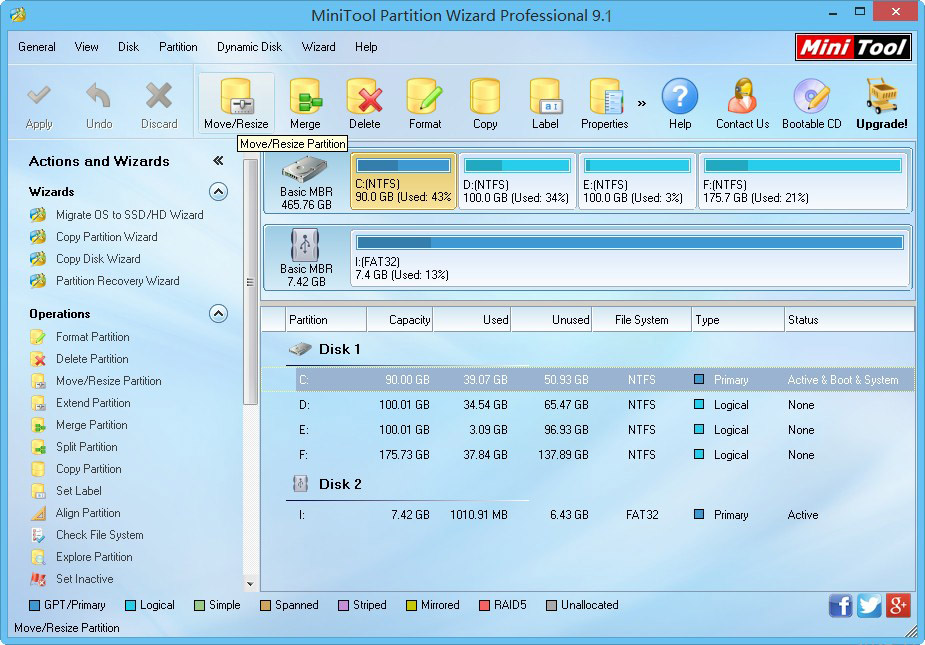
Finally, the user experience is designed for safety. One of the best things about the interface is that it uses a "Pending Operations" queue. When you decide to delete, resize, or format a partition, the software doesn't do it immediately. Instead, it shows you a visual preview of what your disk will look like after the changes. You can stack multiple operations—resize C, move D, format E—and then review them all. Only when you click "Apply" does the software begin the process. This prevents those "oh no" moments where you accidentally click the wrong drive. It is a thoughtful design choice that demonstrates the developers' commitment to data integrity. Whether you are a business user managing a fleet of workstations or a home user trying to get the most out of your PC, MiniTool Partition Wizard Pro is the definitive tool for the job. Do not miss the chance to add this powerhouse to your collection during this giveaway.
In conclusion, MiniTool Partition Wizard Pro is more than just a utility; it is an essential piece of software for anyone who takes their PC performance and data security seriously. From the basic tasks of cleaning up a messy drive to the advanced requirements of system migration and disaster recovery, it handles everything with an intuitive interface and a robust engine. Download it today and take the first step toward total mastery over your computer's storage hardware.

Reviews for MiniTool Partition Wizard Pro
Click Here to Read Reviews for MiniTool Partition Wizard Pro >> Click Here to Submit Reviews for MiniTool Partition Wizard Pro >>