What Does CyberLink Screen Recorder 2 Do?
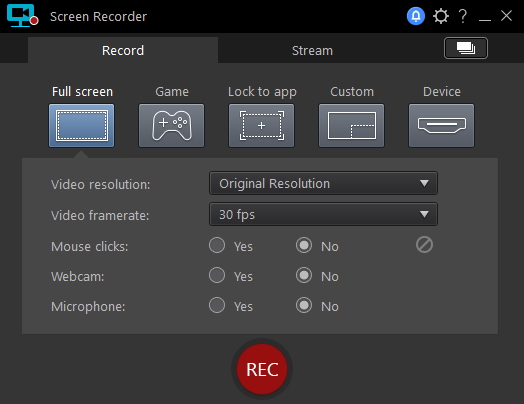
CyberLink Screen Recorder 2 serves as a centralized solution for capturing desktop video and audio content. The application provides multiple recording modes, allowing users to capture the full desktop, specific regions, or lock the recording to a designated application window. Users can manually set the capture resolution to fit specific requirements for software tutorials or presentations.
The software features integrated audio mixing capabilities. It records system audio and external microphone inputs simultaneously, streamlining the production of narrated content. For visual personalization, the tool includes a webcam Picture-in-Picture (PiP) overlay. While this version does not include chromakey background removal, it allows for manual adjustment of the webcam’s position and size within the frame to avoid obstructing important on-screen data.
Output is handled via the H.264 codec, producing MP4 files with AAC audio. The recording process utilizes hardware acceleration from Intel, NVIDIA, and AMD GPUs to reduce CPU load and maintain high frame rates during capture. This technical approach ensures that the recording process remains lightweight while producing high-definition files suitable for immediate sharing or further editing in post-production software.
Top 5 Reasons To Download CyberLink Screen Recorder 2
Before we dive into the nitty-gritty details of why this software is a must-have for your digital toolkit, let’s look at the core benefits that make CyberLink Screen Recorder 2 stand out from the crowd. If you are looking for a reason to hit that download button immediately, here are the top five reasons why you need this tool in your life right now:
- Precision Application Locking: Record exactly what you want by locking the capture to a specific app, ensuring your desktop clutter stays private and your recording stays professional.
- Professional Grade Audio Mixing: Seamlessly blend system sounds with your own voice through microphone input, creating a balanced and high-quality auditory experience for your viewers.
- Integrated Picture-in-Picture Webcam: Add a personal touch to your tutorials or gameplay by overlaying your webcam feed directly onto your screen capture with adjustable sizing and positioning.
- High-Performance H.264 Output: Experience crystal-clear video quality with small file sizes and minimal system impact, thanks to advanced hardware encoding support for Intel, NVIDIA, and AMD.
- Streamlined User Interface: Skip the steep learning curve of complex broadcasting software with a clean, intuitive layout designed for both beginners and power users.
In the world of digital content creation, the tools you choose can either be a bridge to your success or a bottleneck that keeps you from ever finishing a project. We have all been there: you want to record a quick tutorial for a colleague, capture a highlight from a game, or put together a presentation for a client, but you end up spending more time fighting the software than actually recording. This is where CyberLink Screen Recorder 2 enters the fray. It is a sleek, powerful, and remarkably efficient solution for anyone who needs to capture what is happening on their screen without the headache of professional-grade broadcasting suites that require a degree in engineering to operate.
As a tech reviewer, I have seen dozens of screen recording applications. Some are too simple, lacking the basic features needed to make a video look professional. Others are so bloated with features that they hog your system resources, causing your computer to lag just when you need it most. CyberLink Screen Recorder 2 finds that "Goldilocks" zone—it is exactly the right amount of power combined with a user-friendly interface. Let’s break down exactly why this giveaway is something you cannot afford to miss.
1. Precision Application Locking and Custom Resolution
One of the biggest frustrations when recording a screen is the "accidental reveal." We have all seen tutorials where the creator accidentally drags a private window into the recording area or where a notification pop-up ruins a perfect take. With CyberLink Screen Recorder 2, these worries are a thing of the past. The "Lock to App" feature is a genuine game-changer for professional workflows.
When you use the Lock to App feature, the recorder focuses exclusively on the window of the software you are demonstrating. If you accidentally switch to your email or a web browser to check a fact, the recording continues to show only the target application. This allows for a level of privacy and focus that is rarely found in free or basic recording tools. It means you don't have to clean up your desktop icons or hide your taskbar before you start recording. You simply select the app, and the software handles the rest.
Furthermore, the ability to customize your resolution is vital. Whether you are aiming for a standard 1080p output for YouTube, a specific aspect ratio for social media, or a smaller windowed capture for a quick Slack message, this tool gives you the control you need. You aren't forced into a "one size fits all" recording box. You can define the boundaries of your digital stage, ensuring that your audience sees exactly what you want them to see and nothing more. This precision leads to cleaner, more professional-looking videos that require far less editing in post-production.
2. Seamless Audio Mixing for Professional Narration
If you have ever tried to record a video where you needed to hear both the computer's audio and your own voice, you know how tricky the balance can be. Often, the system audio is too loud, drowning out the narrator, or the voice recording is tinny because it’s being picked up by the microphone through the computer speakers. CyberLink Screen Recorder 2 solves this by offering a robust, integrated audio mixing system.
The software allows you to capture system sounds—the music playing in the background, the pings of a notification, or the audio from a video you are reacting to—and mix it directly with your microphone input. This happens in real-time, creating a cohesive audio track that sounds like it was mixed in a studio. For gamers, this is essential for capturing the immersive soundscapes of a game while providing commentary. For corporate trainers, it allows for the seamless inclusion of audio clips within a presentation while they provide live narration.
What makes this particularly impressive is the clarity. By using high-quality AAC audio encoding, the software ensures that your voice sounds natural and crisp. You don't get the "robotic" artifacts common in lower-end recording tools. When you combine this with the ability to toggle inputs on and off with a single click, you have a tool that empowers you to control the narrative of your video from the moment you hit record. It eliminates the need for complex external mixers or secondary audio recording software, keeping your workspace clean and your workflow fast.
3. The Human Touch: Integrated Picture-in-Picture Webcam
In the modern digital landscape, personality is everything. Whether you are a YouTuber, a teacher, or a business leader, people want to see your face. They want to see your expressions, your gestures, and the human being behind the screen. CyberLink Screen Recorder 2 makes it incredibly easy to add this "human touch" through its integrated Picture-in-Picture (PiP) webcam feature.
While many recorders allow you to record a webcam separately, CyberLink integrates it directly into the screen capture interface. You can see exactly where your webcam feed will appear on the final video while you are recording. Even better, the software allows you to adjust the size and position of the webcam overlay on the fly. Do you need to move your face to the top-left corner because there is important information in the bottom-right? No problem. Do you want to enlarge your feed during an introduction and then shrink it down once the demo begins? It is all possible within this intuitive system.
While this version doesn't include chromakey (green screen) support, the simplicity of the implementation is its greatest strength. It is designed to work with your existing setup without requiring a professional studio. The PiP feature adds a layer of engagement that text and voiceover alone simply cannot match. It builds trust with your audience and makes your content significantly more memorable. By allowing the user to visually guide the audience through the screen content, it transforms a static recording into a dynamic presentation.
4. Optimized Video Output and Hardware Acceleration
Nothing kills the excitement of creating a video faster than a computer that grinds to a halt during recording or a finished file that is so large it takes hours to upload. This is where the technical prowess of CyberLink really shines. The software utilizes H.264 MP4 video output, which is the industry standard for high-quality, high-compatibility video. But the real magic lies in how it processes that video.
CyberLink Screen Recorder 2 supports hardware encoding from the three major players: Intel, NVIDIA, and AMD. This means that instead of forcing your computer's CPU (the brain) to do all the heavy lifting of encoding the video in real-time, the software offloads that work to your Graphics Processing Unit (GPU). The result is a recording experience that is incredibly smooth. You can record high-frame-rate gameplay or intensive software demonstrations without seeing a drop in performance on your screen. Your computer stays cool, your frames stay high, and your recording remains fluid.
The use of H.264+AAC encoding also ensures that your final file is ready for any platform. Whether you are uploading to YouTube, Vimeo, or Facebook, or simply emailing a clip to a teammate, the file will be optimized for the web. You get a perfect balance of visual fidelity and file size. You won't find yourself staring at a 5GB file for a five-minute video; instead, you get a lean, professional file that retains every detail of your original screen capture. This efficiency is a massive time-saver for anyone who produces content regularly.
5. All-in-One Efficiency and User Experience
The final reason to download this giveaway is perhaps the most compelling: it is an all-in-one solution that respects your time. In an era of "app fatigue," where we have different tools for recording, different tools for editing, and different tools for streaming, CyberLink Screen Recorder 2 offers a refreshing sense of consolidated power. It is an application designed by a company that has spent decades perfecting video technology, and that expertise is evident in every menu and button.
The user experience is built around the idea of "click and record." You don't have to navigate through endless sub-menus to find the right bitrate or frame rate. The default settings are intelligently chosen to give you great results out of the box, while the advanced settings are there for when you need to tweak the specifics. This makes it the perfect tool for the person who needs to produce content *now*, rather than the person who wants to spend all day tweaking settings.
By downloading this giveaway, you are gaining a tool that replaces several other utilities. You get a desktop recorder, an audio mixer, and a webcam capture tool all in one package. This reduces the strain on your system and simplifies your desktop environment. Whether you are creating educational content, documenting software bugs, or capturing creative sessions, the streamlined nature of this software ensures that the technology never gets in the way of your creativity. It is about removing the friction between your idea and the final video file.
Final Thoughts: CyberLink Screen Recorder 2 is more than just a simple utility; it is a gateway to better communication and more professional content. In a world where video is the primary language of the internet, having a reliable, high-performance tool like this is essential. The combination of application locking, sophisticated audio mixing, and hardware-accelerated encoding makes it a standout choice in a crowded market. If you have been looking for a way to elevate your screen recordings without the complexity of professional broadcasting gear, this is the solution you have been waiting for. Don't miss the chance to add this powerhouse to your collection.
Whether you're a seasoned pro or just starting your journey into video creation, this software provides the stability and feature set needed to produce top-tier results. It's time to stop settling for "good enough" screen captures and start creating the high-quality videos your audience deserves. Download CyberLink Screen Recorder 2 today and experience the difference that professional-grade engineering can make in your daily workflow.

Reviews for CyberLink Screen Recorder 2
Click Here to Read Reviews for CyberLink Screen Recorder 2 >> Click Here to Submit Reviews for CyberLink Screen Recorder 2 >>