What Does Multiple Search and Replace Do?
Multiple Search and Replace is a specialized utility designed for batch processing text across a wide range of file formats. The software supports standard text files, web pages, and Microsoft Office documents including Word, Excel, and PowerPoint, as well as PDF, RTF, and Open Text formats. It also maintains the capability to search within compressed archives.
The application allows users to execute complex search-and-replace operations using regular expressions and wildcards. Beyond simple text substitution, it functions as a data extraction tool, enabling the retrieval of specific information—such as email addresses—from entire directories. Search logic can be refined using operators like Must Contain, Must Not Contain, and Contains Near Text, with full support for multi-line search and replace terms.
Advanced filtering criteria include file attributes, size, date, match counts, and specific line or page numbers. Users can preview results in context with syntax highlighting and utilize a built-in editor for immediate modifications. Once files are identified, they can be moved, copied, deleted, or compressed directly through the interface. The software features a multi-language graphical interface and supports command-line execution for automated workflows. All search results are exportable and sortable for comprehensive reporting.
Top 5 Reasons To Download Multiple Search and Replace
- Universal File Compatibility: Search and replace text across virtually any format, including Word, Excel, PDF, PowerPoint, and even compressed archives.
- Surgical Precision with Advanced Search Logic: Utilize Regular Expressions, wildcards, and sophisticated operators like "Must Contain" or "Contains Near Text" for unmatched accuracy.
- Massive Productivity Gains through Batch Processing: Edit thousands of files simultaneously with multi-line support and command-line automation.
- Deep Contextual Awareness and Built-in Editing: Preview matches in context with highlighting and make instant corrections using the integrated internal editor.
- Powerful Data Extraction and Management: Effortlessly extract specific information like email addresses or phone numbers and manage resulting files by moving, copying, or compressing them.
Introduction: The Solution to Your Data Nightmare
We have all been there. You are working on a massive project, perhaps a website migration, a legal audit, or a complex coding task, and you realize that a specific piece of information needs to be changed across hundreds, if not thousands, of files. Maybe a client changed their phone number, a product name was rebranded, or a specific function in your code has been deprecated. The sheer thought of opening every single Word document, PDF, and Excel sheet manually is enough to induce a headache. This is where most standard search tools fail us. Windows Search is fine for finding a file by name, but when it comes to deep-tissue manipulation of the text inside those files, you need something far more robust.
Enter Multiple Search and Replace. As a tech reviewer who has seen countless "productivity" apps come and go, I can tell you that this isn't just another utility; it is a powerhouse. It is designed for the power user, the webmaster, the developer, and the administrative professional who values their time. In this article, I am going to break down exactly why this software is a mandatory addition to your digital toolkit. If you have ever felt overwhelmed by the volume of data you manage, read on, because this giveaway is about to change your workflow forever.
1. Universal File Compatibility: One Tool to Rule Them All
One of the biggest frustrations in modern computing is the "siloing" of data. Text lives in .txt files, code lives in .html or .php, reports live in .pdf, and data lives in .xlsx. Usually, if you want to find and replace a string of text across these different formats, you would need four or five different programs. Multiple Search and Replace shatters those barriers. It offers a unified interface that treats all these formats with equal ease.
Whether you are dealing with standard Text files (supporting various encodings to ensure no character is lost), Webpages, Word documents, Excel spreadsheets, or PowerPoint presentations, this tool handles them all. But it goes even further. It supports Rich Text Format (RTF), Open Text Format, and—most impressively—PDF files. Searching and replacing text in PDFs is notoriously difficult because of how the format is structured, yet this utility handles it seamlessly. Furthermore, the ability to search within compressed archives is a game-changer. Imagine not having to unzip twenty folders just to find which archive contains a specific keyword. This level of compatibility ensures that no matter where your data is hiding, this software can find it and modify it.
2. Surgical Precision with Advanced Search Logic
A simple "find" command is often too blunt an instrument. If you are looking for the word "Lead," do you mean the chemical element, or the verb "to lead"? Multiple Search and Replace provides the surgical precision required to filter out the noise. It supports Regular Expressions (Regex) and wildcards, which are essential for anyone doing complex data work. With Regex, you aren't just looking for words; you are looking for patterns. This is invaluable for finding things like social security numbers, specific IP addresses, or formatted dates that follow a certain structure.
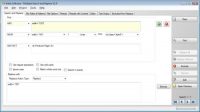
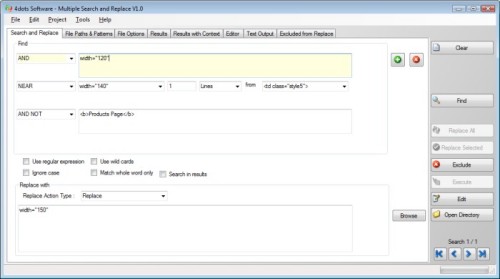
The software goes beyond basic pattern matching by offering sophisticated search operators. You can define criteria such as Contains, Must Contain, Must Not Contain, and Exclusively Contains. My favorite feature, however, is the "Contains Near Text" operator. This allows you to find a word only when it appears within a certain proximity to another word, which is a lifesaver when you are digging through thousands of pages of documentation. By combining these operators with multiple search terms, you can build incredibly complex queries that ensure you only replace exactly what needs to be replaced, leaving the rest of your data untouched.
3. Massive Productivity Gains through Batch Processing
The true "magic" of this software lies in its ability to perform Batch Processing. While most editors allow you to search and replace within a single open file, Multiple Search and Replace allows you to point the software at an entire directory—or multiple directories—and perform the action across every file it finds. This is the difference between a task taking three days or three seconds. For webmasters who need to update a copyright year in the footer of a thousand HTML pages, this tool is an absolute necessity.
The software also supports multi-line search and replace. This is a feature often missing from lighter utilities. Sometimes the text you need to change spans across two or three lines of code or prose. Being able to paste a whole block of text into the "Search" field and another block into the "Replace" field is a massive win for accuracy. For the true power users and system administrators, the application can also be executed from the command-line. This means you can script your search and replace tasks, allowing them to run as part of a larger automated workflow or scheduled task, ensuring your data stays updated without you even having to click a button.
4. Deep Contextual Awareness and Built-in Editing
One of the primary fears people have when using a batch-replace tool is the "oops" factor. What if you accidentally replace something you didn't intend to? Multiple Search and Replace mitigates this risk through its incredible reporting and preview features. Before you commit to a change, you can see the context and the specific line of each search result. The search term is highlighted, allowing your eyes to quickly jump to the relevant part of the document.
If you find a result that needs a slightly different tweak than the others, you don't need to close the program and open the file in another application. The software features a built-in editor. You can directly edit the search result files within the GUI. This creates a workflow where you search, review, tweak if necessary, and then execute. Furthermore, the level of detail you can set for search criteria is staggering. You can filter results based on match count in the file, line numbers, character positions, and even specific page numbers or worksheet numbers in Excel. This transparency gives you total control over your data, eliminating the "black box" feeling of other automated tools.
5. Powerful Data Extraction and Management
While the name of the software emphasizes "Search and Replace," it is equally powerful as a Data Extraction tool. Because of its advanced filtering, you can use it to pull specific information out of a haystack of files. A classic example provided is extracting all email addresses from every Word file in a specific directory. This is an incredibly common task for marketing professionals or HR departments, and doing it manually is impossible. With this tool, it takes moments.
Once you have found your files or extracted your data, Multiple Search and Replace offers a suite of file management options. You can copy or move the found files to a specific folder, delete them (use with caution!), copy them to the clipboard, or even compress them into a new archive. You can also export the list of found files, print it, or save it for later use. This makes the software a dual-threat: it is a text editor and a file organizer rolled into one. Additionally, the ability to filter searches based on file attributes, file size, and file date adds another layer of utility, allowing you to target only the most recent documents or only files of a certain size.
Conclusion: Why You Need This Tool Today
In the world of professional computing, your most valuable asset is your time. Spending that time on repetitive, manual tasks is a waste of your talents and energy. Multiple Search and Replace is one of those rare utilities that pays for itself in the first hour of use. It bridges the gap between simple text editing and complex data management, providing a user-friendly interface that masks its incredible underlying power.
Whether you are a developer managing a massive codebase, a webmaster maintaining a network of sites, a researcher digging through thousands of PDFs, or just someone who likes to keep their digital life organized, this software is a must-have. It is multilingual, supporting over 39 languages, making it accessible to a global audience. The combination of its universal file support, Regex capabilities, batch processing speed, and built-in editor makes it the gold standard in its category.
Don't wait until you are faced with a daunting data task to look for a solution. Download this giveaway now and be prepared. Once you have Multiple Search and Replace in your arsenal, you will wonder how you ever managed without it. It turns impossible tasks into trivial ones, and in the fast-paced world of technology, that is the greatest gift of all. This is more than just a download; it is an upgrade to your entire digital workflow. Highly recommended.

Reviews for Multiple Search and Replace
Click Here to Read Reviews for Multiple Search and Replace >> Click Here to Submit Reviews for Multiple Search and Replace >>