What Does Total Audio Converter Do?
Total Audio Converter (TAC) is a specialized utility designed for the conversion and management of digital audio files. The software supports over 30 different formats, including MP3, WAV, FLAC, OPUS, APE, and WMA. This wide range of compatibility ensures that users can transition files between high-fidelity lossless formats and various compressed standards suitable for mobile playback or storage efficiency.
Beyond standard file conversion, the application includes several integrated tools for media management:
- CD Ripper: Digitizes physical compact discs into various audio formats.
- YouTube Extraction: Captures audio streams directly from online video content.
- iTunes Integration: Facilitates the direct transfer of tracks to an iTunes library.
- Command Line Support: Allows advanced users to execute and automate tasks via the console.
- Built-in Player: Enables immediate file preview and verification within the interface.
The software is designed to accommodate different technical skill levels. While the graphical user interface provides a straightforward workflow for individual tasks, the command line functionality is available for batch processing and professional use. Total Audio Converter is offered with a lifetime license for $24.90, providing a permanent solution for audio digitization and format adjustment without recurring subscription fees.
Top 5 Reasons To Download Total Audio Converter
- Universal Format Support: Total Audio Converter handles over 30 different audio formats, including WAV, MP3, FLAC, and specialized types like OPUS and APE.
- Built-In Multimedia Extras: Beyond simple conversion, the software includes a high-quality CD ripper, a YouTube audio downloader, and direct integration with iTunes.
- Professional Command Line Support: For power users and developers, the ability to run conversions via the command line allows for advanced automation and batch processing.
- Unmatched User-Friendliness: Despite its deep feature set, the interface remains intuitive for beginners, complete with a built-in audio player for instant file verification.
- Exceptional Value and Longevity: With a fair lifetime license model, users get a robust, all-in-one tool that replaces multiple disparate apps without recurring subscription fees.
If you have ever spent an afternoon frustrated because your car stereo won’t play a specific FLAC file, or your smartphone refuses to recognize an old WMA track, you know that the world of digital audio is a fragmented landscape. We live in an era where we have more access to music than ever before, yet we are constantly hindered by compatibility issues, varying bitrates, and proprietary containers. As a tech reviewer, I am constantly on the lookout for tools that simplify the digital life of the average user while providing the "under-the-hood" power that enthusiasts crave. That is exactly where Total Audio Converter (TAC) enters the frame. It is not just another utility; it is arguably the most comprehensive audio Swiss Army Knife available on the market today. This giveaway represents a massive opportunity to secure a tool that will likely become a permanent fixture in your taskbar.
1. Universal Format Support: The End of Compatibility Woes
The primary reason anyone looks for a converter is to solve a problem: "This file won't play where I want it to play." Many free tools online claim to be universal, but they often fall short when dealing with high-fidelity lossless formats or newer, more efficient codecs. Total Audio Converter distinguishes itself by supporting a staggering array of formats. We aren’t just talking about the standards like MP3 and WAV. TAC dives deep into the technical weeds, offering support for FLAC, OGG, APE, MPC, AAC, MP4, WMA, and the increasingly popular OPUS codec.
For the audiophile, the support for FLAC (Free Lossless Audio Codec) and APE (Monkey's Audio) is crucial. These formats preserve every single bit of data from the original source, but they can be notoriously difficult to play on older hardware or standard mobile devices. Total Audio Converter allows you to take these massive, high-quality files and down-convert them into high-bitrate MP3s or AACs for your morning commute, without losing the "soul" of the music. Conversely, if you are an archivist, you can use TAC to move between lossless formats to ensure your collection remains future-proof. The software handles the complex math of re-encoding with precision, ensuring that jitter and artifacts are kept to an absolute minimum.
Furthermore, the inclusion of OPUS support shows that the developers are keeping pace with modern web standards. OPUS is becoming the go-to for high-quality voice and streaming audio due to its incredible efficiency at low bitrates. Being able to convert your library into OPUS for cloud storage can save you gigabytes of space while maintaining surprisingly high fidelity. When you download this tool, you are essentially saying goodbye to the "Unsupported File Format" error message forever.
2. Built-In Multimedia Extras: A Complete Audio Suite
Most converters are "one-trick ponies." They take File A and turn it into File B. But Total Audio Converter understands that the modern user’s workflow is more complex than that. One of the standout reasons to jump on this giveaway is the suite of extra features that would usually require three separate pieces of software. First, let's talk about the CD Ripper. While many people think physical media is dead, there are millions of us with boxes of CDs in the attic. Those discs are degrading over time. TAC’s built-in ripper allows you to digitize your physical collection directly into the format of your choice, automatically fetching track data and ensuring a clean digital transfer.
Beyond physical media, TAC addresses the giant of modern media: YouTube. We’ve all found that one rare live performance or obscure remix on YouTube that isn't available on Spotify or Apple Music. Total Audio Converter allows you to grab audio from YouTube videos and convert it directly into a portable audio file. This is a game-changer for those looking to build a truly unique music library. Once you have your files ready, TAC even offers direct integration to upload tracks to iTunes. This eliminates the tedious process of converting a file, finding where it was saved, opening iTunes, and manually dragging it into your library. It’s a seamless, end-to-end pipeline from the source to your ears.
3. Professional Command Line Support: Automation for the Power User
While the graphical user interface (GUI) is excellent, tech veterans know that the real power of a utility is often hidden in its Command Line Interface (CLI). This is a feature usually reserved for "Pro" versions of software that cost hundreds of dollars, yet it is included here. Why does this matter? Imagine you are a developer or a content creator who has to process hundreds of audio files every week. Opening a window and clicking buttons for every single file is a waste of time. With command line support, you can write a simple script to automate the entire process.
You can set up a "watch folder" on your PC where any audio file dropped into it is automatically converted to a specific format and moved to a server or a backup drive. This level of automation is what separates a hobbyist tool from a professional production tool. It allows Total Audio Converter to be integrated into larger workflows. If you run a podcast, for example, you could script TAC to take your raw WAV recordings and output compressed versions for different hosting platforms simultaneously. This feature ensures that as your technical skills grow, the software grows with you. You won’t "outgrow" this app; you will simply find more sophisticated ways to use it.
4. Unmatched User-Friendliness: Power Without the Pain
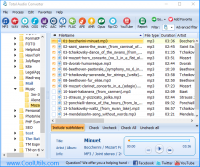
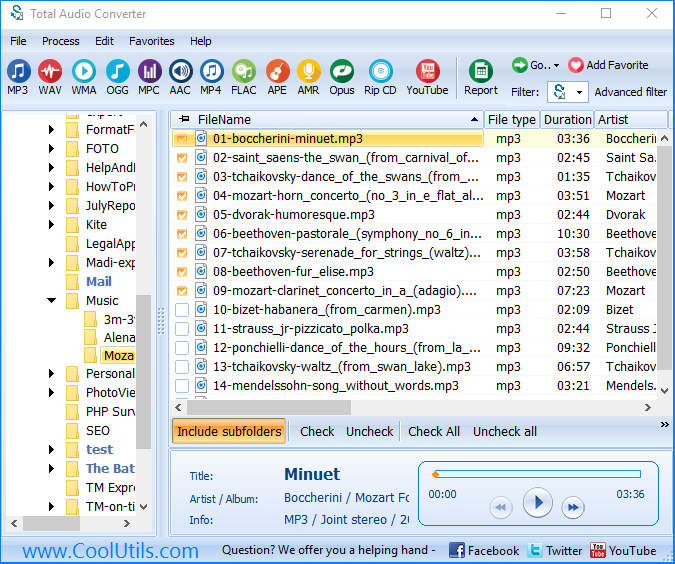
It is a common trope in the tech world that the more powerful a piece of software is, the uglier and more difficult it is to use. Total Audio Converter defies this stereotype. The developers have managed to pack in all the "nerd-friendly" features mentioned above while maintaining an interface that your grandmother could navigate. The layout is logical: you browse your folders on the left, select your files in the center, and choose your target format from a clear, icon-based toolbar at the top.
One of the most underrated features that contributes to this user-friendliness is the built-in audio player. It sounds simple, but you would be surprised how many converters don't allow you to hear the file before or after you convert it. With TAC, you can click on a file and play it instantly within the interface. This allows you to verify that you are converting the correct take of a song or to check the quality of a file after the conversion process is complete. It saves you from having to toggle back and forth between the converter and a media player like VLC or Winamp. Every step of the user journey has been refined to reduce "clicks" and minimize friction, making the conversion process feel like a breeze rather than a chore.
5. Exceptional Value and Longevity: A Lifetime of Audio Freedom
In the current software market, we are being "nickel-and-dimed" by subscription models. Everything from photo editors to weather apps wants $9.99 a month. This is why Total Audio Converter is such a breath of fresh air. The license model is fair and transparent. When you look at the $24.90 life license, you have to consider the cost of the alternatives. To get the same functionality, you might buy a dedicated CD ripper, a separate YouTube downloader, and a pro-grade converter. You could easily spend over $100 on that bundle, and even then, they wouldn't talk to each other as well as the features within TAC do.
By downloading this tool, you are investing in a piece of software that is actively maintained and updated. As new audio formats emerge and Windows or Mac operating systems update, the team at CoolUtils ensures that TAC remains compatible and functional. There is a certain peace of mind that comes with owning a "lifetime" tool. You know that three years from now, when you buy a new device that requires a weird new audio codec, you won't have to go hunting for a new converter or worry about a subscription that expired. You just open Total Audio Converter, and it gets the job done. It is a one-time solution to a recurring problem, and in the world of tech, that is the best kind of value you can find.
In conclusion, Total Audio Converter is the definitive choice for anyone who takes their digital media library seriously. Whether you are a casual listener looking to clean up your MP3 collection, a nostalgic music lover ripping decades of CDs, or a professional looking to automate complex audio workflows via the command line, this software delivers on every front. It combines a massive library of supported codecs with a suite of utility features that make it a true all-in-one powerhouse. The interface is welcoming, the performance is snappy, and the value proposition is unbeatable. Don't let this giveaway pass you by—download it today and take full control over your audio world. You’ll wonder how you ever managed your media without it.
Remember, the digital landscape is always changing, but the need for high-quality, reliable conversion is a constant. By adding Total Audio Converter to your digital toolkit, you are preparing yourself for whatever the future of audio brings. From the smallest OPUS file to the largest FLAC archive, you will have the power to transform, play, and organize your music exactly the way you want it. This is a must-have download for any serious PC user.

Reviews for Total Audio Converter
Click Here to Read Reviews for Total Audio Converter >> Click Here to Submit Reviews for Total Audio Converter >>