What Does MSD Organizer Do?
MSD Organizer is a centralized personal information management (PIM) suite designed to consolidate professional and private data into a single interface. This specific giveaway version provides a streamlined toolkit focused on essential productivity modules. Users can manage schedules through the Calendar, maintain a detailed directory in Contacts, and set Alarms for time-sensitive events. The software also includes dedicated sections for Tasks, Cards, and a Diary for personal journaling.
Beyond data organization, the application includes utility tools such as a built-in word processor, an image viewer, and both standard and financial calculators. For data security and portability, it supports Google synchronization alongside manual backup and restore functions. These features allow users to keep their primary productivity data consistent across devices and secured against data loss.
It is important to note that this version is tailored for core management. While the central database functions remain intact, this edition excludes specific modules found in the full commercial suite, such as integrated email, budget tracking, property management, health logs, music libraries, and network messaging. The focus of this version is providing a robust environment for core scheduling and information retrieval for desktop users.
Top 5 Reasons To Download MSD Organizer
1. Centralized Information Architecture: A single, unified interface that brings your Calendar, Contacts, Alarms, Tasks, Cards, and Diary into one cohesive ecosystem.
2. Integrated Productivity Suite: Beyond simple organization, you get a built-in Word Processor, Image Viewer, and professional-grade Financial Calculators.
3. Bi-Directional Google Synchronization: Seamlessly bridge the gap between your powerful desktop management tool and your mobile devices via Google Calendar and Contacts sync.
4. Robust Data Sovereignty and Security: Complete control over your data with local storage, advanced backup/restore features, and password protection that cloud-only apps cannot match.
5. Comprehensive Personal Logging: The inclusion of a dedicated Diary and "Cards" module allows for deep personal reflection and the storage of miscellaneous unstructured data that other organizers ignore.
In the modern digital landscape, we are constantly bombarded by an overwhelming influx of data. Between work deadlines, personal appointments, social commitments, and the myriad of small details that make up a human life, it is easy to feel like you are drowning in a sea of fragmented information. We use one app for our notes, another for our calendar, a third for our contacts, and perhaps a fourth for our task lists. This fragmentation leads to "app fatigue" and, more importantly, a loss of efficiency. Enter MSD Organizer. This software isn't just another digital planner; it is a comprehensive command center for your life. While this specific sponsored version for SharewareOnSale is a streamlined edition focusing on the core essentials, it remains one of the most powerful tools available for anyone serious about reclaiming their time and focus. If you are looking for a reason to hit that download button, here is a deep dive into why this giveaway is a game-changer for your productivity.
1. Centralized Information Architecture
The primary reason any tech enthusiast or professional should jump on this MSD Organizer giveaway is the sheer power of centralization. Most modern "solutions" are actually part of the problem because they live in silos. When your contacts are in one cloud service and your tasks are in another, you spend more time navigating between tabs than you do actually getting work done. MSD Organizer solves this by providing a unified interface for the most critical pillars of your life: Calendar, Contacts, Alarms, Tasks, Cards, and Diary.
Imagine starting your day and opening just one application. Within seconds, you can check your Calendar for the day's appointments, look at your Tasks to prioritize your "to-do" list, and set Alarms for critical milestones. If you need to call a client, their information is right there in the Contacts module. If you have a breakthrough idea, you don't need to hunt for a notepad; you simply switch to the Cards or Diary section. This version of the software focuses on these specific modules because they represent the "engine room" of personal organization. By keeping these elements under one roof, MSD Organizer reduces cognitive load. You no longer have to remember where you stored a piece of information; you only need to know that it is inside your organizer. This creates a psychological "peace of mind" that is invaluable in our high-stress world.
Furthermore, the interface is designed for speed. Unlike web-based tools that can lag or require a constant high-speed internet connection to function, MSD Organizer is a native desktop application. This means snappy transitions, instant search results, and a level of reliability that "Software as a Service" (SaaS) products simply cannot guarantee. For the power user, this efficiency translates into hours of saved time over the course of a month.
2. Integrated Productivity Suite
One of the most surprising and compelling reasons to download this giveaway is that MSD Organizer is much more than a database of names and dates. It actually includes a suite of built-in tools that eliminate the need to open secondary applications for common tasks. When you download this package, you aren't just getting an organizer; you are getting a productivity toolkit.
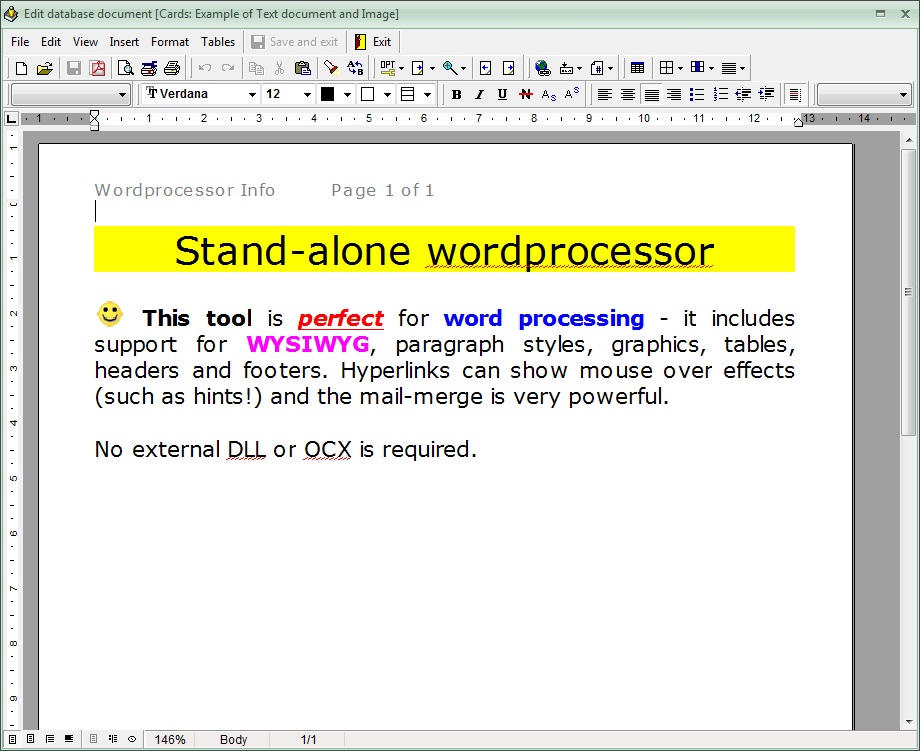
First, let's talk about the Word Processor. It is a common occurrence: you are looking at a contact or a task, and you realize you need to draft a formal letter, a report, or a detailed memo. Instead of launching a heavy application like Microsoft Word, you can use the integrated word processor within MSD Organizer. It supports rich text formatting, allowing you to create professional documents without ever leaving your organizational environment. This keeps you in "the zone" and prevents the distractions that often occur when switching between windows.
Secondly, the inclusion of Financial Calculators is a massive win for professional users. Whether you are trying to calculate loan repayments, investment growth, or simple office budgets, having a specialized financial tool integrated into your organizer is incredibly convenient. Alongside a standard calculator and an Image Viewer, these tools make MSD Organizer feel like a complete digital workstation. The image viewer is particularly helpful for those who like to attach visual references—like receipts, business cards, or project photos—to their entries. Having the viewer built-in ensures that you can see your data and your visual aids in one seamless workflow.
3. Bi-Directional Google Synchronization
We live in a mobile world, and any desktop organizer that doesn't talk to your phone is essentially a digital paperweight. This is where MSD Organizer truly shines. Despite being a robust desktop-first application, it features Google synchronization for both Calendar and Contacts. This is the "bridge" that many users need to make their workflow viable in the 21st century.
With this feature, you get the best of both worlds. You get the deep, granular control and the "big screen" productivity of the MSD Organizer desktop interface while you are at your desk. You can manage complex schedules, write long diary entries, and organize thousands of contacts with ease. Then, when you step away from your computer, you can sync that data to your Google account. This means your appointments and contact updates are instantly available on your smartphone or tablet through the native Google apps you already use.
This bi-directional sync is a critical feature for anyone who works on the go. If you add a contact on your phone while at a networking event, it will be waiting for you in MSD Organizer when you get back to the office. If you reschedule a meeting on your desktop, your phone will alert you at the correct time. This synergy ensures that you are never "out of the loop" regarding your own life. It provides the stability of a desktop database with the agility of a mobile app.
4. Robust Data Sovereignty and Security
In an era where data breaches are a weekly occurrence and privacy is increasingly hard to find, the way MSD Organizer handles your information is a major selling point. Most "modern" organizers are cloud-based, meaning your most sensitive personal data—your diary, your contacts, your daily schedule—lives on someone else's server. MSD Organizer takes a different approach by prioritizing Local Storage and Data Sovereignty.
When you use MSD Organizer, your data resides on your machine. You own it, you control it, and you decide who sees it. For professionals dealing with sensitive client information or individuals who keep a private diary, this is a non-negotiable benefit. The software provides internal security features, including password protection, to ensure that even if someone else uses your computer, your private information remains under lock and key.
Additionally, the Backup and Restore tools included in this giveaway are top-notch. One of the biggest fears of moving to a digital organizer is the "what if" scenario—what if the computer crashes? MSD Organizer makes it incredibly simple to create comprehensive backups of your entire database. You can save these backups to external drives, encrypted USB sticks, or your own private cloud storage. This level of control over your own data security is something you simply don't get with free web-based services. By downloading this giveaway, you are investing in a system that respects your privacy and gives you the tools to protect your digital legacy.
5. Comprehensive Personal Logging
Finally, we have to talk about the Diary and Cards modules. Most professional organizers are cold and clinical; they focus on "Tasks" and "Contacts" but forget that the user is a human being with thoughts, feelings, and miscellaneous information that doesn't fit into a tidy "To-Do" list. MSD Organizer is unique because it treats your personal life with the same level of importance as your professional life.
The Diary module is a powerful tool for self-improvement and historical record-keeping. Whether you use it for "bullet journaling," tracking your daily moods, or keeping a professional log of project progress, having a dedicated space for long-form writing is a luxury in an organizer. It allows you to look back at your year and see not just what you did, but how you felt about it. This is an essential feature for anyone interested in personal growth and mindfulness.
The Cards module is equally impressive. Think of it as a digital "catch-all" for information that doesn't belong in a calendar. Do you have a list of books you want to read? A collection of gift ideas for your family? Technical snippets for a coding project? The Cards module allows you to organize these disparate pieces of information using the same powerful search and categorization tools as the rest of the program. It turns MSD Organizer into a true Personal Information Manager (PIM), capable of holding the messy, unstructured data that makes up a real life. When you combine this with the Alarms and Tasks features, you have a system that doesn't just tell you what time it is, but actually helps you manage the entire scope of your existence.
Conclusion: Why You Should Act Now
The SharewareOnSale giveaway of MSD Organizer is a rare opportunity to get your hands on a premium piece of software that has been refined over years of development. While this specific version is "sponsored" and omits some of the more niche modules like Mail or Health tracking, it includes the absolute "Greatest Hits" of the MSD suite. The Calendar, Contacts, Alarms, Tasks, Cards, and Diary modules are the foundation of any successful organizational strategy, and they are all here in their full, unrestricted glory.
As a tech reviewer, I see hundreds of apps that claim to "fix" your life. Most of them are flashy but shallow. MSD Organizer is the opposite. It is a workhorse application designed for people who value substance over style. It is for the person who wants their data to be searchable, secure, and accessible. It is for the person who wants to stop juggling five different apps and start mastering one powerful tool. The inclusion of the Word Processor, Google Sync, and Financial Calculators elevates this from a simple utility to a comprehensive productivity engine.
Don't let the "sponsored version" label fool you. The modules included in this giveaway are the ones you will use 95% of the time. You are getting a world-class contact manager, a bulletproof task list, and a professional diary for the price of... well, for free during this giveaway period. In the world of tech, we often say that "if the product is free, you are the product." However, with a local-first application like MSD Organizer, you aren't the product—you are the owner. You are downloading a tool that puts you back in the driver's seat of your digital life. Take advantage of this giveaway, centralize your information, and watch your productivity soar. This is one download you won't regret.

Reviews for MSD Organizer
Click Here to Read Reviews for MSD Organizer >> Click Here to Submit Reviews for MSD Organizer >>