What Does Typing Buddy Do?
Typing Buddy is a productivity utility designed to streamline repetitive typing tasks through text expansion and system automation. At its core, the software allows users to define "triggers"—short character strings that, when typed, are instantaneously replaced with longer, pre-set phrases or paragraphs. This functionality is intended for professionals who frequently handle repetitive correspondence, technical documentation, or long-form content like articles and books.
Beyond text replacement, the application integrates system-level shortcuts to accelerate daily workflows. Users can assign triggers to perform various local and web-based actions, including:
- Launching applications: Open specific software programs without navigating the start menu or taskbar.
- Accessing file systems: Instantly open frequently used files or folders stored on local drives.
- Web navigation: Load specific web pages by typing a short code from any active window.
By automating these recurring inputs and navigation steps, the tool aims to reduce physical keystrokes and minimize context switching. The software remains active in the background, monitoring for assigned triggers across different editors and platforms to ensure consistent utility. It focuses on functional efficiency, allowing users to consolidate multi-step navigation and complex text entry into brief, customizable commands that work across the operating system.
Top 5 Reasons To Download Typing Buddy
- Exponential Increase in Writing Velocity and Productivity
- Streamlined Application and File Management via Custom Triggers
- Professional-Grade Consistency and Error Elimination
- Significant Reduction in Physical Strain and Cognitive Load
- A Lightweight, Universal Solution for All Windows Environments
In the modern digital landscape, efficiency isn’t just a luxury; it is the currency of success. We spend hours every single day hunched over our keyboards, repeating the same phrases, opening the same folders, and navigating the same complex directory structures. Whether you are a professional writer, a software developer, a customer support representative, or a student, the sheer volume of keystrokes you output is staggering. What if I told you that a significant portion of that effort is entirely wasted? This is where Typing Buddy enters the frame, and quite frankly, it is a game-changer for anyone who values their time. This isn’t just another utility; it is a fundamental shift in how you interact with your computer. Let’s dive deep into why this specific giveaway is the most important download you will make this year.
1. Exponential Increase in Writing Velocity and Productivity
The primary draw of Typing Buddy is its core functionality as a high-performance text expander. At its simplest level, this software allows you to assign a "trigger"—a short, easily remembered string of characters—to a much longer phrase, paragraph, or even an entire page of text. Imagine the power of typing three letters and having a 500-word disclaimer, a complex mailing address, or a standard bio instantly appear on your screen. This is the essence of "typing less and writing more."
For writers and content creators, the friction between thought and digital output is the greatest enemy of creativity. When you are in "the zone," having to stop and manually type out repetitive transitional phrases or technical jargon breaks your flow. With Typing Buddy, you can create a library of shortcuts for your most frequently used terms. If you are writing a technical manual, you could turn a complex chemical formula or a long-winded software title into a two-letter trigger. This doesn't just save seconds; it preserves your mental energy for the actual creative work.
Furthermore, the productivity gains are compounded when you consider the frequency of our digital interactions. Think about how many times a day you type your email address, your physical address, or common phrases like "Thank you for reaching out, I will get back to you shortly." Over a year, these micro-actions add up to hours of manual labor. Typing Buddy reclaims that time for you. It transforms your keyboard from a simple input device into a sophisticated automation engine. By downloading this giveaway, you are essentially giving yourself a permanent speed boost that applies to every single application on your system.
2. Streamlined Application and File Management via Custom Triggers
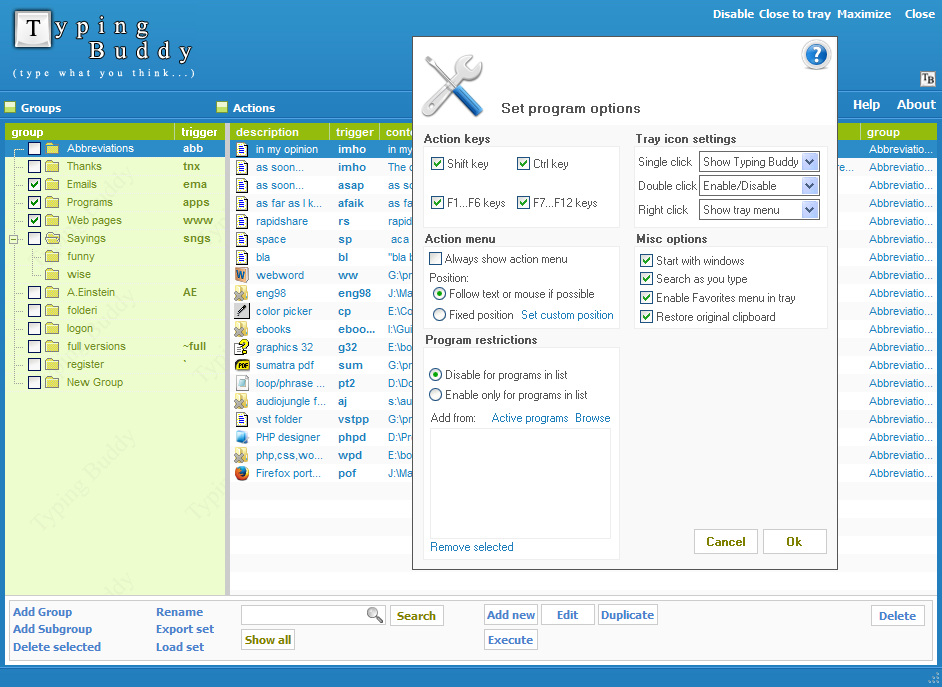
What sets Typing Buddy apart from standard text replacement tools is its versatility. Most people think of text expanders as tools for words, but Typing Buddy recognizes that our digital workflow involves more than just sentences. It involves navigation. We are constantly opening programs, hunting through deep subfolders for specific spreadsheets, and searching for frequently visited websites. This software allows you to apply the same "trigger" logic to system actions.
Imagine you are working on a project that requires you to open a specific Excel file hidden four folders deep in your Documents directory. Instead of clicking through your file explorer, you can set a trigger like "pro1" to launch that file instantly. Need to open your favorite code editor, a specific web browser, or a project management tool? Assign a trigger and watch it pop up in milliseconds. This feature effectively turns your entire keyboard into a command console.
This functionality eliminates the "search and click" fatigue that plagues the modern professional. When you are multitasking, the time it takes to find a file or a program creates a subtle but real cognitive lag. By using Typing Buddy to launch files, folders, and web pages, you maintain your focus on the task at hand. You no longer have to navigate away from your workspace to find your tools; your tools come to you the moment you call them. This integration of text expansion and system navigation makes it an all-in-one productivity suite that replaces several disparate utilities.
3. Professional-Grade Consistency and Error Elimination
Accuracy is the hallmark of professionalism. Whether you are sending a pitch to a high-value client or publishing an article online, a single typo in a critical piece of information can undermine your credibility. Human error is inevitable, especially when typing repetitive data like bank account numbers, SKU codes, or legal jargon. Typing Buddy removes the human element from the equation, ensuring that your output is perfect every single time.
By using triggers for your most important data points, you ensure 100% accuracy. Once you have verified the "replacement phrase" in your Typing Buddy library, you never have to worry about mistyping it again. This is particularly vital for those in data-heavy fields. If you are a coder, you can use triggers for snippets of code that are difficult to memorize or prone to syntax errors. If you are in customer service, you can ensure that every customer receives the exact same, polished, and error-free response, regardless of how tired you are at the end of a shift.
Consistency also applies to branding and tone. If you are managing a team or running a business, you want to make sure that certain phrases—like your mission statement or product descriptions—are always phrased identically. Typing Buddy allows you to standardize these elements. By downloading this tool, you are investing in a system that acts as a perpetual proofreader, ensuring that your communication remains sharp, professional, and flawlessly accurate across all platforms.
4. Significant Reduction in Physical Strain and Cognitive Load
We often ignore the physical toll that thousands of daily keystrokes take on our bodies. Repetitive Strain Injury (RSI) and Carpal Tunnel Syndrome are real risks for anyone who spends their life behind a screen. Typing Buddy is, in a very real sense, a health utility. By allowing you to "type less," it directly reduces the mechanical wear and tear on your fingers, wrists, and forearms. If a 100-word paragraph can be generated with 5 keystrokes, you have reduced the physical impact by 95% for that specific action.
Beyond the physical benefits, there is the reduction of cognitive load. Every time you have to recall a complex password, a long URL, or a specific set of instructions, you are using "brain cycles." While it might seem minor, these small acts of recall and manual execution contribute to "decision fatigue" over the course of a day. Typing Buddy offloads this data from your brain to the software. You don't need to remember the details; you only need to remember the trigger.
The "mental space" you save by using an automation tool like this is invaluable. It allows you to focus on high-level problem-solving rather than the minutiae of data entry. When you download Typing Buddy, you aren't just downloading a shortcut tool; you are adopting a lifestyle of "minimalist effort for maximalist output." You will find yourself ending the workday feeling less drained, both physically and mentally, because you have outsourced the most tedious parts of your job to a reliable digital assistant.
5. A Lightweight, Universal Solution for All Windows Environments
One of the biggest frustrations with productivity software is when it only works in specific environments. You might have a great spell-checker in your word processor, but it doesn't work in your email client or your coding environment. Typing Buddy solves this by being a system-wide utility. Because it operates at the input level, its triggers work anywhere you can type. Whether you are in a web browser, a specialized CRM, a text editor, or even a command-line interface, Typing Buddy is there, ready to expand your text or launch your files.
Furthermore, this software is designed to be unobtrusive. As a tech reviewer, I have seen plenty of "productivity" apps that consume so much RAM and CPU power that they actually slow down the computer they are supposed to be helping. Typing Buddy is the opposite. It is a lightweight, "set it and forget it" tool. It sits quietly in the background, consuming negligible resources, and only springs into action when it detects a trigger string. This makes it ideal for everyone, from those with high-end workstations to those using older laptops.
The simplicity of the interface is also a major selling point. You don't need a degree in computer science to set up your triggers. The process is intuitive: define the trigger, define the replacement, and you're done. This ease of use means you can start seeing the benefits within minutes of downloading the giveaway. There is no steep learning curve, no complex scripting language to master—just pure, unadulterated efficiency. It is the ultimate "power user" tool for people who don't have time to learn how to be a power user.
Conclusion: Why You Need to Download Typing Buddy Now
In conclusion, Typing Buddy is one of those rare utilities that actually delivers on the promise of making your life easier. It addresses the three most common bottlenecks in digital work: speed, accuracy, and navigation. By combining a powerful text expansion engine with a versatile file and application launcher, it provides a comprehensive solution for anyone looking to optimize their workflow.
Think about the tasks you do every day. Think about the emails you write, the files you hunt for, and the phrases you repeat until they lose all meaning. Now, imagine a world where those tasks happen instantaneously. That is the world Typing Buddy creates for you. It allows you to reclaim your time, protect your physical health, and ensure that every word you "type" is perfect.
This giveaway is an incredible opportunity to get your hands on a tool that will pay for itself in saved time within the first week of use. As a tech reviewer, I encounter hundreds of apps that promise to change the way you work, but Typing Buddy actually does it by simplifying the most basic unit of digital interaction: the keystroke. Don't let this opportunity pass you by. Download Typing Buddy, set up your first few triggers, and experience the sheer satisfaction of watching your productivity soar. It is time to stop working for your computer and start making your computer work for you. Type less, write more, and take control of your digital life today!
Remember, the difference between a cluttered, stressful workflow and a streamlined, efficient one often comes down to the tools you choose to use. Typing Buddy is the tool of choice for those who want to stay ahead of the curve. Whether you are finishing a book, managing a business, or just trying to get through your inbox faster, this software is your secret weapon. Get it now and transform your keyboard into the ultimate productivity powerhouse.

Reviews for Typing Buddy
Click Here to Read Reviews for Typing Buddy >> Click Here to Submit Reviews for Typing Buddy >>