What Does Vov Alpha Blend Do?
Vov Alpha Blend is a specialized utility designed for alpha compositing, a digital process that merges two distinct images into a single composite file. The software applies alpha blending to combine a foreground element with a background image, creating the visual appearance of partial or full transparency. This technique is frequently used in digital imaging when elements are rendered in separate passes and must be integrated into a final, unified 2D image.
The tool allows users to select a primary source image and an overlay to generate a new output. By calculating the alpha channel values, the software determines how much of the background remains visible through the foreground layer. This functionality is particularly useful for tasks such as layering character sprites, applying digital watermarks, or compositing interface components over background textures.
Vov Alpha Blend focuses on a lightweight, functional workflow, eliminating the need for complex, multi-layered photo editing suites for straightforward transparency tasks. Once the two images are processed, the application generates a standard image file that preserves the intended opacity effects. It is a practical solution for users requiring rapid image merging and precise control over transparency levels without the need for manual pixel manipulation.
Top 5 Reasons To Download Vov Alpha Blend
Before we dive deep into the technical brilliance of this utility, let’s look at the core reasons why you need to add this tool to your digital toolkit immediately. If you have ever struggled with complex photo editors just to perform a simple overlay, this list is for you.
- Unrivaled Simplicity in Complex Image Processing: It turns the mathematically complex process of alpha compositing into a two-click operation.
- Zero-Bloat Performance for Faster Results: Unlike heavy-duty creative suites, this software focuses on doing one thing perfectly without draining your system resources.
- Professional-Grade Alpha Blending Precision: It ensures that transparency transitions are smooth, avoiding the "jagged edge" look common in low-end editors.
- The Essential Tool for Instant Watermarking and Branding: It provides the fastest way to apply logos and signatures to images while maintaining perfect transparency.
- Creative Freedom Without the Learning Curve: You get to experiment with digital layering and "separate pass" rendering without spending weeks watching tutorials.
Understanding the Power of Specialized Software
In the world of modern computing, we are often led to believe that bigger is always better. We are told that if we want to edit an image, we need a massive, multi-gigabyte suite that costs a monthly subscription fee and requires a dedicated graphics card just to open the splash screen. But as any seasoned tech enthusiast will tell you, the most efficient workflows are built on specialized tools. This is where the Vov Alpha Blend giveaway comes into play. It is a surgical instrument in a world of sledgehammers.
The core of this software is built around a concept called alpha blending, or alpha compositing. For the uninitiated, this is the process of combining an image with a background to create the appearance of partial or full transparency. It sounds simple, but the mathematics happening behind the scenes are actually quite sophisticated. When you merge two images, the software has to calculate the color values of every single pixel, factoring in the "alpha" channel—the data that tells the computer how "see-through" a pixel should be. This giveaway brings that power to your desktop in a lightweight, accessible package.
Reason 1: Unrivaled Simplicity in Complex Image Processing
Let’s be honest: most of us don't have the time to master professional graphic design software. If you just want to take a transparent logo and place it over a high-resolution background, opening a massive editor is like using a rocket ship to go to the grocery store. It’s overkill, and it’s frustrating. This software eliminates the "interface fatigue" that comes with modern creative apps.
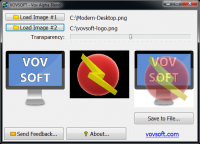
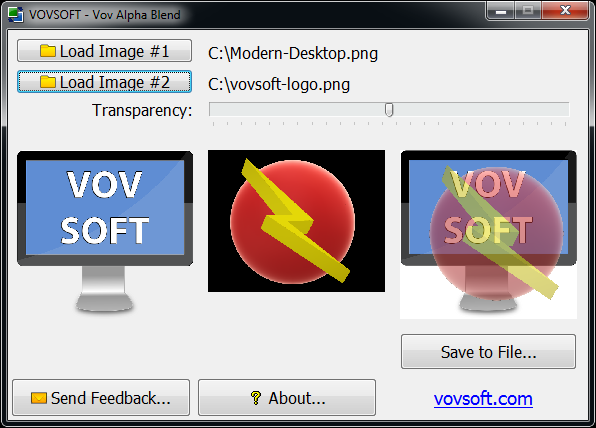
The beauty of this tool lies in its focused UI. You have a source image, you have a background image, and you have the blending engine. By stripping away the hundreds of unnecessary buttons, sliders, and hidden menus found in other programs, this software allows you to achieve your goal in seconds. You aren't hunting for the "layer transparency" setting or trying to figure out which "blend mode" is the right one. The software handles the alpha compositing logic for you. This simplicity is a massive win for productivity. It allows you to stay in your creative flow rather than getting bogged down in technical troubleshooting.
Furthermore, the simplicity doesn't mean a lack of power. Because the software is dedicated to alpha blending, it handles the file headers and transparency data with a level of integrity that even some "all-in-one" web editors fail to do. When you download this giveaway, you’re getting a tool that respects the original quality of your assets while making the merging process effortless.
Reason 2: Zero-Bloat Performance for Faster Results
We live in an era of "software bloat." Even simple text editors now seem to require 500MB of RAM just to sit idle. For those of us who value system performance, this is a nightmare. This software is the antithesis of that trend. It is incredibly lightweight, meaning it launches instantly and processes images with remarkable speed.
If you are working on an older laptop or a workstation that is already bogged down by browser tabs and communication apps, you need tools that don't add to the burden. This alpha blending utility is designed to be efficient. It doesn't install background services, it doesn't "phone home" constantly, and it doesn't take up precious gigabytes on your SSD. It is a portable-style utility that prioritizes the user's time and hardware longevity.
Think about the workflow of a content creator who needs to merge twenty sets of images for a project. In a heavy editor, the time spent waiting for the app to load and the files to export adds up to minutes or even hours over a week. With this giveaway, those tasks are reduced to seconds. It is the definition of "snappy" software. For a tech reviewer, there is nothing more refreshing than an app that respects the CPU cycles of the user.
Reason 3: Professional-Grade Alpha Blending Precision
There is a common problem in digital imaging known as "artifacting." When you try to merge a transparent image (like a PNG with an alpha channel) onto a background using low-quality tools, you often end up with a weird white or black outline around the edges of the foreground object. This happens because the software isn't correctly calculating the alpha-multiplication of the pixels.
This software uses a robust alpha blending algorithm that ensures professional-grade results. It treats the alpha channel as a continuous range of transparency, allowing for smooth anti-aliased edges. This is particularly important for anyone working with 2D renders or separate image passes. In professional 3D rendering, for example, elements like shadows, reflections, and the main subject are often rendered separately. To bring them together into a "composite" image, you need a tool that understands how to blend those layers without losing detail or introducing digital noise.
By downloading this giveaway, you are essentially getting a dedicated compositing engine. Whether you are merging a complex digital painting or simply putting a "watermark" on a photo, the transparency will look natural. The transitions between the foreground and background will be seamless, giving your work a polished, high-end look that is usually reserved for people with expensive software licenses.
Reason 4: The Essential Tool for Instant Watermarking and Branding
In the age of social media and digital copyright, watermarking is no longer optional—it's a necessity. Whether you are a photographer, a small business owner, or a meme creator, you need to be able to "stamp" your images quickly. However, a watermark only looks good if it’s blended correctly. A solid square around your logo looks amateurish. You need that logo to be transparent, and you need it to sit perfectly on top of your content.
This software is arguably the best tool for this specific job. Because it is built to merge two images with transparency, it is the perfect "watermarking station." You can keep your logo file ready, and whenever you have a new image to protect, you just run it through the software. The result is a clean, branded image ready for upload.
Beyond simple watermarking, this is also vital for UI/UX designers. If you are building a website or an app and you need to see how a certain transparent icon looks over various background textures, this tool provides a "live" way to test those compositions. It’s an essential part of the design "rapid prototyping" phase. It saves you from having to set up a full CSS environment just to see if a PNG looks good over a JPEG. You blend it, you see it, you decide.
Reason 5: Creative Freedom Without the Learning Curve
Perhaps the most compelling reason to download this giveaway is the door it opens for creative experimentation. Many people avoid "compositing" because they think it's a "pro-only" skill. They think they need to understand layers, masks, and blending modes like "Multiply," "Screen," or "Linear Burn." This software democratizes that process.
When you have a tool this easy to use, you start to experiment. You might take a texture of rain and try blending it over a street photo. You might take a transparent light flare and see how it looks over a portrait. Because the "cost of failure" is so low—meaning it takes almost no time to try a blend—you find yourself being more creative. You can iterate through ideas at lightning speed.
It is often useful to render image elements in separate passes, as the software description suggests. This is a technique used by the best digital artists in the world. They don't try to create everything in one go; they build the image piece by piece. This software allows you to adopt that professional workflow. You can create your background, create your subject with a transparent background, and then use this tool to bring them together into a final, stunning composite. It turns you from a "photo taker" into a "digital compositor."
Final Thoughts: Why You Shouldn't Pass This Up
As a tech reviewer, I see hundreds of apps every year. Most of them are trying to do too much, and as a result, they do nothing particularly well. This software is different. It identifies a specific, technical need—the merging of images via alpha blending—and it provides a clean, efficient, and high-quality solution.
This giveaway is an opportunity to own a "utility player" for your computer. It’s like having a high-quality screwdriver in your junk drawer; you might not use it every single day, but when you need to turn a screw, nothing else will do the job quite as well. Whether you are a professional looking to speed up your workflow, or a hobbyist who wants to make your photos look a bit more professional, this is a download you won't regret.
The process of alpha compositing doesn't have to be a mystery or a chore. With this tool, it becomes a feature of your daily digital life. You get to enjoy the "appearance of partial or full transparency" without the headaches of traditional editing. The ability to generate a new image file that preserves the delicate balance of two different sources is a powerful thing. Don't let the simplicity fool you; there is some serious math under the hood making your images look great.
In conclusion, the combination of speed, precision, and ease of use makes this giveaway a "must-have." If you value your time and your system's performance, and if you want your digital creations to stand out with professional-level transparency, then stop what you're doing and grab this tool. It is the ultimate shortcut to better imagery, and in the fast-paced world of digital content, shortcuts are the keys to the kingdom. This isn't just another app; it's a workflow revolution in a tiny package. Download it, try it, and watch how it simplifies your creative life.
Note: Always ensure you are using high-quality source images to get the most out of the alpha blending process. The better your alpha channel data, the more impressive your final composite will be!

Reviews for Vov Alpha Blend
Click Here to Read Reviews for Vov Alpha Blend >> Click Here to Submit Reviews for Vov Alpha Blend >>