What Does iDealshare VideoGo Do?
iDealshare VideoGo is a professional-grade media utility designed for cross-format video and audio conversion. It distinguishes itself by supporting a broad spectrum of file types, ranging from standard formats like MP4 and AVI to specialized containers such as H.265, WTV, MXF, DAV, R3D, and Apple ProRes. The software operates on both Windows and Mac platforms, providing high-speed processing without compromising the original quality of the source files.
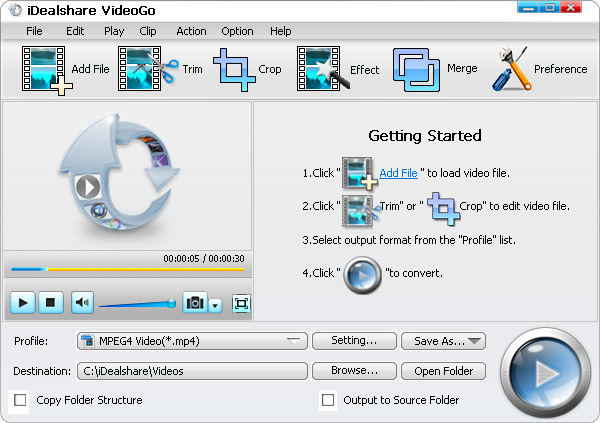
The application includes a comprehensive suite of editing tools. Users can trim, crop, and rotate footage, or apply watermarks and visual effects to their projects. Technical adjustments are also available, including the ability to modify bitrates, aspect ratios, and sample rates. Beyond video, the tool functions as a dedicated audio converter and extractor, handling formats like FLAC, AIFF, and OGG while allowing for the direct extraction of soundtracks from video files.
Key functionalities of the software include:
- Direct conversion for 4K, 1080p, and 720p HD video formats.
- Batch processing and background execution to streamline workflows.
- Device-specific presets for hardware including iPhone, iPad, Samsung, and Sony.
- An integrated media player for direct file playback without external codecs.
- Advanced subtitle management, including the ability to add, remove, or extract tracks.
Top 5 Reasons To Download iDealshare VideoGo
If you have ever found yourself staring at a "File Format Not Supported" error message while trying to open a video on your tablet, or if you have struggled to upload a massive video file to social media because the size was just too large, then you know the frustration of the modern digital landscape. Digital media is everywhere, but it is fragmented into hundreds of different codecs and containers. This is why every power user needs a reliable media Swiss Army Knife in their toolkit. Today, we are looking at iDealshare VideoGo, a professional-grade converter that bridges the gap between incompatible devices and stubborn file formats. Before we dive into the deep technical details of why this software stands out in a crowded market, here are the top five reasons you need to download this giveaway right now.
- Universal Format Support: It handles everything from common MP4s to professional-grade R3D and Apple ProRes files.
- Comprehensive Audio Suite: Beyond video, it is a high-fidelity audio converter and extractor that supports lossless formats like FLAC and ALAC.
- Built-in Pro Editing Tools: You can trim, crop, merge, rotate, and add watermarks or subtitles without needing a separate video editor.
- Smart Device Presets: It takes the guesswork out of conversion with optimized settings for iPhone, iPad, Samsung, and more.
- Lossless Quality and Speed: It features lightning-fast conversion speeds and background processing while maintaining the original quality of your source material.
1. Universal Format Support: The End of "File Not Supported"
In the world of tech reviewing, we see a lot of "standard" converters. Most of them do a fine job with your basic MP4, AVI, or MOV files. But the digital world isn't just made of basics. If you are a professional videographer, a security system owner, or a hardcore media collector, you often run into "niche" formats that leave standard software scratching its head. This is where iDealshare VideoGo truly earns its "professional" moniker.
The sheer breadths of the input support is staggering. We are talking about high-efficiency formats like H.265 (HEVC), which is becoming the standard for 4K video but is notoriously difficult for older systems to play. It handles broadcast and professional formats like MXF, WTV, and Apple ProRes with ease. Even if you are dealing with obscure proprietary formats from CCTV cameras like DAV, or raw footage from high-end cameras like R3D, this software treats them like any other file. It even supports AVCHD, which is the bane of many hobbyists using older camcorders.
This level of support means you no longer have to hunt for specific, shady players or download dozens of codec packs that might clutter your operating system. Whether you are dealing with a 1080p MKV file or a legacy 3GP video from an old flip phone, the software recognizes the source and prepares it for whatever destination you choose. This is the definition of "universal," and for anyone who works with media regularly, this single feature is worth the download alone. It effectively future-proofs your media library, ensuring that no matter how technology evolves, your old and new files remain accessible.
2. Comprehensive Audio Suite: More Than Just Video
While the name suggests a focus on video, iDealshare VideoGo is secretly one of the most robust audio converters on the market. Many users don't realize that audio conversion is just as complex as video conversion. Whether you are an audiophile looking to convert FLAC (Free Lossless Audio Codec) files to something your car stereo can play, or you need to extract a catchy song from a movie trailer, this tool handles it effortlessly.
One of the most useful features is the ability to extract audio from video. Have you ever watched a concert video or a lecture and wished you could have just the audio as an MP3 or AAC file for your commute? With this software, you simply import the video and select your desired audio output. It supports a massive array of audio formats including OPUS, Vorbis, AC3, DTS, ALAC, OGG, and even legacy formats like VOC and CAF.
For those who care about sound quality, the support for lossless conversion is a game changer. You can convert between high-fidelity formats without losing a single bit of data. On the flip side, if you are trying to save space, you can convert high-bitrate files into compressed formats while having granular control over the sample rate and bitrate. This versatility makes it an essential tool for podcasting, music management, and even professional sound design where different hardware requires different, often obscure, file types like QCP or DSS.
3. Built-in Pro Editing Tools: A Complete Studio in One App
Most of the time, we don't just want to convert a file; we want to fix it. Maybe the video was recorded vertically on a phone and needs to be rotated. Maybe there are black bars on the sides that need to be cropped out. Or perhaps you only need a 30-second clip from a two-hour movie. Usually, you would have to import the file into a heavy, complicated video editing suite like Premiere Pro or Final Cut, do the work, and then export it. That is a massive waste of time and system resources.
iDealshare VideoGo includes a suite of advanced editing functions that are surprisingly powerful yet incredibly easy to use. The trim function allows you to set start and end points with frame-perfect precision, ensuring you only convert the segment you actually need. The crop tool lets you remove unwanted edges or change the focus of the frame. You can even merge multiple clips into one continuous file, which is perfect for joining those short clips from your digital camera into a single vacation movie.
Beyond the basics, the software allows you to add watermarks (either text or images) to protect your content, and it provides an array of effects to adjust the visual style of your video. One of my favorite "quality of life" features is the ability to increase audio volume directly during the conversion process. We have all had those videos where the sound is just too quiet to hear; this tool lets you boost that signal so it's clear on any device. Furthermore, the ability to add, remove, or extract subtitles is a feature usually reserved for much more expensive software. Whether you are a content creator or just someone who wants their home movies to look a bit more polished, these editing tools provide everything you need without the steep learning curve.
4. Smart Device Presets: Optimized for Your Hardware
Let's talk about the biggest headache in video conversion: settings. What is the best resolution for an iPhone 14? What bitrate does a Samsung Galaxy support? What is the ideal aspect ratio for an iPad Pro? If you don't know the answers to these questions, you can easily spend hours researching, only to end up with a file that is either too large or looks like a pixelated mess.
iDealshare VideoGo eliminates this guesswork entirely through its library of smart presets. Instead of worrying about codecs and bitrates, you simply select your device from a list. It features optimized profiles for iPhone, iPad, Apple TV, Samsung Galaxy, HTC, LG, Sony, and even gaming consoles like PlayStation and Xbox. When you select a preset, the software automatically configures the resolution, codec, and aspect ratio to ensure the best possible playback experience on that specific screen.
Speed is the other half of this equation. Converting high-definition video is a CPU-intensive task that can slow your computer to a crawl. This software is designed with fast conversion technology that leverages your hardware's capabilities to get the job done quickly. It also supports background processing, meaning you can start a long list of conversions and keep working on other tasks while the software chugs away quietly in the corner. For anyone with a large library of media to process, this efficiency is a massive productivity booster.
5. Lossless Quality and Universal Compatibility
The cardinal sin of video conversion is "generational loss." This happens when you convert a file and it comes out looking blurry, blocky, or desaturated because the software compressed it too aggressively. Professionals and enthusiasts won't tolerate this. iDealshare VideoGo is built on an engine that prioritizes lossless conversion. If you want the output to be an exact 1:1 visual match of the source, this software can do it. It allows you to manually adjust the video codec, bitrate, and sample rate, giving you total control over the balance between file size and image quality.
Finally, we have to talk about compatibility. This isn't just a tool for Windows users; it has high compatibility with both Windows and Mac systems. This is crucial in a modern household or office where you might be jumping between different operating systems. The interface is consistent across platforms, meaning there is no new learning curve if you switch computers.
Additionally, the direct playback feature is a hidden gem. The software can act as a standalone media player for almost any format. If you have a file that your default Windows Media Player or QuickTime can't open, you don't even have to convert it—just drag it into iDealshare VideoGo and hit play. This makes it an invaluable diagnostic tool for checking files before you even begin the conversion process. When you combine this level of quality control with its universal reach, it becomes clear why this is a "must-download" for any tech-savvy user.
Conclusion: Why You Should Get It Now
In the tech world, we often see tools that try to do everything but master nothing. iDealshare VideoGo is the exception. It manages to be accessible enough for a casual user who just wants to put a movie on their kid's iPad, while being powerful enough for a pro who needs to handle R3D files and DTS audio. It solves the most common problems we face with digital media: incompatibility, oversized files, and poor editing options.
By downloading this giveaway, you are essentially getting a professional-grade media laboratory. You get the universal support of a top-tier converter, the precision of a dedicated audio tool, the utility of a video editor, and the convenience of a device-optimized library. In an age where we are constantly switching between our phones, laptops, and smart TVs, having a tool that ensures our media follows us seamlessly is not just a luxury—it is a necessity. Don't wait until the next time you see a "File Format Not Supported" error; download iDealshare VideoGo today and take total control over your digital media library.
The combination of speed, simplicity, and sheer power makes this an easy recommendation. Whether you are cleaning up your hard drive, preparing a presentation, or just trying to watch your favorite show on the go, this software provides the bridge you need. It is rare to find a tool that balances such a deep feature set with an intuitive interface, making it a standout choice in the world of media utility software.

Reviews for iDealshare VideoGo
Click Here to Read Reviews for iDealshare VideoGo >> Click Here to Submit Reviews for iDealshare VideoGo >>