What Does SonicPhoto Silver Do?
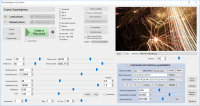
SonicPhoto is a specialized software utility that utilizes reverse spectrogram technology to convert visual data into audio. While traditional digital audio workstations typically provide a visual representation of sound waves, this application reverses the process by interpreting image files as sound sources. By loading any photograph or graphic into the interface, users can generate a diverse range of acoustic textures based on the patterns found within the image.
The software’s conversion engine is capable of producing several distinct types of audio, including rippling arpeggios, bass synthesizers, and percussive effects. All output is rendered in stereo, allowing for atmospheric and space-like soundscapes. The complexity and tone of the resulting sound are determined by the pixel data, colors, and brightness of the source image.
A key technical feature of the application is its harmony mode. This function enables the software to quantize generated noise into specific musical scales, making the output suitable for integration into melodic compositions. This differentiates the tool from standard noise generators by providing a degree of tonal control. Users can manipulate internal parameters to dictate how visual elements correspond to frequency and amplitude, providing a unique method for sound synthesis and experimental music production. This makes the software a practical asset for sound designers looking to create unconventional audio from non-traditional sources.
Top 5 Reasons To Download SonicPhoto Silver
- Unprecedented Creative Freedom Through Image-to-Sound Conversion
- The Revolutionary Harmony Mode for Musical Results
- Professional-Grade Stereo Imaging and Spatial Depth
- Infinite Sound Design Potential for Every Genre
- An Intuitive Workflow That Bridges the Gap Between Art and Audio
Every once in a while, a piece of software comes along that doesn't just iterate on a concept, but completely flips the script on how we approach creativity. If you have ever spent hours tweaking oscillators or scrolling through endless sample packs looking for "that one sound," you know the frustration of the digital plateau. We often find ourselves stuck in the same patterns, using the same waveforms and the same effects. This is where the concept of the reverse spectrogram enters the fray, and specifically, why SonicPhoto is the tool you never knew you desperately needed. It is a piece of software that turns the visual world into an auditory playground, and in this review, I am going to break down exactly why this giveaway is the most important download you will make this year.
1. Unprecedented Creative Freedom Through Image-to-Sound Conversion
The core hook of this software is its ability to perform "reverse spectrogram" conversion. To understand why this is a game-changer, you first have to understand what a spectrogram is. In the professional audio world, a spectrogram is a visual representation of the spectrum of frequencies in a sound as they vary with time. Usually, we use these to "see" our music to fix errors or balance a mix. SonicPhoto does the exact opposite: it takes a static image—any image—and treats it as a map for sound. It reads the pixels, the colors, the brightness, and the contrast, and translates that data into frequency and amplitude.
This provides a level of creative freedom that is frankly mind-blowing. Imagine taking a photograph of a sunset and hearing the warm oranges and deep purples translated into glowing, evolving pads. Imagine taking a picture of a crowded city street and hearing the chaotic geometry turned into a rhythmic, mechanical soundscape. Because the software allows you to load any image, the source material for your sound design is literally infinite. You are no longer limited to the "math" of a traditional synthesizer; you are now using the natural world, digital art, and even your own sketches as the foundation for your audio.
For the tech-savvy artist, this means that the barrier between visual inspiration and sonic realization has been completely removed. You can draw a shape in a basic paint program—zig-zags, circles, complex fractals—and SonicPhoto will interpret those shapes into auditory patterns. This is "sonic alchemy" at its finest. It turns the user from a mere "preset-browser" into a true architect of sound. When you download this giveaway, you aren't just getting an app; you're getting a new way of seeing—and hearing—the world around you.
2. The Revolutionary Harmony Mode for Musical Results
One of the biggest criticisms of "image-to-sound" technology in the past has been that it often results in "unusable noise." While pure noise has its place in experimental genres, most of us want to create something that feels musical, harmonic, and structured. This is where SonicPhoto absolutely demolishes the competition. Its unique Harmony Mode is the secret sauce that makes this software a professional tool rather than just a scientific curiosity.
Harmony Mode allows you to take the raw, often chaotic data generated by an image and "snap" it to a musical scale. You can choose to harmonize the output so that every frequency generated fits perfectly within a specific key or chord structure. This means those "rippling arpeggios" mentioned in the description aren't just random bleeps; they are melodic sequences that you can actually use in a song. You can take a noisy picture of a forest and, with a few clicks, transform it into a hauntingly beautiful melody in C-Minor.
This feature is vital because it bridges the gap between sound design and composition. Without it, you’d be spending hours trying to tune your image-generated sounds to match your project. With it, the software does the heavy lifting for you. It allows you to create "musical noise," which is a highly sought-after texture in modern film scoring and electronic music production. It gives the user the power to control the chaos, ensuring that no matter how complex or "busy" your input image is, the output will always have a sense of tonal purpose and musicality. This is sophisticated engineering hidden behind a user-friendly interface, and it is a massive reason why you need this software in your arsenal.
3. Professional-Grade Stereo Imaging and Spatial Depth
In the world of modern audio production, "mono" is the enemy of immersion. We want sounds that breathe, move, and occupy space. A common flaw in basic conversion utilities is that they produce a flat, centered sound that feels lifeless. SonicPhoto avoids this trap entirely by incorporating a powerful, built-in stereo engine. When you load an image, the software doesn't just generate a single stream of audio; it uses the horizontal and vertical data of the image to create a perfect stereo field.
The "space-like sounds" and "roaring bass synths" mentioned in the software's description benefit immensely from this. Because the software reads the image from left to right (as time) and top to bottom (as frequency), it can also interpret color and position as panning data. This results in sounds that naturally sweep across the stereo field, creating a sense of movement and width that would take hours to program manually in a Digital Audio Workstation (DAW). The "rippling" effect is not just a marketing buzzword—it is a literal description of how the sound moves through your speakers.
For anyone working in ambient music, drone, or cinematic underscores, this spatial depth is worth its weight in gold. You can create massive, cinematic "washes" of sound that feel like they are surrounding the listener. When you combine this stereo imaging with the harmony mode, you get a result that sounds like it was produced in a multi-million dollar studio, even if you just used a photo of your backyard. The professional quality of the output is what separates this software from the "toys" found on the app store. It is a serious tool for serious creators who demand high-fidelity, wide-screen audio.
4. Infinite Sound Design Potential for Every Genre
It is easy to assume that a "reverse spectrogram" tool is only for experimental "glitch" musicians or avant-garde composers. That couldn't be further from the truth. The versatility of SonicPhoto makes it an essential download for producers across every conceivable genre. Whether you are making hard-hitting Techno, lush Lo-Fi Hip Hop, or tension-filled Horror scores, this software has something for you.
- For the EDM Producer: You can create incredibly unique "risers" and transition effects by using images with sharp diagonal lines. Because you can control the "blur" and "quality" of the conversion, you can create synths that sound like they are tearing through the speakers, or percussive hits that have a texture no drum machine could ever replicate.
- For the Film Composer: Scoring a scene that takes place in a cavern? Take a photo of a cave, load it in, and use the "roaring bass" capabilities to create a literal "sonic fingerprint" of that location. The organic nature of image-to-sound conversion creates atmospheres that feel "alive" in a way that traditional synthesis often misses.
- For the Sound Designer: If you are working on video games or foley, you can use high-contrast images to create "UI sounds," "laser beams," or "alien environments." The ability to create an "infinite variety" of sounds means you will never run out of original assets for your projects.
The beauty of SonicPhoto lies in its unpredictability. In an era where everyone is using the same Xfer Serum presets or the same Splice samples, originality is the most valuable currency a creator has. By downloading this software, you are ensuring that your sound palette is 100% unique to you. No two people will ever use the same image with the same settings in the same way. It is the ultimate antidote to the "cookie-cutter" sound of modern digital music.
5. An Intuitive Workflow That Bridges the Gap Between Art and Audio
Finally, we have to talk about the user experience. Many "scientific" audio tools are notoriously difficult to use, requiring a PhD in physics just to get a sound out of them. SonicPhoto, however, is designed with the artist in mind. The workflow is refreshingly simple: Load an image, tweak the parameters, and hit play. It encourages playfulness and experimentation, which are the heart of all great art.
The software includes powerful in-built features that allow you to manipulate the "brightness" and "contrast" of your sound directly by manipulating those same attributes in the image. Want a darker, bassier sound? Lower the brightness. Want more high-end detail and "shimmer"? Crank up the contrast. It makes sense instinctively because we already understand these visual concepts. This "visual-to-audio" translation makes the software accessible to beginners while remaining deep enough for power users.
Furthermore, the software doesn't just stop at "noise." It allows you to create everything from percussive "blips" to "infinite" textures. Because you can control the speed at which the software "reads" the image, you can turn a small 100x100 pixel icon into a 10-minute long evolving drone, or a massive panoramic photograph into a 2-second percussive "whoosh." This level of control over the "time" element of the spectrogram is what makes it a powerhouse for professional workflows.
In conclusion, SonicPhoto is a rare gem in the world of audio software. It takes a complex, high-level mathematical concept—reverse spectrogram synthesis—and turns it into a fun, inspiring, and incredibly powerful creative tool. Whether you are looking to add a unique texture to your next hit song, score a short film with sounds that have never been heard before, or simply spend an afternoon "hearing" what your family photos sound like, this software is an absolute must-download. It challenges you to think differently about sound, and in doing so, it unlocks a level of creativity that traditional tools simply cannot touch. Don't let this giveaway pass you by—your sonic library will thank you.
The tech world is full of imitations, but SonicPhoto stands alone as a bridge between the world we see and the world we hear. It is time to stop just looking at your photos and start listening to them. Download it today and witness the transformation of your creative process.


Reviews for SonicPhoto Silver
Click Here to Read Reviews for SonicPhoto Silver >> Click Here to Submit Reviews for SonicPhoto Silver >>