What Does FlowBreeze 5 Do?
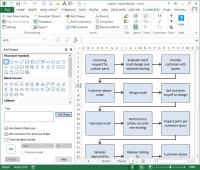
FlowBreeze is an add-in for Microsoft Excel that automates flowchart creation. The software utilizes Excel's native shape library, meaning diagrams remain viewable and editable by any user with the spreadsheet application. The primary feature is interactive flowcharting, which generates shapes, applies formatting, and adds connectors automatically as the user types text into a cell.
Users can define keywords and prefixes to trigger specific symbols and styling. The Flowchart Wizard allows users to pre-layout text on a grid and convert it into a structured diagram, with the option to link shape content to original cells for dynamic updates. For complex layouts, side task panes provide manual control over shape and connector placement.
The service includes several automation and customization tools:
- Automated organizational chart generation from employee and supervisor lists.
- Customizable cross-functional swim lane templates.
- A library of 124 symbols and 84 preset shape styles.
- One-click formatting for uniform shape sizing and connector styles.
- Support for exporting diagrams to five image formats, including PNG, JPG, and GIF.
- Direct embedding of editable flowcharts into Microsoft Word or PowerPoint.
Top 5 Reasons To Download FlowBreeze 5
- Unprecedented Automation via Interactive Flowcharting: FlowBreeze transforms the tedious process of drawing shapes into a seamless "type-and-generate" experience, creating symbols and connectors automatically as you enter text.
- Native Excel Integration and Universal Compatibility: Because it leverages built-in Microsoft Office shapes, your diagrams remain standard Excel objects that anyone can view, edit, or share without needing the add-in themselves.
- The Powerful Flowchart Wizard for Bulk Creation: This feature allows you to map out complex processes in plain text on a spreadsheet and instantly convert that layout into a professional diagram with dynamic linking capabilities.
- Professional-Grade Customization and Specialization: With tools for Org Charts, Cross-Functional (Swim Lane) templates, and over 120 symbols, it scales from simple checklists to enterprise-level process mapping.
- Streamlined Exporting and Office Interoperability: Beyond Excel, FlowBreeze offers one-click exports to five major image formats and direct embedding into Word and PowerPoint, making it a central hub for all business documentation.
If you have ever spent more than five minutes struggling to align an arrow in Microsoft Excel, you know the specific brand of frustration I am talking about. We have all been there: you are trying to document a process, you grab a rounded rectangle, you type some text, and then you spend the next ten minutes trying to get a connector line to actually stay attached to the shape. By the time you have added three steps, the alignment is off, the font sizes are inconsistent, and you want to throw your mouse across the room. This is exactly why FlowBreeze is the download you didn’t know you needed, but won't be able to live without.
As a tech reviewer, I see a lot of "productivity" tools that actually end up adding more steps to your workflow. FlowBreeze is the rare exception. It is an add-in for Microsoft Excel that takes the world’s most popular spreadsheet software and turns it into a high-octane flowcharting engine. It doesn't try to reinvent the wheel; it just makes the wheel spin a whole lot faster. Here is a deep dive into why you need to grab this giveaway immediately.
1. Unprecedented Automation via Interactive Flowcharting
The headline feature of FlowBreeze, and the primary reason it stands head and shoulders above manual drawing tools, is its interactive flowcharting capability. Imagine this: you click a button to start, you type "Start Process" into a cell, and press Enter. Instantly, FlowBreeze wraps that text in a terminator symbol, applies your preset styling, and moves the cursor to the next logical position. You type "Check Inventory" and hit Enter; a decision diamond appears, perfectly aligned, with a connector arrow already joined to the previous shape.
This "text-to-flowchart" logic is a game changer for anyone who needs to document processes in real-time. Whether you are in a meeting capturing a brainstorming session or documenting a standard operating procedure (SOP), the software does the heavy lifting. It uses keywords and prefixes to determine which shape to use. If you type "Is the item in stock?", the software recognizes the question mark or the word "Is" and automatically generates a decision diamond. If you type "Ship Item," it creates a standard process square. This eliminates the "drag-and-drop" fatigue that plagues other diagramming software.
Furthermore, the automation handles the "boring" parts of design. It automatically aligns shapes to the center of the previous one, maintains consistent spacing, and ensures that your connector arrows are straight, elbowed, or curved exactly how you want them. You aren't "drawing" a flowchart; you are writing one. This shift in perspective allows you to focus on the logic of your process rather than the aesthetics of the diagram.
2. Native Excel Integration and Universal Compatibility
One of the biggest pitfalls of specialized flowcharting software is the "walled garden" effect. You create a beautiful diagram in a proprietary app, but when you send it to a colleague, they can't open the file. Or worse, you have to export it as a static PDF, and if a single step changes, you have to go back to the source software, edit it, and re-export it. FlowBreeze solves this by living entirely within Microsoft Excel and using native Office shapes.
This is a massive advantage for corporate environments. When you create a flowchart with FlowBreeze, the resulting file is just a standard .xlsx file. You can send that file to anyone on your team, and as long as they have Excel, they can see the chart. They don't need FlowBreeze installed to view it, and they can even make manual edits using standard Excel tools if they need to. It uses the tools already present in the Office ribbon, but it provides a sophisticated "brain" to manage them.
This integration also means you get to leverage everything you already love about Excel. You can use multiple sheets to organize different parts of a project, use cell comments for metadata, or even use Excel’s version history through OneDrive or SharePoint. By working within the Excel ecosystem, FlowBreeze ensures that your work is portable, professional, and accessible to everyone in your organization without any extra licensing costs for "viewers."
3. The Powerful Flowchart Wizard for Bulk Creation
While the interactive mode is great for building as you go, sometimes you already have the data and you just need to visualize it. This is where the Flowchart Wizard becomes your best friend. This tool is designed for those who prefer to "pre-layout" their thoughts. You can simply type your process steps into various cells on the spreadsheet, roughly in the positions you want them to appear (e.g., Step A in A1, Step B in A3, Step C in C3). Run the Wizard, and FlowBreeze connects the dots.
The Wizard parses the text to determine the correct shape types and then generates a polished flowchart based on your layout. You can choose between a top-to-bottom or left-to-right flow, and the software handles the routing of the lines. But the real "pro tip" here is the dynamic linking capability. The Wizard can link the content of the flowchart shapes to the original cells. If you change the text in your data sheet, the flowchart updates automatically. This is invaluable for dynamic reports or project tracking where the status of a step might change frequently.
For data analysts and project managers, this means you can take a list of requirements or a project plan and turn it into a visual map in seconds. It bridges the gap between raw data and visual communication, making your spreadsheets significantly more impactful during presentations or audits.
4. Professional-Grade Customization and Specialization
A flowchart is only as good as its clarity, and FlowBreeze provides an incredible array of tools to ensure your diagrams look like they were made by a professional graphic designer. The software comes packed with 84 built-in shape styles and 21 arrow styles. You can set global themes so that every "Decision" shape is a specific shade of blue with a bold font, while every "Process" shape is green. This level of consistency is nearly impossible to maintain manually in Excel, but with FlowBreeze, it is the default.
Beyond standard flowcharts, the software handles specialized diagrams with ease. Do you need an Organizational Chart? Just provide a list of employees and their supervisors, and FlowBreeze will build the hierarchy for you. Do you need a Cross-Functional (Swim Lane) diagram to show how a process moves between different departments (like Sales, Engineering, and Billing)? FlowBreeze includes a template designer that creates the lanes for you and keeps your shapes contained within the correct boundaries.
With 124 available symbols—including block arrows, callouts, and specialized engineering symbols—you are never limited to just squares and circles. You can create complex technical diagrams, marketing funnels, or simple logic maps all using the same intuitive interface. It even includes a "one-click" formatting feature that can take an existing, messy chart and apply a uniform style, size, and alignment to every element on the page instantly.
5. Streamlined Exporting and Office Interoperability
The final reason this giveaway is a must-download is the sheer ease with which you can get your work out of Excel and into the hands of stakeholders. While keeping the file as an Excel sheet is great for collaboration, you often need these diagrams for formal reports, slide decks, or company handbooks. FlowBreeze understands this and provides robust exporting and embedding options.
You can export your flowcharts as high-quality images in five different formats: PNG, BMP, JPG, GIF, and TIF. This is perfect for uploading to a company wiki or including in a PDF report. But the even more impressive feature is the ability to embed editable flowcharts directly into Microsoft Word or PowerPoint. Instead of taking a screenshot and pasting it (which always looks blurry and unprofessional), FlowBreeze allows you to bring the actual Excel objects into your other Office documents. If you need to make a quick change, you can often do so right within the document, maintaining the crispness and professional look of the original vector shapes.
Furthermore, the workflow is packed with "quality of life" features. For instance, it can automatically add "Start" and "End" terminators so you don't forget them. It can force all shapes to be a uniform size regardless of how much text is inside them (within reason), ensuring your chart doesn't look like a jigsaw puzzle of different-sized boxes. It even allows for straight, elbow, or curved connectors to be applied globally or individually, giving you total control over the "vibe" of your diagram.
Conclusion: Why You Should Act Now
In the world of business, time is the one resource we can never get back. We spend hours every week documenting processes because documentation is the backbone of efficiency, training, and compliance. However, the act of documenting shouldn't be a chore that eats up your entire afternoon. FlowBreeze is designed by people who clearly understand the pain points of the average Office user. It takes a tool you already have on your desktop—Excel—and supercharges it into a professional design suite.
FlowBreeze represents the perfect intersection of automation and flexibility. It doesn't force you into a specific way of working; if you want to type as you go, use the interactive mode. If you want to dump text from a list, use the Wizard. If you just need a specific shape for a complex layout, use the task panes. It is a versatile, powerful, and incredibly lightweight solution to a problem we have all faced.
Don't pass up the opportunity to add this to your digital toolkit. Whether you are an engineer, a manager, a teacher, or a small business owner, the ability to clearly visualize a process is a superpower. FlowBreeze gives you that superpower without the steep learning curve of high-end CAD or specialized diagramming software. Download it, install it, and the next time someone asks you for a process map, you won't groan in frustration—you'll have it finished before they even leave the room. This is the productivity boost you have been waiting for.


Reviews for FlowBreeze 5
Click Here to Read Reviews for FlowBreeze 5 >> Click Here to Submit Reviews for FlowBreeze 5 >>