What Does Throttle 8 Do?
PGWARE Throttle is an optimization utility designed to enhance internet connectivity by modifying system-level networking parameters. The software targets common bottlenecks within the Windows registry to decrease latency and increase throughput across a wide range of connection types, including Fiber, Cable, DSL, Satellite, and mobile networks.
The application automates several low-level adjustments to improve how data packets are transmitted and received. By increasing buffer sizes and streamlining the way web browsers handle simultaneous file downloads, the utility aims to reduce lag in online multiplayer environments and accelerate large file transfers. These system changes are designed to be permanent, allowing users to maximize their current hardware performance without increasing monthly costs associated with higher-tier ISP plans.
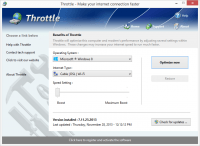
Users can deploy these optimizations through a simplified interface that requires a single click followed by a system reboot. In addition to performance tuning, the software includes the following features:
- Broad Compatibility: Supports 2G, 3G, 4G, and various broadband standards.
- System Optimization: Modifies registry settings to lower latency between computers and servers.
- User Interface: Features a modern design compliant with standard Windows guidelines.
- Integrated Updates: Software updates are managed directly within the application.
By refining how Windows networking components process data, Throttle provides a factual performance boost for browsing, downloading, and gaming activities.
Top 5 Reasons To Download Throttle 8
- Instantaneous Internet Speed Boost: Dramatically accelerate your browsing, file downloads, and streaming capabilities without hardware upgrades.
- Lag-Free Gaming Performance: Minimize latency and ping times by optimizing how your system handles networking packets for a competitive edge.
- Universal Connection Compatibility: Whether you are on fiber, cable, satellite, or even 4G mobile data, Throttle optimizes every type of connection.
- Significant Long-Term Cost Savings: Maximize the bandwidth you already pay for and avoid expensive monthly ISP plan upgrades.
- Safe and Permanent System Optimization: Make expert-level Windows registry and modem tweaks with a single click, ensuring peak performance safely.
If you have ever found yourself staring at a loading bar that refuses to move, or if you have experienced the soul-crushing "Connection Timed Out" message in the middle of an important task, then you know that internet speed isn’t just a luxury—it is a necessity. In the modern digital age, our lives revolve around the efficiency of our data transmission. From working remotely to streaming high-definition content and engaging in fast-paced competitive gaming, the quality of your connection defines your digital experience. This is where PGWARE Throttle comes into play. As a tech reviewer who has seen countless "speed booster" apps come and go, I can tell you that Throttle stands out because it doesn't just promise smoke and mirrors; it fundamentally changes how your operating system interacts with the web.
Most users believe that the speed they get from their Internet Service Provider (ISP) is the maximum they can achieve. They assume that if they want faster speeds, they simply have to shell out an extra twenty or thirty dollars a month for a "Premium" tier. However, there is a hidden bottleneck that most people never consider: your computer’s default settings. Windows is designed to be compatible with a vast range of hardware and networking environments, which means its default configurations are often "safe" rather than "optimal." PGWARE Throttle unlocks that hidden potential. Let’s dive deep into the top five reasons why this specific giveaway is the one you need to download today to transform your digital life.
1. Instantaneous Internet Speed Boost
The primary reason anyone looks for a tool like Throttle is, of course, the raw speed. We are living in an era of massive file sizes. Whether you are downloading the latest triple-A video game title, a 4K video project for work, or simply updating your operating system, those gigabytes add up. Without optimization, your computer may not be utilizing its full capacity to receive data packets. Throttle works by instantly upgrading your computer and modem's ability to process these files. It isn't just about making the "top speed" higher; it is about making the flow of data more efficient from the moment you click "download."
When you use Throttle, you will notice that web pages which used to "stutter" as they loaded—images appearing one by one, text shifting around—now snap into view almost instantly. This is because Throttle optimizes how Internet Explorer and other browsers simultaneously download images and files. By increasing the number of concurrent connections and optimizing the buffer sizes, the software ensures that your bandwidth is being saturated in the best way possible. It turns a narrow straw into a wide pipe, allowing the data you are already paying for to reach your screen without unnecessary delays.
Furthermore, this boost isn't temporary. Unlike some tools that need to be running in the background, consuming your precious RAM and CPU cycles, Throttle makes permanent, high-level changes to your system’s configuration. This means that once you apply the settings, your computer "remembers" how to be fast. You get that "new computer" feel every time you open your browser, and the frustration of waiting for downloads becomes a thing of the past.
2. Lag-Free Gaming Performance
For the gamers out there, speed is only half of the equation; the real enemy is latency. You could have a 1GB connection, but if your "ping" (the time it takes for a signal to go from your computer to the server and back) is high, you are going to experience lag. In a fast-paced shooter or a high-stakes strategy game, a fraction of a second is the difference between victory and defeat. Throttle is specifically designed to address this by lowering the latency between your computer and the gaming servers.
The software achieves this by making several crucial Windows registry changes that improve how networking packets are transmitted and received. In standard Windows settings, there is often a delay in how the system acknowledges received packets. Throttle tweaks these settings to ensure that data is processed the microsecond it arrives. By increasing the buffer sizes, the software allows your computer to handle a higher volume of data transmission without getting "choked up."
Imagine playing an online multiplayer game where your movements are registered instantly, and you no longer see opponents "teleporting" across the screen. That is the lag-free experience Throttle provides. It optimizes the path your data takes, ensuring that the "handshake" between your PC and the game server is as efficient as possible. If you are tired of being the person in the lobby with the high ping, this download is your secret weapon.
3. Universal Connection Compatibility
One of the most impressive aspects of PGWARE Throttle is its versatility. Many optimization tools are built with only modern fiber-optic connections in mind, leaving those on older or more specialized hardware in the dust. Throttle, however, is an all-encompassing solution. It works with Cable, DSL, U-Verse, and Fios, but it also provides significant benefits to those using dial-up, satellite, and mobile phone connections (including 2G, 3G, and 4G).
This is particularly important for users in rural areas or those who rely on mobile hotspots for their primary internet. Satellite and mobile connections are notoriously finicky; they suffer from high latency and inconsistent speeds due to environmental factors. Throttle helps mitigate these hardware-level weaknesses by ensuring the software-level communication is as tight as possible. It squeezes every bit of performance out of even the most limited connections.
Even if you think your connection is "too old" or "too slow" to be helped, Throttle can surprise you. By optimizing the way large data packets are sent, it can make a sluggish 4G connection feel much more like a stable home broadband line. It bridges the gap between different technologies, providing a unified standard of efficiency regardless of how you get online. This level of universal compatibility makes it a "must-have" utility for any tech kit, whether you’re on a high-end gaming rig or an older laptop used for travel.
4. Significant Long-Term Cost Savings
We often forget that our relationship with our ISP is a financial one. ISPs make their money by upselling you. They want you to believe that your current package is "too slow" so that you will upgrade to the next tier for an extra $10, $20, or even $50 per month. Over a year, that is hundreds of dollars. But what if your current connection isn't actually slow? What if your computer is just poorly configured to handle it?
Throttle allows you to take full advantage of your current internet package, maximizing every kilobit of bandwidth you are already paying for. By optimizing your system, you might find that the "slow" speeds you were experiencing were actually just bottlenecks in your Windows settings. Once those are cleared away by Throttle, the need for a more expensive internet package often vanishes. You are essentially giving yourself a free speed upgrade that lasts forever, rather than paying a monthly "tax" to your ISP for more speed that your un-optimized computer might not even be able to fully utilize anyway.
In this sense, downloading Throttle is an investment in your financial health. It empowers the consumer to get the most out of their existing services. Why give more money to a massive corporation when you can achieve the same—or better—results by simply optimizing the hardware you already own? It is the smartest way to "upgrade" your internet without signing a new contract or seeing your monthly bill increase.
5. Safe and Permanent System Optimization
The tech-savvy users among us might be hesitant when they hear about "registry changes." We’ve all seen software that promises to "clean" the registry but ends up breaking the operating system. However, PGWARE Throttle is built on a foundation of safety and stability. The changes it makes are professional-grade optimizations that follow Windows user interface guidelines and networking protocols. These aren't "hacks"; they are precise adjustments to parameters that are already present in your system but are set to sub-optimal values by default.
The beauty of Throttle is its simplicity. You don't need to be a network engineer to use it. The software features a modern, intuitive interface where you can choose your connection type, select your OS, and then simply click a button. The software does the heavy lifting, scanning your system and applying the specific registry and modem changes needed to boost performance. After a quick reboot, the changes are set. There is no need to keep the program open, no need to constantly monitor it, and no need to worry about it interfering with your other applications.
Because these changes are permanent (unless you decide to change them back using the software), you get a consistent performance boost. It is a set-it-and-forget-it solution. The software even handles its own updates, allowing you to download and install new versions directly from the application interface. This ensures that as Windows evolves and new networking standards emerge, your optimization tool remains at the cutting edge. It is the safest, easiest, and most effective way to ensure your computer is always operating at its peak potential.
Conclusion: Why You Should Act Now
In conclusion, the PGWARE Throttle giveaway is an opportunity that no internet user should pass up. Whether you are a hardcore gamer looking to shave milliseconds off your response time, a professional who needs to move large files without delay, or just someone who wants to browse the web without the frustration of slow-loading pages, this software delivers. It addresses the core issues of internet performance—latency, packet loss, and throughput—in a way that is safe, easy, and incredibly effective.
We spend so much of our lives online that any improvement in our connection speed has a massive cumulative effect on our productivity and happiness. Think about all the seconds you have wasted waiting for a video to buffer or a page to load. Over the course of a year, that adds up to hours, if not days, of lost time. Throttle gives that time back to you. It optimizes your current hardware, saves you money on ISP fees, and ensures that your gaming sessions are defined by your skill, not your lag.
Don’t settle for the "standard" internet experience that your ISP and Windows defaults provide. You deserve a connection that is as fast as your hardware allows. Download PGWARE Throttle today, click that optimization button, and see for yourself how much faster the internet can be. It is a transformative tool that turns a sluggish PC into a high-performance networking machine, and once you experience the difference, you will wonder how you ever lived without it. This is the definitive "must-have" download for anyone looking to reclaim their speed and master their digital environment.
The installation process is incredibly straightforward. Once you download the software, the interface guides you through the process with ease. There are no complicated menus to navigate and no confusing technical jargon to decipher. It is designed for everyone, from the tech enthusiast to the casual user. After the initial setup and the mandatory reboot, the results speak for themselves. You will feel the difference the very first time you open your browser. The internet will feel "lighter," more responsive, and significantly more enjoyable. This is more than just a utility; it is an essential upgrade for the modern computer.
Take control of your connection today. Stop letting your ISP dictate your speeds and stop letting default Windows settings hold your hardware back. With Throttle, you are the one in the driver's seat. Enjoy faster downloads, smoother streaming, and lag-free gaming. It is time to experience the web the way it was meant to be experienced—at full throttle.


Reviews for Throttle 8
Click Here to Read Reviews for Throttle 8 >> Click Here to Submit Reviews for Throttle 8 >>