What Does WPS Office Premium Do?
WPS Office is a cross-platform productivity suite that integrates word processing, spreadsheets, presentations, and PDF management into a single application. It is designed to be fully compatible with 48 file formats, including DOCX, XLSX, PPTX, and PDF, ensuring seamless transitions for users migrating from Microsoft Office, Google Workspace, or Adobe Acrobat. The software’s moderate installation size allows it to operate efficiently on devices with limited RAM capacity.
The suite includes several core utilities:
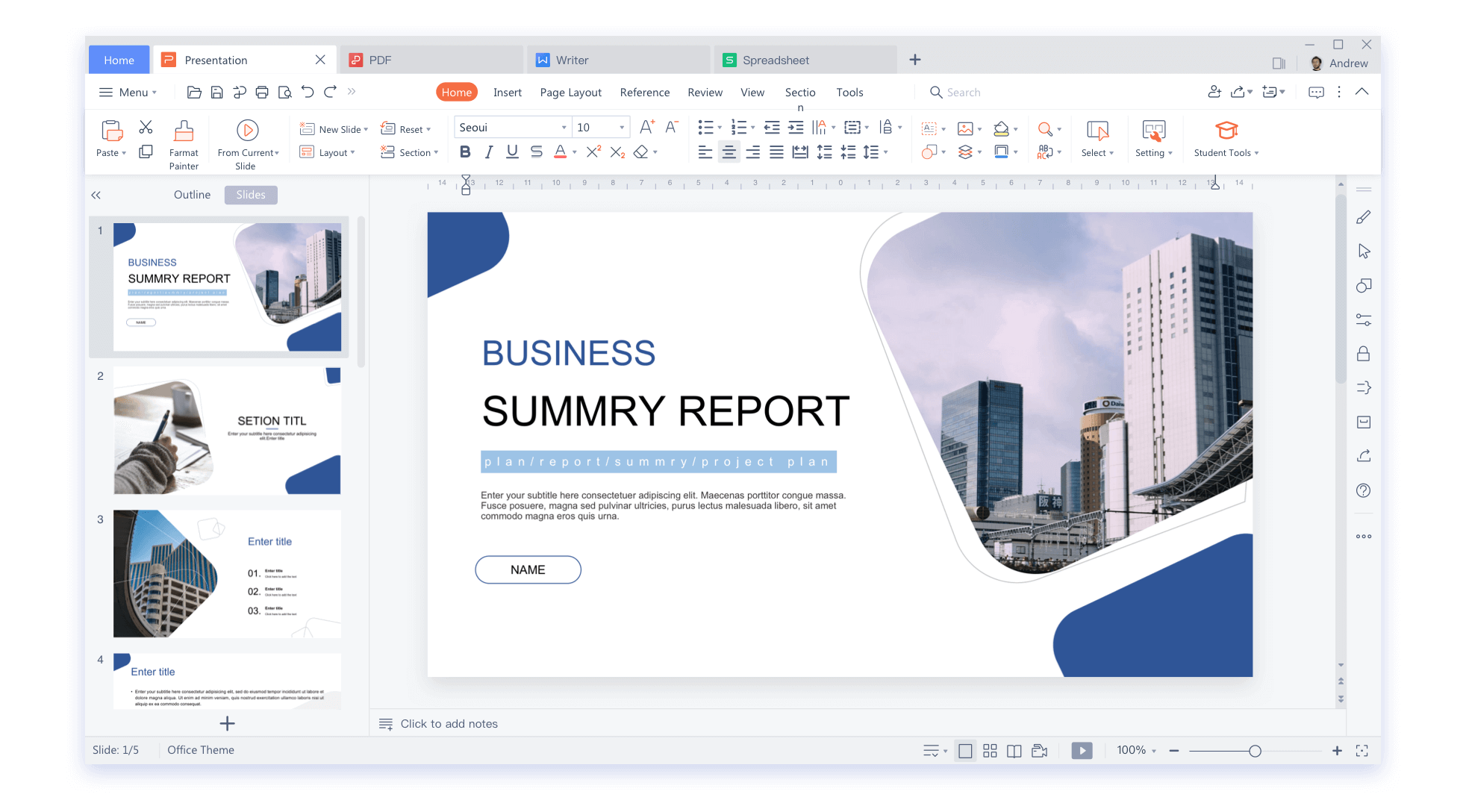
- Multi-Format Editing: Users can create and edit documents, spreadsheets, and slides, or use the built-in PDF reader and converter to handle scanned files and screenshots.
- Cloud Integration: An intelligent cloud service allows for real-time document synchronization and collaboration. Teams can share files online to edit, comment, and track action items simultaneously.
- Cross-Platform Access: A single account supports up to nine concurrent logins, including three PCs and six mobile devices, across Windows, macOS, Linux, Android, and iOS.
- Template Library: The software provides a vast library of preset templates categorized for business, finance, and education.
While the freemium model provides essential viewing and editing tools, the premium version grants access to advanced PDF editing and expanded cloud storage. By utilizing its integrated interface, users can manage complex workflows across multiple devices without needing to switch between separate applications.
Top 5 Reasons To Download WPS Office Premium
- Complete All-in-One Integration: Seamlessly manage Documents, Spreadsheets, Presentations, and PDFs within a single, lightweight application.
- Unrivaled Universal Compatibility: Full support for over 48 file formats, ensuring perfect synchronization with Microsoft Office, Google Docs, and Adobe PDF.
- Intelligent Cloud Synchronization: Access your work anywhere with a powerful cloud service that connects up to nine devices under a single account.
- Real-Time Collaborative Efficiency: Boost productivity with advanced sharing features, real-time editing, and integration with tools like Zoom and Slack.
- Massive Professional Template Library: Gain access to thousands of high-quality templates and utility features that turn basic drafts into professional masterpieces instantly.
In the fast-paced world of digital productivity, we are constantly bombarded with new tools, apps, and "revolutionary" software that promise to change the way we work. But as a tech reviewer who has seen hundreds of these suites come and go, I can tell you that very few actually deliver on the promise of making your life easier. Most office suites are either too bloated, slowing down your hardware with unnecessary background processes, or they are too stripped-down, leaving you hunting for a third-party PDF editor or a file converter just to finish a simple task. This is exactly why you need to pay attention to WPS Office. This isn't just another office clone; it is a streamlined, powerhouse ecosystem designed for the modern professional, student, and creator. If you have been looking for a reason to ditch your expensive subscriptions or your clunky, fragmented workflow, this giveaway is your golden ticket. Let’s dive deep into the five core reasons why WPS Office is the download you didn’t know you needed.
1. Complete All-in-One Integration
The single biggest headache in modern digital work is "app switching." You know the routine: you open a Word document to write a report, then you have to open a separate spreadsheet program to grab data, and then you have to launch a heavy PDF reader to verify a source. Each of these apps eats up RAM, clutters your taskbar, and drains your battery. WPS Office solves this by providing a unified interface where Documents, Spreadsheets, Presentations, and a fully functional PDF editor live under one roof.
What makes this integration truly impressive is the efficiency of the software. Despite being an "all-in-one" suite, the software size is remarkably moderate. For those of us running on older laptops or mobile devices with limited RAM, WPS is a breath of fresh air. It doesn't hog resources. It loads quickly, and switching between a complex spreadsheet and a pitch deck is instantaneous. One of my favorite "hidden gems" in this integrated suite is the ability to convert screenshots directly to PDF files. This is a massive time-saver for students capturing lecture slides or professionals grabbing data from a web meeting. Instead of saving an image, opening a converter, and then saving a PDF, it’s all handled natively within the app. Whether you are on a PC or a mobile phone, the experience remains consistent, simple, and incredibly powerful. By downloading this, you aren't just getting a tool; you are getting a centralized command center for all your digital assets.
2. Unrivaled Universal Compatibility
We have all experienced the "formatting nightmare." You spend hours perfecting a document in a free office app, you send it to your boss or a client who uses Microsoft Office, and suddenly the fonts are wrong, the tables are broken, and your professional image is tarnished. This fear is the primary reason people stick with expensive, legacy software. However, WPS Office has mastered the art of full compatibility. It supports 48 different file formats, including the heavy hitters like DOCX, XLSX, and PPTX.
But it goes further than just Microsoft Office. It is fully compatible with Google Docs, Google Sheets, and Google Slides, as well as open-source alternatives like OpenOffice and LibreOffice. If you are a designer or a legal professional who works heavily with Adobe PDF, WPS integrates that functionality seamlessly as well. The user interface is intentionally designed to feel familiar to anyone who has spent time in the Microsoft ecosystem. The menus, the icons, and the layout are intuitive, meaning there is zero learning curve. You can jump from your old software into WPS and feel like a power user within five minutes. Most importantly, the premium membership is significantly more affordable than its competitors, and it allows you to log into three PCs and six mobile devices simultaneously. That is nine total devices covered by one account, ensuring that no matter what file type someone throws at you, you can open, edit, and save it without losing a single pixel of formatting.
3. Intelligent Cloud Synchronization
The modern office isn't a physical desk anymore; it’s wherever you happen to be. Whether you’re on a train using your phone, in a coffee shop with your tablet, or at your home office with a multi-monitor setup, your files need to follow you. The Intelligent Cloud Service provided by WPS is the glue that holds your mobile and desktop lives together. When you sign up, you get access to a robust cloud storage system that is baked directly into the editing experience.
I cannot stress enough how vital this is for productivity. You can start a draft on your Windows PC at the office, and the moment you walk out the door, that document is synced and ready for review on your Android or iOS device. If you realize you forgot to add a crucial slide to your presentation while you’re in the taxi, you don't need to panic. You just open the app on your phone, make the edit, and it’s updated everywhere. This isn't just about storage; it’s about active control. You have the power to decide which files are synced and how they are accessed. Furthermore, the software supports Harmony OS, Pad OS, and even TV OS, meaning your documents are accessible even in the boardroom or the living room. This level of cross-platform fluidity is usually reserved for much more expensive enterprise software, but here, it is part of the core WPS experience.
4. Real-Time Collaborative Efficiency
The era of emailing "Document_v1_Final_Final_EDITED.docx" back and forth is over. If your office suite doesn't support real-time collaboration, you are working in the past. WPS Office excels at bringing teams together, regardless of where they are physically located. The sharing features allow you to invite others to edit, comment, and add action items to a document in real-time. This is a game-changer for project managers and teams who need to iterate quickly.
Beyond simple document sharing, WPS integrates perfectly with the tools your team is already using. It works with Google Classroom for educators, Zoom and Slack for communication, and Google Drive for external storage. This means you can be in a Slack huddle, share a link to a WPS document, and have four people editing the same spreadsheet simultaneously while you discuss the data over Zoom. This level of integration reduces errors, eliminates redundant communication, and significantly speeds up the project lifecycle. By using a single WPS account across your team, you create a synchronized environment where everyone is on the same page—literally. For those who are worried about security, the cloud disk and sharing functions give you active control over permissions, ensuring that your sensitive data stays in the right hands.
5. Massive Professional Template Library
Let's be honest: most of us aren't graphic designers. Starting a presentation or a financial report from a blank white screen is intimidating and time-consuming. This is where WPS Office truly shines compared to its competitors. The software comes packed with a massive library of templates that cover almost every imaginable use case. Whether you are in education, business, finance, or trade, there is a preset style waiting for you.
These aren't just basic layouts; they are professionally designed, aesthetically pleasing templates that make your work look like it took days to prepare. From complex financial spreadsheets with pre-built formulas to cinematic presentation decks that will wow any audience, the utility features are endless. For those who opt for the premium membership, the library expands even further, offering "competitive content" that gives you an edge in the professional world. Think of it as having a digital assistant who has already done the heavy lifting of formatting and design for you. You just plug in your data and your text, and you’re done. This focus on utility extends to the software’s advanced features as well, such as the ability to edit scanned PDFs using OCR (Optical Character Recognition) and the ability to convert spreadsheets with a single click. It is these "quality of life" features that turn a standard office app into an indispensable productivity tool.
In conclusion, downloading WPS Office is a no-brainer for anyone who values their time and their wallet. It is rare to find a software package that manages to be both lightweight and incredibly feature-rich. It bridges the gap between different operating systems and different file formats, removing the friction from your workday. If you are tired of the "subscription fatigue" from other major office providers, or if you simply need a more reliable way to handle PDFs and documents on your mobile device, this is the solution. With its "freemium" model, you can get started today for free and experience the core features that have made it a favorite for millions of users worldwide. When you consider the massive template library, the seamless cloud syncing, and the robust collaboration tools, it’s clear that WPS Office isn't just an alternative—it’s a superior way to work. Don't let this opportunity pass you by; download it, sync your devices, and start working smarter, not harder.
Whether you are a student trying to organize your notes for Google Classroom, a freelancer collaborating with clients over Slack, or a business owner managing finances on a budget, WPS Office provides the professional-grade tools you need without the professional-grade price tag. It’s efficient, it’s compatible, and it’s ready to help you conquer your to-do list. The integration of Word, Excel, PowerPoint, and PDF into a single, cohesive unit is a masterclass in software design, and once you make the switch, you'll wonder how you ever managed without it. Make the move today and see for yourself why this is the top office suite giveaway of the year.

Reviews for WPS Office Premium
Click Here to Read Reviews for WPS Office Premium >> Click Here to Submit Reviews for WPS Office Premium >>