What Does Ashampoo Taskbar Customizer Do?
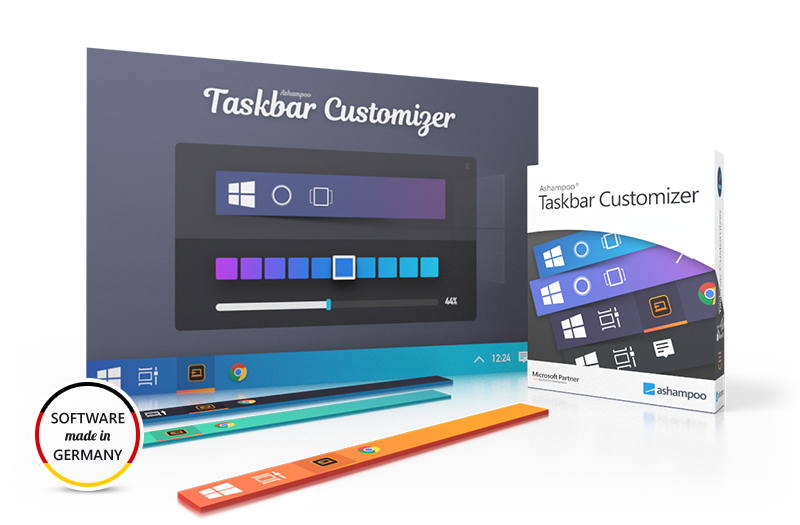
Ashampoo Taskbar Customizer is a streamlined utility designed to give users granular control over the visual appearance of the Windows taskbar. While the operating system provides limited native options for user interface modification, this tool allows for the precise adjustment of color and opacity levels. Users can transition the taskbar from its default state to a semi-translucent appearance or render it entirely invisible with a single click.
The software functions by applying a custom overlay to the taskbar area without interfering with system performance or core functionality. Key features include:
- Complete Color Control: Apply any specific color to the taskbar to match desktop themes or high-resolution wallpapers.
- Opacity Management: Use a slider or presets to determine how much of the background is visible through the bar.
- Icon Preservation: All open programs, pinned shortcuts, and the system clock remain fully opaque and functional regardless of the background settings.
The application is designed for low resource consumption, running quietly in the background once settings are applied. It is particularly useful for users with large displays or intricate desktop backgrounds who find the standard, opaque taskbar disruptive to their workspace aesthetics. The software can quickly reset to default settings or toggle between custom profiles, making it a functional tool for desktop personalization without requiring manual registry edits or complex system modifications.
Top 5 Reasons To Download Ashampoo Taskbar Customizer
- Total Aesthetic Freedom: Achieve perfect transparency or custom colors that Windows natively restricts.
- Enhanced Visual Continuity: Seamlessly integrate your taskbar with high-resolution wallpapers and ultra-wide displays.
- Preserved Functionality: Modify the background without affecting the usability of icons, system tray, or open programs.
- Minimalist Resource Footprint: Enjoy a premium look without the system lag associated with heavy desktop skinning suites.
- One-Click Simplicity: Instant transformation without the need for risky registry edits or complex configuration files.
If you are anything like me, you spend a significant portion of your day staring at a computer screen. Whether you are a professional creative, a hardcore gamer, or someone who simply uses their PC for daily browsing and productivity, the environment you work in matters. We spend hundreds of dollars on high-resolution monitors, mechanical keyboards with customizable RGB lighting, and high-fidelity wallpapers that showcase breathtaking landscapes or abstract art. Yet, for some reason, we often settle for the default, stagnant appearance of the Windows operating system. Specifically, the taskbar—that permanent fixture at the bottom of your screen—has remained a somewhat stubborn element of the user interface. While Microsoft has made strides in design over the years, the taskbar often remains an opaque, semi-rigid block of color that can clash with your carefully curated desktop aesthetic. This is exactly where the Ashampoo Taskbar Customizer steps in, and why this giveaway is an absolute must-download for anyone who values a personalized computing experience.
1. Total Aesthetic Freedom
The primary reason you need to jump on this giveaway is the sheer level of aesthetic control it grants you. Windows users have long clamored for more customization options, but the native settings are often lackluster. You might be able to pick a "primary accent color" or toggle a basic transparency effect, but these options are frequently tied to other UI elements, meaning you can’t change the taskbar without changing your window borders or start menu colors. Ashampoo Taskbar Customizer breaks these chains by isolating the taskbar as its own entity.
With this software, "transparency" isn’t just a buzzword; it is a fully adjustable spectrum. You can go from the standard solid block to a subtle, classy semi-translucence, all the way to 100% invisibility. Imagine your desktop icons simply floating at the bottom of a beautiful 4K wallpaper with no bar behind them at all. It creates a "floating" effect that mimics high-end customized Linux builds or the most polished versions of macOS, but with the familiar functionality of Windows. Beyond transparency, the ability to apply any color you like is a game-changer. You are no longer limited to the preset palette provided by the OS. If you want a specific shade of neon purple to match your gaming peripheral setup, or a deep charcoal to minimize eye strain during night sessions, you can set it with precision. This tool transforms the taskbar from a utility bar into a piece of digital art.
2. Enhanced Visual Continuity
We live in the era of the "minimalist desktop." If you browse through tech forums or subreddits dedicated to workstation setups, you will notice a common theme: the pursuit of visual "flow." When you have a gorgeous, expansive desktop background—perhaps a panoramic shot of the Milky Way or a minimalist architectural render—the last thing you want is a thick, dark gray bar cutting off the bottom ten percent of the image. It breaks the immersion and creates a visual "stop" that can be distracting.
By using the Ashampoo Taskbar Customizer, you restore the continuity of your display. For users with ultra-wide monitors or multi-monitor setups, this is particularly impactful. On a large screen, an opaque taskbar feels like a heavy anchor. Making it translucent or invisible allows the colors of your wallpaper to bleed through, making the screen feel even larger and more open. It turns your workspace into a cohesive environment rather than a collection of separate windows and bars. As a reviewer, I always look for tools that reduce "visual friction," and this software does exactly that. It removes the hard edges of the operating system and lets the user’s personal style take center stage.
3. Preserved Functionality and Stability
One of the biggest fears users have when downloading customization tools is the "breakage" factor. We have all been there: you install a "skin" or a "shell" for Windows, and suddenly your icons are flickering, your system tray is unresponsive, or your start button stops working. The genius of the Ashampoo Taskbar Customizer is its surgical precision. It does not attempt to rewrite the core code of the Windows shell or replace the explorer process. Instead, it focuses exclusively on the visual layer of the taskbar background.
When you use this app to turn your taskbar invisible or change its color, your open programs remain fully visible. Your pinned icons don't disappear, and your system tray—with the clock, volume control, and network settings—remains perfectly usable. This is a crucial distinction. It offers the "pro" look of a custom-modded OS without the stability risks. You aren't sacrificing productivity for style. In my testing, the software behaves like a native part of the system, responding instantly to changes without requiring a reboot or even a restart of the Explorer.exe process. It’s the "safe" way to mod your PC, making it an ideal choice for users who need their machines to be reliable for work while still looking great.
4. Minimalist Resource Footprint
There are other ways to customize your Windows taskbar, but many of them come at a high cost to system performance. Popular suites like Rainmeter or specialized theme patchers can be incredibly resource-intensive. They often require background processes that eat up significant chunks of RAM and CPU cycles, which is a dealbreaker if you are a gamer or a video editor who needs every ounce of power your machine can provide.
The Ashampoo Taskbar Customizer is designed with efficiency in mind. It is a lightweight utility that sits quietly in the background, consuming negligible system resources. It doesn't need to constantly poll the CPU or manage complex scripts. Once you set your preferred color and opacity, it simply holds that state. This is what I call "set and forget" software. You get the premium visual upgrade without the "bloatware" feel. For users who take pride in a lean, fast-booting system, this giveaway is a dream come true. It proves that you don't need a heavy, complicated program to make a significant impact on how your computer looks and feels. It is the definition of "efficient design."
5. One-Click Simplicity
Let's talk about the alternative: the manual route. If you wanted to achieve a transparent taskbar without a tool like this, you would likely have to dive into the Windows Registry. For the uninitiated, the Registry is the "brain" of the operating system, and one wrong click or deleted key can lead to a system that won't boot. Even for those who are tech-savvy, hunting down hex codes and dword values in the Registry is a tedious, time-consuming process that often gets reverted every time Windows pushes a major update.
Ashampoo Taskbar Customizer eliminates the barrier to entry. Its interface is clean, intuitive, and, quite frankly, foolproof. You have a slider for opacity and a color picker for the hue. That’s it. You don't need a tutorial or a YouTube guide to figure it out. You click, you adjust, and you see the results in real-time. This "one-click" philosophy is what makes it so appealing as a giveaway. It’s an instant gratification tool. Whether you are a "power user" who wants to save time or a casual user who just wants their computer to look a little cooler, the ease of use here is unmatched. It democratizes desktop customization, making it accessible to everyone regardless of their technical expertise.
Conclusion: Why You Should Grab This Now
In the world of software, we often see programs that try to do too much. They pack in hundreds of features that you will never use, cluttering your hard drive and your mind. Ashampoo Taskbar Customizer is the exact opposite. It does one thing, and it does it perfectly. It gives you back control over a part of your computer that you look at every single minute you are logged in.
We often underestimate how much our digital environment affects our mood and productivity. A cluttered, clashing, or "boring" desktop can feel like a cramped office with bad lighting. By contrast, a clean, customized, and visually harmonious desktop can make using your PC a joy. This software provides that "premium" feeling that usually requires expensive hardware or dangerous system modifications.
By downloading this giveaway, you are giving yourself the gift of a cleaner workspace. You are removing the "static" of the default Windows UI and replacing it with something that reflects your personality. Whether you want a taskbar that is a ghost-like translucent strip, a bold statement of color, or completely invisible to let your 8K wallpaper shine, this tool is your ticket to that reality. Don't settle for the "standard" Windows experience when you can have a bespoke one for free. This is a small download with a massive impact on your daily user experience, and in the realm of tech customization, it’s a absolute must-have in your utility toolkit.
Final Reviewer Note: If you've ever looked at your desktop and thought, "I wish I could just get rid of that solid bar at the bottom," this is your answer. It is stable, lightweight, and incredibly satisfying to use. Don't miss out on the chance to elevate your OS aesthetics with such a streamlined, professional tool. It is rare to find a utility that offers this much visual payoff for so little effort. Download it, set your transparency to your heart's content, and enjoy the most beautiful version of Windows you’ve ever seen.

Reviews for Ashampoo Taskbar Customizer
Click Here to Read Reviews for Ashampoo Taskbar Customizer >> Click Here to Submit Reviews for Ashampoo Taskbar Customizer >>