What Does Tipard FixMP4: Repair Corrupt Videos Do?
Tipard FixMP4 is a dedicated utility designed to restore unplayable video files across several major formats, including MP4, MOV, AVI, and 3GP. The software addresses corruption stemming from a wide variety of technical failures, such as interrupted downloads, data transfer errors, and improper editing exports. It also handles files rendered unreadable by faulty compression codecs or hardware-related recording glitches.
The tool is engineered to reconstruct video data regardless of the specific cause of damage. Users can process files that have become corrupted during storage on external drives or those that failed to finalize during the recording process. By analyzing the internal file structure, FixMP4 attempts to resolve playback issues that standard media players cannot bypass. Key capabilities include:
- Repairing files damaged during transfer or migration between devices.
- Fixing videos broken by editing errors or incorrect save procedures.
- Restoring media affected by false compression codecs or software crashes.
- Recovering broken recordings from cameras or smartphones.
The application supports the restoration of media assets that would otherwise be considered permanently lost. Whether the issue is a broken header or a deeper codec inconsistency, the software aims to return the file to a functional state for standard viewing on any compatible device. The recovery process is designed to be direct, focusing on the technical integrity of the video stream to ensure compatibility with standard media players.
Top 5 Reasons To Download Tipard FixMP4: Repair Corrupt Videos
- Universal Format Compatibility: Seamlessly repair the most popular video formats including MP4, MOV, AVI, and 3GP.
- Comprehensive Scenario Recovery: Fixes damage caused by download interruptions, transfer errors, recording crashes, and improper compression.
- Advanced Reference-Based Repair: Uses a healthy sample file to ensure high-quality reconstruction of metadata and frame data.
- User-Friendly Interface: A streamlined, "one-click" philosophy that requires zero technical expertise to master.
- Reliability for Professionals and Home Users: Whether it is a professional wedding video or a casual family clip, it restores irreplaceable memories with high success rates.
We have all been there. You have spent hours filming the perfect shot, or perhaps you finally finished downloading a massive video file, only to be met with the dreaded "File Cannot Be Played" error message. It is the digital equivalent of a gut punch. Whether the file is "unsupported," "corrupted," or simply shows a black screen with no audio, the frustration is universal. This is where Tipard FixMP4 steps in as a literal lifesaver. In the world of digital media, corruption is not a matter of if, but when. Having a robust repair tool in your arsenal is no longer a luxury; it is a necessity. This giveaway offers you the chance to secure one of the most reliable repair utilities on the market today. Let’s dive deep into why this specific software deserves a permanent spot on your hard drive.
1. Universal Format Compatibility
One of the biggest hurdles in video repair is the sheer variety of file containers and codecs. Many free tools or basic players might attempt to "fix" a file, but they often only support one specific type of container. Tipard FixMP4 breaks down these barriers by offering comprehensive support for the "Big Four" of video formats: MP4, MOV, AVI, and 3GP.
Think about the devices you use daily. Your smartphone likely records in MP4 or MOV. Your high-end DSLR or mirrorless camera probably favors MOV for its high bitrate capabilities. Your legacy archives might be full of AVI files, and perhaps you still have some older mobile clips in 3GP format. By supporting these four pillars, this software ensures that regardless of whether the video came from an iPhone, an Android device, a professional Sony Alpha camera, a GoPro, or even a drone, you have the technology to bring it back to life. It handles the complexities of different containers with ease, ensuring that the internal architecture of the file is rebuilt correctly according to its specific format standards.
Furthermore, the software doesn't just look at the file extension. It looks at the underlying data. Because MP4 and MOV are so widely used in streaming and professional editing, having a tool that specializes in these formats means you are covered for 95% of the video content you will ever encounter. It is about having a versatile "Swiss Army Knife" for your media library.
2. Comprehensive Scenario Recovery
Why do videos break? The reasons are as varied as the videos themselves. This software is specifically designed to tackle corruption regardless of the source of the problem. This is a critical distinction because some repair tools only work if the header is slightly damaged, but they fail if the corruption happened during the writing process. Tipard FixMP4 is built to handle a massive spectrum of "disaster scenarios."
Download and Transfer Errors: Have you ever had your internet flicker while downloading a large file? Or perhaps you pulled a USB drive out a second too early? These actions cause "packet loss" or incomplete data writing, which renders the file unreadable. This software can analyze the fragmented data and bridge the gaps to make the file playable again.
Recording Crashes: This is a nightmare for content creators. Imagine your camera battery dies right as you hit the "stop" button. The camera never gets the chance to "finalize" the file, leaving the video without the necessary metadata to tell a media player how to read it. Tipard FixMP4 specializes in finalizing these "orphaned" files, effectively writing the end of the story that the camera failed to finish.
Editing and Compression Faults: Sometimes, when we use video converters or editing software, a glitch in the software or an incorrect codec application can lead to a "broken" export. Instead of re-rendering for hours, you can often run the corrupted export through FixMP4 to correct the internal logic of the file. It is a massive time-saver for anyone who works with video on a regular basis.
3. Advanced Reference-Based Repair
This is where the "magic" happens under the hood. Many basic repair tools simply try to "guess" what the missing data should look like. This often leads to "Frankenstein" videos that are glitchy, pixelated, or have out-of-sync audio. Tipard FixMP4 uses a much more sophisticated method: Reference-Based Repair.
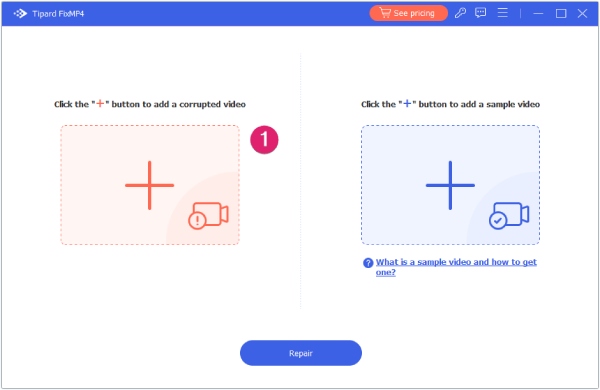
The process is ingenious yet simple for the user. If you have a corrupted video, you simply provide the software with a "sample" or "reference" video. This sample should be a healthy, playable file recorded on the same device with the same settings. For example, if your 4K drone footage is corrupted, you just upload another 4K clip from that same drone. The software then analyzes the "DNA" of the healthy file—looking at the frame rate, the resolution, the bitrate, and the codec structure. It then uses that healthy blueprint to rebuild the corrupted file.
By using this "blueprint" method, the software can reconstruct the missing headers and frame indices with incredible precision. This results in a repair that isn't just "good enough to watch," but is often indistinguishable from the original, uncorrupted footage. It ensures that the audio remains perfectly synced with the video, which is usually the first thing to break in a corrupted file. This professional-grade logic is now available in a package that anyone can use.
4. User-Friendly Interface
As a tech reviewer, I see plenty of powerful tools that are ruined by terrible user interfaces. They require you to understand hex code, manual bitrates, or command-line prompts. Tipard FixMP4 takes the opposite approach. It is built for the "everyman," yet powerful enough for the "pro." The interface is clean, modern, and incredibly intuitive.
The workflow is a simple three-step process: Upload the broken file, upload the sample file, and click Repair. There are no confusing menus to navigate and no obscure jargon to decipher. The software provides a clear preview of the repaired video before you even save it, allowing you to verify that the fix worked. This transparency is vital because it saves you the time and disk space of saving files that didn't turn out right.
Emphasizing efficiency is key here. In a world where we are all strapped for time, we don't want to spend an afternoon learning how to use a repair tool. We want the tool to work, and we want it to work now. The drag-and-drop functionality and the clear progress bars make the entire experience stress-free. It turns a high-stress situation (losing a video) into a minor, easily solvable task.
5. Reliability for Professionals and Home Users
Finally, we have to talk about the value of what is being repaired. Videos are often more than just files; they are memories, professional assets, or historical records. The reliability of Tipard FixMP4 makes it an essential "digital insurance policy."
For the Home User: Think about the videos of your child’s first steps, a graduation ceremony, or a once-in-a-lifetime vacation. If those files become corrupted, they are gone forever. You cannot "re-record" a memory. Having this tool downloaded and ready to go means you never have to accept the loss of a precious moment. It provides peace of mind that your digital legacy is protected.
For the Professional: If you are a YouTuber, a wedding videographer, or a corporate media creator, a corrupted file is a threat to your livelihood. If a client's footage is lost, your reputation is on the line. Tipard FixMP4 acts as a safety net. It allows you to recover footage that would otherwise require a costly and embarrassing re-shoot. The ability to repair 3GP and AVI also means you can help clients recover "legacy" media from old devices, adding another layer of value to your professional services.
Conclusion: This giveaway is a rare opportunity to get a premium solution for a problem that affects everyone. Video corruption is a frustrating reality of the digital age, but it doesn't have to be a permanent one. With its support for multiple formats, its ability to handle any corruption scenario, its advanced reference-based technology, and its incredibly simple interface, Tipard FixMP4 stands out as a top-tier utility. Do not wait until you have a broken file to start looking for a solution. Download this giveaway now, keep it in your toolkit, and the next time you see a "File Corrupted" error, you will be able to click "Repair" with confidence. It is fast, it is effective, and it is exactly what you need to keep your video library safe and playable.
In the fast-paced world of tech, we often focus on the latest cameras or the newest displays, but the tools that protect and repair our content are just as important. Tipard FixMP4 is one of those essential tools. It’s light on system resources but heavy on results. Whether you are dealing with a minor glitch or a major file system collapse, this software provides the best chance of a full recovery. Make sure you take advantage of this offer and give your digital media the protection it deserves.
Final Verdict: If you value your videos, this is a mandatory download. It’s rare to find a tool that balances professional-grade repair algorithms with such a user-friendly design. Get it today and breathe new life into your unplayable videos.

Reviews for Tipard FixMP4: Repair Corrupt Videos
Click Here to Read Reviews for Tipard FixMP4: Repair Corrupt Videos >> Click Here to Submit Reviews for Tipard FixMP4: Repair Corrupt Videos >>