What Does PrivaZer PRO Do?
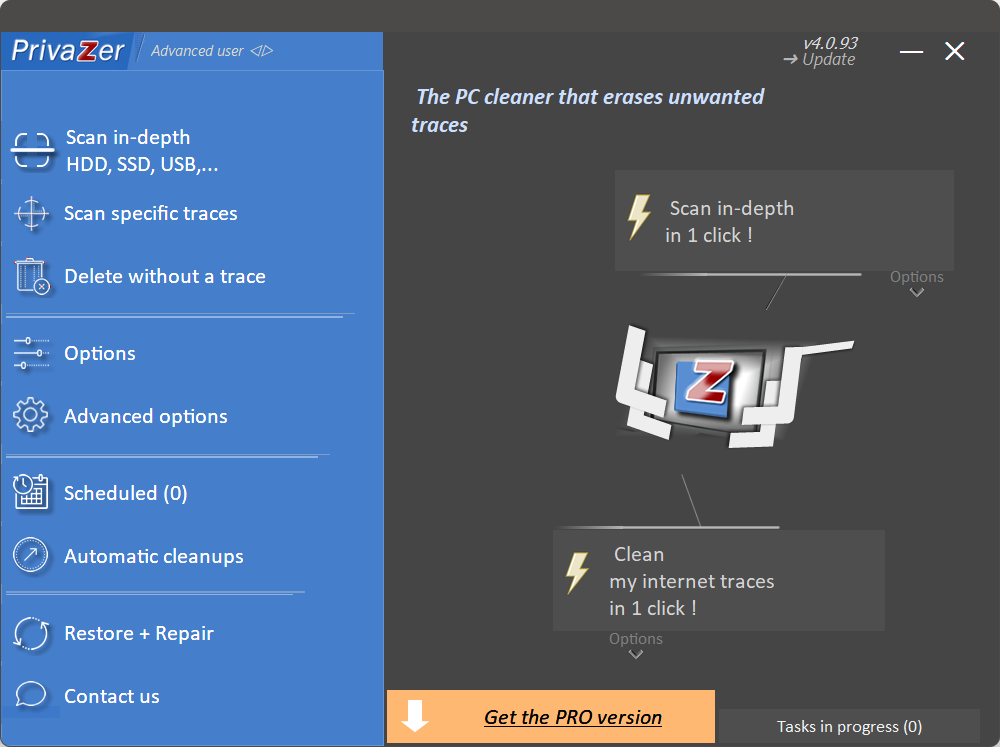
Privazer is a specialized privacy utility designed to identify and remove digital footprints across Windows systems and external storage devices. As a technical tool for data hygiene, it performs deep scans to locate residual data that standard deletion methods often leave behind, including browser history, cookies, and system logs.
Users can utilize the software to perform the following tasks:
- Secure Data Destruction: The application employs advanced overwriting techniques to ensure that deleted files and free disk space are rendered irretrievable by professional data recovery software.
- System Optimization: By identifying and removing redundant files, temporary logs, and application traces, the tool frees up storage capacity and can improve overall system responsiveness.
- Comprehensive Device Management: The software supports various hardware types, including SSDs, external hard drives, and USB sticks, allowing for consistent privacy management across multiple storage platforms.
- Portable Deployment: A portable version is available for execution directly from a USB drive, facilitating system cleaning on public or shared workstations without requiring local installation.
Privazer provides both automated cleaning routines for general users and granular controls for advanced technicians. It is a functional solution for those preparing to decommission hardware or individuals seeking to minimize their local data footprint through regular, secure maintenance of their digital environment.
Top 5 Reasons To Download PrivaZer PRO
- Total Digital Privacy and Deep Trace Removal: Unlike standard cleaners, this tool hunts down hidden residues in the registry, MFT, and system logs to ensure your activity remains truly private.
- Military-Grade Secure File Erasure: It doesn't just "delete" files; it overwrites them using advanced algorithms that make data recovery impossible even for forensic software.
- Comprehensive Device Support: Whether it is an internal SSD, a legacy HDD, a USB thumb drive, or an SD card, the software optimizes and cleans every corner of your hardware ecosystem.
- System Performance and Disk Space Optimization: By clearing out gigabytes of "ghost" data and zeroing out free space, it breathes new life into aging hardware and speeds up modern systems.
- Zero-Installation Portability: The ability to run the software from a USB drive means you can protect your privacy on any machine—at work, in a library, or on a friend’s PC—without leaving a footprint.
If you have spent any significant amount of time in the tech world, you know that the "Delete" button is a lie. When you move a file to the trash and hit empty, your operating system isn't actually destroying that data. It is simply marking the space as "available." Until that space is overwritten by something else, your private photos, bank statements, and sensitive documents are sitting there, waiting for anyone with a basic recovery tool to find them. This is the fundamental problem of the digital age: we leave a trail of digital breadcrumbs everywhere we go. But today, I am reviewing the ultimate solution to this problem. If you care about your privacy—and in this day and age, you absolutely should—then you need to pay attention to Privazer. This isn't just another system utility; it is a professional-grade privacy powerhouse that acts as a digital shredder for your entire computing life. Here is the deep dive into why this giveaway is a mandatory download for anyone with a computer.
1. Total Digital Privacy and Deep Trace Removal
Most people think that clearing their browser history is enough to keep their secrets safe. As a tech reviewer, I can tell you that browser history is just the tip of the iceberg. Your operating system is constantly recording what you do. It tracks which folders you open, what images you preview, the programs you launch, and even the searches you perform within your own file explorer. These traces are stored in obscure places like the Master File Table (MFT), Registry, USN Journals, and Prefetch folders. While other cleaning tools might skim the surface, Privazer dives into the deepest trenches of your hard drive.
The beauty of this software lies in its thoroughness. When you run a scan, it doesn't just look for temporary internet files. It looks for ShellBags, which are remnants of folders you've accessed in the past, even if those folders have long been deleted. It finds Jump Lists, which show your recent activity in specific apps. By cleaning these deep-seated traces, the software ensures that a forensic analysis of your computer would yield nothing. For anyone who uses their computer for sensitive work, or simply wants to keep their personal life personal, this level of deep cleaning is a game-changer. It provides a level of digital hygiene that is simply unattainable through manual cleaning or basic "CC-style" utilities.
Furthermore, the software doesn't just "blindly" delete things. It uses an intelligent scanning engine that understands the difference between a critical system file and a privacy-threatening remnant. This means you get the benefits of a "factory-clean" privacy state without the risk of breaking your operating system. It’s like having a professional digital cleaning crew come in and scrub every microscopic surface of your home until it’s spotless.
2. Military-Grade Secure File Erasure
We’ve all been there: you have a file that is so sensitive you want it gone forever. Maybe it’s an old tax return, a scan of your passport, or a confidential business proposal. As I mentioned earlier, standard deletion is not enough. This is where the Secure File Erasure feature of Privazer becomes your best friend. This software employs advanced erasure techniques that go far beyond the standard "overwriting" process. It uses specialized algorithms that are designed to defeat even the most sophisticated data recovery hardware used by forensic experts.
When you use this tool to delete a file, it overwrites the data multiple times with different patterns of bits. This ensures that the original "magnetic signature" of the data on a traditional hard drive is completely destroyed. But what about modern Solid State Drives (SSDs)? Cleaning an SSD is different and more complex due to wear-leveling algorithms. Privazer is smart enough to handle this too. It uses specific commands to ensure that the data is truly purged from the NAND flash cells without causing unnecessary wear on your drive.
The software also includes a "Wipe Free Space" feature. This is perhaps one of the most underrated features in the entire privacy niche. Think about all the files you deleted *before* you installed this software. Those files are still recoverable. By wiping the free space, the software hunts down these "ghosts" and overwrites them, ensuring that your entire drive is a blank slate. If you are planning on selling your computer or returning a work laptop, this feature is not just a luxury—it is a necessity. You wouldn’t sell your house without cleaning out the closets; why would you sell your PC with your digital ghost still haunting the hard drive?
3. System Performance and Disk Space Optimization
While the primary focus is on privacy, a massive secondary benefit of using Privazer is the sheer amount of speed and space you get back. Over months and years of use, Windows (and other operating systems) accumulate an incredible amount of "sludge." This sludge consists of old Windows update files, redundant log files, temporary caches that never cleared, and error reports that serve no purpose. This doesn't just take up space; it slows down your system. Every time your computer has to index files or search for data, it has to wade through this digital swamp.
During my testing, I have seen this software reclaim anywhere from 2GB to a staggering 50GB of space on a single machine. That is the difference between a drive that is "in the red" and a drive that has room to breathe. When your storage device has more free space and fewer fragmented "leftover" files to manage, the entire system feels snappier. Boot times can improve, applications launch faster, and the dreaded "stuttering" during file searches often disappears.
It is also worth noting the Optimization aspect. By cleaning out the MFT and compacting certain system files, Privazer streamlines how the OS interacts with the hardware. It is like a tune-up for your engine. You aren't just cleaning the car; you're changing the oil, replacing the filters, and ensuring everything is running at peak efficiency. For users with older hardware or smaller SSDs, this optimization can feel like getting a new computer for free. It’s a win-win: your data is safer, and your computer runs better.
4. Comprehensive Device Support
One of the things that truly sets Privazer apart from the competition is its versatility. Most privacy tools are designed to clean your primary "C:" drive and nothing else. But we live in a multi-device world. We use external hard drives for backups, USB sticks to transfer files between the office and home, and SD cards in our cameras and phones. Each of these devices is a potential privacy leak.
This software is built to handle it all. It can perform the same deep-cleaning and secure erasure on any storage medium you plug into your PC. Have you ever wondered what’s still on that old USB drive you’ve been using for five years? Even if it looks empty, it likely contains fragments of every file that has ever been on it. Privazer can scan that drive, identify the traces, and wipe them clean. It even supports network drives, which is a rarity in the consumer software space.
This comprehensive support is vital because privacy is only as strong as your weakest link. If you secure your PC but leave sensitive traces on an unencrypted external drive, you aren't really protected. By providing a unified interface to clean all your devices, the software ensures a holistic approach to privacy. Whether you are a photographer wanting to clear an SD card before a new shoot, or a professional clearing a thumb drive before a presentation, this tool has you covered. It treats your entire hardware ecosystem with the same level of rigorous security.
5. Zero-Footprint Portability
The final reason this giveaway is a "must-have" is the Portable Version. In the world of tech, portability is king. We don't always want to install heavy software that integrates itself into our system startup and adds more icons to our desktop. Privazer understands this perfectly. When you download it, you have the option to run it as a portable application. This means you can put the executable file on a USB thumb drive and take it with you wherever you go.
Why is this a big deal? Imagine you are traveling and have to use a business center computer or a laptop at a library. You log into your email, check your bank account, and maybe edit a document. Once you are done, you can plug in your USB drive, run the portable version of the software, and instantly scrub every trace of your session from that public machine. This is the ultimate "ninja" move for privacy-conscious users. You leave the machine exactly as you found it, with no record of your presence left behind.
Even on your own machine, the portable version is a fantastic option for those who like to keep their system "lean." You can run it once a week or once a month to do a deep clean, and then simply close it. There are no background services constantly eating up your RAM, and no annoying pop-ups asking you to upgrade every five minutes. It is there when you need it and gone when you don’t. This level of respect for the user’s system resources is something I wish more developers would emulate.
The Tech Reviewer’s Verdict: Why You Need This Now
As someone who looks at dozens of apps every week, I can say with confidence that Privazer is in a league of its own. Most "cleaning" software is just a glorified way to delete your recycle bin. This tool, however, is a sophisticated piece of security software that happens to be incredibly user-friendly. The User-Friendly Interface is worth mentioning specifically; it guides you through the process with a "wizard" style approach. It asks you questions about your technical level and what you want to achieve, then tailors the scan to your needs. You don't need a degree in computer science to use it, but you get the results that a professional would expect.
Let's talk about the "Giveaway" aspect. Privacy tools of this caliber often come with hefty subscription fees or expensive one-time licenses. Getting access to a tool that offers regular updates and professional-grade algorithms for free is a rare opportunity. The development team is incredibly active, ensuring that the software stays ahead of new Windows updates and new ways that browsers store your data. This isn't "abandonware"—it is a living, breathing project that is constantly being refined to fight against modern privacy threats.
Who is this really for? If you are a journalist protecting sources, you need this. If you are a business professional handling client data, you need this. If you are a student who shares a computer with roommates, you need this. And if you are just an average user who is tired of being tracked and wants their computer to run a little faster, you definitely need this. We live in an era where data is the new currency, and there are countless entities trying to harvest yours. Privazer is the shield that keeps your data where it belongs: with you.
In conclusion, Privazer is the gold standard for system cleaning and privacy protection. It combines the power of a digital forensic tool with the simplicity of a consumer app. It cleans deeper, erases more securely, and optimizes more effectively than almost anything else on the market. Don’t wait until your data has already been leaked or your system has slowed to a crawl. Download this giveaway, run a deep scan, and see for yourself just how many "traces" you’ve been leaving behind. Your computer will thank you, and your peace of mind will be well worth the few minutes it takes to run. This is a five-star tool that belongs in every user's digital toolkit. Download it now and take back control of your digital life.
The bottom line is simple: Your privacy is a right, not a privilege. But in the digital world, that right has to be actively defended. This software gives you the weapons you need to defend it. From the secure file erasure that prevents data recovery to the portable version that lets you stay private on the go, every feature is designed with the user's protection in mind. It is rare to find a tool that is this powerful, this versatile, and this easy to use. Don't let this opportunity pass you by. Secure your devices, clean your system, and enjoy the feeling of a truly private computing experience.

Reviews for PrivaZer PRO
Click Here to Read Reviews for PrivaZer PRO >> Click Here to Submit Reviews for PrivaZer PRO >>