What Does Picture Cutout Guide Do?
Picture Cutout Guide is a specialized photo editing utility designed to isolate objects from their original backgrounds for use in digital compositions. The software focuses on the creation of photomontages by separating specific subjects from arbitrary backgrounds and allowing their transfer to different images. During the extraction process, users can apply effects to the remaining background, such as blurring, shadowing, or solid color filling.
The application's toolset is centered around several key functions:
- Wide Edge: Facilitates object separation and storage for future collage projects while applying background effects.
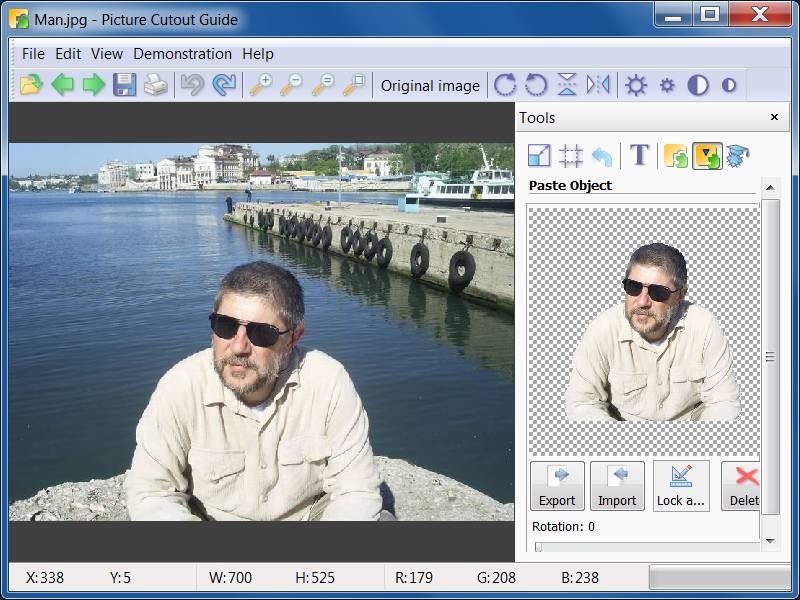
- Paste Object: Manages the export and import of separated subjects into new photos to create multi-layered compositions.
- Smart Patch: A retouching tool that replaces specific areas of a photo with a "patch" sampled from another part of the image.
- Standard Utilities: Includes tools for text insertion, resizing, cropping, and rotation.
To assist users with the technical aspects of masking and compositing, the software includes a series of stepwise animated demo samples. These tutorials illustrate the necessary steps to execute complex edits and use the specific masking tools provided. By combining these utilities, Picture Cutout Guide enables the assembly of image overlays and the manipulation of photographic elements without requiring advanced manual selection skills.
Top 5 Reasons To Download Picture Cutout Guide
If you have ever spent hours trying to meticulously trace the outline of a person or an object in a photo, only to end up with a jagged, unprofessional mess, you know exactly how frustrating photo editing can be. For years, the ability to create high-quality photomontages and clean background separations was locked behind expensive subscriptions and steep learning curves. But today, everything changes. We are looking at a piece of software that levels the playing field for everyone from hobbyist photographers to social media influencers: Picture Cutout Guide. This tool is designed with one goal in mind—to make complex photo manipulation accessible, fast, and, most importantly, fun.
Before we dive into the nitty-gritty details of why this software deserves a permanent spot on your hard drive, let’s look at the highlights. Here are the top five reasons why you need to download this giveaway right now:
- Professional-Grade Edge Separation Made Simple: The Wide Edge tool allows you to isolate complex objects from any background without needing the steady hand of a surgeon.
- Seamless Photomontage Capabilities: With the Paste Object tool, you can effortlessly transfer isolated objects between different photos to create stunning, realistic compositions.
- Magic Object Removal with Smart Patch: You can clean up your photos by replacing unwanted elements with "patches" from other areas of the image, making distractions disappear instantly.
- Built-In Interactive Learning: You don't need to hunt for tutorials online because the software includes stepwise animated demo samples that guide you through every feature.
- A Complete Essential Editing Suite: Beyond the specialized tools, it includes all the fundamental features like resizing, cropping, rotation, and text overlays, making it a versatile all-in-one solution.
Now, let’s break these down and talk about why Picture Cutout Guide is a game-changer for your creative workflow.
1. Professional-Grade Edge Separation Made Simple
The biggest hurdle in photo editing has always been the "cutout." Whether you are trying to remove a person from a crowded street or isolate a product for an e-commerce listing, the boundary between the object and the background is where most software fails. Traditional tools often leave you with a "halo" effect or cut off essential details like hair or clothing fibers. Picture Cutout Guide tackles this head-on with its Wide Edge tool.
The genius of the Wide Edge tool lies in its intelligent algorithm. Instead of forcing you to click a thousand tiny points around an object, it allows you to define a broad area where the edge exists. The software then analyzes the pixels to determine exactly where the object ends and the background begins. This is a massive time-saver. Imagine being able to separate a complex subject from a busy, "arbitrary" background in just a few strokes. This tool isn't just for solid colors or green screens; it’s designed to handle the messy, real-world photos we take every day.
Once you have separated your object, the software doesn’t just leave you there. You can apply background effects directly to the original image, such as filling the background with a solid color, adding shadows to give the object depth, or applying a professional-looking blur to create a "bokeh" effect that makes your subject pop. This level of control is usually reserved for high-end suites, but here it is presented in a way that anyone can master.
2. Seamless Photomontage Capabilities
Once you’ve mastered the art of the cutout, the next logical step is creation. This is where the Paste Object tool comes into play. A photomontage is more than just a collage; it is an art form that allows you to blend different worlds. You can take a photo of a friend and place them on a tropical beach, or take a vintage car and place it in a futuristic city. The possibilities are limited only by your imagination.
What makes Picture Cutout Guide particularly impressive is its ability to store these separated objects. You can build your own library of cutouts—people, pets, trees, or decorative elements—and import them whenever you need to create a new collage. The software handles the export and import of these objects seamlessly, ensuring that the transparency and edge data are preserved. When you paste an object into a new photo, you have full control over its placement and scale, allowing you to create compositions that look natural and convincing. This is a must-have feature for anyone looking to create unique marketing materials, personalized greeting cards, or just fun images for social media.
3. Magic Object Removal with Smart Patch
We’ve all been there: you take the perfect photo, but there’s a stray piece of trash on the ground, a power line cutting through the sky, or a stranger photobombing your beautiful landscape. Normally, this would require complex "cloning" tools that take forever to look right. However, Picture Cutout Guide includes a feature called Smart Patch that feels like magic.
The Smart Patch tool allows you to select an area you want to disappear and then choose a "patch" from another part of the photo to fill it in. The software doesn't just copy and paste the pixels; it blends them. It analyzes the textures, colors, and lighting of the surrounding area to ensure the patch is invisible. This is essentially "content-aware" editing that allows you to retouch your photos with incredible precision. You can remove blemishes from a portrait, clear up a cluttered background, or even "rebuild" parts of an image that were obscured. It is a powerful restoration tool that turns "almost perfect" photos into masterpieces.
4. Interactive Animated Tutorials for Every Skill Level
One of the biggest reasons people shy away from powerful photo editing software is the intimidating interface. Many programs look like the cockpit of a jet fighter, with hundreds of buttons and no clear starting point. Picture Cutout Guide takes a completely different approach by prioritizing user education. The software comes with stepwise animated demo samples built right into the interface.
This is a feature I cannot praise enough. Instead of reading a dry manual or searching through forums, you can watch the software perform the tasks in front of your eyes. These demos show you exactly where to click, how to move the mouse, and what settings to use for different effects. It’s like having a professional editor sitting right next to you, guiding you through the process. Whether you are a total beginner or an experienced user looking to speed up your workflow, these demos ensure that you are never left guessing. You can go from downloading the software to creating your first professional cutout in a matter of minutes.
5. A Complete Essential Editing Suite
While the specialized tools like Wide Edge and Smart Patch are the stars of the show, a piece of software is only as good as its foundation. Picture Cutout Guide understands this and includes a full suite of essential editing tools. This means you don’t have to switch between three different programs just to get a photo ready for the web.
- Text: Add captions, watermarks, or artistic typography to your montages.
- Resize: Perfect for ensuring your images meet the specific requirements of different social media platforms or print sizes.
- Crop: Easily remove unnecessary edges or change the composition of your shot to focus on what matters.
- Rotation: Fix crooked horizons or get creative with the orientation of your images.
By including these core functions, Picture Cutout Guide acts as a comprehensive workstation. It’s lean, it’s fast, and it doesn’t bloat your system with features you’ll never use. It provides a streamlined path from a raw photo to a finished, polished piece of art.
Why You Should Download It Today
In the world of tech, we often see software that tries to do everything and ends up doing nothing well. Picture Cutout Guide is the exception. It focuses on the hardest parts of photo editing—background removal and compositing—and makes them incredibly easy. The inclusion of the Smart Patch tool adds a layer of utility that makes it useful even for those who aren't interested in making collages but just want to clean up their personal photos.
The "Giveaway" aspect makes this an absolute no-brainer. You are getting a tool that rivals the core functionality of expensive graphic design software for free. Whether you are a parent looking to make a fun collage of your children, a student working on a creative project, or a professional looking for a lightweight tool to handle quick cutouts, this software delivers.
The combination of the Wide Edge technology and the Smart Patch feature alone would be worth the download, but when you add the animated tutorials and the Paste Object functionality, you have a powerhouse of a program. It removes the technical barriers to creativity. You no longer need to be a "tech person" to create professional-looking images. All you need is your imagination and this software.
In conclusion, if you value your time and want to elevate your photo editing game, do not let this opportunity pass you by. Picture Cutout Guide is an intuitive, powerful, and educational tool that transforms the way you interact with your digital memories. It turns the tedious chore of photo masking into an effortless creative process. Download it, run through the animated demos, and start creating your own stunning photomontages today. You will be amazed at what you can achieve with just a few clicks.
Final Verdict: This is a must-have utility for anyone with a camera. Simple, effective, and brilliant.

Reviews for Picture Cutout Guide
Click Here to Read Reviews for Picture Cutout Guide >> Click Here to Submit Reviews for Picture Cutout Guide >>