What Does GiliSoft Video Recorder Do?
GiliSoft Video Recorder is a Windows-based screen capture utility designed to record visual and auditory activity simultaneously. The software saves these captures as compressed video files in real-time, making it a functional tool for creating software demonstrations, archiving streaming media, or producing gameplay footage. It serves as a digital alternative to using external cameras for screen recording by capturing everything that appears on the monitor.
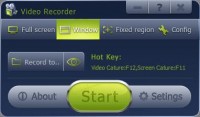
The application offers four distinct recording modes: Full Screen, Windows, Region, and a specialized mode for DirectX and OpenGL-based PC games. To ensure performance on legacy systems, it utilizes a high-performance capture driver and maintains strict audio/video synchronization throughout the recording process.
Key technical features include:
- Configurable audio sources, including speakers, microphones, or external lines.
- Automatic file splitting based on user-defined time or size increments.
- Real-time video compression outputting to FLV format.
- Customizable hotkeys for starting and stopping recordings.
- The option to toggle mouse cursor visibility and display in-game frame rates.
By providing a direct method to capture on-screen content, the software simplifies the process of sharing digital workflows. It provides an integrated solution for users needing to document complex computer tasks or save web-based video content directly to a local hard drive for offline viewing.
Top 5 Reasons To Download GiliSoft Video Recorder
- High-Performance Game Recording: Dedicated support for DirectX and OpenGL ensures your gaming highlights are captured smoothly without dropping frames.
- Versatile Capture Modes: Whether you need the full screen, a specific window, or a custom-defined region, this tool offers total flexibility for any task.
- Perfect Audio-Video Synchronization: Advanced real-time compression keeps your commentary and system sounds perfectly aligned with the high-definition visuals.
- Intelligent File Splitting: Automatically manage your storage by splitting long recording sessions by file size or time duration.
- Lightweight and Resource-Efficient: Built with a high-performance driver that allows even legacy PCs to record high-quality video without system lag.
How many times have you found yourself stuck in a loop trying to explain a simple computer task to a friend or a family member? We have all been there. You are on the phone, trying to describe which icon to click, which menu to open, and where the settings are hidden, only for them to get more confused. In the tech world, there is an old saying: show, don't tell. This is exactly why a robust screen recording tool is not just a luxury but a necessity in the modern digital landscape. Today, I am looking at a tool that simplifies this process entirely: GiliSoft Video Recorder. If you have been looking for a reason to upgrade your toolkit, this giveaway is the perfect opportunity to snag a professional-grade solution for free.
GiliSoft Video Recorder is designed to be the bridge between what you see on your monitor and what you want the world to see. It is a comprehensive Windows-based utility that captures every pixel of action and every bit of audio with surgical precision. From creating professional software demos to capturing that "once-in-a-lifetime" gaming moment, this software handles it all with an ease of use that is frankly refreshing in an industry often bogged down by overly complex interfaces. Let’s dive deep into why this specific giveaway should be at the top of your "must-download" list.
1. High-Performance Game Recording for the Modern Gamer
Let’s start with the feature that most of you are probably most excited about: game recording. We live in an era where sharing your gameplay is part of the gaming experience itself. Whether you are a budding YouTuber, a competitive player looking to review your own matches, or someone who just wants to show off a "God-tier" play to your friends, you need a recorder that won't kill your frame rate. There is nothing worse than hitting the "Record" button only to have your game turn into a slideshow. This is where GiliSoft Video Recorder truly shines.
The software features a unique game recording mode that specifically supports PC games based on DirectX and OpenGL. This is crucial because it means the software communicates directly with your graphics hardware. Instead of simply "taking pictures" of your screen, it hooks into the rendering engine to capture the frames as they are produced. This results in incredibly smooth footage that looks exactly like the game felt while you were playing it. You can even toggle a frame rate indicator so you can keep an eye on your performance in real-time, ensuring that your recording isn't taxing your system too heavily. If you want to make your own game movies, this feature alone makes the download worth every second of your time.
2. Versatile Capture Modes for Every Scenario
Not every recording task is the same. Sometimes you need to show your entire desktop to demonstrate a workflow across multiple applications. Other times, you might want to record a specific video playing in a web browser window without showing your cluttered taskbar or private desktop icons. GiliSoft Video Recorder offers multiple recording modes to cater to these specific needs. You have the choice between Full Screen Recording, Windows Recording, and Region Recording.
The Region Recording Mode is particularly useful for content creators. It allows you to draw a box around a specific area of your screen, ensuring that only the relevant information is captured. This is perfect for recording "how-to" tutorials or capturing a specific portion of a live stream. On the other hand, the Windows Recording Mode allows you to lock onto a specific application window. This means even if you accidentally move another window in front of it or resize things, the focus remains purely on the target application. This level of flexibility ensures that your final video looks professional and targeted, saving you hours of post-production cropping and editing.
3. Perfect Audio-Video Synchronization and Quality Control
One of the biggest complaints users have with free or low-quality screen recorders is the "audio drift." You’ve seen it before: the person in the video clicks a button, but you don't hear the sound until two seconds later. It’s jarring and makes the content unwatchable. GiliSoft has solved this with its fast real-time audio/video compression engine. By compressing the data as it is captured, the software ensures that the audio and video streams stay perfectly synced from the first second to the last.
Moreover, the level of customization available for your audio and video quality is impressive. You can choose to capture audio from your speakers (to get the game sounds or system alerts), from your microphone (for your commentary), or even from external lines. If you are recording a silent demo, you can simply use the "mute capture" option. The software even lets you decide whether you want the mouse cursor to be visible. For tutorials, showing the cursor is vital so the viewer can follow your movements; for cinematic game movies, you might want to hide it to maintain immersion. Having these options at your fingertips allows you to tailor the output to the specific medium you are creating for.
4. Intelligent File Splitting for Effortless Management
If you have ever recorded a long gameplay session or a two-hour webinar, you know how massive video files can get. Managing a 10GB or 20GB file can be a nightmare for your hard drive, and it makes uploading to platforms like YouTube or sharing via cloud storage incredibly slow. GiliSoft Video Recorder includes a brilliant automatic file splitting feature that takes the headache out of large-scale recording. You can set the software to automatically split files based on time or size.
For example, you can tell the program to start a new file every 30 minutes or every 2GB. This is a lifesaver for several reasons. First, it protects your data; if your computer crashes or loses power at the two-hour mark, you won't lose the entire recording—only the most recent segment might be affected. Second, it makes the editing process much easier, as you can work with smaller, more manageable chunks of footage. This "set-and-forget" functionality is typical of high-end professional software, and seeing it included here makes this giveaway an absolute steal for anyone who does long-form content capture.
5. Lightweight Architecture and High-Speed Drivers
Perhaps the most underrated feature of GiliSoft Video Recorder is its efficiency. Many modern screen recorders are "resource hogs" that require the latest i9 processor and 32GB of RAM just to function properly. GiliSoft, however, includes a high-performance screen capture driver specifically optimized for legacy PCs. This means if you are working on an older laptop or a budget desktop, you can still produce high-quality FLV recording files without your system grinding to a halt.
The software is incredibly easy to use, featuring a clean interface and customizable hotkeys. You can start or stop a recording with a single hit of a key, which is essential when you need to capture a fleeting moment on your screen. You don't have to tab out of your game or your presentation to fiddle with settings; you just hit your hotkey and the software goes to work in the background. This combination of a low system footprint and a streamlined user interface makes it the ideal tool for everyone from tech-savvy gamers to office professionals who just need a reliable way to document their screen activity.
Conclusion: Why You Shouldn’t Pass This Up
In conclusion, the GiliSoft Video Recorder is a powerhouse of a tool disguised as a simple utility. It addresses the three main pain points of screen recording: performance lag, audio desync, and file management. Whether you are trying to save a favorite flash streaming video to your hard disk, share a "cool game play" with your friends, or create a software demo that actually looks professional, this software provides the tools you need to get it done efficiently.
The ability to capture what you see and what you hear simultaneously in real-time is a game-changer for digital communication. We live in a visual world, and being able to produce a video file of your screen is often the most effective way to communicate complex ideas. With its robust support for DirectX/OpenGL, its intelligent file-splitting capabilities, and its high-speed performance on even older hardware, GiliSoft Video Recorder stands out as a top-tier choice.
Don't wait until you actually need to record something to start looking for a tool. By then, the moment might have passed. Download this giveaway today, set up your hotkeys, and be ready to capture anything that happens on your screen with a single click. It is simple, it is powerful, and for a limited time, it is yours to add to your digital arsenal. This is one download you definitely won't regret.


Reviews for GiliSoft Video Recorder
Click Here to Read Reviews for GiliSoft Video Recorder >> Click Here to Submit Reviews for GiliSoft Video Recorder >>