What Does PhotoToFilm Do?
PhotoToFilm is a utility designed for digital camera users who want to transform static images into video content. The software streamlines the movie-making process, allowing users to compile photos into compressed files suitable for distribution. It utilizes existing codecs on a user’s system, such as DivX, to handle video encoding and compression.
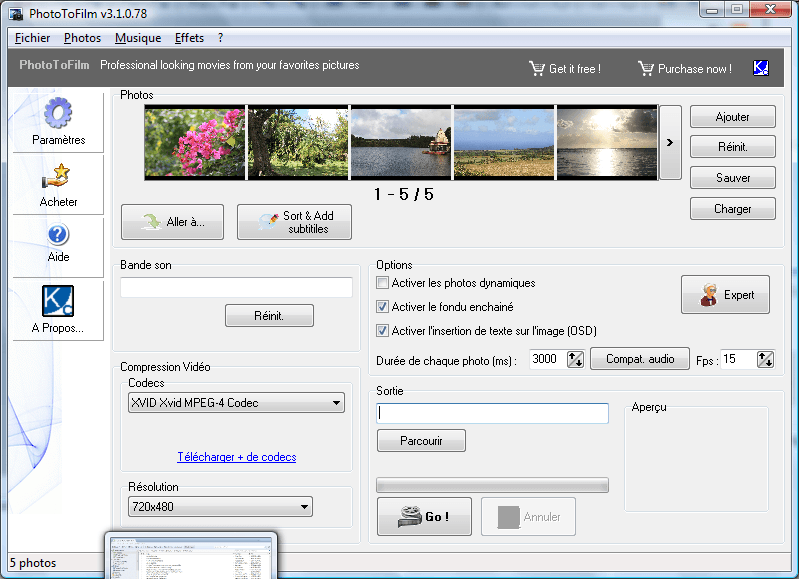
The application includes several tools to enhance visual presentations. Users can apply transitions like cross-fading and enable dynamic image movement to prevent static slideshows. Audio integration is supported through MP3 file implementation for background soundtracks. Additionally, the software features an On-Screen Display (OSD) function for inserting dynamic text directly onto the video frames.
The software focuses on a simplified workflow to make video authoring accessible. Key features of the application include:
- Support for standard image formats including JPEG and Bitmap.
- Automated transition effects such as cross-fading between images.
- Dynamic image support and On-Screen Display text insertion.
- Direct DVD burning capabilities.
- MP3 soundtrack integration for audio backdrops.
- Multi-language support and a localized user interface.
By automating the authoring process, PhotoToFilm converts a library of still images into a functional video production ready for playback on various devices. The tool is compatible with most modern Windows operating systems and leverages local system resources for efficient rendering.
Top 5 Reasons To Download PhotoToFilm
- Transform Static Memories into Cinematic Experiences: PhotoToFilm uses professional-grade transitions and dynamic image support to turn boring folders of photos into engaging movies.
- Unrivaled Ease of Use: The software is designed with a user-friendly interface that makes video authoring feel like a game rather than a chore.
- Full Multimedia Customization: With support for MP3 soundtracks and On-Screen Display (OSD) text, you can tell a complete story with audio and captions.
- Optimized Sharing and Compression: By utilizing popular codecs like DivX, the app creates high-quality videos with small file sizes, perfect for emailing or uploading.
- Complete Output Versatility: From supporting all major image formats to providing built-in DVD burning capabilities, it covers the entire production workflow.
We have all been there. You come home from a breathtaking vacation, a heartwarming family reunion, or a once-in-a-lifetime wedding with a memory card overflowing with hundreds, if not thousands, of digital photographs. For a few days, you might scroll through them on your smartphone or laptop, showing them to anyone within arm’s reach. But eventually, those photos end up in a forgotten folder on your hard drive, rarely to be seen again. The problem isn't the quality of the photos; it is the format. Scrolling through static images one by one can feel tedious for the viewer. If you want to truly capture the essence of a moment and share it in a way that resonates, you need to turn those images into a movie. This is where PhotoToFilm steps in as a complete game-changer for digital camera users.
As a tech reviewer, I see a lot of "slideshow makers" hit the market. Most of them are either too simple, offering zero customization, or so complex that you need a degree in film editing just to add a fade effect. PhotoToFilm strikes that elusive "Goldilocks" balance. It provides the professional tools you need to make your photos pop while maintaining an interface so intuitive that anyone can master it in minutes. If you have been looking for a way to breathe new life into your digital archives, this is the giveaway you cannot afford to miss. Let’s dive deep into the top five reasons why this software deserves a permanent spot on your desktop.
1. Transform Static Memories into Cinematic Experiences
The biggest hurdle with traditional photo viewing is that it is static. When you look at a still image, you are seeing a frozen moment in time. While beautiful, it lacks the flow of life. PhotoToFilm solves this by introducing dynamic images support and professional transitions like cross-fading. Instead of a jarring jump from one photo to the next, the software allows images to blend into one another seamlessly. This creates a narrative flow that mimics the way we naturally remember events—one memory bleeding into the next.
The "dynamic images" feature is particularly impressive. Rather than just showing a flat image, the software can apply subtle movements that keep the viewer’s eye engaged. When you combine this with high-quality transitions, your "slideshow" suddenly feels like a "film." This isn't just about making things look "fancy"; it is about professionalizing your personal content. Whether you are creating a memorial for a loved one or a highlight reel of your child’s first year, these cinematic touches add an emotional weight that a simple folder of JPEGs simply cannot provide. By downloading this software, you are gaining the ability to act as the director of your own life’s story.
2. Unrivaled Ease of Use
In the world of tech, "user-friendly" is a term that gets thrown around a lot, often losing its meaning. However, PhotoToFilm truly embodies this philosophy. The developers have designed the interface to be lean, mean, and incredibly focused. When you open the application, you aren't greeted by a labyrinth of menus or confusing jargon. Instead, the workflow is linear and logical. You add your photos, choose your settings, add your music, and hit go.
The software makes video authoring a game. This is a bold claim, but it holds up under scrutiny. There is a certain satisfaction in seeing how easily you can drag and drop your files and watch a movie come together in real-time. For many people, the barrier to entry for video editing is the "learning curve." They fear that they will spend hours watching tutorials just to figure out how to trim a clip. PhotoToFilm removes that barrier entirely. It is designed for the "everyone"—the grandparent who wants to share photos of the grandkids, the student working on a project, or the hobbyist photographer who wants a quick way to showcase their portfolio. This accessibility is a primary reason why this software stands out in a crowded market.
3. Full Multimedia Customization
A movie is only half-finished if it doesn't have a soundtrack. Sound is the quickest way to evoke emotion in an audience. PhotoToFilm understands this deeply, providing robust MP3 support. You can easily take your favorite song—whether it’s a high-energy track for a travel vlog or a soft instrumental for a wedding video—and sync it perfectly to your photo sequence. The ability to layer audio over your visuals instantly elevates the production value of your movie.
But the customization doesn't stop at audio. One of the most underrated features of this software is the OSD: On Video dynamic text insertion. Have you ever watched a video and wondered where a specific photo was taken or who was in the shot? With the OSD feature, you can overlay text directly onto your video. You can add captions, dates, locations, or even funny anecdotes that appear as the photos scroll by. This turns your movie into a narrated documentary of your life. It ensures that the context of your photos is never lost, making the video a valuable historical record for your family. The combination of music and text allows for a level of storytelling that goes far beyond what a standard photo viewer can offer.
4. Optimized Sharing and Compression
One of the most frustrating aspects of modern digital media is file size. High-resolution photos are massive, and high-definition videos can be even larger. If you try to send a 2GB video file to your aunt via email, it’s going to bounce back. If you try to upload it to a slow connection, it will take hours. PhotoToFilm tackles this problem head-on by supporting popular codecs like DivX.
Compression is often misunderstood as "reducing quality," but with the right codecs, it actually means "optimizing efficiency." PhotoToFilm allows you to create movies that look stunning on a big screen while maintaining a file size that is small enough to distribute easily. This is vital for the modern user who shares content across multiple platforms. Whether you want to put your movie on a USB stick, upload it to a cloud drive, or share it on social media, the software ensures that your output is tailored for portability. You get the best of both worlds: the visual clarity of your original digital photos and the convenience of a highly compressed video file. The ability to use the codecs already present on your computer means you have total control over the final output's balance between size and quality.
5. Complete Output Versatility
Finally, we have to talk about the sheer versatility of this tool. PhotoToFilm isn't just a one-trick pony. It supports the most popular photo formats, including JPEG and Bitmaps, ensuring that no matter what camera or smartphone you use, your files will be compatible. But what really impressed me was the inclusion of DVD burning capabilities. While we live in a digital-first world, there is still a significant need for physical media.
Think about the older generation who might not be tech-savvy enough to navigate a cloud link but knows exactly how to put a disc into a DVD player. Being able to burn your photo-movie directly to a DVD from within the app makes it an all-in-one production house. You don't need to export the file and then find a third-party burning software; PhotoToFilm handles the entire process from import to physical disc. Furthermore, with international support, the software is accessible to a global audience, breaking down language barriers in the creative process. It is a comprehensive package that covers every stage of the video creation lifecycle, from the first photo imported to the final disc burned.
Conclusion: Why You Need to Download This Now
In the digital age, we are all photographers. We capture thousands of moments, but we often fail to curate them. We leave them sitting in digital graveyards, where their impact fades over time. PhotoToFilm is the antidote to this digital clutter. It is a tool that empowers you to take those fragments of time and weave them into a narrative that can be enjoyed, shared, and preserved for generations.
The reasons to download this giveaway are clear. You are getting a tool that provides professional visual flair without the professional price tag or complexity. You are getting a streamlined workflow that respects your time and your intelligence. You are getting multimedia features that allow you to express your creativity through music and text. You are getting smart compression that makes sharing your work a breeze. And finally, you are getting hardware versatility that ensures your movies can be watched on everything from a high-end PC to a standard living room DVD player.
As a tech reviewer, my job is to find tools that solve problems. The problem of "photo hoarding" is universal, and PhotoToFilm is the most elegant, accessible solution I have encountered in a long time. It turns the chore of organizing photos into the joy of creating movies. Don't let your memories sit idle for another day. Download this software, grab your favorite photos, and start building your first film. Your friends and family will thank you, and you will find a newfound appreciation for the art of digital photography. This isn't just another app; it is the perfect companion for your digital camera, and it is a must-have for anyone who values their memories.
Final Verdict: If you want a fast, efficient, and high-quality way to share your life’s highlights, PhotoToFilm is an absolute winner. It’s rare to find software that is this lightweight yet this powerful. Grab it while you can and start your journey into video authoring today!


Reviews for PhotoToFilm
Click Here to Read Reviews for PhotoToFilm >> Click Here to Submit Reviews for PhotoToFilm >>