
Original price was: $22.95.Current price is: $0.00. (100% off)
Sale has ended!
Get More Giveaways And Discounts
Discuss This Offer >> Submit A Review >>

Official Product Description

PowerArchiver is an advanced compression utility with an exclusive new PA format with strongest/fastest compression and secure AES. Supports 60+ formats: Multicore fast ZIP, ZIPX, ISO, RAR, 7-ZIP, CAB, LHA (LZH), TAR, GZIP, BZIP2, PGP & more. RAR compression & UNRAR available. Full OpenPGP support. FIPS 140-2 validated AES encryption. Cloud browser, Adv. Backup, S/FTP client, Burner, Virtual ISO Drive. 64-bit, Portable versions available!

PowerArchiver is an advanced file management – compression utility w/support for ZIP, ZIPX, , ISO, RAR, 7-ZIP, PA, CAB, LHA (LZH), TAR, GZIP, BZIP2 & more. PowerArchiver includes hundreds of other features!

PowerArchiver is an award winning professional file management/compression utility that offers the best file compression on the market today. PowerArchiver has full integration with Windows Explorer, multiple encryption methods, and advanced compression algorithms. With support for all popular compression formats, PowerArchiver is the last compression app you’ll ever need!

There are many options and features to love in PowerArchiver. You can preview many file types directly in the PowerArchiver without having to open an archive (PDF, PNG, JPEG, TXT, etc). PowerArchiver fully supports Windows 10 with both 32-bit and 64-bit installations, as well as all of your legacy Windows OS installations going all the way back to Windows XP and Server 2003. But the very best part? The highly advanced ZIP engine which use all cpu threads available and is multi-core threaded by block, not file, so even single file compression is fast.

PowerArchiver’s ZIP format support is the best on the market. The multicore engine runs up to 400% faster than single core systems on quad computers and works at the superior speeds of zip compression and extraction jobs. There’s full support for the ZIPX format, plus LZMA, XZ, JPEG, PPMd, BZIP2 and WAVPACK in ZIP/ZIPX! You can even use the open source 7-Zip advanced compression format. Want more?

In Addition to the advanced ZIP format, PowerArchiver features an exclusive compression format, the Advanced Codec Pack (.PA format). The Advanced Codec Pack (.PA format) features a comprehensive collection of filters and codecs that let you compress and extract various types of files at great speeds and compression ratios. It has been optimized for multicore processors and 64-bit systems (including multi-core extraction). It has superior compression compared to 7z, RAR and Zipx, with special compressors for jpeg, mp3, text, exe as well as docx, pdf, etc. PA format even has de-deduplication filter that will significantly lower the size of similar content, such as in ISO archives, images or anywhere else (works at byte level).

PA format is easy to configure and use with 2 main settings – Optimized Strong and Optimized Fast. Both settings will smartly utilize your PC power to the max by optimizing memory and cpu usage (unlimited cores supported). Aside for very strong compression ratio, PA format also includes very secure encryption, with special codec that obfuscates data before AES-256bit encryption, to make brute force attacks even harder. It also exclusively uses FIPS 140-2 validated encryption components.

PowerArchiver features additional advanced features:

· Full Windows 10 support with jump lists, taskbar progress and taskbar icon overlays.
· When you need to backup databases, Outlook .pst files, or in-use files? PowerArchiver offers exclusive support for VSS (volume shadow support), a feature typically only available in enterprise backup software.
· Has excellent support for the 7-Zip compression format with unique optimized modes.
· PowerArchiver supports over 60 formats and it has 10 different tools such as Multi Extract, Archive Converter and more.
· PowerArchiver has pioneered advanced Shell Extensions that let you compress, extract and encrypt files using one click from directly within Windows Explorer.
· Features Compression Profiles that store frequently used compression settings.
· Internal and fully independent PDF Viewer – PDF viewer that is fast and allows you to view and print PDFs without any additional pdf tools installed.
· Multiple tabs support – multiple tabs support for opening several archives in the same interface. This enables easy copy and pasting between the archives and lets us minimize your memory usage significantly.
· Advanced Codec Pack (.pa format) – Advanced Codec pack features a comprehensive collection of filters and codecs that let you compress and extract various types of files at great speeds and compression ratios. It has been optimized for multicore processors and 64-bit systems.
· Portable version – Improved portable version, both x86 and x64 available. No need for installation, super-fast start-up and many tools in one simple to use portable package. Requires no installation, saves all settings and even has support for shell extensions (unique)!
· FIPS 140-2 Validated – PowerArchiver’s encryption components use the highest standard ZIP AES (public and open data standard) encryption for storage and a secure ftp client (both SFTP and FTP over SSL, both public transport standards) for transfer. Both solutions use FIPS 140-2 validated components and are in compliance with all legal requirements for open data storage and transport as well as data protection standards. GDPR compliance.
· New two-panel Explorer mode – Explorer replacement mode for powerful file handling!
· FAST start-up– PowerArchiver has been optimized from the ground up to be lighting fast on start-up.
· Customizable to the core with new Skins – change GUI skins, toolbar icons and file format icons too, customize PA to your own liking!
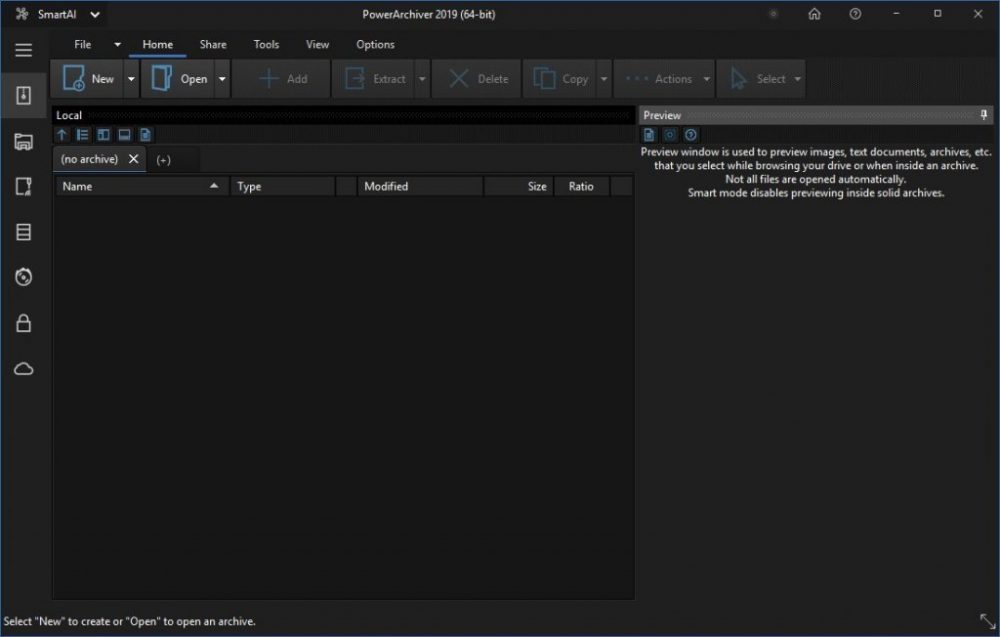
· Full implementation of the Modern/Ribbon toolbar that is fast, looks great and is easy to use.

Get PowerArchiver today and enjoy our award-winning compression utility.
You May Like


Overview

What Does PowerArchiver 2019 Do?

PowerArchiver is a comprehensive file management and compression suite for Windows. It supports over 60 archive formats, including ZIP, ZIPX, RAR, 7-ZIP, ISO, and TAR. The software introduces a proprietary Advanced Codec Pack (.PA format) that utilizes multicore processors to achieve higher compression ratios and faster performance than traditional formats. Its ZIP engine is optimized for multi-core threading by block, allowing for significant speed increases even when processing single files.

Security is a central component of the utility, featuring FIPS 140-2 validated AES encryption and full OpenPGP support. It utilizes specialized codecs to obfuscate data before encryption, which provides additional protection against brute-force attacks. The suite also includes enterprise-grade features like Volume Shadow Service (VSS) support, enabling the backup of databases and files currently in use by the system.

The application integrates several standalone tools, including an S/FTP client, a cloud browser, a virtual ISO drive, and a disc burner. Users can manage files through a modern ribbon interface or a dual-panel explorer mode. Additional features include shell extensions for Windows Explorer integration, a built-in PDF viewer, and an archive converter. PowerArchiver is available in 64-bit and portable versions, compatible with operating systems from Windows XP through Windows 10.

Top 5 Reasons To Download PowerArchiver 2019

  1. The Revolutionary .PA Format: Experience the world's most advanced compression with the exclusive Advanced Codec Pack, offering superior ratios and speeds that outperform 7z, RAR, and ZIPX.
  2. Unrivaled Multi-Core Performance: PowerArchiver features a lightning-fast ZIP engine that is multi-threaded by block rather than file, utilizing every ounce of your CPU's power for up to 400% faster processing.
  3. Military-Grade Security and FIPS Validation: Protect your data with FIPS 140-2 validated 256-bit AES encryption and full OpenPGP support, ensuring your sensitive files meet the highest legal and professional standards.
  4. The Ultimate All-in-One Utility Suite: It is far more than just a compression tool; it includes a full S/FTP client, a cloud browser, a virtual ISO drive, a professional backup suite with VSS support, and a built-in PDF viewer.
  5. Modern Interface and Seamless Portability: Enjoy a fully customizable Ribbon UI with Windows 10/11 integration and a powerful portable version that requires no installation while maintaining full shell extension support.

If you have been using the same old file extraction tool for the last decade, it is time for a serious reality check. In the world of modern computing, where file sizes are ballooning and data security is more critical than ever, relying on a basic, single-threaded utility is like trying to win a Formula 1 race in a minivan. You need something that can handle the heavy lifting of high-resolution media, massive databases, and complex encryption without breaking a sweat. Enter PowerArchiver. This isn't just another archive manager; it is a comprehensive data management ecosystem designed for power users who demand the absolute best in speed, efficiency, and security. Whether you are a system administrator, a creative professional, or a tech enthusiast, this giveaway is the upgrade your workstation has been begging for. Let’s dive deep into why PowerArchiver stands head and shoulders above the competition.

1. The Revolutionary .PA Format and Advanced Codec Pack

The crown jewel of PowerArchiver is undoubtedly its exclusive .PA format. While most users are familiar with ZIP and RAR, the .PA format (Advanced Codec Pack) represents a generational leap in compression technology. Most compression tools use a "one size fits all" approach, applying the same algorithm to every file. PowerArchiver is smarter than that. It utilizes a comprehensive collection of filters and codecs that intelligently analyze your data to apply the most effective compression method for that specific file type. We are talking about specialized compressors for JPEGs, MP3s, text files, executables, and even DOCX or PDF files.

One of the most impressive features of the .PA format is its byte-level de-duplication filter. If you are archiving ISO images, system backups, or folders with similar content, PowerArchiver identifies redundant data segments and compresses them far more effectively than traditional methods. This results in archive sizes that are significantly smaller than what you would get with 7z or RAR. Furthermore, the format is optimized for 64-bit systems and multi-core extraction, meaning you don't have to sacrifice speed to get those tiny file sizes. You can choose between "Optimized Strong" for maximum space saving or "Optimized Fast" for a perfect balance of speed and efficiency. In a world where storage space is a premium and bandwidth is precious, the .PA format is a genuine game-changer.

2. Unrivaled Multi-Core Performance

Let’s talk about speed. Most compression utilities claim to be fast, but they often hit a bottleneck when dealing with single, massive files because they thread their processes by file. If you have one 10GB file, a standard compressor might only use one CPU core to process it. PowerArchiver changes the game by being multi-threaded by block. This means it can take a single large file, break it into blocks, and distribute those blocks across every available thread on your processor. If you are running a quad-core or octa-core system, you will see performance gains of up to 400% or more compared to single-core systems.

This multi-core optimization extends across its entire engine, including its world-class ZIP and ZIPX support. PowerArchiver’s ZIP engine is widely considered the fastest on the market, utilizing LZMA, XZ, JPEG, PPMd, BZIP2, and WAVPACK compression within the ZIP/ZIPX container. When you are extracting massive archives or creating backups of huge directories, every second counts. PowerArchiver ensures that your high-end hardware is actually being utilized, rather than sitting idle while a single core struggles to keep up. It is the definition of "power" in PowerArchiver.

3. Military-Grade Security and FIPS Validation

In an era of constant data breaches and privacy concerns, your compression tool needs to be a fortress. PowerArchiver takes security more seriously than any other utility in its class. It doesn't just offer encryption; it offers validated encryption. PowerArchiver uses FIPS 140-2 validated components for its AES-256 bit encryption. This is the gold standard required by government agencies and large corporations to ensure data protection. If you are handling sensitive client information, financial records, or proprietary code, you need the peace of mind that comes with FIPS validation.

But it goes further than just standard AES. PowerArchiver includes a special codec within the .PA format that obfuscates data before the encryption process even begins. This makes brute-force attacks significantly more difficult because the underlying data structure is hidden. Additionally, the software offers full OpenPGP support, allowing you to encrypt, decrypt, sign, and verify files using the most trusted public-key encryption standard available. It is fully GDPR compliant, making it the perfect tool for professionals who need to navigate the complex world of modern data regulations. When you lock a file with PowerArchiver, it stays locked.

4. The Ultimate All-in-One Utility Suite

What really sets PowerArchiver apart from "lite" alternatives is the sheer volume of integrated tools that come bundled within the application. When you download PowerArchiver, you aren't just getting an unzipper; you are getting a Swiss Army knife for file management. Consider these built-in features:

  • VSS (Volume Shadow Support): This is a feature usually reserved for expensive enterprise backup software. It allows PowerArchiver to back up files that are currently in use, such as Outlook .pst databases or system files, without requiring you to close the applications first.
  • Cloud Browser: Why download files to your desktop just to re-upload them elsewhere? PowerArchiver’s cloud browser allows you to connect directly to Dropbox, Google Drive, OneDrive, Amazon S3, and more. You can compress files locally and upload them to the cloud in one seamless step.
  • Professional S/FTP Client: It includes a fully functional, secure FTP client (supporting SFTP and FTP over SSL). This is perfect for web developers and admins who need to move archives directly to their servers.
  • Virtual ISO Drive and Burner: You can mount ISO images as virtual drives without needing extra software, or you can burn your archives directly to CD, DVD, or Blu-ray discs.
  • Independent PDF Viewer: No need to open a heavy application like Adobe Reader just to see what’s inside a compressed PDF. PowerArchiver’s internal viewer is fast, lightweight, and even allows for printing.

By integrating these tools, PowerArchiver eliminates the need for five or six separate applications, streamlining your workflow and saving valuable system resources.

5. Modern Interface and Seamless Portability

A tool this powerful could easily become overwhelming, but PowerArchiver boasts one of the most intuitive and customizable user interfaces in the industry. It fully embraces the modern Ribbon UI seen in Microsoft Office, making every feature easy to find and use. However, if you are a fan of the "classic" look, it is fully skinnable and customizable to your liking. It supports Windows 11 and 10 with advanced features like jump lists, taskbar progress bars, and icon overlays, making it feel like a native part of your operating system. It even includes a two-panel Explorer mode, which is a dream for users who prefer the classic "Norton Commander" style of file management.

Finally, the portability factor is a major win for IT professionals and power users on the go. PowerArchiver offers a true portable version (available in both 32-bit and 64-bit) that requires no installation. Unlike other "portable" apps that lose their shell integration, PowerArchiver’s portable version uniquely supports shell extensions, allowing you to right-click and compress files even when running from a USB drive. It starts up instantly and saves all your settings to the portable folder, ensuring that your powerful toolkit is always with you, no matter which computer you are using. This combination of a polished, modern UI and the flexibility of portability makes it the most versatile file manager on the market today.

In conclusion, PowerArchiver is the definitive choice for anyone who takes their digital file management seriously. It bridges the gap between a simple utility and a professional-grade productivity suite. With the revolutionary .PA format, unmatched multi-core speed, top-tier security certifications, an incredible array of built-in tools, and a user-friendly interface, it truly is the last compression app you will ever need to download. Don't miss this opportunity to secure a professional license for a tool that will fundamentally improve how you interact with your data every single day.

Key Technical Highlights:

  • Support for over 60 formats including ZIP, RAR, 7-ZIP, and ISO.
  • Exclusive Advanced Codec Pack (.PA) for industry-leading compression.
  • FIPS 140-2 Validated 256-bit AES Encryption.
  • Multi-core engine with up to 400% speed increase.
  • Integrated Cloud, FTP, Backup, and Burning tools.
  • Full Windows 10/11 and legacy support (back to XP).

Make the switch today and experience what a professional-grade compression utility is actually capable of. Your CPU—and your workflow—will thank you.