What Does Sketch Drawer Pro Do?
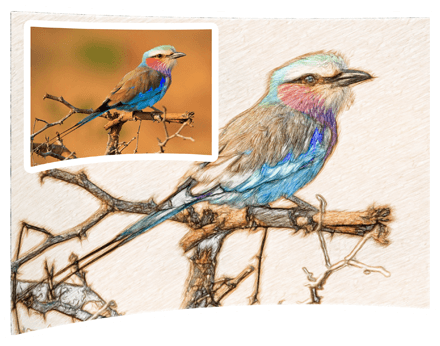
SoftOrbits Sketch Drawer Pro is a dedicated utility designed to transform digital photographs into hand-drawn sketches. The software utilizes algorithms to simulate accurate pencil strokes, allowing users to convert standard images into black-and-white or color illustrations without requiring manual artistic skills. It functions as a lightweight tool for users looking to generate stylized visual content quickly.
The interface offers two primary methods for image processing. Beginners can utilize a collection of ready-made presets to replicate specific artistic styles, including pen drawings, pencil sketches, and watercolor paintings. More advanced users can manually adjust sliders to fine-tune stroke thickness, texture, and color intensity. Key features of the software include:
- Color Sketching: A dedicated "Color Sketch" toggle allows for the creation of vibrant drawings using simulated colored pencils instead of standard graphite.
- Batch Processing: The software includes a batch mode that enables users to apply uniform settings to a single image or entire folders of photographs simultaneously.
- Versatile Output: Finalized sketches are exported as JPEG files, making them compatible with most digital platforms and printing services.
Sketch Drawer Pro focuses on accessibility and speed, catering to those who need to produce artistic renditions from a photo library with minimal manual intervention. By automating the placement of pencil strokes, the program converts realistic digital captures into exquisite hand-drawn works of art in just a few clicks.
Top 5 Reasons To Download Sketch Drawer Pro
If you have ever looked at a stunning pencil sketch and wished you had the artistic talent to create one yourself, you are not alone. Most of us can snap a decent photo with our smartphones, but the ability to translate that image into a hand-drawn masterpiece is a skill that takes years of dedicated practice to master. However, what if I told you that you could bridge that gap instantly? Enter SoftOrbits Sketch Drawer Pro. This isn't just another photo filter app; it is a sophisticated piece of software designed to turn your digital memories into genuine works of art. Right now, this tool is available as a giveaway, and if you are a fan of digital photography or creative editing, this is an opportunity you simply cannot pass up.
As a tech reviewer, I see hundreds of apps that claim to "transform" your photos, but most of them deliver nothing more than a grainy, computerized mess. SoftOrbits Sketch Drawer Pro stands out because it mimics the actual stroke of a pencil. It analyzes the edges, shadows, and textures of your photographs to recreate them with artistic integrity. Whether you want a rough charcoal look, a delicate graphite sketch, or a vibrant watercolor painting, this software delivers with surprising precision.
Before we dive into the deep details of how this software works and why it belongs in your digital toolkit, let’s look at the highlights. Here are the top five reasons why you need to download this giveaway today:
- Professional Artistic Results Without the Learning Curve: You don’t need to be an artist to produce gallery-quality sketches. The software does the heavy lifting for you.
- A Massive Library of Versatile Presets: From pen-and-ink to classic graphite and watercolor, the ready-made presets allow for instant transformations tailored to any style.
- Granular Creative Control: While the presets are great, the ability to manually tweak stroke thickness, intensity, and coloration gives you the power of a professional studio.
- Vibrant Color Sketching Capabilities: Unlike many competitors that only offer black-and-white conversions, this tool excels at creating rich, multi-colored pencil drawings.
- Efficient Batch Processing: You can convert entire albums of photos into sketches simultaneously, saving you hours of manual editing time.
1. Professional Artistic Results Without the Learning Curve
The most significant barrier to creating art is the technical skill required. Most people have the vision but lack the hand-eye coordination or the thousands of hours of practice needed to sketch a realistic portrait or a complex landscape. SoftOrbits Sketch Drawer Pro removes this barrier entirely. When you download this software, you are essentially downloading the skill of a master illustrator.
The beauty of this tool lies in its sophisticated algorithms. It doesn't just overlay a texture on top of your photo; it actually traces the lines and contours of the image as if a human hand were moving a pencil across a canvas. This results in "accurate pencil strokes" that look organic and intentional. When you look at the final product, you won't see the typical digital artifacts found in cheap mobile apps. Instead, you see hatching, cross-hatching, and shading that look incredibly authentic.
For the average user, this means you can take a photo of your pet, your children, or a beautiful vacation spot and turn it into something that looks like it belongs in a frame on your wall. It is the ultimate tool for those who appreciate the aesthetic of hand-drawn art but prefer the convenience of digital photography. The ease of use is unparalleled—you simply open your image, select your style, and let the software work its magic.
2. A Massive Library of Versatile Presets
One of the highlights of Sketch Drawer Pro is its extensive collection of presets. For many users, particularly beginners, the prospect of adjusting dozens of sliders can be overwhelming. This software solves that problem by providing a wide variety of "out of the box" styles that can be applied with a single click.
These presets cover a vast range of artistic mediums. Do you want a classic graphite pencil look? There is a preset for that. Are you looking for something more aggressive, like a charcoal drawing with deep blacks and high contrast? You can find that too. There are even options for pen-and-ink styles, which are perfect for architectural photos or detailed landscapes. If you are feeling more colorful, the watercolor presets can turn a simple outdoor shot into a soft, flowing painting.
What makes these presets truly valuable is that they serve as a fantastic starting point. You can apply a preset to see how the software interprets your photo, and if it’s 90% of the way to what you want, you can then move on to minor tweaks. This workflow makes the software incredibly fast. You can cycle through ten different artistic styles in under a minute, giving you the freedom to experiment and find the perfect "vibe" for your specific photograph. It’s like having an entire art supply store and a professional artist at your beck and call.
3. Granular Creative Control
While the presets are perfect for those who want instant results, the "Pro" in the name really shines when you start exploring the manual settings. Tech enthusiasts and creative hobbyists will love the level of control offered by the various sliders and adjustment tools. SoftOrbits hasn't just given you a "sketch" button; they've given you a digital easel.
Inside the interface, you can adjust the stroke length, the thickness of the pencil lead, and the intensity of the edges. These aren't just arbitrary numbers; they change the fundamental character of the drawing. For example, by shortening the strokes and increasing the pressure, you can create a sketch that looks frantic and energetic. Alternatively, by using long, light strokes, you can create something ethereal and delicate.
You can also control the smudging and the contouring of the lines. This is particularly useful for portraits, where you might want the facial features to be sharp and defined while the hair and background remain soft and blended. This level of customization ensures that no two sketches ever look exactly the same. You are the director of the process, and the software is your highly skilled assistant. This balance between automation and manual control is exactly what you want in a high-quality editing tool.
4. Vibrant Color Sketching Capabilities
Many photo-to-sketch converters on the market are limited to monochromatic outputs. While black-and-white graphite sketches have a timeless appeal, sometimes a photo demands color to truly come alive. SoftOrbits Sketch Drawer Pro offers a dedicated "Color Sketch" mode that is, quite frankly, a game-changer.
When you enable the color sketch option, the software doesn't just keep the original colors of the photo. Instead, it simulates the use of colored pencils. This means the colors are applied with the same stroke-based logic as the graphite lines. The result is a vibrant, hand-drawn look where the colors blend and layer just like real wax-based pencils would on paper. This is perfect for floral photography, bright cityscapes, or portraits where the subject's eye color or clothing is a focal point.
Furthermore, the software includes a watercolor mode. Watercolor is notoriously difficult to master in real life because of how the water and pigment interact. Sketch Drawer Pro mimics this fluidity, creating soft edges and beautiful gradients that give your photos a dreamy, painterly quality. Being able to switch between a gritty pencil sketch and a soft watercolor painting within the same application provides immense creative flexibility. It’s a complete artistic suite that goes far beyond simple line drawing.
5. Efficient Batch Processing
If you are a content creator, a blogger, or someone who just takes a lot of photos, you know that editing images one by one can be a soul-crushing chore. This is where the Batch Mode of Sketch Drawer Pro becomes your best friend. It is one of the most powerful features of the software and a primary reason why professionals find it so useful.
Imagine you have a series of photos from a wedding or a vacation, and you want to create a themed album where every photo looks like a pencil sketch. Instead of opening each file, applying the settings, and saving it individually, you can simply point the software to an entire folder. You set your preferred parameters once, and the batch processor handles the rest. It will churn through dozens or even hundreds of photos in a matter of minutes.
The batch mode isn't just a time-saver; it ensures consistency. When you are creating a series of images, you want the "pencil" style to look the same across all of them to maintain a cohesive aesthetic. SoftOrbits makes this seamless. Beginners will appreciate the simplicity of selecting a folder and clicking "Start," while power users will appreciate the ability to process high volumes of work without having to sit at their desks and monitor every single file conversion. This feature alone makes the software worth the download, especially during this giveaway period.
Why You Should Download It Now
We live in an age of visual storytelling. Whether you are posting on social media, creating a digital scrapbooking project, or looking for a unique gift for a friend, the ability to turn a standard photo into a piece of art is incredibly valuable. SoftOrbits Sketch Drawer Pro is a specialized tool that does one thing exceptionally well: it makes art accessible to everyone.
The user interface is clean and intuitive. It is a "tiny" program in terms of system resources, meaning it won't bog down your computer, yet it is "fast" in its execution. You don't need a high-end workstation to run this; a standard home computer is more than enough to start producing professional-grade sketches. The workflow of Open, Tweak, and Save is so straightforward that even someone with very little technical experience can master it in minutes.
Furthermore, the creative possibilities are endless. Beyond just making sketches for the sake of art, you can use these images for:
- Personalized Greeting Cards: Turn a photo of your home into a sketch for a unique "we've moved" card or a holiday greeting.
- Social Media Standouts: In a sea of filtered photos, a hand-drawn sketch stands out and catches the eye of your followers.
- Home Decor: Print your sketches on high-quality paper or canvas to create custom art for your living room.
- Digital Avatars: Create a stylized version of your profile picture that looks professional and artistic.
The current giveaway of SoftOrbits Sketch Drawer Pro is a rare chance to add a premium creative tool to your collection at no cost. It is a robust, reliable, and fun application that encourages you to look at your photography in a whole new light. Instead of seeing just a digital file, you'll start seeing the potential for a charcoal drawing, a pen-and-ink illustration, or a colorful pencil masterpiece.
In conclusion, if you want a tool that is easy to use, powerful in its customization, and efficient in its performance, look no further. Sketch Drawer Pro is the perfect bridge between the world of photography and the world of fine art. Don't let this opportunity slip by—download the software, unleash your inner artist, and start converting your favorite memories into exquisite sketches today. You’ll be surprised at how much fun it is to see your photos transformed, and you’ll be even more impressed by the quality of the art you can create with just a few button clicks and a few slider tweaks.
Embrace the art of the sketch and make your photos unforgettable. This is one download you definitely won't regret.


Reviews for Sketch Drawer Pro
Click Here to Read Reviews for Sketch Drawer Pro >> Click Here to Submit Reviews for Sketch Drawer Pro >>