What Does Zortam Mp3 Media Studio PRO 33 Do?
Zortam Mp3 Media Studio serves as a comprehensive suite for managing and organizing digital music libraries of any size. The application utilizes a music identification algorithm to automatically recognize unknown tracks and populate missing ID3 tag information, including artist names, album titles, track numbers, and genres. Users can batch-process entire collections to clean up existing tags or write new metadata based on existing filenames.
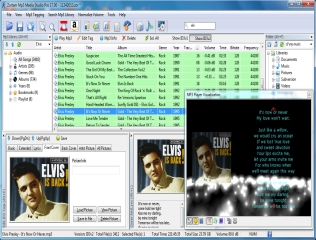
Beyond basic metadata, the software automates the retrieval of album cover art and lyrics from the internet. These elements can be embedded directly into the Mp3 files or added manually through the advanced ID3 tag editor. The tool also supports ripping audio CDs with integrated cover art and features a normalization function to ensure consistent volume levels across a library.
Management and utility features include:
- Identification and removal of duplicate or similar audio files based on artist and title.
- Renaming files using tag information for standardized folder organization.
- Transferring tagged collections to mobile devices, including Android and iPhone.
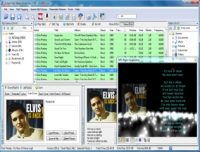
- A built-in player with visualization support and the ability to watch YouTube videos for tagged songs.
This software provides a centralized environment for users to catalog, edit, and maintain their multimedia collections through automated identification and batch processing tools.
Top 5 Reasons To Download Zortam Mp3 Media Studio PRO 33
- Effortless Batch Auto-Tagging and Metadata Correction: Automatically fix and clean up your entire music library’s tags, including Artist, Title, Album, and Year, using advanced music identification algorithms.
- High-Definition Album Art and Lyrics Integration: Instantly download and embed missing cover art and song lyrics into your Mp3 files for a visually stunning and informative media library.
- Intelligent Music Identification and Duplicate Removal: Identify unknown tracks and purge your collection of identical or similar files to reclaim storage space and streamline your listening experience.
- Sophisticated File Renaming and Library Management: Dynamically rename files based on their metadata and organize even the largest collections into structured folders for easy navigation.
- Comprehensive Audio Optimization and Multimedia Tools: Normalize volume levels across your collection, watch YouTube videos for tagged songs, and utilize a built-in player with visualization plugins.
If you are anything like me, your digital music collection is a beautiful, chaotic disaster. We have all been there: years of ripping CDs, downloading tracks from various sources, and transferring files from old hard drives have left us with a library full of "Track 01," missing album covers, and misspelled artist names. It is the digital equivalent of a junk drawer, and honestly, it makes enjoying your music a lot harder than it should be. When you are scrolling through your phone or media player, you want to see vibrant album art and correct titles, not a sea of generic gray icons and "Unknown Artist" labels. This is exactly why Zortam Mp3 Media Studio is the absolute powerhouse utility you need to download right now. It is not just a tag editor; it is a full-scale renovation crew for your music library.
In the world of tech, we often look for tools that "just work." We want software that takes a complex, manual task and turns it into a one-click solution. Zortam Mp3 Media Studio is the gold standard for this philosophy. It addresses the fundamental pain points of being a music collector in the digital age. Whether you have a modest collection of a few hundred songs or a massive archive spanning several terabytes, the manual labor required to keep that data clean is overwhelming. This software changes the game by automating the grunt work, allowing you to actually spend time listening to your music rather than editing it. Let’s dive deep into the five primary reasons why this giveaway is an essential addition to your software toolkit.
1. Effortless Batch Auto-Tagging and Metadata Correction
The core frustration of any music lover is the lack of proper ID3 tags. These tags are the invisible metadata that tell your media player the song title, the artist, the album name, the track number, and the genre. Without them, your library is a mess. Zortam Mp3 Media Studio excels because it does not just wait for you to type in this information manually. It utilizes a sophisticated music identification algorithm to "listen" to your songs and identify them against a massive online database. This is a lifesaver for those mystery tracks that have been sitting in your folders for years with names like "Recording_001.mp3."
The real magic happens with the Batch processing capabilities. You do not have to fix one song at a time. You can select your entire library—thousands of files at once—and let the software go to work. It will automatically fix and clean up tags for Artist, Title, Album, Track, and Year. It replaces "AC-DC" with "AC/DC," fixes capitalization errors, and ensures that every track in an album is tagged consistently so they don't appear as separate entries in your player. This level of automation is what separates a professional-grade tool from a basic editor. It’s about taking a task that would take weeks of manual entry and finishing it in the time it takes to grab a cup of coffee.
Beyond just fixing what is broken, the software allows you to write ID3 tags from filenames. If your files are named in a consistent way (like "Artist - Song Title.mp3") but the internal tags are empty, Zortam can parse that filename and populate the metadata fields instantly. Conversely, if your tags are perfect but your filenames are a mess, it can work in the opposite direction. It provides a level of flexibility that ensures your metadata is accurate from every possible angle.
2. High-Definition Album Art and Lyrics Integration
We live in a visual world. When you are using an iPhone, an Android device, or a high-end digital audio player, the interface is designed to showcase album cover art. There is nothing more depressing than a high-resolution screen showing a generic musical note icon because the cover art is missing. Zortam Mp3 Media Studio is widely recognized as the best cover art downloader on the market for a reason. It doesn't just find any image; it searches the internet for high-quality, relevant artwork and embeds it directly into the Mp3 file itself.
Embedding the art is a crucial detail. Some programs just save a "folder.jpg" file in the directory, which often gets lost or ignored by mobile devices. By adding the album cover art directly to the Mp3, Zortam ensures that the image stays with the song no matter where you move it—whether it’s to your phone, a USB drive for your car, or a cloud storage service. You can even copy and paste image cover art from other applications or local files if you have a specific, rare version of an album cover you prefer to use.
But it doesn't stop at visuals. This software also automatically downloads and adds lyrics to your Mp3 files. Imagine being able to pull up the lyrics to any song in your library on your mobile device while you're listening. It turns your music collection into an interactive experience. Whether you’re trying to settle a bet about what a singer actually said or you just want to sing along, having those lyrics hard-coded into the file metadata is a premium feature that most other managers overlook. It provides a "complete" feel to every track in your collection.
3. Intelligent Music Identification and Duplicate Removal
One of the biggest hidden problems in large music libraries is the "bloat" caused by duplicate Mp3 files. You might have the same song on a "Best Of" album, a movie soundtrack, and the original studio album. Over time, these duplicates eat up valuable gigabytes of storage and clutter your search results. Zortam Mp3 Media Studio includes a powerful tool to search for duplicate Mp3 files, but it goes a step further than most. It can search and remove similar Mp3 files using artist names and song titles, helping you find those pesky tracks that are nearly identical but might have slightly different bitrates or file sizes.
The music recognition technology is the "brain" behind this operation. Even if the files have different names or are missing tags entirely, the software can identify the underlying audio. This allows you to identify and tag unknown songs that you might have otherwise deleted because you didn't know what they were. It’s like having a digital forensic expert for your audio files. It looks at the "fingerprint" of the music to ensure 100% accuracy in identification.
Cleaning up your collection also involves removing unwanted data. Sometimes files come with "junk" tags from previous owners or weird "encoded by" comments that you don't want. Zortam allows you to remove mp3 tags entirely or specify exactly which tags you wish to strip away. This "clean slate" approach is perfect for purists who want their metadata to be pristine and free of any third-party marketing or incorrect information. By the time Zortam is done with your library, it won't just be organized; it will be optimized.
4. Sophisticated File Renaming and Library Management
A well-tagged library is only half the battle; the other half is a well-organized file structure. If your tags are perfect but your files are all dumped into one giant "Music" folder with names like "track1_final_version.mp3," you still have a management problem. Zortam Mp3 Media Studio offers a robust Rename Mp3 files from tags feature. This allows you to create a logical, consistent naming convention for every file you own. You can set it to automatically rename files as "Artist - Album - Track Number - Song Title," or any other combination you prefer.
This organizational prowess extends to how you catalog your music collection. The software allows you to browse your collection by artist, album name, genre, year, and more. It creates a virtual library that makes finding a specific song effortless, even if you have tens of thousands of tracks. For users who need to move their music between devices, the transfer your collection feature is a godsend. It simplifies the process of moving your newly organized and tagged music to your Android phone or iPhone, ensuring that all that hard work you put into tagging and art stays intact during the transition.
For those who still value physical media or want to create perfect digital backups, the ability to rip Mp3s with cover art and lyrics included from the start is a massive time-saver. Instead of ripping a CD and then having to tag it later, Zortam handles everything in a single workflow. It’s an end-to-end solution for music management, from the moment the audio hits your hard drive to the moment you sync it to your mobile device.
5. Comprehensive Audio Optimization and Multimedia Tools
While many people download Zortam for the tagging, they stay for the advanced multimedia features that you won't find in a basic ID3 editor. One of the most underrated features is the ability to normalize your mp3 collection. We have all experienced the "volume jump" where one song is quiet and the next is deafeningly loud. Zortam can analyze your files and normalize the volume levels across your entire collection, providing a consistent listening experience without you having to constantly reach for the volume knob.
The software also includes the Zortam Mp3 Player, which is a surprisingly capable media player in its own right. It supports visualization plugins, giving you that classic, nostalgic visual flair while you listen to your tunes. It turns the act of managing your music into an enjoyable experience. But the integration goes even deeper—Zortam allows you to watch YouTube videos for any tagged song with a single click. It bridges the gap between your local library and the vast world of online streaming, allowing you to discover music videos, live performances, or official clips for the songs you already own.
Finally, for the power users, the Advanced ID3 Tag Editor provides granular control over every single piece of metadata. If you want to change or replace any specific tag, or if you need to add custom comments or genre classifications, the interface is designed to make these changes quickly and across multiple files simultaneously. It is this combination of "auto-pilot" features and "manual-control" tools that makes Zortam Mp3 Media Studio the definitive choice for anyone serious about their music collection.
Conclusion:
In summary, Zortam Mp3 Media Studio is much more than just a utility; it is an essential piece of software for anyone who still values a local music collection. In an era of streaming, having a curated, perfectly tagged, and beautifully organized library is a mark of a true audiophile. This giveaway provides you with a professional tool that automates the most tedious parts of digital ownership. You get the auto-tagging power to fix thousands of files, the visual enhancement of cover art and lyrics, the storage efficiency of duplicate removal, the logic of a structured file system, and the bonus features of normalization and YouTube integration.
Don't let your music collection stay in a state of disarray. Take this opportunity to download a tool that will breathe new life into your songs. Whether you are preparing your library for a new phone, cleaning up years of messy downloads, or just want to see the lyrics to your favorite tracks, Zortam is the answer. It is fast, it is powerful, and most importantly, it makes your music library look and sound better than ever before. This is the giveaway your hard drive has been waiting for—download it, run it, and finally get the organized music collection you deserve!

Reviews for Zortam Mp3 Media Studio PRO 33
Click Here to Read Reviews for Zortam Mp3 Media Studio PRO 33 >> Click Here to Submit Reviews for Zortam Mp3 Media Studio PRO 33 >>