What Does HippoEDIT Do?
HippoEDIT is a Windows-based text editor designed for programmers and power users who require a versatile environment for code manipulation. The software functions as a comprehensive Integrated Development Environment (IDE) supporting projects, external tools, and auto-completion, or alternatively, as a lightweight source code viewer for web and shell environments. It is optimized to handle large log files and provides full support for Unicode texts, various encodings, and multiple line break styles.
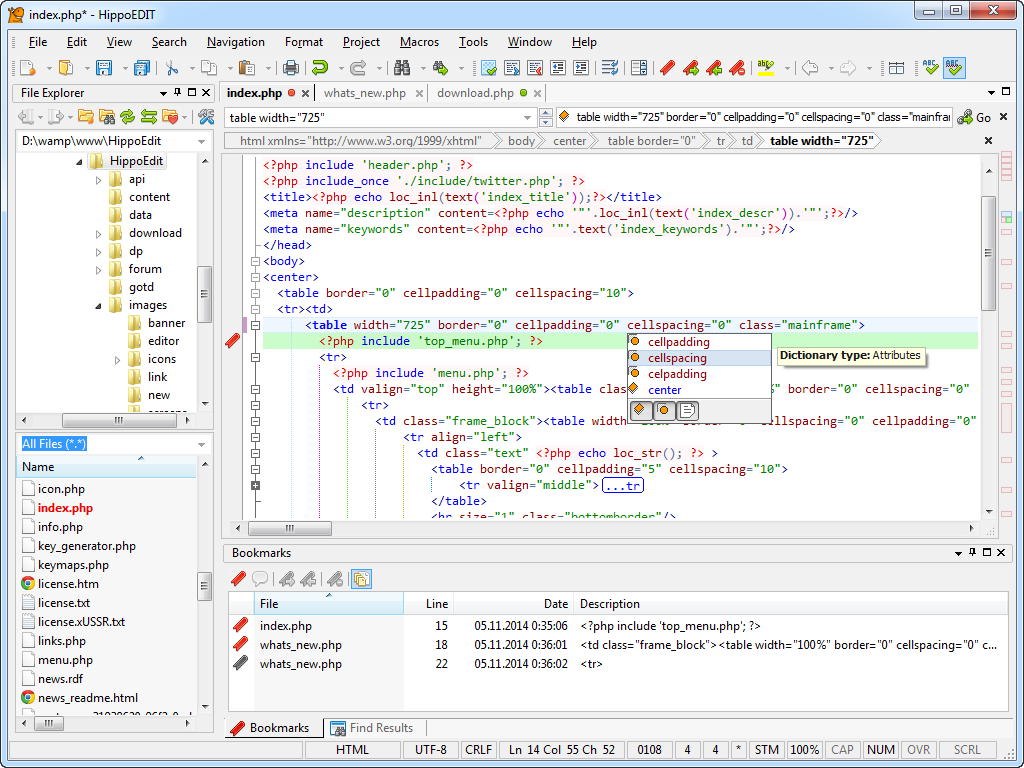
The editor includes syntax highlighting and code outlining for numerous programming languages. Users can extend core functionality through a plugin architecture that adds tools such as an FTP Explorer, File Explorer, Spell Checker, Emmet, and XML Pretty Print. Visual customization is available through multiple color schemes and built-in live color and image previewers.
HippoEDIT incorporates several specialized tools to streamline development workflows and improve navigation, including:
- Hierarchy and Navigation Bar for structural orientation within code.
- Colored Braces and Guides to improve visual readability.
- Intelligent Smart Highlight and Fuzzy Search for efficient data retrieval.
- Multi-Clipboard and Workspaces for managing complex sessions.
- Code Hints and User Text Highlighting for personalized editing environments.
These features allow users to maintain a high degree of control over their source code while automating repetitive formatting and navigation tasks.
Top 5 Reasons To Download HippoEDIT
- Unrivaled Navigation and Structural Organization: With the Hierarchy and Navigation bar, you never lose your place in complex codebases.
- High-Performance Handling of Massive Files: Effortlessly open and edit enormous log files and diverse encodings that crash standard editors.
- Intelligent Coding Assistance and Smart Highlighting: Boost your productivity with context-aware code hints, fuzzy search, and intelligent highlighting.
- A Robust Plugin Ecosystem for Infinite Customization: Transform the editor into a full-scale IDE with FTP, Emmet, Spell Checker, and Beautifiers.
- Unique Productivity Features Found Nowhere Else: Utilize a Multi-Clipboard, Live Colors, and inline image previewers to streamline your creative process.
If you are a programmer, a power user, or someone who spends hours every day staring at lines of code and configuration files, you know the frustration of using tools that just can't keep up. We have all been there: an editor that chokes on a 100MB log file, a "lite" tool that lacks the necessary context for modern languages, or a bloated IDE that takes five minutes to launch just so you can make a quick edit. Today, I am taking a deep dive into a tool that strikes the perfect balance between raw power and nimble performance. HippoEDIT is a Windows text editor that has been quietly building a reputation as the ultimate secret weapon for developers. Whether you need a full-featured Integrated Development Environment (IDE) or a fast source code viewer, this is the giveaway you cannot afford to pass up. Let’s explore why this software belongs in your permanent toolkit.
1. Unrivaled Navigation and Structural Organization
In the world of software development, we spend significantly more time reading code than we do writing it. This means that navigation is arguably the most important feature of any text editor. HippoEDIT understands this better than almost any other tool on the market. While most editors give you a simple file tree or a basic list of functions, this software introduces the Hierarchy and Navigation bar, a game-changer for anyone working with deeply nested code.
Imagine you are working on a massive XML file or a complex C++ class. Traditionally, you would be scrolling endlessly, trying to remember which scope you are currently in. With the Hierarchy bar, you get a breadcrumb-style view of your exact location within the document structure. It doesn't just show you the file name; it shows you the specific function, the loop, or the conditional block you are currently editing. This visual map allows you to jump between scopes with a single click, maintaining your mental flow and preventing the "where am I?" fatigue that kills productivity.
Furthermore, the Workspaces feature allows you to group related files and projects together in a way that makes sense for your specific workflow. Unlike other editors that treat every file as an isolated island, HippoEDIT allows you to create a cohesive environment. When you combine this with Code Outlining (folding), you can collapse the parts of the code you aren't working on, leaving only the relevant sections visible. This level of structural organization is usually reserved for heavy-duty IDEs, but here it is delivered in a lightweight, lightning-fast package. If you value your time and your sanity, the navigation features alone make this a mandatory download.
2. High-Performance Handling of Massive Files
We have all had that sinking feeling when you try to open a massive server log file or a giant database dump, and your text editor simply freezes. Most standard editors load the entire file into RAM, which is a recipe for disaster when dealing with gigabytes of data. HippoEDIT is built with a high-performance engine designed specifically for these "power user" scenarios. It handles large files with grace, allowing you to scroll, search, and edit without the stuttering or crashing common in other applications.
But performance isn't just about file size; it's about compatibility. In a globalized development environment, you are constantly dealing with different encodings and line break styles. Whether it is UTF-8, UTF-16, or legacy ANSI encodings, HippoEDIT detects and handles them perfectly. You can switch between Windows, Unix, and Mac line endings on the fly, ensuring that your code remains clean and functional across all platforms. This makes it an indispensable tool for sysadmins who need to view logs from various operating systems or web developers who need to ensure their text content is properly encoded for a global audience.
Moreover, the software's ability to act as a source code viewer for web browsers and the shell means it integrates perfectly into your existing ecosystem. It isn't just an editor; it's a diagnostic tool. When you need to see exactly what is happening inside a raw data file, you need an editor that won't get in your way or mangle the data. The stability and versatility offered here are simply top-tier.
3. Intelligent Coding Assistance and Smart Highlighting
What separates a simple notepad from a professional developer's tool is intelligence. HippoEDIT is packed with features that anticipate your needs and reduce the cognitive load of coding. The Intelligent Smart Highlight feature is a perfect example. When you click on a variable or a function name, the editor doesn't just highlight other instances of that text; it understands the context. It helps you quickly identify where a variable is defined, where it is used, and where it might be causing an error. This is "situational awareness" for your source code.
Then there are the Code Hints and Auto-completion. Writing code is often a battle against syntax and typos. By providing accurate, language-specific suggestions as you type, HippoEDIT significantly reduces the number of errors you introduce. It supports syntax highlighting for a vast array of programming languages right out of the box, ensuring that your code is readable and organized. The Colored Braces and Guides provide a visual check on your logic, making it immediately obvious if you have forgotten to close a bracket or if your indentation is off.
One of my favorite features is the Fuzzy Search. We don't always remember the exact name of the function or the variable we are looking for. Fuzzy search allows you to type a few characters and find the closest match, saving you from having to dig through documentation or scroll through thousands of lines of code. When you add User Text Highlighting to the mix—which allows you to define your own rules for how specific strings are displayed—you have an environment that is perfectly tuned to your specific brain and your specific project. This isn't just about typing; it's about thinking at the speed of light.
4. A Robust Plugin Ecosystem for Infinite Customization
No two developers work the same way. Some people want a minimalist environment, while others want every tool imaginable at their fingertips. The genius of HippoEDIT lies in its extensibility through plugins. You aren't stuck with the base features; you can expand the editor to become whatever you need it to be. This modular approach keeps the core application fast while providing the power of a heavy IDE when you need it.
Consider the FTP Explorer plugin. With this, you can edit files directly on your server without needing a separate FTP client. You open the file, make your changes, hit save, and it’s live. For web developers, this is an incredible time-saver. Then there is Emmet support, which allows you to write HTML and CSS at incredible speeds using shorthand snippets. If you are doing web work, Emmet is practically a requirement in 2024, and having it integrated directly into your text editor is a dream come true.
Other essential plugins include the JS Beautifier and XML Pretty Print, which can take a mess of minified, unreadable code and format it into a beautiful, human-readable structure with a single click. There is a Spell Checker for documentation, HTML Tools for quick tag manipulation, and even Live Colors which shows you a preview of the color hex code you are typing directly in the editor. This ecosystem ensures that as your needs evolve, your editor evolves with you. You aren't just downloading a static piece of software; you are gaining access to an evolving platform that you can mold to fit your personal style.
5. Unique Productivity Features Found Nowhere Else
As a tech reviewer, I see hundreds of apps that all do the same thing. It is rare to find a tool that offers truly unique features that make me stop and say, "Why doesn't everyone do this?" HippoEDIT is full of those "Eureka" moments. Let's talk about the Multi-Clipboard. Most of us are used to the standard Windows clipboard that holds only one item. If you copy something else, the first item is gone. HippoEDIT maintains a history of your clips, allowing you to cycle through previous snippets of code and paste them as needed. This is a massive boost for those of us who find ourselves moving multiple blocks of code around or reusing specific templates frequently.
Another incredible feature is the inline image previewer. If you are working on a web project or a UI layout and you have a link to an image file in your code, HippoEDIT can show you a thumbnail of that image just by hovering over the path. You don't have to switch to your browser or a file explorer to check if you are referencing the right asset. It is a small detail, but it’s these "micro-efficiencies" that add up to hours of saved time over the course of a project.
We also have to mention Workspaces and User-defined Tools. You can configure HippoEDIT to launch external compilers, linters, or deployment scripts directly from the editor interface. This turns your text editor into the "command center" of your entire development process. Instead of alt-tabbing between five different windows, everything happens in one place. When you combine all of this with a highly customizable UI and a variety of Color Schemes that protect your eyes during late-night coding sessions, it becomes clear that this software was designed by people who actually use these tools for a living. It is polished, it is thoughtful, and it is built for speed.
In conclusion, HippoEDIT is much more than just a place to type text. It is a sophisticated, high-performance workstation that respects your time and enhances your capabilities. Whether you are debugging a complex backend system, building a modern website, or just trying to make sense of a massive log file, this editor provides the tools you need to get the job done efficiently. The combination of structural navigation, massive file support, intelligent coding aids, a deep plugin library, and unique productivity "hacks" makes it one of the most compelling editors on the Windows platform. Do not miss your chance to download this powerhouse—your workflow will thank you.
The giveaway for HippoEDIT represents a rare opportunity to upgrade your digital workbench with a professional-grade tool. If you have been looking for a reason to ditch your basic editor and step up to something that can truly handle the demands of modern programming and data management, this is it. Download it, explore the settings, install a few plugins, and experience the difference that a truly "smart" editor can make in your daily life.

Reviews for HippoEDIT
Click Here to Read Reviews for HippoEDIT >> Click Here to Submit Reviews for HippoEDIT >>